
In the increasingly digital landscape of personal finance, applications like Cash App have revolutionized the way we send, receive, and manage money. They offer unparalleled convenience, speed, and accessibility, making peer-to-peer and even some merchant transactions instantaneous. However, this very speed can sometimes lead to moments of panic, particularly when a payment is sent in error. The question “How do I cancel a Cash App payment?” is a common one, highlighting a critical aspect of financial management in the digital age: the need for precision and understanding the mechanisms for error correction.
This guide delves into the realities of cancelling Cash App payments, framing the discussion within the broader context of personal finance and the diligent use of financial tools. We’ll explore the conditions under which a payment can be reversed, the steps to take, and crucially, what financial precautions and alternatives exist when direct cancellation isn’t an option. Understanding these nuances is essential for anyone leveraging mobile payment platforms to maintain control over their financial transactions and mitigate potential losses.
Understanding Cash App Payment Dynamics
The ability to cancel a payment on Cash App is not always straightforward; it largely depends on the status of the transaction. Unlike traditional banking where stop payments can often be issued for checks or transfers before they clear, the instantaneous nature of digital payments significantly limits the window for intervention. This section dissects the fundamental dynamics that govern payment cancellation on Cash App, emphasizing the financial implications of each scenario.
The Immutability of Completed Transactions
One of the most critical aspects of Cash App, and indeed many other instant payment platforms, is the finality of completed transactions. Once a payment has been successfully sent and accepted by the recipient, it is typically irreversible from the sender’s end. This is a fundamental design choice that underpins the trust and efficiency of these systems. Financially, this means that money transferred in error that has already been received is effectively gone from your account, similar to handing over cash. This underscores the paramount importance of verifying all transaction details—recipient, amount, and purpose—before hitting the ‘send’ button. The speed of these systems is a double-edged sword: while convenient, it offers little room for post-transaction correction.
Pending Payments: Your Window of Opportunity
Fortunately, not all payments are instantly completed. Sometimes, a payment may remain in a “pending” state. This usually occurs if the recipient hasn’t yet accepted the payment, if there’s a temporary network issue, or if Cash App’s security systems flag the transaction for review. A pending status represents your primary, and often only, window of opportunity to directly cancel a payment. From a financial management perspective, this pending period is a crucial safety net. It allows users to correct genuine mistakes before funds are irrevocably transferred. Understanding why a payment might be pending and how to check its status is a vital skill for any Cash App user. This temporary hold is a built-in feature designed to protect users, albeit under specific conditions.
The Role of Merchant Payments vs. Peer-to-Peer
The distinction between peer-to-peer (P2P) payments and merchant payments also influences cancellation possibilities. While Cash App is predominantly known for P2P transfers, it also facilitates payments to businesses through its Cash Card or Square’s ecosystem. When paying a merchant, your ability to cancel or dispute a transaction typically aligns more closely with credit card or debit card dispute processes, which can be more involved and time-consuming. These disputes often require evidence of non-receipt of goods/services or fraudulent activity, rather than simple buyer’s remorse or accidental payment. For P2P payments, the relationship is usually directly between individuals, and the platform’s role in reversing completed transactions is minimal, pushing the onus back on the sender and recipient to resolve issues. This difference is a significant financial consideration, as the recourse for an erroneous merchant payment can be different and potentially more robust than for a P2P error, though still not guaranteed instant cancellation.
Step-by-Step Guide to Cancelling a Pending Payment
If you’ve initiated a payment on Cash App and quickly realized an error, your immediate action can be critical. This section provides a clear, step-by-step guide on how to attempt to cancel a payment that is still in a pending state, emphasizing the speed and precision required for successful intervention.
Identifying the Transaction in Your Activity Feed
The very first step is to quickly navigate to your Cash App activity feed. This is where all your transactions, both incoming and outgoing, are meticulously recorded.
- Open Cash App: Launch the Cash App on your mobile device.
- Navigate to the Activity Tab: Tap the clock icon (Activity tab), usually located in the bottom-right corner of the home screen.
- Locate the Erroneous Transaction: Scroll through your recent transactions to find the payment you wish to cancel. Look for transactions marked as “Pending” or “Awaiting Recipient.” If the transaction shows as “Completed,” direct cancellation is likely not an option, and you’ll need to consider other avenues discussed later. Speed is of the essence here; the longer a payment remains pending, the higher the chance the recipient might accept it, closing your window.
Locating the ‘Cancel’ Option
Once you’ve identified the pending transaction, the next step is to access its details and look for the cancellation option.
- Tap on the Transaction: Select the specific pending payment from your activity feed. This will open a detailed view of the transaction.
- Search for the ‘Cancel’ Button: On the transaction details screen, carefully look for an option to “Cancel Payment,” “Cancel,” or “Stop Payment.” This option is typically prominent if the payment is indeed cancellable. The presence of this button is the clearest indicator that you still have control over the funds before they are fully processed. If you do not see a ‘Cancel’ option, it could mean the payment has already been completed, or it’s a type of payment that isn’t directly cancellable from your end (e.g., some merchant payments).
Confirming Your Cancellation Request
Once you’ve found and tapped the ‘Cancel’ option, Cash App will typically ask for a confirmation to ensure you genuinely wish to proceed.
- Review and Confirm: Read any prompts or confirmation messages carefully. This is your final chance to ensure you’re cancelling the correct payment.
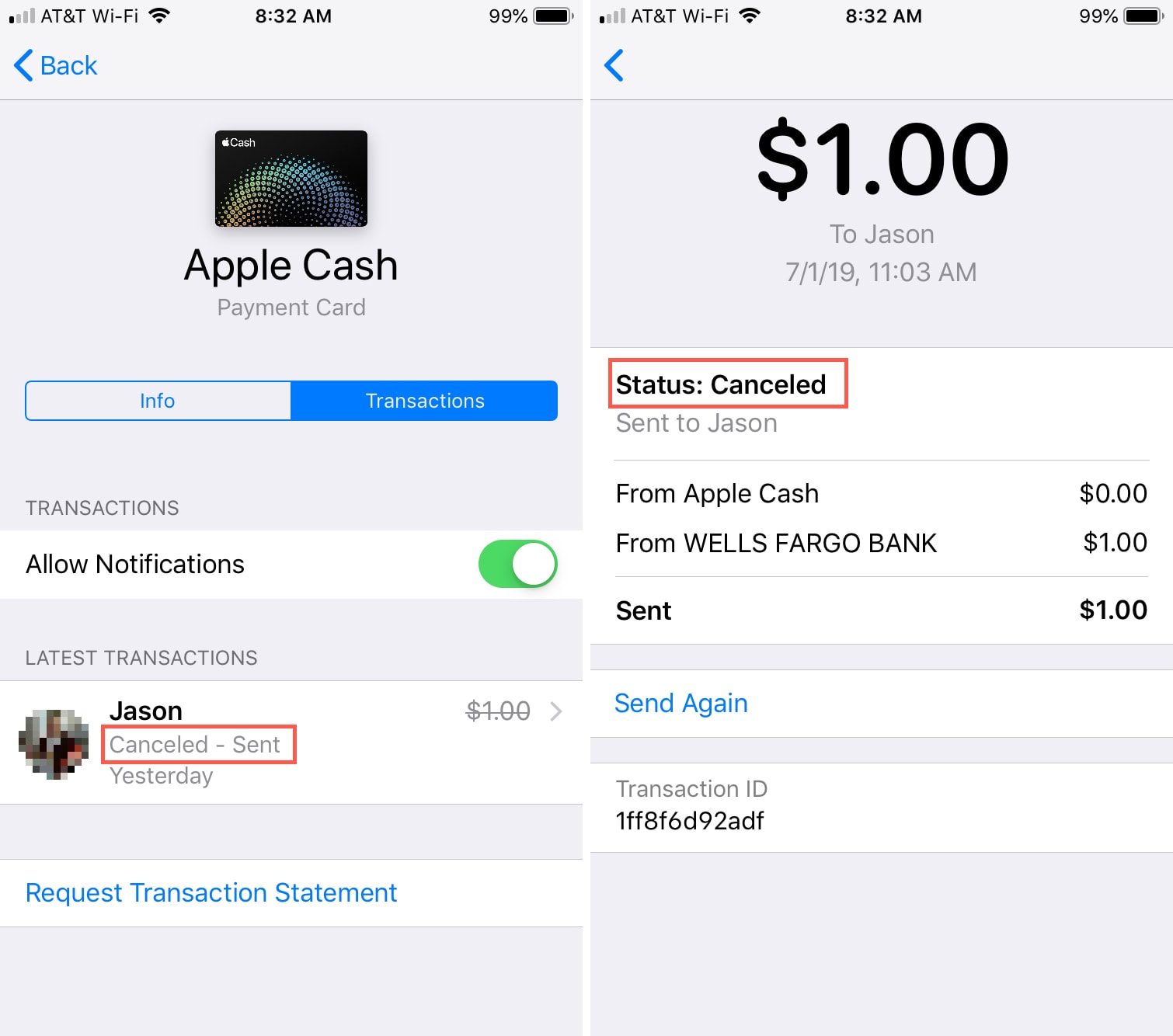
- Execute Cancellation: Confirm your request. If successful, Cash App will notify you that the payment has been cancelled, and the funds should be immediately returned to your Cash App balance or linked bank account. Monitor your activity feed to verify that the transaction status has changed to “Cancelled.” This immediate feedback is crucial for confirming that your financial intervention was successful.
What to Do When a Payment Cannot Be Directly Cancelled
The reality for many users is that they discover an error only after a payment has already been completed, rendering the direct cancellation steps described above moot. In such scenarios, while direct cancellation is off the table, all is not lost. This section explores the alternative avenues available, emphasizing the proactive financial communication and potential dispute processes that come into play.
Requesting a Refund from the Recipient

The most straightforward and often most effective method for recovering funds from a completed erroneous payment is to politely request a refund directly from the recipient. This method relies heavily on the recipient’s cooperation and honesty.
- Immediate Communication: As soon as you realize the error, contact the recipient directly. If you know them personally, a quick phone call or message explaining the situation is best.
- Provide Details: Clearly state the amount, the date, and explain that the payment was sent by mistake.
- Use Cash App’s Request Feature: Cash App has a “Request” feature. You can send a request for the exact amount you mistakenly sent. While this doesn’t force a refund, it serves as a formal prompt within the app and clearly outlines the amount you are seeking back.
- Financial Implication: This method highlights the importance of sending money only to trusted individuals. If the recipient is unknown or uncooperative, recovering funds can become significantly more challenging, representing a direct financial loss.
Initiating a Dispute with Cash App Support
If the recipient is unresponsive or refuses to return the funds, your next recourse is to contact Cash App support. While Cash App generally states that completed payments are final, they do have mechanisms for investigating certain disputes, particularly in cases of suspected unauthorized transactions or fraud.
- Gather Information: Collect all relevant transaction details, including recipient information, date, amount, and any communication you had with the recipient.
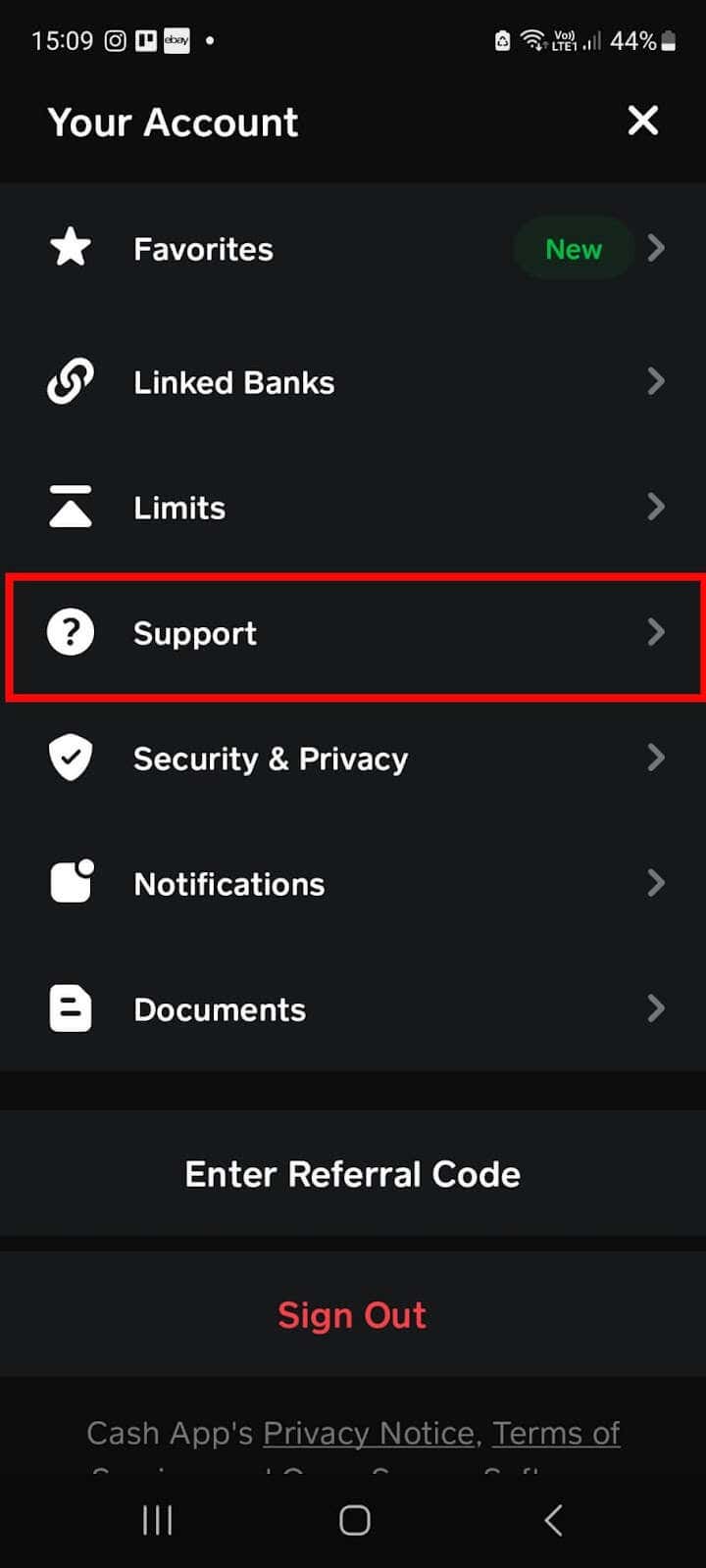
- Contact Support Through the App:
- Tap the profile icon on your Cash App home screen.
- Scroll down and tap “Support.”
- Tap “Something Else.”
- Describe your issue clearly, stating that you sent money in error and the recipient is uncooperative.
- Be Realistic: Understand that Cash App’s ability to recover funds in an “accidental payment” scenario (where you authorized the payment, even if mistakenly) is limited. Their fraud protection primarily targets unauthorized use of your account. However, reporting the issue is crucial as it creates a formal record and may initiate a review process, especially if the recipient has a history of suspicious activity.
- Financial Implication: This process can be lengthy and does not guarantee fund recovery. It’s a last resort when direct communication fails, emphasizing that the primary responsibility for payment accuracy lies with the sender.
The Ramifications of Unsuccessful Reversal Attempts
If all attempts to cancel or recover funds are unsuccessful, the financial ramifications are straightforward: the erroneous payment becomes a permanent loss. This scenario underscores several key principles of personal finance:
- Due Diligence: The critical importance of double-checking every detail before authorizing a transaction.
- Budgeting Impact: An unexpected loss can disrupt personal budgets, especially for larger sums, necessitating adjustments to other spending or savings goals.
- Trust and Security: It reinforces the need to exercise extreme caution when interacting with unknown individuals or suspicious requests, as digital payment platforms can be targets for scams.
- Learning Opportunity: While frustrating, an unsuccessful reversal serves as a valuable (albeit costly) lesson in digital financial literacy and risk management.
Proactive Financial Management on Cash App
Preventing errors is always preferable to attempting to correct them after the fact, especially in the context of irreversible digital payments. Proactive financial management on Cash App involves adopting best practices and leveraging the platform’s features to minimize the risk of accidental payments and secure your funds.
Double-Checking Before You Send
This cannot be stressed enough: pause, review, and verify before authorizing any payment.
- Recipient Verification: Always confirm the recipient’s $Cashtag, phone number, or email address. Even a single digit or letter off can send money to an unintended party. If it’s a new recipient, consider sending a small test amount first (e.g., $1) to confirm they receive it, then send the larger sum.
- Amount Accuracy: Double-check the numerical amount entered. A misplaced decimal or an extra zero can have significant financial consequences.
- Purpose Clarity: Ensure the payment description is accurate, especially for business-related transactions, as this can be crucial for record-keeping and potential disputes.
By making this verification a habit, you significantly reduce the likelihood of costly errors.
Leveraging Cash App’s Security Features
Cash App offers several security features designed to protect your account and transactions. Activating and understanding these features is a cornerstone of responsible financial management within the app.
- Security Lock (PIN/Touch ID/Face ID): Enable a security lock for all transactions. This requires a PIN, fingerprint, or facial recognition before any payment can be sent, adding an extra layer of protection against unauthorized use of your device.
- Notifications: Keep transaction notifications enabled. This allows you to receive instant alerts for every payment sent or received, enabling immediate detection of any unauthorized activity or errors.
- Two-Factor Authentication (2FA): If available for specific actions, enable 2FA. This typically involves a code sent to your registered phone number or email, providing an additional verification step.
Understanding Cash App’s User Agreement and Policies
A crucial, yet often overlooked, aspect of proactive financial management is a thorough understanding of the terms and conditions governing the use of financial tools.
- Read the Fine Print: Familiarize yourself with Cash App’s official user agreement, privacy policy, and help articles. These documents outline the platform’s responsibilities, user responsibilities, and the limitations of its services, especially concerning payment reversals and disputes.
- Know Your Recourse: Understanding what situations Cash App support can (and cannot) assist with empowers you to set realistic expectations and take appropriate action if an issue arises. For instance, knowing that accidental payments are generally not reversible by Cash App itself means you’ll prioritize contacting the recipient first.
- Financial Literacy: This practice contributes to overall financial literacy, making you a more informed and responsible user of digital financial services.
The Broader Financial Implications of Digital Payment Errors
While the immediate concern of an erroneous Cash App payment is the lost money, the implications extend far beyond a single transaction. Digital payment errors highlight broader themes in personal finance, trust, and the evolving landscape of money management.
Impact on Personal Budgeting and Cash Flow
An accidental payment, especially of a significant amount, can wreak havoc on a meticulously planned personal budget. Funds allocated for bills, savings, or essential expenses can suddenly be depleted, leading to:
- Cash Flow Issues: Unexpected shortages can cause delays in paying other obligations, potentially incurring late fees or impacting credit scores.
- Emergency Fund Depletion: If an emergency fund is tapped to cover a mistaken payment, it compromises your financial safety net for genuine emergencies.
- Goal Setbacks: Savings goals for large purchases, investments, or retirement can be derailed, requiring recalculations and adjustments to financial plans.
This domino effect underscores why precision in managing digital payments is not just about avoiding minor inconveniences but maintaining the integrity of your entire financial strategy.
Trust and Security in Digital Financial Tools
Every incident of an accidental or unrecoverable payment, whether due to user error or outright fraud, chips away at trust in digital financial tools. For users, it can foster hesitation and anxiety about using these convenient platforms. For the platforms themselves, maintaining user trust is paramount.
- User Confidence: Users need to feel confident that their money is secure and that reasonable recourse exists for genuine errors or malicious activity.
- Platform Responsibility: While user error is a factor, payment platforms also bear the responsibility of designing intuitive interfaces, offering robust security features, and providing clear, accessible support for dispute resolution.
- Evolving Landscape: The continuous development of security protocols, fraud detection algorithms, and user education initiatives are crucial for the long-term viability and adoption of digital payment systems.
Best Practices for Error Prevention and Resolution
Moving forward, a holistic approach to managing digital payments involves integrating error prevention into daily financial habits and being prepared for resolution.
- Dedicated Financial Time: Allocate specific times to review transactions, reconcile accounts, and address any pending issues.
- Backup Methods: Understand that digital platforms are part of a broader financial ecosystem. Have alternative payment methods and contingency plans in place for critical transactions.
- Continuous Learning: Stay informed about new security features, common scams, and best practices for using digital financial tools safely and effectively. Resources from financial institutions, consumer protection agencies, and reputable tech blogs can be invaluable.
- Financial Discipline: Ultimately, the responsibility for sound financial management rests with the individual. Digital tools are powerful enablers, but they require discipline, attention to detail, and a proactive mindset to harness their benefits while mitigating their inherent risks.
In conclusion, while cancelling a Cash App payment is possible under specific “pending” conditions, the instant nature of digital finance means that prevention is far more effective than cure. By understanding the dynamics of these transactions, adopting meticulous habits, leveraging security features, and being aware of the broader financial implications, users can navigate the conveniences of Cash App with confidence and control, safeguarding their hard-earned money in the digital age.
aViewFromTheCave is a participant in the Amazon Services LLC Associates Program, an affiliate advertising program designed to provide a means for sites to earn advertising fees by advertising and linking to Amazon.com. Amazon, the Amazon logo, AmazonSupply, and the AmazonSupply logo are trademarks of Amazon.com, Inc. or its affiliates. As an Amazon Associate we earn affiliate commissions from qualifying purchases.