
In the realm of personal and business finance, the ability to accurately calculate percentages is not merely a mathematical skill but a fundamental literacy. From understanding discounts and sales tax to deciphering interest rates on loans and investments, percentages are the universal language of financial metrics. While the concept might seem daunting, modern calculators, whether physical or digital, simplify these computations dramatically, transforming complex figures into actionable insights. Mastering the percentage function on your calculator is a powerful step towards greater financial acumen, enabling better decision-money decisions, more informed budgeting, and a clearer grasp of your financial landscape.
The Essential Role of Percentages in Personal Finance
Percentages serve as the bedrock for countless financial decisions, impacting everything from daily spending to long-term wealth accumulation. Their ubiquity in financial discourse necessitates a clear understanding of how they function and, crucially, how to compute them effectively using a readily available tool like a calculator.
Understanding Basic Percentage Calculations for Financial Health
At its core, a percentage represents a portion of a whole, expressed as a fraction of 100. For instance, 25% means 25 out of 100. In finance, this translates into practical applications such as:
- Identifying Proportions: What percentage of your income goes towards housing?
- Tracking Changes: By what percentage did your investment portfolio grow or shrink?
- Comparing Values: Is a 15% discount on item A better than a 20% discount on item B if item B is more expensive?
The ability to quickly calculate these proportions and changes provides clarity and control over your financial resources. Without this skill, interpreting bank statements, investment reports, or even grocery store sales becomes a guessing game.
Calculating Discounts and Sales Tax
Perhaps the most frequent encounter with percentages for many individuals comes in the form of retail transactions. Discounts entice purchases, while sales tax is an unavoidable addition. Knowing how to quickly verify these figures on your calculator can prevent overspending or catching errors.
- Discounts: When a product is advertised as “20% off,” you need to determine the actual savings and the final price. For a $100 item, 20% off means a $20 saving, resulting in an $80 purchase price. Your calculator simplifies this by allowing you to input the original price, the percentage, and then deduce the discounted value or final cost.
- Sales Tax: Similarly, sales tax, typically applied as a percentage of the purchase price, needs to be added to the subtotal. If a state has a 7% sales tax, and your purchase is $50, you’ll need to calculate 7% of $50 and add it to the original amount to get the total.
These everyday calculations, while seemingly minor, accumulate over time and significantly impact your budget. Accurate and swift calculation empowers you to make informed decisions at the point of sale.
Navigating Interest Rates and Loan Repayments
Beyond immediate transactions, percentages play a critical, often complex, role in credit and debt. Interest rates, whether on savings accounts, credit cards, or mortgages, are always expressed as percentages. Understanding how these percentages translate into actual dollar amounts is paramount for managing debt and growing savings.
- Simple Interest: The most straightforward form, where interest is calculated only on the principal amount. For example, a $1,000 loan at 5% simple annual interest will accrue $50 in interest per year.
- Compound Interest: This is where things get more intricate and powerful. Compound interest is calculated on the initial principal and also on the accumulated interest from previous periods. This “interest on interest” effect can rapidly grow savings or, conversely, inflate debt. Mortgages and credit cards often use compound interest, making it vital to understand how the percentage rate translates to your monthly payments and total repayment cost over time.
- Annual Percentage Rate (APR): This rate represents the annual cost of a loan to a borrower, including interest and other fees. Understanding how to calculate payments based on APR helps in comparing loan offers and avoiding costly mistakes.
By mastering percentage calculations on your calculator, you gain the ability to demystify loan statements, forecast the growth of your investments, and critically assess the true cost of borrowing.
Mastering Your Calculator for Financial Operations
While different calculators may have slightly varied interfaces, the core functionality for percentage calculations remains largely consistent. Understanding these fundamental operations is the key to unlocking their financial utility.
The Basic Percentage Button (%)
Most standard calculators feature a dedicated percentage button (%). This button often acts as a shortcut for division by 100 and facilitates common percentage operations.
- Finding a Percentage of a Number: To find 20% of 150:
- Enter 150.
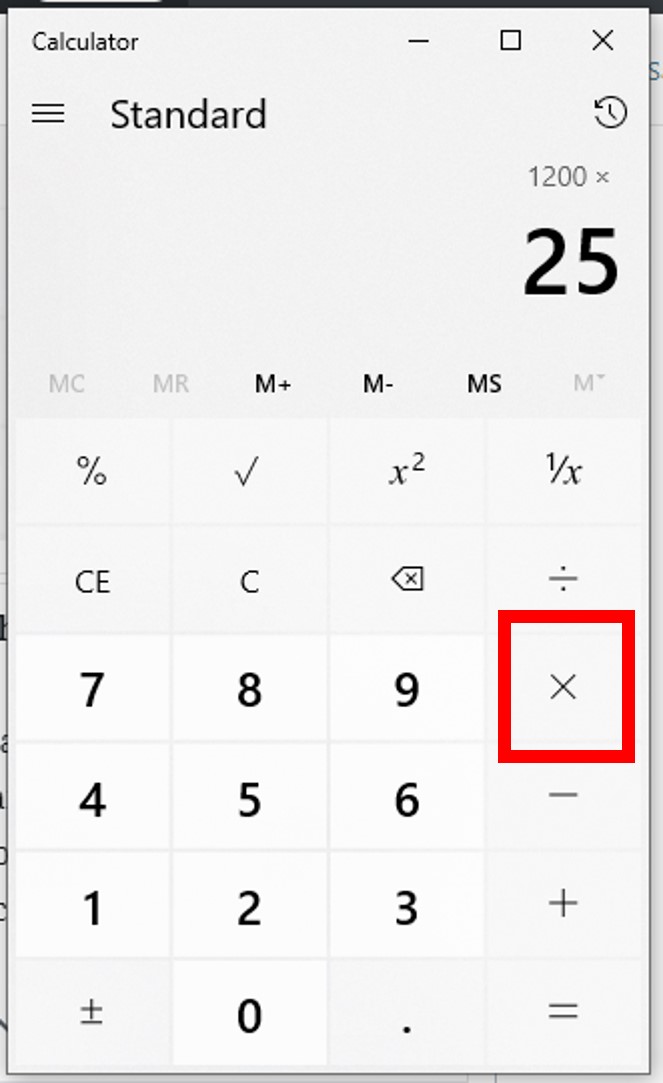
- Press the multiplication key (x).
- Enter 20.
- Press the percentage key (%).
- The display should show 30. (Alternatively, you can skip the % button and just type 150 x 0.20 for the same result).
- Adding/Subtracting a Percentage: To add 10% to 200 (e.g., sales tax):
- Enter 200.
- Press the addition key (+).
- Enter 10.
- Press the percentage key (%).
- The display should show 220. (This automatically calculates 10% of 200, which is 20, and adds it to 200).
To subtract 10% from 200 (e.g., discount): - Enter 200.
- Press the subtraction key (-).
- Enter 10.
- Press the percentage key (%).
- The display should show 180.

It’s crucial to understand how your specific calculator’s percentage button operates, as some might require pressing “=” after “%” for the final result. Experimentation with simple numbers will clarify its behavior.
Step-by-Step Guides for Common Financial Scenarios
Let’s put the calculator’s percentage function into practice with real-world financial examples.
Scenario 1: Calculating a Sales Discount
You want to buy a jacket that costs $120, and it’s on sale for 35% off.
- Enter 120.
- Press the minus key (-).
- Enter 35.
- Press the percentage key (%).
- Press the equals key (=).
Result: 78. The jacket will cost $78.
Scenario 2: Adding Sales Tax
You’re buying electronics for $450, and the sales tax is 8.5%.
- Enter 450.
- Press the plus key (+).
- Enter 8.5.
- Press the percentage key (%).
- Press the equals key (=).
Result: 488.25. Your total cost will be $488.25.
Scenario 3: Determining a Tip Amount
You had a great meal costing $65 and want to leave a 15% tip.
- Enter 65.
- Press the multiplication key (x).
- Enter 15.
- Press the percentage key (%).
- Press the equals key (=).
Result: 9.75. The tip amount is $9.75.
Scenario 4: Calculating Simple Interest Earned
You have $5,000 in a savings account with a 2.5% annual simple interest rate. How much interest do you earn in one year?
- Enter 5000.
- Press the multiplication key (x).
- Enter 2.5.
- Press the percentage key (%).
- Press the equals key (=).
Result: 125. You earn $125 in interest.
Advanced Financial Calculations with Percentages
Beyond basic addition and subtraction, percentages are instrumental in evaluating financial performance, planning budgets, and analyzing investment growth.
Growth, Decline, and Investment Returns
Calculating percentage changes is vital for understanding financial performance over time.
-
Percentage Increase/Decrease: To find the percentage change from an old value to a new value, use the formula:
((New Value - Old Value) / Old Value) * 100.
Example: Your stock investment grew from $1,500 to $1,800.- (1800 – 1500) = 300 (Press 300)
- Divide by 1500 (Press / 1500)
- Press equals (=). (Display shows 0.2)
- Multiply by 100 (Press x 100)
- Press equals (=). (Display shows 20).
Result: 20% growth.
This method allows you to evaluate investment returns, assess inflation’s impact, or track budget variances.
-
Annualized Returns: For investments held for less than a year, annualizing the return helps compare its performance against annual benchmarks. This involves a slightly more complex formula often built into financial calculators or spreadsheets, but understanding the underlying percentage concept is the first step.
Budgeting and Income Allocation
Percentages are indispensable tools for effective budgeting and strategic income allocation.
-
Expense Categories: Many budgeting frameworks, like the 50/30/20 rule (50% for needs, 30% for wants, 20% for savings/debt), rely entirely on percentages. To apply this, you’d calculate 50% of your net income for needs, 30% for wants, and so on. Your calculator makes these allocations quick and easy.
Example: Net monthly income is $4,000.- Needs (50%): 4000 x 50% = $2,000
- Wants (30%): 4000 x 30% = $1,200
- Savings/Debt (20%): 4000 x 20% = $800
-
Debt-to-Income Ratio: Lenders often assess your financial health using your debt-to-income (DTI) ratio, which is your total monthly debt payments divided by your gross monthly income, expressed as a percentage. A calculator allows you to quickly determine this critical ratio.
Example: Monthly debt payments = $1,500, Gross monthly income = $5,000.- Enter 1500.
- Press the division key (/).
- Enter 5000.
- Press the multiplication key (x).
- Enter 100.
- Press the equals key (=).
Result: 30. Your DTI is 30%.

Common Pitfalls and Tips for Accuracy
While calculators simplify percentage calculations, a few common errors can lead to incorrect financial outcomes.
- Misinterpreting the Percentage Key: As mentioned, some calculators handle the ‘%’ key differently. Always perform a simple test (e.g., 100 + 10%) to ensure you understand its specific function on your device. For instance, some calculators might require
100 + 10 / 100 * 100instead of100 + 10%. - Decimal vs. Percentage: Remember that 20% is equivalent to 0.20 in decimal form. If your calculator doesn’t have a ‘%’ button, or if you prefer manual calculation, always convert percentages to decimals by dividing by 100. Forgetting to do so is a common mistake.
- Order of Operations: In more complex calculations involving multiple steps, ensure you follow the correct order of operations (PEMDAS/BODMAS) or use parentheses to group calculations correctly.
- Rounding: Be mindful of rounding, especially in financial contexts. While rounding to two decimal places (cents) is standard for final currency amounts, avoid rounding intermediate steps in a multi-part calculation to maintain accuracy.
- Check Your Work: For critical financial calculations, always double-check your figures or use an alternative method to verify the result. Even the simplest calculations can go wrong with a single miskeyed digit.
By understanding how your calculator works, applying the correct methods for various financial scenarios, and being aware of potential pitfalls, you transform a simple device into a powerful financial tool. This mastery is not just about crunching numbers; it’s about gaining confidence, making smarter financial decisions, and ultimately achieving greater financial stability and growth.
aViewFromTheCave is a participant in the Amazon Services LLC Associates Program, an affiliate advertising program designed to provide a means for sites to earn advertising fees by advertising and linking to Amazon.com. Amazon, the Amazon logo, AmazonSupply, and the AmazonSupply logo are trademarks of Amazon.com, Inc. or its affiliates. As an Amazon Associate we earn affiliate commissions from qualifying purchases.