
Google Voice has established itself as an indispensable tool for countless users, offering a versatile platform for communication that often blurs the lines between traditional phone services and modern internet telephony. While its core offerings – such as free domestic calls and texts – are widely celebrated, many users eventually encounter scenarios where additional functionality is needed. This is where Google Voice credit comes into play, primarily enabling affordable international calls and other premium features. Understanding how to efficiently add and manage this credit is key to unlocking the full potential of your Google Voice service. This comprehensive guide will walk you through every step, ensuring a seamless experience in topping up your account.

Understanding Google Voice Credit and Its Purpose
Before diving into the mechanics of adding credit, it’s crucial to grasp what Google Voice credit is, why you might need it, and how it differentiates from the service’s free functionalities.
What is Google Voice Credit?
Google Voice credit is a prepaid balance that you add to your Google Voice account, specifically designed to cover costs associated with services not included in the free tier. Primarily, this credit is used for:
- International Calls: Making calls to phone numbers outside the United States and Canada (where domestic calls are typically free). Google Voice offers highly competitive international calling rates to destinations worldwide.
- Calls to Premium Numbers: In some regions, certain domestic numbers (e.g., premium rate numbers, directory assistance) might incur a small charge, which would be deducted from your credit.
- Call Forwarding to International Numbers: If you set up call forwarding within Google Voice to an international phone number, calls forwarded to that number will deplete your credit.
It’s important to note that Google Voice credit operates much like a prepaid phone card. You purchase a specific amount, and calls or services that incur charges are deducted from this balance.
Why You Might Need Google Voice Credit
While Google Voice is celebrated for its cost-free domestic services, several common scenarios necessitate the purchase of credit:
- Frequent International Communication: For individuals with family, friends, or business contacts abroad, Google Voice credit offers an economical way to stay connected without incurring exorbitant international roaming or long-distance charges from traditional carriers.
- Travelers and Expats: When traveling internationally, using Google Voice over Wi-Fi with purchased credit can be significantly cheaper than relying on local SIM cards or expensive international roaming plans for calls back home or to other international destinations. Expats often use it to maintain a US number and make calls to various countries at low rates.
- Business Users: Small businesses or entrepreneurs who deal with international clients or suppliers can leverage Google Voice credit to manage their communication costs effectively, presenting a professional image with a dedicated number.
- Specific Service Access: Occasionally, you might encounter a need to call a non-standard domestic number that incurs a minor charge, which your credit would cover.
Credit vs. Free Services: A Quick Overview
The distinction between free and paid services is fundamental to understanding Google Voice credit.
- Free Services: These typically include making and receiving calls to and from numbers within the United States and Canada (using your Google Voice number), sending and receiving SMS messages within the US, voicemail transcription, and call forwarding to US numbers. These services are often contingent on linking a US mobile or landline number for verification and forwarding.
- Paid Services (Requiring Credit): As mentioned, the primary paid service is international calling outside the US and Canada. Specific international texting rates can also apply depending on the destination, though many international texts are also free to common destinations. It’s always wise to check current rates within your Google Voice account for clarity.
The power of Google Voice lies in its hybrid model, offering robust free features while providing a simple, cost-effective way to extend its utility globally through credit.
A Step-by-Step Guide to Purchasing Google Voice Credit
Adding credit to your Google Voice account is a straightforward process, primarily managed through the Google Voice website. While the mobile app provides access to many features, purchasing credit is generally more streamlined via a web browser.
Accessing Your Google Voice Account
- Open a Web Browser: Navigate to voice.google.com on your computer. While you can technically access the web interface from a mobile browser, the desktop experience is typically more user-friendly for this task.
- Sign In: Ensure you are signed in with the Google account associated with your Google Voice number. If you have multiple Google accounts, double-check that you’re using the correct one.
Navigating to the Credit Purchase Section
Once logged in:
- Locate Settings: In the top left corner of the Google Voice interface, you’ll see a menu icon (usually three horizontal lines). Click on this to open the sidebar menu.
- Go to Settings: From the sidebar, select “Settings.”
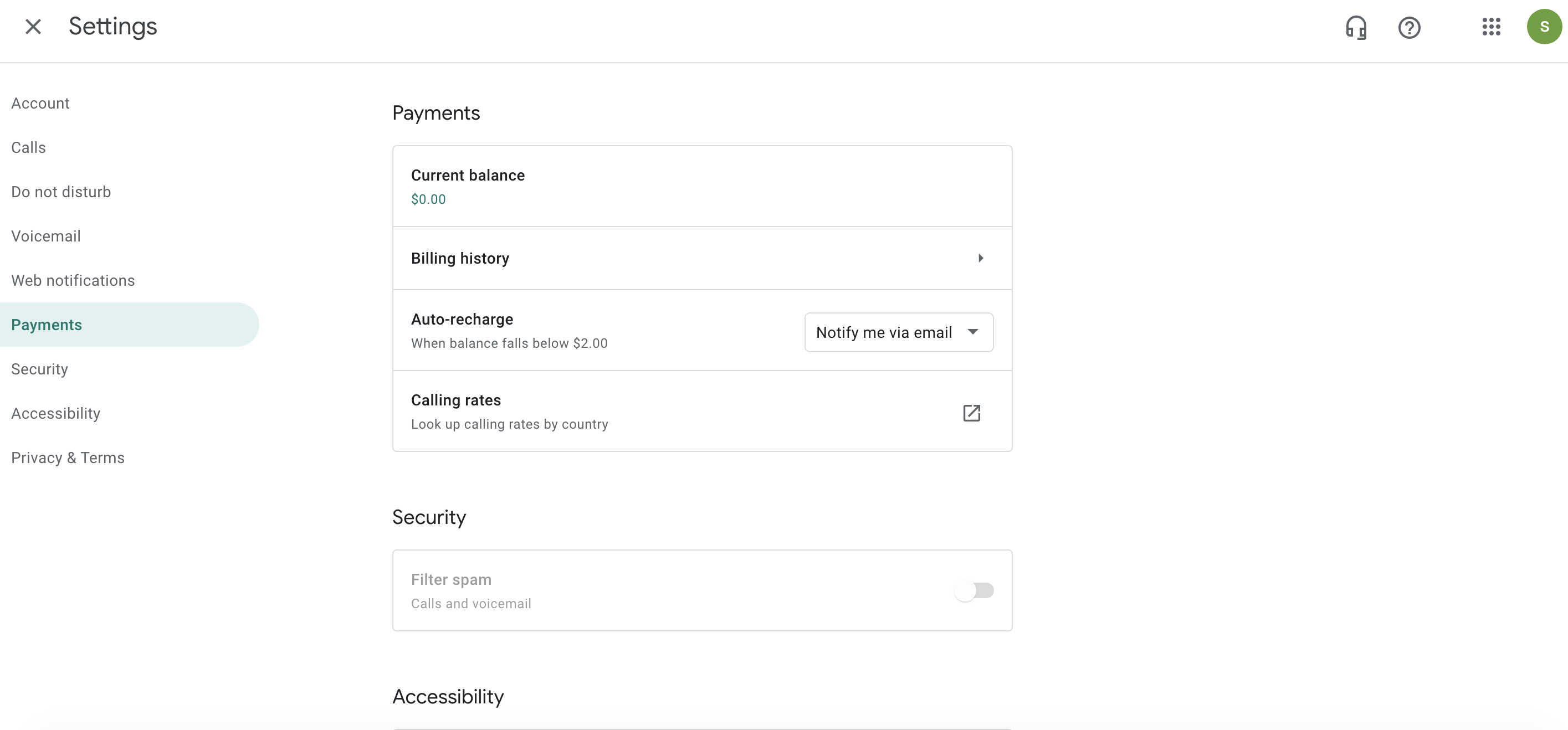
- Find “Payments” or “Credit”: Within the Settings menu, look for a section related to “Payments,” “Credit,” or “Account” details. The exact label might vary slightly over time due to UI updates but will generally be intuitive. You’re typically looking for “Add credit” or “Buy credit.” In older interfaces, it might be under “Calls” or directly visible on the main page. The most common path is
Settings > Payments > Add credit.
Selecting Your Credit Amount
Upon reaching the credit purchase page, you will be presented with various credit denominations:
- Choose an Amount: Google Voice typically offers predefined amounts, such as $10, $25, or $50. Select the amount that best suits your expected calling needs. Keep in mind that Google Voice credit generally doesn’t expire as long as the account remains active, so purchasing a larger amount for long-term use can be convenient.
- Review Rates (Optional but Recommended): Before committing, you might want to quickly review the international calling rates for the countries you intend to call. There’s usually a link on this page or nearby that directs you to the detailed rate list. This helps you gauge how much credit you’ll need.
Choosing a Payment Method
Google leverages its robust Google Pay ecosystem for processing payments:
- Google Pay Integration: Your Google Voice credit purchase will be processed through Google Pay. If you already have payment methods saved to your Google account (e.g., credit cards, debit cards, PayPal), they will be available for selection.
- Add New Payment Method: If you don’t have a payment method saved or wish to use a new one, you’ll see an option to “Add a payment method.” You can typically add:
- Credit or Debit Card: Enter your card number, expiry date, CVC, and billing address.
- PayPal: Link your PayPal account.
- Other options: Depending on your region, other local payment methods might be available.
- Select Your Preferred Method: Choose the payment method you wish to use for the purchase.
Confirming Your Purchase
- Review Order: Before finalizing, a summary of your order will be displayed, showing the credit amount and the total cost.
- Complete Purchase: Click the “Buy” or “Confirm” button. You might be prompted to re-enter your Google account password or complete a two-factor authentication step for security.
- Confirmation: Once the transaction is successful, you’ll receive a confirmation message on screen, and usually an email receipt from Google Pay. Your new credit balance should be reflected in your Google Voice account shortly thereafter.
Managing Your Google Voice Credit and Account Settings
Purchasing credit is just the first step. Effective management ensures you get the most out of your investment and avoid any interruptions in service.
Checking Your Current Credit Balance
Monitoring your balance is crucial for budgeting and knowing when to top up:
- Via Web Browser: Go to voice.google.com, navigate to
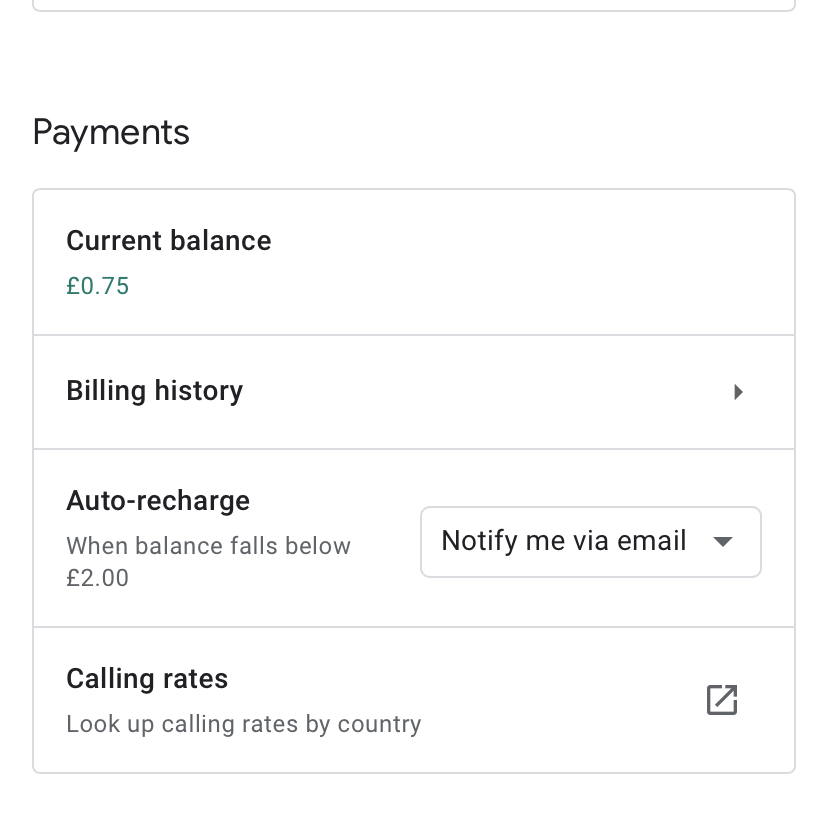
Settings > Payments. Your current credit balance will be prominently displayed at the top of this section. - During a Call: When initiating an international call that requires credit, Google Voice will often display your remaining balance or warn you if you’re low.
- Via Mobile App: In the Google Voice mobile app, you can usually find your balance by tapping the menu icon (three lines) and looking for “Credit” or checking the “Settings” section.
Understanding Credit Expiration Policies
A significant advantage of Google Voice credit is its long-term validity:
- Non-Expiring Credit: Google Voice credit typically does not expire as long as you make at least one call or send one text message (using your Google Voice number, not your carrier number) every six months. If your account remains inactive for an extended period, the credit might expire, but this is rare for active users. It’s always good practice to use your Google Voice number periodically.
- Refund Policy: Google generally offers refunds for unused credit within six months of purchase, provided the request meets their terms of service. This offers a safety net if your calling needs change.
Auto-Recharge and Its Benefits
For frequent international callers, setting up auto-recharge is a highly convenient feature:
- Enable Auto-Recharge: In the
Settings > Paymentssection, you’ll usually find an option to “Enable auto-recharge.” - Set Threshold: You can configure auto-recharge to automatically add a specific amount (e.g., $10) to your account whenever your balance drops below a certain threshold (e.g., $2).
- Benefits:
- Uninterrupted Service: Avoids unexpected disconnections during important international calls.
- Convenience: Eliminates the need to manually add credit each time you run low.
- Peace of Mind: Ensures you always have sufficient funds for your international communication needs.
Viewing Call History and Credit Usage
Transparency in spending is vital:
- Detailed Call History: Google Voice provides a comprehensive call history accessible via the web interface.
- Credit Deductions: Next to each international call made, you’ll see the duration and the exact amount of credit deducted. This allows you to track your spending and understand where your credit is going.
- Export Options: You can often export your call history for record-keeping or reconciliation purposes, particularly useful for business users.
Troubleshooting Common Issues with Google Voice Credit
While adding and managing Google Voice credit is generally smooth, you might occasionally encounter minor hiccups. Here’s how to address them.
Payment Processing Errors
- Declined Card: Double-check that your credit card details (number, expiry, CVC) are entered correctly. Ensure your card is not expired and has sufficient funds. Contact your bank or card issuer if problems persist, as they might have fraud protection measures in place blocking the transaction.
- Google Pay Issues: Verify that your Google Pay account is fully set up and doesn’t have any outstanding issues. Sometimes, simply re-linking or re-verifying a payment method within Google Pay can resolve the problem.
- Browser/Connection Problems: Try clearing your browser’s cache and cookies, or attempt the purchase from a different browser or even in incognito mode. A stable internet connection is also crucial.
Credit Not Appearing After Purchase
- Wait a Few Minutes: Sometimes, it can take a few minutes for the credit to register and update in your account, especially during peak times.
- Refresh Your Page/App: Log out and log back into your Google Voice account on the web or refresh the mobile app.
- Check Google Pay Activity: Go to pay.google.com and check your transaction history. If the purchase shows as “completed,” the credit should appear soon. If it shows “pending” or “failed,” there might be a delay or an issue with the transaction.
- Email Confirmation: Look for a purchase confirmation email from Google Pay. If you received one, it’s a good sign the payment went through, and the credit will likely appear.
Understanding Call Rates and Charges
- Higher-Than-Expected Usage: If your credit seems to deplete faster than anticipated, re-verify the international calling rates for the specific country and number type you are calling. Rates can vary significantly even within the same country (e.g., landline vs. mobile numbers).
- Call Duration: Be mindful of the duration of your international calls. Even low per-minute rates can add up over long conversations.
- Premium Numbers: Confirm you are not accidentally calling a premium or special service number in the destination country that might have higher rates.
Contacting Google Voice Support
If you’ve exhausted the troubleshooting steps and still face issues:
- Google Voice Help Center: Start by visiting the official Google Voice Help Center (support.google.com/voice). It has extensive FAQs and community forums.
- Contact Options: While direct phone support for Google Voice is limited, you can often find options for community support, bug reporting, or in some cases, email support through the help center. Provide as much detail as possible about your issue, including dates, times, and any error messages.
Optimizing Your Google Voice Experience with Credit
Leveraging Google Voice credit effectively can significantly enhance your communication strategy, whether for personal use or business.
Strategic Use for International Travel
When traveling abroad, Google Voice can be a lifesaver:
- Wi-Fi Calling: Connect to Wi-Fi, open your Google Voice app, and make calls using your purchased credit. This bypasses expensive international roaming charges from your traditional carrier entirely.
- Maintain Your US Number: Keep your US Google Voice number active for incoming calls and texts from the US, even while overseas, ensuring you don’t miss important communications.
- Local SIM Alternative (for calls out): While a local SIM is great for local data and calls, Google Voice credit offers a competitive alternative for calling back home or other international destinations using data.
Business Applications of Google Voice Credit
For small businesses and freelancers, Google Voice with credit offers a professional yet cost-effective solution:
- Global Client Reach: Make international calls to clients, partners, or suppliers at low rates, projecting a global presence without a global budget.
- Separate Business Line: Use your Google Voice number as a dedicated business line, keeping personal and professional communications separate.
- Scalability: Easily add credit as your international communication needs grow, without complex contracts or rate plans.
Integrating Google Voice with Other Google Services
Google Voice fits seamlessly into the broader Google ecosystem:
- Google Contacts: Your Google Voice experience is enhanced by integration with Google Contacts, making it easy to dial numbers from your address book.
- Google Calendar: Potentially link communications to your schedule for better organization.
- Google Workspace: For businesses using Google Workspace, Google Voice integrates well, offering advanced features and unified administration in some plans.
Future of Google Voice and Credit Features
Google continuously updates its services. While the core functionality of adding credit for international calls is likely to remain, users can anticipate potential enhancements:
- Improved Rate Visibility: Even more transparent and dynamic rate displays.
- Bundled International Plans: The possibility of monthly international calling plans for frequent users, moving beyond purely pay-as-you-go credit.
- Enhanced Integration: Deeper integration with other Google communication tools like Google Meet or Chat for a more unified experience.
In conclusion, adding credit to Google Voice is a simple, secure, and highly beneficial process that unlocks a world of affordable international communication. By following these steps and intelligently managing your account, you can transform Google Voice into an even more powerful tool for all your personal and professional needs.
aViewFromTheCave is a participant in the Amazon Services LLC Associates Program, an affiliate advertising program designed to provide a means for sites to earn advertising fees by advertising and linking to Amazon.com. Amazon, the Amazon logo, AmazonSupply, and the AmazonSupply logo are trademarks of Amazon.com, Inc. or its affiliates. As an Amazon Associate we earn affiliate commissions from qualifying purchases.