
In an increasingly data-driven world, the ability to manipulate numbers efficiently is a foundational skill. Among the most common numerical operations is adding a percentage to a base number—a task that permeates various aspects of our digital lives, from calculating sales tax in e-commerce and determining salary raises in HR systems to applying markups in business analytics and forecasting growth in financial models. While the underlying mathematical principle is straightforward, the methods and tools available to perform this calculation have evolved significantly, offering unparalleled precision, speed, and automation.
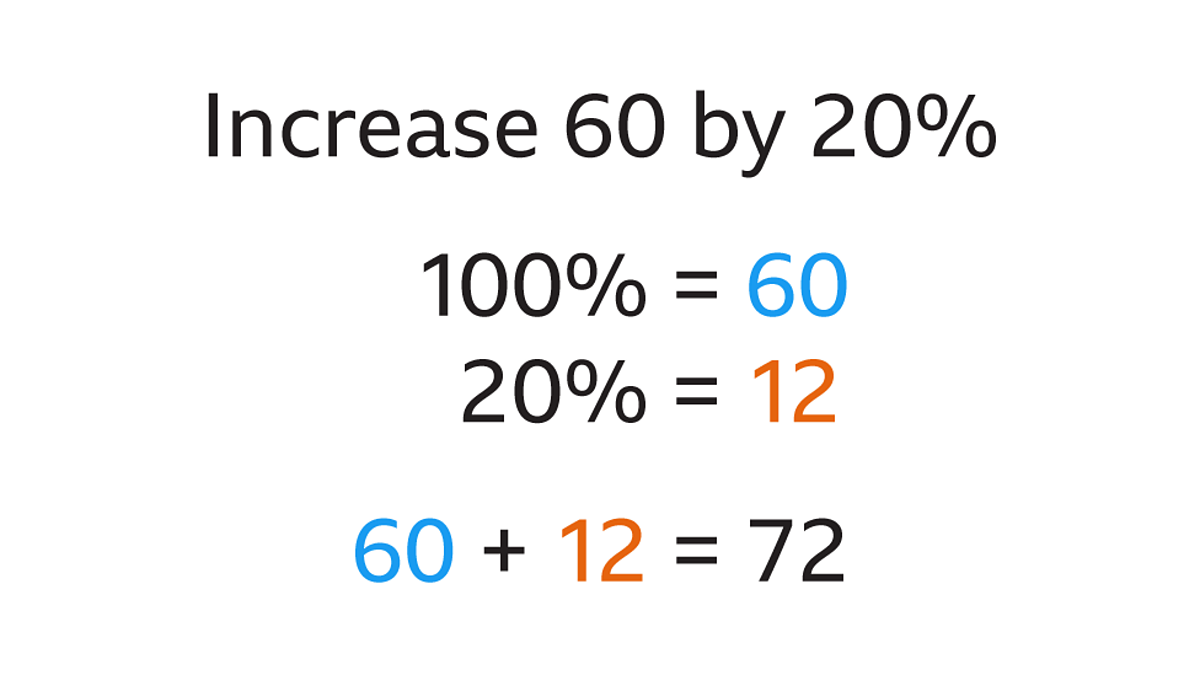
This guide delves beyond the basic arithmetic, exploring how technology empowers us to integrate percentage additions seamlessly into our workflows. Whether you’re a data analyst, a small business owner, a student, or simply someone looking to streamline everyday calculations, understanding the diverse digital avenues for adding percentages to numbers is an indispensable skill in today’s technological landscape.
Understanding the Core Concept: The Math Behind the Magic
Before diving into the technological applications, a solid grasp of the fundamental mathematical concept is essential. Every digital tool, from the simplest calculator app to the most complex programming script, relies on this core principle.
Deconstructing Percentages: What They Truly Represent
A “percentage” literally means “per hundred” or “out of one hundred.” It’s a way to express a number as a fraction of 100. For instance, 10% means 10 out of 100, which can also be written as the fraction 10/100 or the decimal 0.10. Understanding this conversion is crucial, as most computational tools operate with decimals or fractions rather than the percentage symbol itself.
To convert a percentage to a decimal, simply divide it by 100.
- Example: 25% = 25 / 100 = 0.25
- Example: 5% = 5 / 100 = 0.05
The Fundamental Formula: Adding a Percentage Increment
When you need to add a percentage to a number, you are essentially increasing that number by a specified fractional amount of itself. The process involves two primary steps:
- Calculate the percentage amount: Determine what the given percentage of the original number is.
- Add it to the original number: Sum this calculated amount with the original number.
This can be expressed by two equivalent formulas:
-
Method 1 (Two steps):
Percentage Amount = Original Number * (Percentage / 100)
Result = Original Number + Percentage Amount -
Method 2 (Combined, more efficient for calculations):
Result = Original Number * (1 + Percentage / 100)
Let’s illustrate with a simple example: Adding 10% to the number 200.
Using Method 1:
- Percentage Amount = 200 * (10 / 100) = 200 * 0.10 = 20
- Result = 200 + 20 = 220
Using Method 2:
- Result = 200 * (1 + 10 / 100) = 200 * (1 + 0.10) = 200 * 1.10 = 220
Both methods yield the same result, but Method 2 is often preferred in computing environments as it condenses the operation into a single multiplication, leading to cleaner code and spreadsheet formulas. This foundational understanding sets the stage for efficient application across various tech platforms.
Leveraging Spreadsheet Software for Efficiency and Accuracy
Spreadsheet programs like Microsoft Excel and Google Sheets are arguably the most ubiquitous and powerful tools for performing percentage calculations, especially when dealing with lists of numbers or requiring dynamic updates. Their cell-based structure and formula capabilities make them ideal for both simple and complex scenarios.
Microsoft Excel: Your Go-To for Data-Driven Calculations
Excel’s robust feature set makes it indispensable for many professionals. To add a percentage to a number in Excel:
- Input Data: Enter your original number in one cell (e.g.,
A1) and the percentage in another (e.g.,B1).- Pro Tip: You can enter the percentage as a decimal (e.g.,
0.10for 10%) or directly as a percentage (e.g.,10%). Excel automatically handles the conversion when the cell is formatted as “Percentage.”
- Pro Tip: You can enter the percentage as a decimal (e.g.,
- Apply the Formula: In a third cell (e.g.,
C1), type the formula using Method 2:
=A1*(1+B1)
IfB1contains10%, Excel interprets it as0.10. IfB1contains10(as a whole number representing percent), you would use=A1*(1+B1/100). - Drag and Fill: For lists of numbers, simply drag the fill handle (the small square at the bottom-right of the cell containing the formula) down the column. Excel automatically adjusts the cell references for each row, applying the same calculation.
Real-World Example: Calculating Sales Tax for Multiple Items
Imagine you have a list of product prices in column A and a fixed sales tax rate (e.g., 7%) in cell B1.
- Cell
A2: Product Price (e.g., 50.00) - Cell
B1: Sales Tax Rate (e.g.,7%or0.07) - Cell
C2(Total Price):=A2*(1+$B$1)- The
$signs create an absolute reference for cellB1, ensuring that when you drag the formula down, the tax rate remains fixed, whileA2correctly changes toA3,A4, etc.
- The
Excel’s ability to handle large datasets, perform conditional calculations, and visualize results makes it a powerful environment for any percentage-based analysis.
Google Sheets: Collaborative Cloud-Based Percentage Power
Google Sheets offers nearly identical functionality to Excel, with the added advantage of cloud-based collaboration. The formulas and steps for adding a percentage to a number are essentially the same:
- Input Data: Enter your original number (e.g.,
A1) and percentage (e.g.,B1). - Apply the Formula: In
C1, use=A1*(1+B1)(ifB1is formatted as a percentage or entered as a decimal) or=A1*(1+B1/100)(ifB1is a whole number representing the percentage). - Fill Down: Use the fill handle to apply the formula to subsequent rows.
Example: Updating Prices with a New Markup Across Shared Inventory
A small business uses a Google Sheet to manage its product inventory and pricing. If they decide to apply a 15% markup to all existing product costs:
- Column A: Original Product Cost
- Cell
B1: Markup Percentage (e.g.,15%) - Column C (New Price): Formula
=A2*(1+$B$1)applied down the column.
The collaborative nature of Google Sheets means multiple team members can simultaneously view and update these calculations, making it ideal for dynamic business environments.
Beyond Basic Addition: Advanced Spreadsheet Functions
While the basic formula is sufficient for most tasks, spreadsheets offer functions that can simplify more complex scenarios:
IFstatements: Apply percentages conditionally (e.g., “add 10% if product category is ‘Electronics’, otherwise add 5%”).- Named Ranges: Assign meaningful names to cells (like
SalesTaxRate) for clearer and more maintainable formulas (e.g.,=A2*(1+SalesTaxRate)). - Data Validation: Ensure users enter percentages correctly.
Mastering these spreadsheet techniques not only answers “how do I add a percentage to a number” but transforms it into a scalable, error-resistant operation.
Harnessing Programming Languages for Automation and Scalability
For developers, data scientists, or anyone dealing with large-scale data processing or building custom applications, programming languages offer the ultimate control and automation for percentage calculations. Python and JavaScript are excellent examples of languages that make this straightforward.
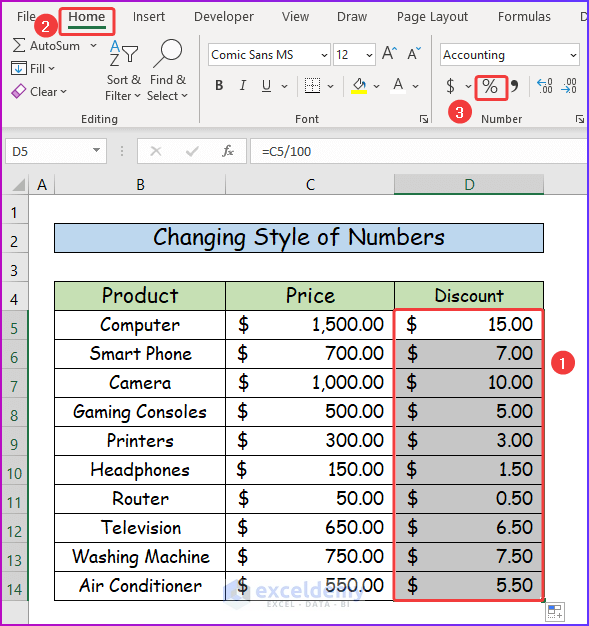
Python: Simple Scripts for Powerful Computations
Python’s readability and extensive libraries make it a favorite for numerical tasks.
def add_percentage(number, percentage):
    """Adds a percentage to a given number."""
    # Convert percentage to its decimal equivalent
    percentage_decimal = percentage / 100
    # Apply the formula: Number * (1 + decimal_percentage)
    result = number * (1 + percentage_decimal)
    return result

# Example usage:
original_number = 250
increase_percentage = 20 # Represents 20%

final_value = add_percentage(original_number, increase_percentage)
print(f"Adding {increase_percentage}% to {original_number} gives: {final_value}")

# Output: Adding 20% to 250 gives: 300.0

# Batch processing example:
prices = [10.50, 25.00, 100.00, 7.75]
markup = 15 # 15%
updated_prices = [add_percentage(price, markup) for price in prices]
print(f"Original prices: {prices}")
print(f"Prices after {markup}% markup: {updated_prices}")

# Output:
# Original prices: [10.5, 25.0, 100.0, 7.75]
# Prices after 15% markup: [12.075, 28.75, 115.0, 8.9125]
Python scripts can be integrated into larger data pipelines, web applications, or used for complex financial modeling where dynamic, automated percentage adjustments are crucial. Libraries like NumPy and Pandas further enhance Python’s capabilities for high-performance numerical operations on large datasets.
JavaScript: Web-Based Interactive Percentage Calculations
JavaScript is essential for front-end web development, enabling interactive calculations directly within a browser. This is perfect for creating tools like online calculators or dynamic forms.
function addPercentage(number, percentage) {
    const percentageDecimal = percentage / 100;
    const result = number * (1 + percentageDecimal);
    return result;
}

// Example for a web application (e.g., a simple tip calculator):
const billAmount = 75.50;
const tipPercentage = 18; // 18%

const totalWithTip = addPercentage(billAmount, tipPercentage);
console.log(`Original bill: $${billAmount}`);
console.log(`Tip (${tipPercentage}%): $${(totalWithTip - billAmount).toFixed(2)}`);
console.log(`Total bill with tip: $${totalWithTip.toFixed(2)}`);

// Output in browser console:
// Original bill: $75.5
// Tip (18%): $13.59
// Total bill with tip: $89.09

// Integrating with an HTML input:
/*
<label for="initialNumber">Enter Number:</label>
<input type="number" value="100">
<label for="percentToAdd">Add Percentage:</label>
<input type="number" value="10">
<button onclick="calculateTotal()">Calculate</button>
<p>Result: <span></span></p>

<script>
    function calculateTotal() {
        const num = parseFloat(document.getElementById('initialNumber').value);
        const percent = parseFloat(document.getElementById('percentToAdd').value);
        if (!isNaN(num) && !isNaN(percent)) {
            const result = addPercentage(num, percent);
            document.getElementById('calculationResult').textContent = result.toFixed(2);
        } else {
            document.getElementById('calculationResult').textContent = 'Invalid Input';
        }
    }
</script>
*/
JavaScript allows for immediate user feedback and can power everything from e-commerce discount calculators to financial projection tools embedded directly on web pages.
Quick Calculations: Online Tools and Dedicated Apps
For ad-hoc or infrequent calculations, or when you don’t need the full power of spreadsheets or programming, various online tools and dedicated apps provide immediate results.
The Power of Search Engines and Built-in Calculators
Most modern operating systems and web browsers include highly capable calculators:
- Google Search: Simply type “200 + 10%” directly into Google search bar, and it will provide the answer (220). This is incredibly convenient for quick, single calculations.
- Operating System Calculators: Windows Calculator, macOS Calculator, and built-in smartphone calculator apps all support percentage operations. You typically enter the number, then
+, then the percentage, and then the%button (e.g.,200 + 10 % =). Note that the order of operations for the%button can vary between calculators, so it’s good practice to verify.
Specialized Percentage Calculators: When Precision Matters
Beyond general-purpose calculators, numerous online tools and mobile apps are designed specifically for percentage calculations, often tailored to particular use cases:
- Tip Calculators: Automatically calculate tip amounts and split bills.
- Loan/Mortgage Calculators: Determine interest additions over time, often involving complex compound interest formulas built upon the basic percentage addition principle.
- Discount Calculators: Quickly show the final price after a percentage discount.
- Sales Tax Calculators: Compute the total price including local sales tax.
These specialized tools abstract away the formula, focusing on user-friendliness for specific needs, but they all rely on the same fundamental math: adding a percentage to a number.
Common Pitfalls and Best Practices
While technology simplifies calculations, awareness of potential issues and adherence to best practices ensure reliable results.
Understanding Percentage vs. Percentage Point
It’s crucial to distinguish between a “percentage increase” and a “percentage point” increase.
- Percentage increase: A relative change (e.g., stock price increases by 10%).
- Percentage point increase: An absolute change in the numerical value of a percentage (e.g., interest rate increases from 5% to 6%, which is a 1 percentage point increase, but a 20% relative increase from 5%).
Most “add a percentage to a number” queries refer to a relative percentage increase.
Data Integrity and Formatting: Ensuring Reliable Results
- Spreadsheets: Always ensure cells containing percentages are correctly formatted as “Percentage” or that you explicitly divide by 100 in your formula if you’re entering them as whole numbers (e.g.,
10instead of10%). Incorrect formatting is a common source of errors. - Programming: Validate user inputs to ensure they are indeed numbers and percentages within reasonable ranges. Type conversion (e.g.,
parseFloat()in JavaScript,int()orfloat()in Python) is critical.
Double-Checking Your Work: The Human Element in Automation
Even with sophisticated tools, a quick mental check or calculation with a simpler tool can catch significant errors, especially when setting up new formulas or scripts. For critical applications, always verify a sample of results manually.

Conclusion: Mastering Percentage Addition in the Digital Age
The question “how do I add a percentage to a number” is more than just a basic arithmetic query; it’s an entry point into a world of technological efficiency. From the intuitive interfaces of spreadsheets like Excel and Google Sheets to the powerful automation capabilities of programming languages like Python and JavaScript, and the convenience of online calculators, modern tools have democratized this essential mathematical operation.
By understanding the underlying formula and strategically choosing the right digital tool for the task, you can transform a potentially tedious calculation into a precise, scalable, and integral part of your data management, financial planning, or application development workflows. Mastering these tech-driven methods not only boosts your productivity but also enhances your confidence in navigating the numerical demands of our increasingly digital world. Embrace the tools, practice their application, and unlock a new level of numerical proficiency.
aViewFromTheCave is a participant in the Amazon Services LLC Associates Program, an affiliate advertising program designed to provide a means for sites to earn advertising fees by advertising and linking to Amazon.com. Amazon, the Amazon logo, AmazonSupply, and the AmazonSupply logo are trademarks of Amazon.com, Inc. or its affiliates. As an Amazon Associate we earn affiliate commissions from qualifying purchases.