
In an increasingly digital world, managing our online subscriptions has become a critical aspect of personal finance and digital hygiene. Amazon Prime, with its ubiquitous presence and extensive array of benefits, is often one of the first services individuals subscribe to. Yet, circumstances change, needs evolve, and sometimes, the decision to cancel becomes necessary. This guide offers a detailed, step-by-step tutorial on how to navigate the Amazon Prime cancellation process, while also delving into the broader context of digital subscription management, data retention, and best practices for a seamless online experience. As technology continues to embed itself deeper into our daily lives, understanding how to control these digital threads is paramount.

Understanding Amazon Prime: More Than Just Free Shipping
Amazon Prime began primarily as a service offering expedited, free shipping for eligible items. Over the years, it has burgeoned into a sprawling ecosystem of digital benefits, cementing its status as a cornerstone of Amazon’s business model and a significant part of many consumers’ digital lives. Before diving into the cancellation process, it’s insightful to briefly touch upon what Prime truly encompasses and why individuals might choose to opt out.
The Ecosystem of Benefits
Beyond the famed two-day (or even same-day) shipping, an Amazon Prime membership unlocks a treasure trove of digital services. Prime Video offers a vast library of streaming movies and TV shows, competing directly with platforms like Netflix and Hulu. Prime Music provides ad-free access to millions of songs, while Prime Reading grants access to a rotating selection of ebooks, magazines, and comics. Gamers benefit from Prime Gaming (formerly Twitch Prime), which offers free games, in-game content, and a monthly Twitch channel subscription. Other perks include unlimited photo storage with Amazon Photos, exclusive deals, early access to Lightning Deals, and even groceries with Amazon Fresh and Whole Foods Market discounts in select regions. This comprehensive suite of services means that Prime is not merely a shipping convenience but a multifaceted digital entertainment and utility package.
Common Reasons for Cancellation
The decision to cancel a service as integrated as Amazon Prime rarely comes lightly. Several factors typically drive this choice, reflecting shifts in user needs, financial priorities, or simply a reevaluation of perceived value.
One primary reason is cost-effectiveness. As the annual or monthly fee for Prime has increased over time, some users find that the benefits no longer justify the expense, especially if their usage of services like Prime Video or Music has declined, or if their shopping habits have changed.
Another significant factor is redundancy. Many consumers subscribe to multiple streaming services (Netflix, Disney+, HBO Max) and music platforms (Spotify, Apple Music). If a household’s entertainment needs are met by other subscriptions, Prime Video or Music might become superfluous. Similarly, if grocery delivery is handled by another provider or if local shopping preferences change, the benefits of Amazon Fresh might diminish.
Infrequent usage is also a common motivator. If a subscriber realizes they aren’t utilizing the shipping benefits as often as they once did, or if they haven’t streamed content or read books through Prime in months, the membership can feel like an unnecessary drain on their budget.
Finally, ethical or privacy concerns occasionally lead users to reconsider their relationship with large tech companies, prompting them to reduce their digital footprint and disentangle from services like Amazon Prime. Regardless of the specific motivation, the ability to cancel easily and understand the implications is crucial for digital autonomy.
The Step-by-Step Process: Navigating Amazon’s Cancellation Flow
Canceling a digital subscription, particularly one as entrenched as Amazon Prime, can sometimes feel like navigating a maze. Tech companies, by design, often make the cancellation process less straightforward than signing up, hoping to encourage retention. However, with clear instructions, the process is manageable. This section provides a detailed, systematic guide to discontinuing your Amazon Prime membership.
Accessing Your Account Settings
The first step in canceling your Amazon Prime membership is to log into your Amazon account. This can be done via the Amazon website on a desktop or laptop, or through the Amazon shopping app on a mobile device. While the exact interface might vary slightly between the web and app, the core navigation remains consistent.
- On the Amazon Website: Go to Amazon.com. In the top right corner, hover over “Account & Lists” and click on “Account”. Alternatively, once logged in, you can often find a direct link to “Your Prime Membership” under the “Your Account” page.
- On the Amazon Shopping App: Open the Amazon app. Tap on the three horizontal lines (menu icon) usually located in the bottom right (iOS) or top left (Android). Scroll down and tap on “Account.”
Locating the Membership Management Section
Once you are in your account settings, you need to find the specific section dedicated to managing your Prime membership. Amazon provides a centralized location for this, designed to give members control over their subscription status.
- On the Amazon Website: From the “Your Account” page, look for a section titled “Prime Membership,” “Prime,” or “Manage Prime Membership.” Click on this link. This will take you to a dedicated page detailing your Prime benefits, billing information, and renewal date.
- On the Amazon Shopping App: Under the “Account” section, look for “Manage Prime Membership” or “Prime Membership.” Tapping this will bring you to a similar overview page as the website, showing your current membership status and benefits.
Following the On-Screen Prompts for Cancellation
Amazon’s process for cancellation typically involves a few clicks and confirmations. Be prepared for several screens that might attempt to remind you of the benefits you’ll lose or offer alternatives to full cancellation (e.g., pausing your membership, changing to a monthly plan).
- Initiating Cancellation: On your “Manage Prime Membership” page, look for phrases like “End Membership,” “Manage Membership,” “Update, Cancel, and More,” or “End Prime Benefits.” These options are usually clearly visible, though sometimes intentionally de-emphasized compared to renewal options. Click on the relevant link.
- Navigating Retention Prompts: Amazon will likely present you with information about how many Prime benefits you’ve used (e.g., how much you’ve saved on shipping, how many Prime Video titles you’ve watched). It may also offer partial refunds based on usage or suggest switching to a different plan (e.g., a monthly subscription instead of annual). Politely decline these offers if your intent is to fully cancel.
- Confirming Cancellation: You will typically be prompted to confirm your decision multiple times. Look for buttons or links that explicitly state “End My Membership,” “Cancel My Benefits,” or similar definitive phrases. Be careful not to accidentally select options like “Keep My Membership” or “Change Plan.” The final confirmation step is crucial.
Confirmation and Understanding Refund Policies
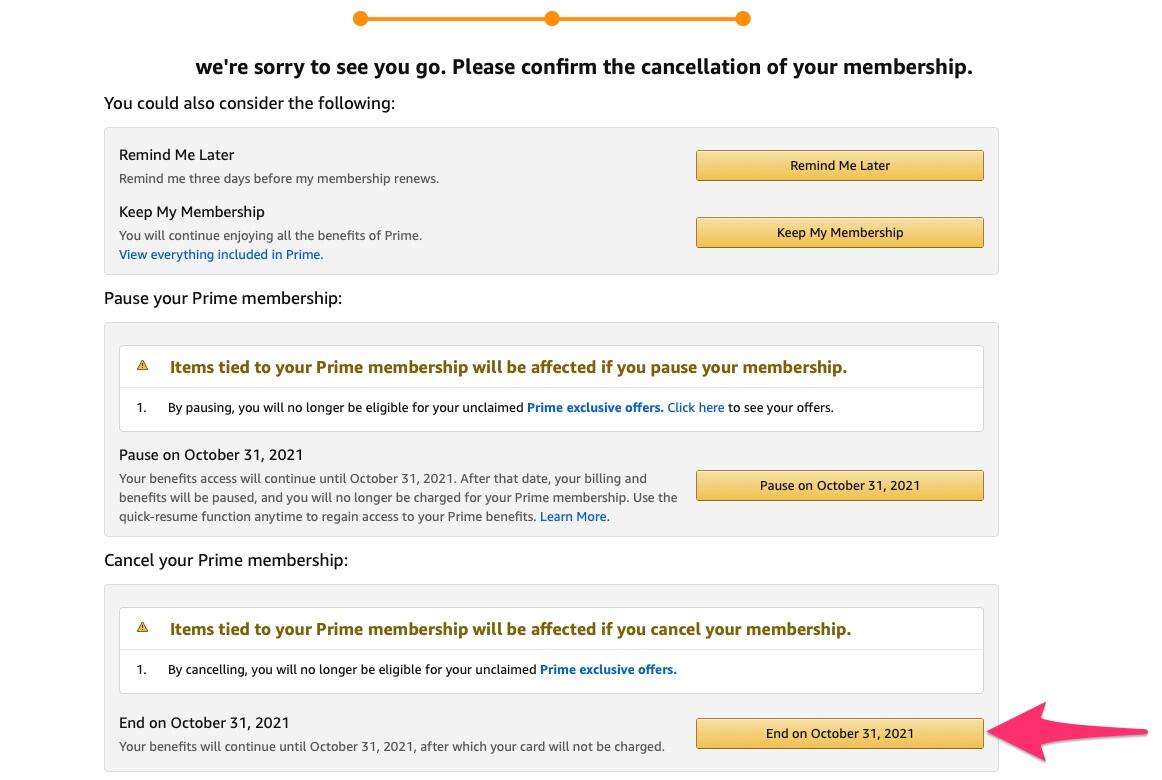
After successfully navigating the prompts and confirming your cancellation, Amazon will provide you with a confirmation message, usually sent via email. This confirmation is vital for your records.
Refund Policies: Amazon’s refund policy for Prime memberships is generally quite fair.
- If you haven’t used any Prime benefits (including Prime shipping or streaming services) since your latest charge, you are usually eligible for a full refund of that charge.
- If you have used some Prime benefits, Amazon may offer a partial refund based on your usage.
- If you’re still within a free trial period, ending the membership simply means your trial will conclude without a charge.
It’s important to review the refund information presented during the cancellation process and in your confirmation email. The cancellation is often effective at the end of your current billing cycle, meaning you can continue to use Prime benefits until that date, or it may be immediate with a corresponding refund.
Post-Cancellation Considerations and Alternatives
Canceling Amazon Prime doesn’t necessarily mean severing all ties with Amazon. It’s important to understand what changes and what remains, as well as to consider alternatives for services you might still need. This section addresses the implications of cancellation and explores options for continued engagement with Amazon’s broader ecosystem or other service providers.
Data Retention and Digital Rights
A common concern after canceling any major online service is the fate of your data. For Amazon, canceling Prime specifically affects your membership benefits, not your core Amazon account.
- Your Amazon Account Remains Active: You will still have an active Amazon account, allowing you to purchase items, access your order history, manage your Kindle library, and use other non-Prime services.
- Prime-Specific Data: Data associated with your Prime Video watch history, Prime Music listening habits, and Prime Reading activity may be retained by Amazon in accordance with their privacy policy, even if you no longer have access to those services. This data is often anonymized or used for internal analytics.
- Photos and Cloud Storage: If you utilized Amazon Photos for unlimited full-resolution photo storage as a Prime benefit, your photos are typically downgraded to a limited storage plan (e.g., 5 GB) after cancellation. It is critical to download or migrate any excess photos before your Prime membership officially ends to avoid losing access or incurring additional storage fees. This is a crucial digital right consideration.
- Purchased Digital Content: Any digital content you have purchased (e.g., Kindle ebooks, Prime Video movies/TV shows bought, not just streamed) remains accessible through your Amazon account, regardless of your Prime status.
Exploring Other Amazon Services Without Prime
Many core Amazon services are available without a Prime membership, albeit sometimes with different terms:
- Shopping: You can still shop on Amazon.com, but you will pay for shipping (or qualify for free shipping on eligible orders above a certain threshold, though it might be slower than Prime shipping).
- Kindle: You can continue to buy and read Kindle ebooks. Prime Reading is a benefit of Prime, but the Kindle ecosystem is separate.
- Audible: If you have an Audible subscription, it is distinct from Prime, though Prime members often receive discounts.
- Amazon Music (Free Tier): Amazon offers a free, ad-supported tier of Amazon Music, which provides access to curated playlists and stations without a Prime subscription.
- Cloud Storage: If you need more storage than the basic 5 GB, you can purchase additional Amazon Photos or Amazon Drive storage plans separately.
Rejoining Prime: What You Need to Know
Should your needs or circumstances change, rejoining Amazon Prime is always an option. The process is straightforward, essentially mimicking the initial signup.
- Seamless Re-Subscription: You can easily re-subscribe through your Amazon account settings at any time. Your previous account history and preferences will typically be preserved.
- Trial Eligibility: If you’ve been a Prime member before, you are generally not eligible for another free trial.
- Billing Options: You’ll have the option to choose between monthly or annual billing again. Consider your expected usage and financial preferences when selecting.
- Promotional Offers: Keep an eye out for any promotional offers for new or returning members, especially during peak shopping seasons like Prime Day or Black Friday.
Best Practices for Digital Subscription Management
Canceling Amazon Prime serves as an excellent case study for the broader topic of managing digital subscriptions effectively. In an era of “subscription fatigue,” adopting systematic approaches to track, evaluate, and control these recurring expenses is essential for both financial wellness and digital security.
Regular Review of Subscriptions
The most fundamental best practice is to conduct periodic audits of all your digital subscriptions. Just as you might review bank statements, make it a habit to examine your recurring charges every few months.
- Inventory Your Services: Create a list of all services you subscribe to (streaming, software, apps, cloud storage, fitness, etc.). Many people are surprised by how many they have accumulated.
- Assess Usage vs. Value: For each service, honestly evaluate how often you use it and whether the benefits you derive justify the cost. Are you watching enough Prime Video or using enough expedited shipping to warrant the Prime fee?
- Cancel Unused Services: Be ruthless. If you haven’t used a service in months, or if you consistently find yourself questioning its value, it’s a prime candidate for cancellation. This proactive approach prevents “ghost subscriptions” from draining your finances.
- Leverage Free Trials Wisely: When signing up for free trials, always set a calendar reminder a few days before the trial ends to decide whether to continue or cancel. This avoids unexpected charges.
Leveraging Financial Tools for Tracking
Managing subscriptions manually can be tedious, especially as the number of services grows. Fortunately, various digital tools can assist:
- Budgeting Apps: Many personal finance and budgeting apps (e.g., Mint, YNAB, Rocket Money, Truebill) automatically categorize your spending and can highlight recurring subscription charges. Some even offer features to help you cancel unwanted subscriptions directly from the app.
- Bank/Credit Card Features: Several banks and credit card companies now offer enhanced online banking features that track subscriptions and recurring payments. Check your financial institution’s online portal for such tools.
- Dedicated Subscription Managers: There are apps specifically designed for subscription management. These tools can centralize your subscription information, alert you to upcoming renewals, and help identify services you might have forgotten about.

Ensuring Digital Security Post-Cancellation
While canceling a subscription primarily focuses on cost and access, there are also digital security implications to consider:
- Account Hygiene: Even after canceling Prime, your Amazon account remains active. Ensure your password is strong and unique, and consider enabling two-factor authentication (2FA) for added security. This protects your purchase history and payment information.
- Reviewing Linked Services: If you used your Amazon Prime account (or generally, your Amazon login) to sign into or link with other third-party services (e.g., certain smart home devices, gaming platforms), review those connections. While canceling Prime typically doesn’t break these links, it’s good practice to understand what permissions you’ve granted.
- Data Download/Migration: As noted with Amazon Photos, always check the data retention policies for any service you cancel. If you have data stored on their platform that you wish to keep, download it or migrate it to another service before your access is fully revoked. This ensures you maintain control over your digital assets.
- Email Management: Be prepared for marketing emails from Amazon even after cancellation. You can adjust your email preferences within your Amazon account or unsubscribe directly from promotional emails.
Canceling Amazon Prime, or any digital subscription, is more than a simple transaction; it’s an act of informed digital citizenship. By understanding the process, anticipating the implications, and adopting best practices for subscription management, individuals can maintain control over their digital lives, optimize their spending, and ensure their online experience remains aligned with their evolving needs and priorities.
aViewFromTheCave is a participant in the Amazon Services LLC Associates Program, an affiliate advertising program designed to provide a means for sites to earn advertising fees by advertising and linking to Amazon.com. Amazon, the Amazon logo, AmazonSupply, and the AmazonSupply logo are trademarks of Amazon.com, Inc. or its affiliates. As an Amazon Associate we earn affiliate commissions from qualifying purchases.