
AMC, known for its groundbreaking original programming like The Walking Dead, Mad Men, and Better Call Saul, has cemented its place as a powerhouse in modern television. For many viewers, accessing this premium content is a top priority, whether they’re looking to catch up on a gripping drama, delve into a cult classic movie, or stay current with the latest series. However, with the ever-evolving landscape of television consumption – from traditional cable to a myriad of streaming services – understanding the most efficient and cost-effective ways to watch AMC can be a daunting task. This guide aims to demystify the process, offering a comprehensive technical breakdown of every viable method to ensure you never miss out on AMC’s critically acclaimed shows. We’ll explore the various platforms, essential technical requirements, and smart strategies to optimize your viewing experience, keeping you firmly in control of your entertainment.
Traditional Cable and Satellite Subscriptions: The Established Path
Before the streaming wars dominated the conversation, cable and satellite providers were the undisputed gatekeepers of television content. For many households, these services remain a reliable backbone, offering a vast array of channels, including AMC. Opting for a traditional subscription often provides a stable, high-quality broadcast, particularly for those who prefer a structured channel lineup and robust DVR capabilities. Understanding how AMC integrates into these legacy systems is the first step for many seeking access.
Identifying Providers Offering AMC
The first step in watching AMC via cable or satellite is to identify which providers in your geographic area carry the channel. Major players like Xfinity (Comcast), Spectrum, Cox, Verizon Fios, AT&T U-verse, and satellite providers such as DirecTV and DISH Network almost universally include AMC in their channel lineups. The key is to verify availability specific to your address. Most providers offer an online tool where you can input your ZIP code to see available packages and channel lists. It’s important to remember that while AMC is widely available, its inclusion can sometimes depend on the specific package tier you subscribe to.
Understanding Package Tiers and Inclusions
Cable and satellite companies typically structure their offerings into various tiers (e.g., basic, standard, premium). While AMC is often found in standard or extended basic packages, it’s not always guaranteed in the most entry-level offerings. Before committing, meticulously review the channel lineup for each package. Sometimes, a slightly higher tier might include AMC along with other channels you desire, making it a more comprehensive and better value proposition. Be aware of promotional pricing, which often has an expiration date, and always inquire about the regular price after the promotional period ends to avoid unexpected cost increases. Understanding the long-term cost is crucial for budgeting.
Installation and Setup Considerations
Once you’ve selected a provider and package, the technical setup typically involves professional installation. A technician will visit your home to set up the necessary equipment, which usually includes a set-top box (or multiple boxes for different TVs), and ensure proper connection to your television(s). They will also activate your service. For satellite, this includes mounting a dish outdoors. While this process is largely hands-off for the consumer, it’s vital to ensure your home has the necessary wiring or an appropriate location for satellite dish placement. Furthermore, understanding the functionality of the provided equipment, such as remote control operation, DVR scheduling, and on-demand access via the set-top box, will enhance your viewing experience. Most modern set-top boxes also offer apps and digital guides that can streamline content discovery.
Embracing the Streaming Revolution: Live TV Services
The shift towards internet-delivered television has fundamentally altered how many consumers access live channels. Live TV streaming services provide a compelling alternative to traditional cable, offering flexibility, often lower costs, and no long-term contracts. These services deliver AMC directly to your smart TV, streaming device, or mobile gadget via your internet connection, effectively merging the convenience of streaming with the immediacy of live television.
Sling TV: A Budget-Friendly Gateway
Sling TV often stands out for its à la carte approach and competitive pricing. AMC is a core offering in both Sling Orange and Sling Blue packages. Sling Orange is typically geared towards sports and family content, while Sling Blue focuses on entertainment and news. Since AMC is available in both, users can choose based on other desired channels or even combine both packages for a more extensive lineup. Its lower price point makes it an attractive option for those looking to cut costs without sacrificing access to key channels like AMC. Technically, Sling TV operates seamlessly across a wide array of devices, from Roku and Fire TV to smartphones and web browsers, offering a user-friendly interface.
YouTube TV & Hulu + Live TV: Comprehensive Bundles
For viewers seeking a more traditional “cable-like” experience with a broad channel lineup, YouTube TV and Hulu + Live TV are robust choices. Both services offer AMC as part of their extensive base packages, which also typically include major broadcast networks, sports channels, news, and a wealth of other entertainment options.
- YouTube TV is known for its unlimited cloud DVR storage and excellent user interface, making it easy to record and access AMC shows whenever you want. Its integration with the broader YouTube ecosystem also provides a familiar experience for many users.
- Hulu + Live TV combines live television with Hulu’s vast on-demand library, including its original programming. This offers a powerful dual benefit: live AMC broadcasts plus a massive catalog of other shows and movies. Both services require a stable broadband connection and support a wide range of streaming devices, ensuring high-definition streaming quality.
Philo & DirecTV Stream: Niche and Premium Options
- Philo caters to a specific audience, offering an incredibly budget-friendly package focused purely on entertainment, lifestyle, and knowledge-based channels, notably excluding sports and news. AMC is a central part of Philo’s lean lineup, making it an excellent choice for those whose primary interest aligns with this content niche and who want to save money. The technical setup is straightforward, relying on apps for common streaming devices.
- DirecTV Stream (formerly AT&T TV Now) positions itself at the more premium end of the live TV streaming spectrum. It offers various packages, with AMC generally included from its base “Entertainment” package upwards. DirecTV Stream is designed to offer a robust channel count that closely mirrors traditional satellite offerings, often appealing to users who want a comprehensive package without a satellite dish. It supports a diverse range of streaming hardware and provides a reliable streaming experience.
The Mechanics of Live TV Streaming Apps
All these live TV streaming services operate through dedicated applications available on various smart devices. After subscribing, users download the app onto their smart TV, streaming stick (e.g., Roku, Amazon Fire Stick, Apple TV), game console, smartphone, or tablet. Upon logging in, they gain access to a live channel guide, on-demand content (often including recent AMC episodes), and cloud DVR functionality. A reliable internet connection (generally 25 Mbps or higher for optimal performance, especially for multiple streams) is critical for a smooth, buffer-free viewing experience. These apps also often feature authentication options, allowing users to log into other “TV Everywhere” apps using their streaming service credentials, though AMC’s dedicated app might require a direct AMC+ subscription for full access (discussed next).
On-Demand Access and Complementary Streaming: AMC+ and Other Platforms
Beyond live broadcasts, a significant portion of the modern viewing experience revolves around on-demand access. AMC has strategically expanded its digital footprint to cater to this preference, most notably through its proprietary streaming service, AMC+, and by integrating its content with other major video-on-demand platforms. These options offer unparalleled flexibility, allowing viewers to watch their favorite AMC shows and movies anytime, anywhere, often without commercials.
Unlocking AMC+: Exclusive Content and Ad-Free Viewing
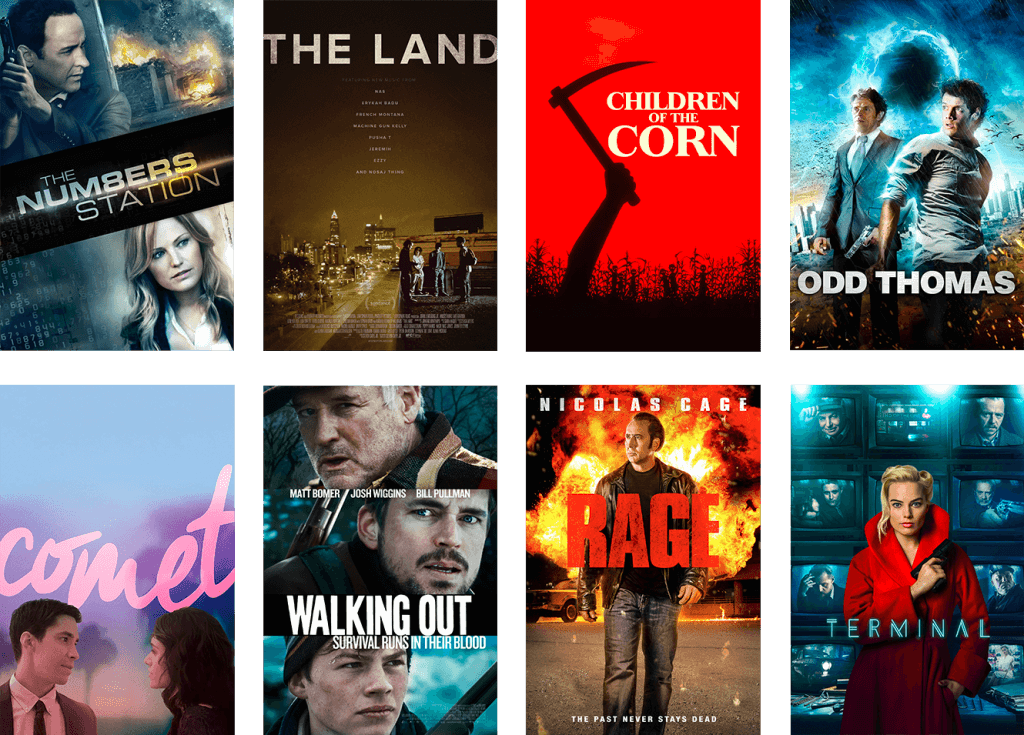
AMC+ is AMC Networks’ premium streaming service, designed as the ultimate destination for fans of AMC content. It offers an extensive library of programming from AMC, Shudder (horror), Sundance Now (indie films and series), and IFC Films Unlimited (independent films), often providing early access to new episodes of flagship AMC series before they air on the linear channel. Crucially, AMC+ delivers an entirely ad-free viewing experience for most of its content. This dedicated platform is accessible through standalone subscriptions directly from AMC Networks, or as an add-on channel via major streaming aggregators like Amazon Prime Video Channels, Apple TV Channels, The Roku Channel, and Google Play. Subscribing to AMC+ through one of these aggregators often simplifies billing and content discovery within that ecosystem. Technical considerations include ensuring your streaming device supports the AMC+ app or the channel integration of your chosen aggregator, and having a stable internet connection for high-quality, on-demand streaming.
AMC’s Role on Other VOD Platforms (Amazon Prime Video Channels, Apple TV Channels, Roku Channel)
The modular nature of streaming has led to the rise of “channels” or “add-ons” within larger streaming platforms. This is a convenient way to consolidate subscriptions and access content directly within a familiar interface.
- Amazon Prime Video Channels: If you’re an Amazon Prime member, you can subscribe to AMC+ directly through Prime Video Channels. This integrates AMC+’s entire library into your Prime Video experience, making it seamless to browse and watch alongside other Prime content.
- Apple TV Channels: Similarly, Apple TV users can subscribe to AMC+ as an Apple TV Channel. This allows for centralized billing and access within the Apple TV app on Apple devices, smart TVs, and other compatible hardware.
- The Roku Channel: Roku device owners can also subscribe to AMC+ as a premium subscription within The Roku Channel. This provides a similar integrated experience, leveraging Roku’s extensive user base.
These integrations simplify the user journey by centralizing payment and content discovery, but it’s important to remember that the AMC+ subscription is separate from any base Prime Video, Apple TV+, or Roku Free Channel content. You are effectively paying for AMC+ through these platforms, not getting it for free.
The AMC App and Website: Authenticated Access
For those who have a traditional cable or live TV streaming subscription that includes AMC, the AMC app (available on mobile devices and streaming platforms) and the AMC website (amc.com) offer an additional layer of access. By authenticating with your cable or streaming provider’s login credentials, you can unlock a selection of on-demand content, including recent episodes of current series, behind-the-scenes features, and sometimes even live feeds of the AMC channel. This “TV Everywhere” functionality is a valuable perk, allowing subscribers to watch on the go or on devices not directly connected to their main television setup. While it may not offer the full, ad-free library of AMC+, it provides a robust complementary service for existing subscribers. Always ensure your provider is listed among the supported authenticators within the AMC app or website.
Beyond the Basics: Advanced Tips and Troubleshooting
Navigating the diverse world of digital television can sometimes present technical challenges. To ensure a consistently smooth and enjoyable AMC viewing experience, it’s essential to understand the underlying technical requirements and common troubleshooting steps. Optimizing your setup and knowing how to quickly address minor hitches can significantly enhance your engagement with AMC’s compelling content.
Device Compatibility: Smart TVs, Streaming Sticks, Mobile Devices
The breadth of devices compatible with AMC content is vast, but understanding the nuances is key.
- Smart TVs: Most modern smart TVs (Samsung, LG, Sony, Vizio, etc.) have built-in app stores that support major streaming services like YouTube TV, Hulu, Sling, and standalone AMC+ apps. Ensure your TV’s operating system is up-to-date for optimal performance.
- Streaming Sticks/Boxes: Devices like Roku, Amazon Fire TV Stick, Apple TV, and Google Chromecast are workhorses for streaming. They provide dedicated hardware and user interfaces, often outperforming older smart TV operating systems. Ensure your device is sufficiently powerful for HD/4K streaming and has adequate storage for app installations.
- Mobile Devices & Tablets: The AMC app, as well as apps for various live TV streaming services, are readily available on iOS and Android. These are perfect for on-the-go viewing. Ensure your device has enough battery life and a stable cellular or Wi-Fi connection.
- Web Browsers: Most services can be accessed directly through a web browser on a laptop or desktop computer. Always use a modern, updated browser (Chrome, Firefox, Edge, Safari) for the best experience.
Internet Requirements for Seamless Streaming
A robust and stable internet connection is the bedrock of any good streaming experience.
- Bandwidth: For standard definition (SD), 3-5 Mbps is usually sufficient. For high definition (HD), 5-10 Mbps per stream is recommended. For 4K Ultra HD (if supported by AMC+ content and your device), aim for 20-25 Mbps or higher. If multiple people in your household are streaming simultaneously or using bandwidth-intensive applications, you’ll need significantly more.
- Stability: Beyond raw speed, the stability of your connection (low latency, minimal packet loss) is crucial. A wired Ethernet connection, where possible, is almost always more reliable than Wi-Fi, especially for fixed devices like smart TVs or streaming boxes.
- Router & Modem: Ensure your modem and Wi-Fi router are up-to-date and capable of handling your internet speed. An older router can bottleneck even a fast internet connection. Consider upgrading if you’re experiencing frequent buffering or drops.
Geoblocking and VPNs: A Word of Caution
Content licensing agreements often restrict access to AMC content based on geographical location. If you are traveling outside the region where your subscription is valid, you may encounter “geoblocking” restrictions. Some users attempt to circumvent these restrictions using Virtual Private Networks (VPNs). While a VPN can mask your IP address, it’s important to note:
- Service Provider Policies: Many streaming services actively detect and block VPN usage, as it often violates their terms of service.
- Performance Impact: Routing your connection through a VPN server can introduce latency and reduce bandwidth, potentially leading to buffering or lower video quality.
- Legality: While VPNs are legal tools, using them to bypass geoblocks can sometimes put you in a grey area regarding terms of service and content licensing, and AMC has the right to terminate service if detected. Proceed with caution and be aware of the implications.
Common Streaming Issues and Quick Fixes
Even with a perfect setup, occasional streaming issues can arise.
- Buffering/Lag:
- Check your internet speed using an online speed test.
- Restart your router and modem.
- Close other bandwidth-intensive applications or devices on your network.
- Reduce video quality settings if available in the app.
- Move closer to your Wi-Fi router or use a wired connection.
- App Crashes/Freezes:
- Force-close and restart the app.
- Clear the app’s cache (usually found in device settings).
- Check for app updates in your device’s app store.
- Restart your streaming device or smart TV.
- Login Issues:
- Double-check your username and password.
- Ensure your subscription is active and in good standing.
- Try logging in on a different device or web browser to isolate the issue.
- Contact the streaming service’s customer support if problems persist.
Making the Smart Choice: Factors to Consider
With so many avenues available to watch AMC, the decision often comes down to personal priorities, technical preferences, and financial considerations. There isn’t a single “best” option, but rather the most suitable one for your individual needs. By weighing various factors, you can make an informed choice that optimizes your viewing experience.
Cost vs. Content Value
The primary driver for many cord-cutters is cost savings, but it’s crucial to balance this with the value received.
- Traditional Cable/Satellite: Often the most expensive, but provides a vast channel lineup and potentially integrated internet/phone bundles. Look for promotional rates.
- Live TV Streaming Services: Generally more affordable than cable, offering live TV flexibility. Compare channel lineups carefully – ensure AMC is included alongside other must-have channels.
- AMC+: A dedicated, ad-free, on-demand service focused purely on AMC Networks content. Excellent value if AMC’s specific content is your main draw, but doesn’t include other live channels.
Consider your overall viewing habits. Do you watch only a few key channels, or do you desire a broad spectrum? This will dictate whether a lean, focused service like Philo or AMC+, or a comprehensive bundle like YouTube TV, offers better value for your money.
User Experience and Interface Preference
Technical functionality and ease of use vary across platforms.
- Simplicity: Some users prefer the straightforward channel surfing of cable, while others enjoy the app-centric navigation of streaming.
- DVR Capabilities: Cloud DVRs in streaming services offer flexibility, but storage limits and recording retention policies differ. Traditional cable DVRs often have larger local storage.
- Content Discovery: How easily can you find what you want to watch? Services like YouTube TV are praised for their search and recommendation algorithms, while a traditional cable guide is familiar to many.
- Device Support: Ensure your chosen service supports all the devices you intend to use for watching AMC.

Bundling Opportunities and Promotions
Many providers offer incentives to attract and retain customers.
- Telecom Bundles: Cable companies frequently offer discounts when you bundle internet, TV, and phone services.
- Streaming Service Promotions: Keep an eye out for free trials (typically 7 days) for live TV streaming services and AMC+. These are invaluable for testing the service and its technical performance before committing.
- Annual Subscriptions: AMC+ and other services sometimes offer discounts for committing to an annual plan rather than monthly.
Always read the fine print on promotions, noting expiration dates and any price hikes after the initial period. Leverage free trials to truly evaluate a service’s compatibility with your devices and your viewing habits.
In conclusion, accessing AMC channel content has never been more flexible, thanks to a confluence of traditional and cutting-edge technologies. Whether you prefer the familiarity of cable, the dynamism of live TV streaming, or the focused, on-demand luxury of AMC+, there’s a technical solution tailored for you. By carefully considering your viewing preferences, technical infrastructure, and budget, you can confidently choose the optimal path to enjoy AMC’s unparalleled programming on your terms.
aViewFromTheCave is a participant in the Amazon Services LLC Associates Program, an affiliate advertising program designed to provide a means for sites to earn advertising fees by advertising and linking to Amazon.com. Amazon, the Amazon logo, AmazonSupply, and the AmazonSupply logo are trademarks of Amazon.com, Inc. or its affiliates. As an Amazon Associate we earn affiliate commissions from qualifying purchases.