
In today’s fast-paced commercial landscape, the ability to accept credit card payments is no longer a luxury but an absolute necessity for businesses of all sizes. From burgeoning startups and bustling small businesses to expansive e-commerce platforms and well-established enterprises, integrating a robust credit card payment system is fundamental to meeting customer expectations, optimizing financial flows, and securing a competitive edge. This comprehensive guide delves into the essential mechanisms, available options, and crucial considerations for setting up and managing credit card payments, ensuring your financial operations are both efficient and secure.
The Imperative of Accepting Credit Card Payments in Today’s Economy
The shift towards cashless transactions has been a defining trend in modern commerce, accelerated by technological advancements and evolving consumer behaviors. Businesses that fail to adapt risk isolating a significant portion of their potential customer base and hindering their financial growth.
Meeting Customer Expectations
Modern consumers wield credit and debit cards as their primary payment method for convenience, security, and the accumulation of rewards. Whether making a quick purchase at a local coffee shop or a significant investment online, customers expect a seamless, secure, and swift transaction process. Denying them this option can lead to abandoned carts in e-commerce or lost sales in brick-and-mortar stores, directly impacting revenue. Offering diverse payment options, including credit cards, signals a business’s commitment to customer service and adaptability, fostering trust and repeat business.
Boosting Sales and Revenue
The direct correlation between accepting credit cards and increased sales is well-documented. Studies consistently show that businesses offering credit card payment options experience higher average transaction values compared to those relying solely on cash or checks. Credit cards enable impulse purchases, facilitate larger transactions by leveraging credit lines, and provide a convenient alternative when customers may not have sufficient cash on hand. For online businesses, credit card acceptance is non-negotiable, serving as the backbone of digital commerce and enabling global reach. By removing payment friction, businesses can convert more leads into paying customers, thereby directly contributing to top-line growth.
Streamlining Financial Operations
Beyond direct sales benefits, integrating credit card payments significantly streamlines a business’s internal financial operations. Automated processing reduces manual errors associated with cash handling, reconciliation, and ledger entries. Digital transaction records simplify bookkeeping, tax preparation, and auditing processes, providing clear, auditable trails of all financial activity. Furthermore, quicker access to funds through electronic settlements improves cash flow management, allowing businesses to reinvest faster, manage expenses more effectively, and maintain liquidity. This operational efficiency translates into reduced administrative costs and allows businesses to allocate resources more strategically towards growth initiatives.
Understanding the Core Components of Credit Card Processing
Before diving into specific solutions, it’s vital to grasp the foundational elements that facilitate credit card transactions. These interconnected components work in harmony to move funds from a customer’s bank account to a merchant’s bank account.
Merchant Accounts: The Foundation
A merchant account is a specialized bank account that allows a business to accept credit and debit card payments. It acts as an intermediary, holding funds from credit card sales before they are settled into the business’s primary bank account. Banks and financial institutions provide these accounts, and they are a critical prerequisite for processing card payments. While some modern payment solutions offer aggregated merchant accounts (where many small businesses share one large merchant account), traditional dedicated merchant accounts often provide more customizable terms and potentially lower fees for higher-volume businesses.
Payment Gateways: Bridging the Gap
A payment gateway is a service that authorizes credit card payments for e-businesses and traditional retailers. It securely encrypts sensitive credit card details from the customer and transmits them to the payment processor. Think of it as the digital equivalent of a physical point-of-sale (POS) terminal. It ensures that credit card information is transmitted safely and efficiently between the customer, the merchant, and the banks involved, protecting against fraud and data breaches. Popular examples include Stripe, Authorize.net, and PayPal’s payment gateway services.
Payment Processors: The Backbone of Transactions
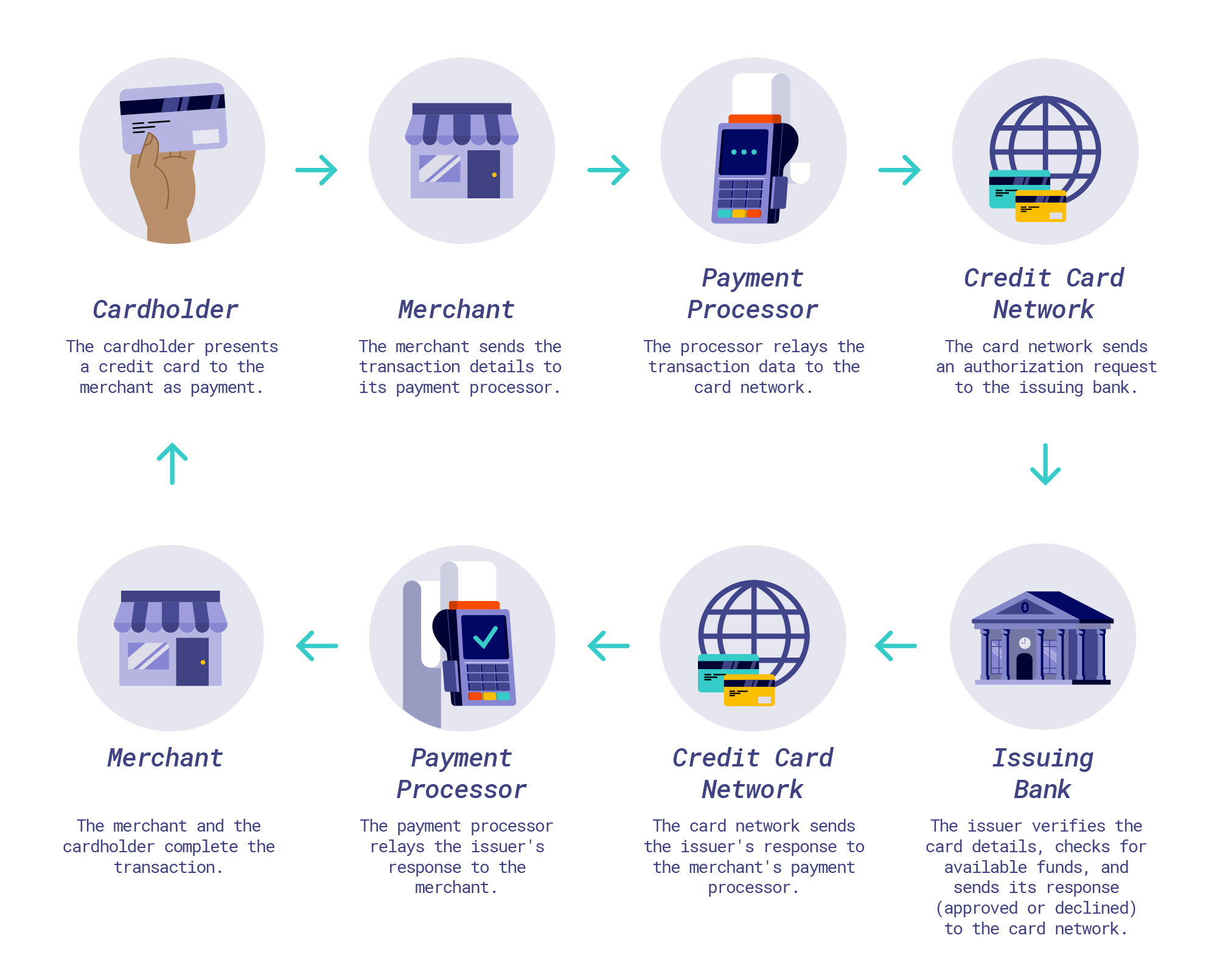
The payment processor is the entity that actually handles the transaction details, communicating with the banks involved. When a customer makes a purchase, the payment gateway sends the encrypted information to the payment processor. The processor then communicates with the customer’s bank (issuing bank) to verify funds and authenticity, and then with the merchant’s bank (acquiring bank) to approve or decline the transaction. Once approved, the processor facilitates the transfer of funds. Processors also handle dispute resolution (chargebacks) and settlement of funds into the merchant account.
Point-of-Sale (POS) Systems: Integrated Solutions
A POS system is a combination of hardware and software that allows businesses to process sales transactions. For brick-and-mortar stores, this typically includes a terminal, card reader (for EMV chips, magnetic stripes, and NFC), receipt printer, and cash drawer, all integrated with inventory management and sales reporting software. Modern POS systems are increasingly cloud-based and mobile, offering flexibility for businesses to accept payments anywhere. They streamline the checkout process, manage inventory, track sales data, and often integrate directly with payment gateways and processors for a unified financial management solution.
Exploring Diverse Methods for Accepting Payments
The method you choose for accepting credit card payments will largely depend on your business model, whether you operate primarily online, in a physical store, or through a combination of channels.
In-Person Payments: Modernizing the Till
For businesses with a physical storefront or those that interact directly with customers, in-person payment solutions are paramount.
- Traditional POS Terminals: These dedicated devices are common in retail environments. They feature keypads, screens, and card readers, often connecting to a central system.
- Mobile POS (mPOS) Systems: These solutions turn a smartphone or tablet into a payment terminal using a card reader dongle (e.g., Square Reader, Zettle by PayPal). They offer flexibility, lower upfront costs, and are ideal for mobile businesses, pop-up shops, or field service technicians.
- NFC/Contactless Payments: Utilizing Near Field Communication (NFC) technology, these allow customers to tap their card or mobile device (e.g., Apple Pay, Google Pay) against a reader for swift, secure transactions. This is a growing preference among consumers for its speed and convenience.
Online Payments: The Digital Storefront
For e-commerce businesses, online payment processing is the lifeblood of their operations.
- E-commerce Platform Integrations: Most popular e-commerce platforms (Shopify, WooCommerce, BigCommerce) have built-in integrations or easy-to-add plugins for various payment gateways and processors, simplifying setup.
- Hosted Payment Pages: Some payment gateways offer hosted payment pages where customers are redirected to a secure page managed by the gateway to enter their payment details. This offloads some PCI DSS compliance burden from the merchant.
- APIs (Application Programming Interfaces): For custom websites or more advanced integrations, developers can use APIs provided by payment gateways to embed payment processing directly into the website’s checkout flow, offering a seamless user experience.
- Subscription Billing: For businesses offering recurring services, specialized platforms and gateway features support automated subscription billing, managing recurring charges, upgrades, and cancellations.
Mobile Payments: On-the-Go Transactions
Beyond mPOS, “mobile payments” can also refer to situations where customers pay using their mobile device.
- Mobile Wallets: These digital wallets (e.g., Apple Pay, Google Pay, Samsung Pay) store credit card information securely on a smartphone, allowing for contactless payments in-store or quick checkouts online.
- In-App Purchases: For businesses with dedicated mobile apps, integrating payment processing allows users to make purchases directly within the application, enhancing convenience and engagement.
Mail Order/Telephone Order (MOTO) Payments: Traditional Avenues
For businesses that take orders remotely without a physical card presence, MOTO payments remain relevant.
- Virtual Terminals: These are web-based applications that allow businesses to process credit card payments manually by typing in card details received over the phone or via mail. They require a secure internet connection and adherence to strict PCI DSS compliance rules. While less common for new businesses, they serve niche markets.
Choosing the Right Payment Solution: Key Considerations
Selecting the ideal credit card payment solution involves more than just picking a popular provider. A thorough evaluation of several factors ensures the chosen system aligns with your business’s financial goals and operational needs.
Understanding Fee Structures and Pricing Models
Payment processing fees can significantly impact your bottom line. It’s crucial to understand the various components:
- Transaction Fees: A percentage of each transaction plus a fixed fee (e.g., 2.9% + $0.30). This is the most common fee.
- Monthly Fees: A flat fee charged each month for access to the service.
- Setup Fees: One-time fees to establish your account or integrate the system.
- PCI Compliance Fees: Annual fees for ensuring your business meets security standards.
- Chargeback Fees: Fees incurred when a customer disputes a transaction.
- Interchange-Plus Pricing: A transparent model where you pay the interchange rate (set by card networks) plus a small markup from the processor.
- Tiered Pricing: A less transparent model where transactions are grouped into qualified, mid-qualified, and non-qualified tiers, each with different rates. This can be more expensive and harder to predict.
- Flat-Rate Pricing: A simple, fixed percentage and per-transaction fee, often favored by small businesses for its predictability (e.g., Square).
Carefully compare these structures across providers based on your projected transaction volume and average ticket size.
Prioritizing Security and PCI DSS Compliance
Protecting customer data is paramount. The Payment Card Industry Data Security Standard (PCI DSS) is a set of security standards designed to ensure that all companies that process, store, or transmit credit card information maintain a secure environment.
- Data Encryption: Ensure your chosen solution encrypts all sensitive cardholder data during transmission and storage.
- Fraud Detection Tools: Look for features like Address Verification Service (AVS), Card Verification Value (CVV), and machine learning-based fraud analysis.
- PCI Compliance: Verify that your chosen provider is PCI DSS compliant and understand your own responsibilities in maintaining compliance. Non-compliance can lead to hefty fines and reputational damage.
Assessing Ease of Setup and Integration
The complexity of integrating a new payment system can vary widely.
- Plug-and-Play vs. Custom Integration: Some solutions offer straightforward integrations with popular e-commerce platforms and POS hardware, while others may require developer expertise for custom API integrations.
- User-Friendly Interface: A clear, intuitive interface for managing transactions, refunds, and reports can save significant time and reduce training costs.
- Hardware Compatibility: If you’re using a physical POS, ensure the payment solution is compatible with your existing or planned hardware.
Evaluating Customer Support and Scalability
As your business grows, your payment processing needs may evolve.
- Reliable Support: Access to responsive and knowledgeable customer support is crucial for troubleshooting issues and ensuring uninterrupted service.
- Scalability: Choose a solution that can handle increased transaction volumes without performance degradation or prohibitively high costs. Consider if the provider offers features that align with future growth, such as multi-currency support for international expansion.
Analyzing Reporting and Analytics Capabilities
Effective financial management relies on accurate and accessible data.
- Detailed Transaction Reports: Look for solutions that provide comprehensive reports on sales, refunds, chargebacks, and settlement times.
- Analytics Dashboards: Robust dashboards can offer valuable insights into sales trends, customer behavior, and financial performance, aiding strategic decision-making.
- Integration with Accounting Software: Seamless integration with accounting software (e.g., QuickBooks, Xero) can automate reconciliation and streamline financial reporting.
Setting Up and Optimizing Your Credit Card Payment System
Once you’ve chosen a solution, the final steps involve implementation and ongoing management to ensure maximum efficiency and financial health.
Application and Approval Process
Most payment processors require an application that involves providing business details, financial history, and sometimes personal guarantees. Be prepared to provide:
- Business legal name, address, and structure.
- Employer Identification Number (EIN) or Social Security Number (SSN).
- Bank account information for settlements.
- Estimated annual sales volume and average transaction size.
The approval process can take anywhere from a few hours to several days, depending on the provider and the complexity of your business.
Integration with Business Operations
Once approved, the next step is integrating the payment system into your existing business flow.
- E-commerce: Follow the provider’s instructions to connect the payment gateway to your online store’s checkout page. This often involves API keys or plugin installations.
- Physical Store: Install and configure POS hardware and software, ensuring card readers are properly connected and tested.
- Training: Train all relevant staff on how to process payments, handle refunds, resolve common issues, and understand security protocols.
Training and Staff Preparedness
Even the most advanced system is only as good as the people operating it. Comprehensive training for your team is essential to:
- Ensure smooth transaction processing.
- Reduce errors and customer frustration.
- Educate staff on security best practices to protect sensitive data.
- Empower them to handle basic troubleshooting.
Ongoing Monitoring and Reconciliation
Effective financial management doesn’t end after setup.
- Daily Reconciliation: Regularly compare your processed transactions with your bank deposits to identify discrepancies and prevent fraud.
- Performance Monitoring: Keep an eye on transaction success rates, chargeback ratios, and processing fees to ensure your system is operating efficiently and cost-effectively.
- Security Audits: Periodically review your security practices and ensure continuous PCI DSS compliance, especially as your business processes or technology evolves.
By carefully considering these factors and making informed decisions, businesses can establish a credit card payment system that not only meets the demands of the modern consumer but also significantly enhances their financial performance and operational efficiency.
aViewFromTheCave is a participant in the Amazon Services LLC Associates Program, an affiliate advertising program designed to provide a means for sites to earn advertising fees by advertising and linking to Amazon.com. Amazon, the Amazon logo, AmazonSupply, and the AmazonSupply logo are trademarks of Amazon.com, Inc. or its affiliates. As an Amazon Associate we earn affiliate commissions from qualifying purchases.