
The Indispensable Role of Your Chase Account Number
Your Chase account number is more than just a string of digits; it’s a crucial identifier that underpins nearly every significant financial transaction you conduct. While many daily interactions with your bank account, such as swiping a debit card or making online purchases, rely on different identifiers, the account number is the master key for linking funds directly to your specific account at Chase. Understanding its purpose and knowing how to locate it promptly is a fundamental aspect of effective personal financial management.

Why You Need It: Common Scenarios
There are numerous practical scenarios where your Chase account number becomes essential. Setting up direct deposit for your paycheck or government benefits, for instance, invariably requires both your account number and Chase’s routing number. Similarly, if you need to set up automatic bill payments directly from your bank account (rather than using a debit or credit card), your account number will be requested by the payee. Initiating a wire transfer, receiving large deposits from third parties, or even resolving discrepancies with your bank can all necessitate providing this specific piece of information. For tax purposes, or when dealing with financial advisors or other institutions for investment or loan applications, proof of account ownership and its unique identifier is often a prerequisite. Being able to access this information quickly can save time, prevent delays, and ensure the smooth flow of your financial operations.
Understanding Your Account Number vs. Debit Card Number vs. Routing Number
It’s common for individuals to confuse their account number with other seemingly similar identifiers. However, each serves a distinct purpose within the financial ecosystem.
-
Your Chase Account Number: This is the unique identifier for your specific checking, savings, or money market account. It typically ranges from 10 to 12 digits and is crucial for direct deposits, wire transfers, and linking to other financial services. It identifies your specific fund receptacle at the bank.
-
Your Chase Debit Card Number: This 16-digit number, found on the front of your debit card, is linked to your checking account but is primarily used for point-of-sale transactions, online purchases, and ATM withdrawals. It acts as a gateway to your funds through a payment network (like Visa or Mastercard) and is not your account number.
-
Chase’s Routing Number: This nine-digit number identifies Chase Bank as a financial institution within the U.S. banking system. Different Chase regions or types of accounts (e.g., checking vs. savings) may have slightly different routing numbers. While essential for transactions like direct deposits and wire transfers, it identifies the bank itself, not your specific account within it.
Knowing these distinctions is vital for providing the correct information when requested, preventing errors, and safeguarding your financial data.
Direct Methods to Locate Your Chase Account Number
Accessing your Chase account number is straightforward, with several reliable methods available to customers. Whether you prefer digital channels or physical documents, Chase provides multiple avenues to retrieve this critical information securely.
Through Chase Online Banking and Mobile App
For most users, the quickest and most convenient way to find your account number is through Chase’s robust digital platforms.
-
Chase Online Banking:
-
Navigate to the official Chase website (chase.com) and log in to your account using your username and password.
-
Once logged in, you’ll see a summary of your accounts. Select the specific checking or savings account for which you need the number.
-
On the account details page, you should see an option to “See account details,” “Account & routing numbers,” or a similar link. Click on this.
-
A pop-up or new section will display your account number, often masked for security until you click an “unmask” or “show” button. You might need to re-enter your password or respond to a security challenge to fully reveal the number.
-
Note down the full account number accurately.
-
-
Chase Mobile App:
-
Open the Chase Mobile App on your smartphone or tablet and log in using your credentials.
-
From the main dashboard, tap on the specific checking or savings account.
-
Scroll down or look for a section labeled “Account details,” “Manage account,” or similar.
-
Tap on this section, and you should find an option to “Show account number” or “View routing & account numbers.”
-
Similar to online banking, the number might be partially hidden initially and require a tap to reveal or a security verification.
-
Ensure you are on a secure, private network when accessing sensitive information on your mobile device.
-
On Your Physical Checks
If you have a Chase checking account and have ordered checks, your account number is prominently displayed on them. This is one of the most traditional and reliable ways to find it.
-
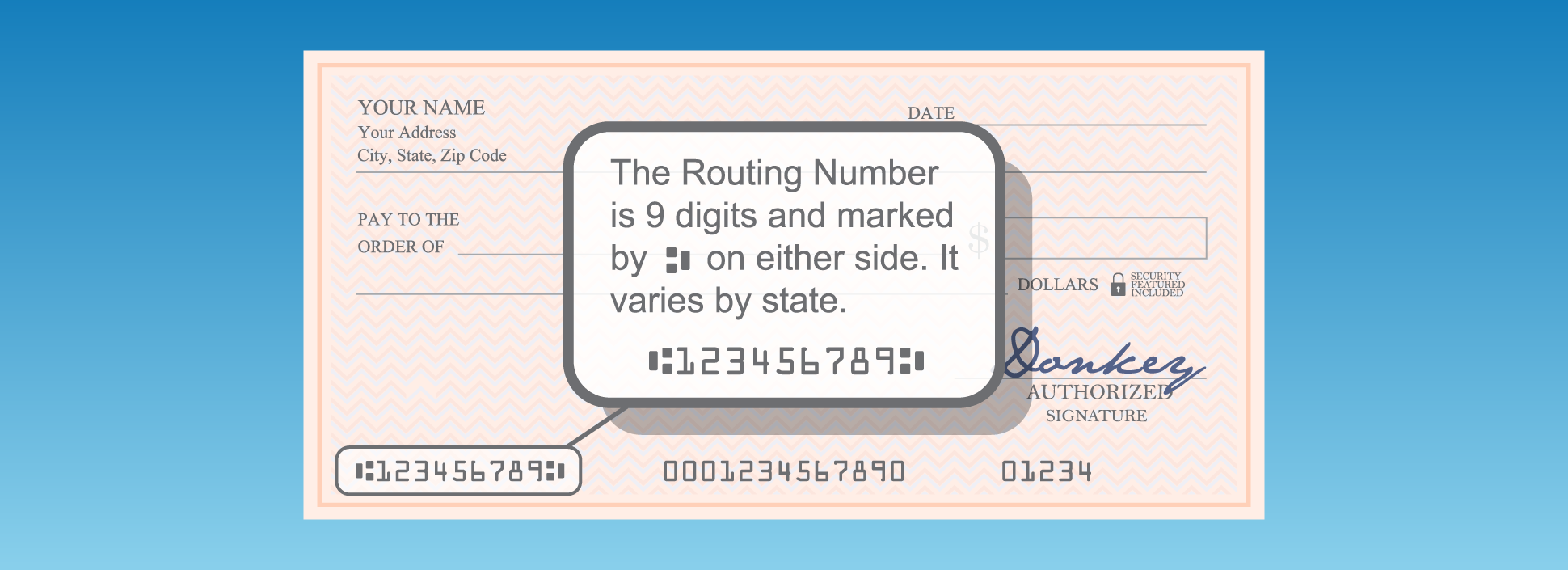
Location on Check: Look at the bottom of a personalized Chase check. You will see three sets of numbers separated by unique symbols.
-
Order of Numbers: From left to right, the first set of nine digits is typically the routing number. The middle set of numbers, which is usually 10-12 digits long, is your account number. The final set of numbers is the check number.
-
Verification: Always double-check to ensure you’re reading the correct sequence, as the account number is crucial for transactions. If you use starter checks, the account number might not be printed, as these often have temporary numbering.
Via Your Monthly Bank Statements
Whether you receive paper statements in the mail or access e-statements online, your account number is always included as a standard piece of information.
-
Paper Statements: When your monthly Chase statement arrives in the mail, locate the section that details your account information. Your full account number will typically be listed near your name and address, often at the top of the statement.
-
E-Statements:
-
Log in to Chase Online Banking.
-
Navigate to the “Statements” or “Documents” section.
-
Select the checking or savings account you need and choose a recent monthly statement to view.
-
The e-statement will open as a PDF. Your account number will be clearly displayed, usually in the header or account summary section, just as it would be on a paper statement.
-
Remember to securely delete any downloaded e-statements after use, especially if accessing them on a public or shared computer.
-
Contacting Chase Customer Service
If you’ve exhausted other options or prefer to speak with a representative, contacting Chase customer service is always a viable route.
-
Call the Official Number: Find the customer service number on the back of your debit card, on the Chase website (chase.com/contact-us), or on a recent bank statement. Avoid using numbers found through untrustworthy search results to prevent falling victim to phishing scams.
-
Verification Process: When you call, the representative will go through a security verification process to confirm your identity. Be prepared to provide information such as your full name, address, date of birth, social security number digits, or answers to security questions. This is a critical step to protect your account from unauthorized access.
-
Requesting Your Account Number: Once your identity is verified, you can simply ask the representative for your checking or savings account number. They will provide it to you verbally, which you can then write down.
-
In-Branch Visit: For an in-person approach, visit a local Chase branch. A teller or personal banker can assist you in finding your account number, provided you have a valid photo ID (e.g., driver’s license, passport) for verification.
Best Practices for Account Number Security
While knowing how to find your account number is crucial for financial tasks, understanding how to protect it is equally, if not more, important. Your account number, especially when combined with your routing number, is sensitive information that, if compromised, could potentially be used for fraudulent activities.
Protecting Your Financial Information
-
Be Discerning with Sharing: Only provide your account number to trusted entities and for legitimate purposes, such as direct deposit setup, bill payments, or authorized financial institutions. Be extremely wary of unsolicited requests via email, text message, or phone calls. Chase will never ask for your full account number or login credentials through insecure channels.
-
Secure Document Storage: Keep physical bank statements and checks in a secure location, away from prying eyes. Shred old statements or voided checks before discarding them.
-
Digital Security: Ensure your online banking login credentials are strong and unique. Use multi-factor authentication whenever possible. Access your accounts only on secure, private Wi-Fi networks. Be cautious when using public computers for banking.
-
Monitor Your Accounts: Regularly review your Chase bank statements and transaction history for any unauthorized or suspicious activity. Early detection is key to mitigating potential damage.
What to Do If Your Information Is Compromised
Despite best efforts, security breaches can happen. If you suspect your Chase account number or other personal financial information has been compromised:
-
Contact Chase Immediately: Call Chase’s fraud department or customer service hotline as soon as you detect an issue. Explain the situation clearly.
-
Monitor Your Credit Report: Obtain copies of your credit report from the three major credit bureaus (Equifax, Experian, Transunion) to check for any new accounts opened in your name.
-
Change Passwords: Update your online banking password and any other passwords that might be linked to compromised information.
-
File a Police Report: In cases of significant fraud or identity theft, filing a police report can provide an official record that may be needed for further actions.
Streamlining Your Financial Management with Chase
Knowing how to efficiently access your account number is a small but significant step in mastering your personal finances. Chase offers a suite of tools and services designed to help you manage your money effectively, with your account number acting as a central identifier.
Leveraging Digital Tools for Access
Chase’s online banking portal and mobile app are not just for finding your account number; they are comprehensive platforms for daily financial management. Use them to:
-
Pay Bills: Set up one-time or recurring bill payments, often utilizing your account and routing numbers for direct debits.
-
Transfer Funds: Move money between your Chase accounts or to external accounts.
-
Deposit Checks: Use the mobile app’s photo deposit feature for convenience.
-
Monitor Activity: Track transactions, view balances, and set up alerts for specific account activities.
-
Access Documents: Easily retrieve e-statements, tax documents, and other important financial records.
By becoming proficient with these digital tools, you reduce reliance on physical documents and streamline your interactions with your bank, making financial tasks quicker and more secure.

Proactive Account Monitoring
Beyond simply locating your account number, a key aspect of sound financial health is proactive account monitoring. Your Chase account number is the gateway to your funds, and keeping a close eye on your account’s activity helps ensure its security and accuracy. Set up alerts for large transactions, low balances, or suspicious activity directly through your Chase app or online portal. Regularly reviewing your transaction history and monthly statements allows you to catch any errors or fraudulent charges promptly. This proactive approach not only protects your assets but also gives you a clearer understanding of your spending habits and overall financial position, contributing to stronger, more informed money management decisions.
aViewFromTheCave is a participant in the Amazon Services LLC Associates Program, an affiliate advertising program designed to provide a means for sites to earn advertising fees by advertising and linking to Amazon.com. Amazon, the Amazon logo, AmazonSupply, and the AmazonSupply logo are trademarks of Amazon.com, Inc. or its affiliates. As an Amazon Associate we earn affiliate commissions from qualifying purchases.