
The Cash App Card, a free, customizable debit card linked directly to your Cash App balance, has become a popular financial tool for millions. It offers a convenient way to spend the funds in your Cash App account anywhere Visa debit cards are accepted, both online and in physical stores. Understanding how to efficiently add cash to this card is fundamental to leveraging its full potential as part of your personal finance strategy, allowing for seamless transactions, budgeting, and access to your money.
Understanding Your Cash App Card: A Primer
Before delving into the mechanics of funding, it’s crucial to grasp the nature and utility of the Cash App Card itself. It’s not a credit card but a prepaid debit card, meaning you can only spend the money you have available in your Cash App balance. This characteristic makes it a powerful tool for budget-conscious individuals and those seeking to manage their spending without incurring debt.

What is the Cash App Card?
The Cash App Card functions much like a traditional bank debit card, but it draws funds directly from your Cash App balance. It’s issued by Sutton Bank and is part of the Visa network, ensuring wide acceptance. Unlike a checking account with an attached debit card, the Cash App Card is inherently linked to a digital wallet, allowing for rapid transfers, peer-to-peer payments, and direct deposit capabilities, all managed through a mobile application. This integration provides a streamlined financial experience for users who prefer digital-first banking solutions.
Why Use a Cash App Card?
The utility of the Cash App Card extends beyond simple spending. For many, it serves as an alternative or supplementary financial tool. It’s particularly beneficial for:
-
Budgeting: By only spending what’s available in your Cash App balance, it can help in controlling discretionary spending.
-
Convenience: Managing funds, sending money, and making purchases are all handled within a single app.
-
Accessibility: It provides a banking-like experience without the need for a traditional bank account for certain functionalities.
-
Instant Access: Funds received via Cash App can be immediately spent or withdrawn using the card.
-
Savings Opportunities: Features like “Boosts” offer instant discounts at various merchants, directly saving you money on everyday purchases.
Understanding these foundational aspects sets the stage for effectively managing and adding cash to your Cash App Card to suit your financial needs.
Direct Methods for Funding Your Card
The most common ways to add value to your Cash App Card involve digital transfers and direct deposits, integrating seamlessly with modern financial practices. These methods leverage existing financial infrastructure to move money quickly and securely.
Linking a Bank Account or Debit Card
The simplest and most direct way to fund your Cash App Card is by linking an external bank account or another debit card. This process allows you to transfer money from your existing financial institutions directly to your Cash App balance.
-
Adding a Bank Account: Within the Cash App, navigate to the “Link Bank” or “Add Cash” section. You’ll typically be prompted to connect your bank account using your bank’s online login credentials, often facilitated by a secure third-party service like Plaid. Once linked, you can initiate transfers from your bank account to your Cash App balance. These transfers usually take 1-3 business days to clear, though Cash App offers an “instant deposit” option for a small fee if you need the funds immediately.
-
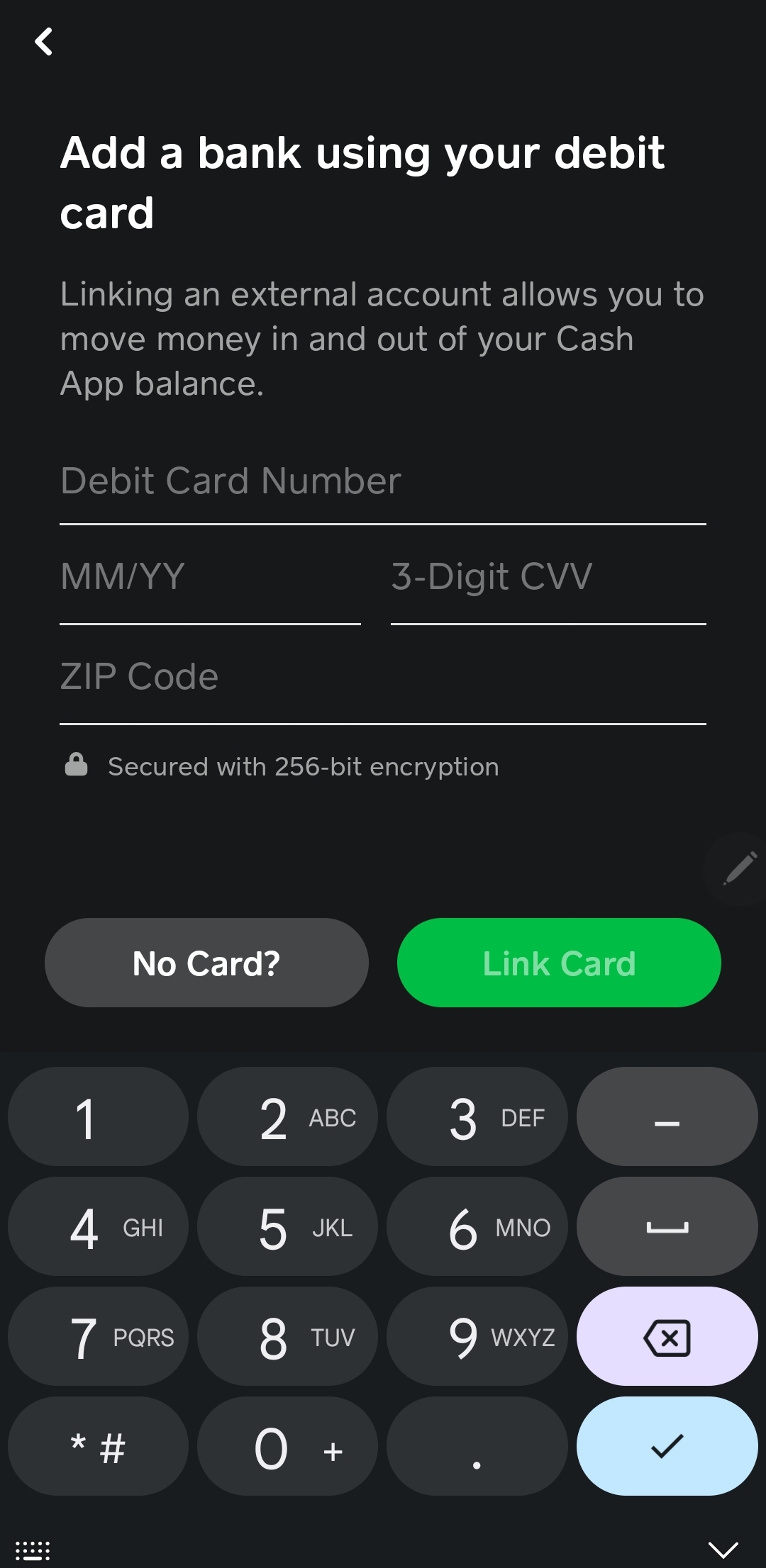
Adding a Debit Card: Similarly, you can link an existing debit card to your Cash App account. This allows for instant transfers from your debit card’s linked bank account to your Cash App balance. Be aware that while the transfer is instant, your bank might impose limits or fees on such transactions, though Cash App itself generally does not charge for standard transfers from a linked debit card. This method is particularly useful for topping up your balance quickly when you need to make an immediate purchase or send money.
Receiving Funds from Other Cash App Users
One of Cash App’s core functionalities is peer-to-peer money transfers. If someone sends you money via Cash App, those funds automatically appear in your Cash App balance and are immediately available for use with your Cash App Card. This method is incredibly efficient for receiving payments from friends, family, or even clients who also use the platform. It requires no additional action on your part beyond having a Cash App account and providing your Cashtag or phone number/email to the sender.
Direct Deposit for Your Paycheck
For regular income, Cash App offers a direct deposit feature, allowing you to have your paycheck, government benefits, or tax refunds deposited directly into your Cash App account. This effectively transforms your Cash App into a primary banking hub for your incoming funds.
-
How to Set Up: You can find your Cash App routing and account numbers within the app (usually by tapping the banking icon on the home screen). Provide these details to your employer’s payroll department or the relevant agency. Once set up, your funds will be directly deposited into your Cash App balance, typically on payday, making them instantly accessible via your Cash App Card.
-
Benefits: Direct deposit eliminates the need for physical checks and provides quicker access to your earnings, reducing delays often associated with traditional banking methods. It’s a powerful feature for managing regular income entirely within the Cash App ecosystem.
Adding Physical Cash: The Retail Store Option
While digital transfers are convenient, there are times when you might need to add physical cash to your Cash App Card. Cash App has partnered with various retailers to facilitate this, providing an essential bridge between physical currency and your digital wallet.

Participating Retailers and Process
Cash App allows you to add paper money to your balance at thousands of participating retail locations across the U.S. Major partners often include stores like Walmart, 7-Eleven, Walgreens, CVS, and Family Dollar. The process is straightforward:
-
Locate a Participating Retailer: Use the Cash App map feature (if available and updated) or check Cash App’s official website for a list of nearby stores.
-
Generate a Barcode: In the Cash App, navigate to the “Add Cash” section, select “Paper Money,” and follow the prompts to generate a unique barcode.
-
Present Barcode and Cash: At the retailer, inform the cashier you want to “add cash to Cash App” and present the barcode on your phone. Hand over the physical cash you wish to deposit. The cashier will scan the barcode, and the funds will be added to your Cash App balance.
-
Confirm Transaction: Always check your Cash App balance immediately after the transaction to ensure the funds have been successfully added. You should receive a digital receipt within the app.
Fees and Limits to Consider
When adding physical cash, it’s important to be aware of potential fees and limits:
-
Fees: Many retailers charge a small service fee for processing cash deposits, typically ranging from $1 to $4 per transaction. This fee is usually deducted from the amount you are depositing or added to the total amount you hand to the cashier. Always confirm any fees with the retailer before completing the transaction.
-
Limits: Cash App imposes limits on how much cash you can add:
-
Per Transaction: There is often a limit on the maximum amount you can deposit in a single transaction (e.g., $500).
-
Daily Limit: There’s usually a daily limit on the total amount of cash you can deposit (e.g., $1,000).
-
Weekly Limit: A weekly limit also applies (e.g., $4,000).
-
These limits are subject to change and may vary based on your account verification status. Checking the most current limits within the app before making a large deposit is always recommended.
Step-by-Step Guide for In-Store Deposits
For clarity, here’s a simplified breakdown of the in-store cash deposit process:
-
Open the Cash App on your mobile device.
-
Tap the “Banking” tab (the house icon) on the main screen.
-
Tap “Deposit Cash” or “Paper Money.”
-
Follow the prompts to find a nearby store.
-
Generate the deposit barcode within the app.
-
Go to the chosen retail location’s checkout counter.
-
Tell the cashier you want to add cash to your Cash App.
-
Present your phone with the barcode for the cashier to scan.
-
Hand the cashier the exact amount of cash you wish to deposit (plus any applicable retailer fee).
-
Confirm the transaction on your phone and verify your Cash App balance has been updated.
Maximizing Your Cash App Card’s Financial Potential
Effectively funding your Cash App Card is just one piece of the puzzle. To truly maximize its utility, you need to integrate it intelligently into your broader financial management strategy.
Budgeting and Tracking Expenditures
Because the Cash App Card draws directly from your balance, it can be an excellent tool for controlled spending. Consider dedicating your Cash App balance to a specific budget category, such as dining out, entertainment, or transport. By only adding the allocated amount for that category, you can easily track and limit your spending. The app’s transaction history provides a clear record of all expenditures, making it simple to review where your money is going and adjust your budget as needed. Regular review of your in-app activity is crucial for maintaining financial discipline.
Security Best Practices
Protecting your funds is paramount. While Cash App employs robust security measures, user vigilance is key:
-
PIN Protection: Always set and use a strong PIN for your Cash App Card.
-
App Security: Enable security features like a PIN, Touch ID, or Face ID to access your Cash App.
-
Transaction Monitoring: Regularly review your transaction history for any unauthorized activity.
-
Phishing Awareness: Be wary of suspicious emails or messages purporting to be from Cash App. Cash App will never ask for your sign-in code, PIN, or full debit card number outside of the app.
-
Card Locking: If your card is lost or stolen, immediately lock it within the Cash App to prevent unauthorized use. You can unlock it just as easily if found.
Understanding Transaction Limits and Fees
Beyond cash deposit limits, be aware of other transaction limits that may apply to your Cash App account and card:
-
Spending Limits: There might be daily or weekly limits on how much you can spend using your Cash App Card.
-
ATM Withdrawal Limits: If you use your Cash App Card for ATM withdrawals (which incur a fee), there are typically daily and per-transaction limits.
-
Transfer Limits: Limits also apply to how much money you can send or receive from other Cash App users.
Most of these limits can be increased by verifying your identity within the app, usually by providing your full name, date of birth, and the last four digits of your Social Security Number. Understanding these parameters helps you plan your financial activities effectively and avoid unexpected roadblocks. Be mindful of fees associated with instant transfers from your bank, ATM withdrawals, and in-store cash deposits, as these can accumulate if not managed carefully.
The Broader Financial Implications
The Cash App Card, when understood and used strategically, is more than just a payment method; it’s a component of a modern personal finance toolkit. Its ability to facilitate peer-to-peer payments, offer direct deposit, and provide a direct link between digital funds and physical spending capabilities makes it a versatile instrument. For individuals seeking simplicity, control over discretionary spending, and quick access to their funds, knowing how to efficiently add cash to your Cash App Card is an essential financial skill that empowers better money management in the digital age. It contributes to financial inclusion by offering banking-like services to a wider audience, and its features can be tailored to support a variety of financial goals, from daily spending to targeted savings.
aViewFromTheCave is a participant in the Amazon Services LLC Associates Program, an affiliate advertising program designed to provide a means for sites to earn advertising fees by advertising and linking to Amazon.com. Amazon, the Amazon logo, AmazonSupply, and the AmazonSupply logo are trademarks of Amazon.com, Inc. or its affiliates. As an Amazon Associate we earn affiliate commissions from qualifying purchases.