
For years, the iPhone has been championed as the epitome of mobile security, often heralded as virtually impenetrable to malware. This perception, carefully cultivated by Apple’s brand strategy, has positioned iOS devices as a safe haven in a digital landscape teeming with threats. The “walled garden” approach, where Apple maintains stringent control over hardware, software, and app distribution, has indeed made the iPhone significantly more resilient than many other platforms. Yet, in an increasingly sophisticated world of cyber threats, the question persists: can malware truly be installed on your iPhone? The short answer is yes, though it’s far less common and considerably more challenging than on other operating systems. Understanding the nuances of iOS security, the vectors attackers exploit, and the best practices for protection is crucial for anyone navigating the digital realm, especially when considering the significant impact digital security has on personal finance, data privacy, and overall tech experience.
The Fortress of iOS: Apple’s Security Philosophy
Apple’s commitment to security is not just a marketing slogan; it’s deeply embedded in the architecture of iOS. This robust foundation is built upon several key pillars, making it a formidable challenge for malicious actors. From technology trends in software development to hardware design, Apple prioritizes user safety, directly impacting the overall digital security of its users.
The Walled Garden: App Store and Sandboxing
The most prominent line of defense is Apple’s tightly controlled App Store. Unlike more open ecosystems, every application submitted to the App Store undergoes a rigorous review process. This involves both automated checks and human review to identify malware, privacy violations, and functionality issues. While not foolproof, this process significantly reduces the chance of malicious apps making their way to users’ devices.
Beyond the review, iOS employs a powerful security feature called sandboxing. Each app on an iPhone operates in its own isolated environment, with limited access to the device’s system resources or data from other apps. If a malicious app somehow bypasses the App Store review, its ability to cause widespread damage or steal sensitive information is severely curtailed by these sandboxing restrictions. This architectural decision fundamentally enhances digital security, preventing a single compromised app from jeopardizing the entire system or sensitive financial data stored in other applications.
Hardware-Level Protections and Secure Enclave
Apple’s security extends beyond software to the very hardware of the iPhone. Features like the Secure Enclave processor are designed to protect critical user data, such as biometric information (Face ID and Touch ID) and encryption keys. This dedicated, isolated hardware component operates independently of the main processor and even the iOS kernel, meaning that if the main system is compromised, the data within the Secure Enclave remains protected. This physical layer of security is a powerful deterrent against deep-seated malware that attempts to access core system functions or decrypt sensitive user information. Furthermore, Apple’s proprietary chips integrate advanced encryption capabilities, ensuring that data stored on the device is encrypted by default, adding another layer of protection for personal finance details, private messages, and other crucial data.
Rapid Updates and the Security Patch Cycle
Apple’s consistent and frequent iOS updates are another cornerstone of its security strategy. When security vulnerabilities are discovered—and no software is entirely bug-free—Apple acts swiftly to develop and release patches. Encouraging users to update their operating system regularly is not just about gaining new features; it’s primarily about plugging security holes that could otherwise be exploited by attackers. These updates are crucial technology trends in maintaining a secure posture against evolving threats, ensuring that any newly discovered exploits are quickly neutralized before they can be widely weaponized. For businesses and individuals relying on their iPhones for online income or managing investments, staying updated is a non-negotiable aspect of digital security.
Beyond the Walls: How Malware Can Infiltrate iPhones
Despite Apple’s robust defenses, iPhones are not entirely immune. Highly sophisticated attackers, often state-sponsored or well-funded criminal enterprises, can find ways to circumvent these protections. Understanding these vectors for compromise is essential for a comprehensive view of digital security.
The Elusive Threat of Zero-Day Exploits
Perhaps the most potent and terrifying threat to iPhone security comes from zero-day exploits. These are vulnerabilities in software that are unknown to the vendor (Apple, in this case) and thus have not yet been patched. Attackers who discover these vulnerabilities can weaponize them to create highly effective malware that can bypass all current security measures. Famous examples like Pegasus spyware, developed by the NSO Group, have used zero-day exploits to remotely and silently infect iPhones, turning them into surveillance devices. These exploits are incredibly expensive to develop or acquire, making them primarily the domain of state actors targeting high-value individuals like journalists, activists, or political figures. While rare for the average user, the existence of such technology demonstrates that even the “impenetrable” can be breached, albeit with extreme effort and resources.
The Human Element: Phishing and Social Engineering
Even the strongest technological defenses can be undermined by human error. Phishing and social engineering remain incredibly effective attack vectors, regardless of the device. Attackers employ deceptive tactics to trick users into revealing sensitive information (like Apple ID credentials, credit card details, or banking logins) or into performing actions that compromise their device. This could involve fake login pages that mimic legitimate services, urgent-sounding emails or texts claiming to be from Apple or a bank, or even calls from fraudsters impersonating technical support. If an attacker gains your Apple ID credentials through phishing, they could potentially gain access to your iCloud data, purchase apps, or even lock your device, severely impacting your personal finance and privacy. These attacks are not unique to iPhones but are a persistent threat to any digital user.
Malicious Configuration Profiles and Enterprise Certificates
Another vector for compromise involves malicious configuration profiles. These profiles, typically used by organizations for legitimate purposes (like setting up company email accounts or VPNs on employee devices), can also be abused. If a user is tricked into installing a malicious profile, it can grant an attacker unwanted control over certain device settings, reroute network traffic, or even install untrusted apps outside the App Store (though these typically still require explicit user permission). Similarly, enterprise certificates, designed to allow companies to distribute internal apps to their employees without going through the App Store, have occasionally been misused by third parties to distribute unauthorized or even malicious apps to a wider audience, though Apple generally revokes such certificates swiftly once detected.
The Risks of Jailbreaking
Jailbreaking an iPhone involves removing Apple’s software restrictions, allowing users to install apps from unofficial sources, customize the operating system beyond Apple’s design, and gain root access to the device. While this offers greater flexibility and control, it comes at a significant security cost. By bypassing Apple’s carefully constructed security layers, jailbreaking exposes the device to a myriad of vulnerabilities. Apps from unofficial app stores are not vetted by Apple and can easily contain malware. Furthermore, jailbroken devices are more susceptible to system-level attacks, as the protective sandboxes and other security mechanisms are weakened or disabled. For anyone concerned about digital security, personal finance, or data integrity, jailbreaking is strongly advised against.
The Threat Landscape: Types of Malware Targeting iOS
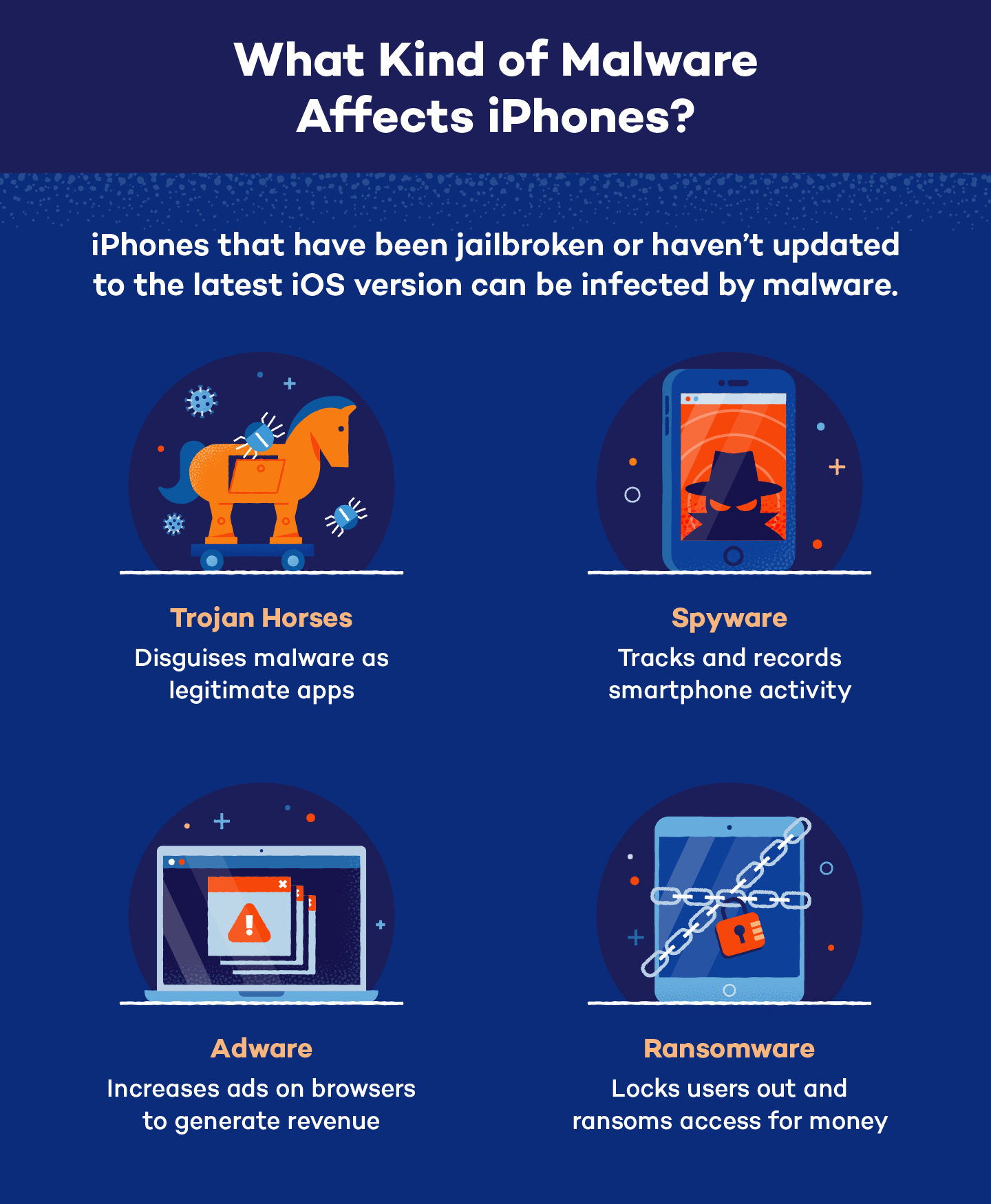
While the types of malware commonly seen on iPhones are less diverse and prevalent than on other platforms, it’s important to understand the forms they can take. The evolving technology trends in cybercrime mean that attackers are always seeking new methods to bypass defenses.
Spyware: The Silent Data Harvester
Spyware represents the most significant and concerning malware threat to iPhones. As seen with Pegasus, advanced spyware can operate stealthily, collecting a vast array of personal data without the user’s knowledge. This includes messages, call logs, browsing history, location data, photos, and even activating the device’s microphone and camera. The goal is covert surveillance, and it poses an extreme threat to privacy and personal security, potentially impacting personal branding and reputation, especially for public figures. The sophistication required to deploy such spyware typically means it’s not targeting the average user, but its existence underscores the potential for profound privacy breaches.
Adware, Ransomware, and Other Less Common Threats
Other types of malware are considerably rarer on un-jailbroken iPhones:
- Adware: Malicious software designed to display unwanted advertisements. While some legitimate apps might be aggressive with ads, true adware that hijacks the system is very uncommon on iOS due to App Store policies and sandboxing.
- Ransomware: Software that encrypts a victim’s data or locks them out of their device, demanding a ransom payment for restoration. While ransomware is a huge threat to computers, it’s exceptionally rare for iPhones in the traditional sense, thanks to iOS’s robust encryption and backup features. However, attackers might attempt to lock iCloud accounts through credential theft and demand payment, which is more of an account compromise than a device-level ransomware attack.
- Malicious Cryptominers: Software that secretly uses a device’s processing power to mine cryptocurrency. These are generally prevented by App Store rules and sandboxing, as they would quickly drain battery and make the device overheat, leading to prompt removal from the store.
Fortifying Your Digital Life: Essential Protection Strategies
Given that iPhones, while secure, are not entirely invulnerable, proactive measures are crucial. These best practices align with broader digital security principles applicable across all your tech and personal finance interactions.
The Importance of Software Updates and App Store Vigilance
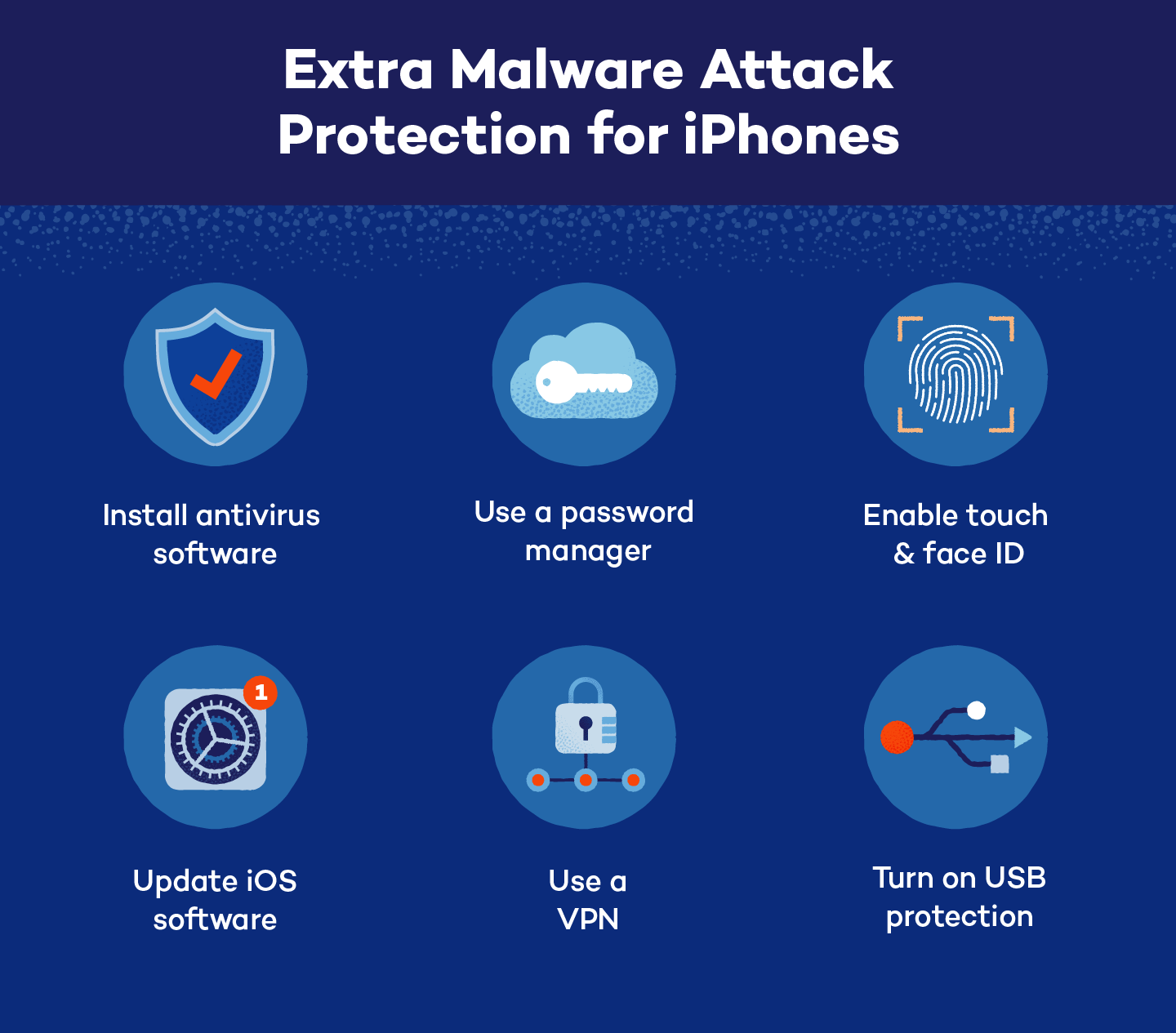
- Keep iOS Updated: This is perhaps the single most important step. Apple’s updates contain critical security patches that close vulnerabilities. Enable automatic updates or check for them regularly.
- Download Apps Only from the Official App Store: Adhere strictly to Apple’s App Store. Avoid third-party app stores or installing apps from untrusted sources, even if they claim to offer premium apps for free. This is your primary defense against malicious software trying to bypass Apple’s review process.
- Review App Permissions: Before installing an app, or while using it, pay attention to the permissions it requests. Does a flashlight app really need access to your contacts or location? Be judicious and revoke unnecessary permissions in your iPhone’s settings.
Strong Authentication and Data Privacy Practices
- Use Strong, Unique Passwords and Two-Factor Authentication (2FA): This is paramount for your Apple ID and all other online accounts, especially those related to personal finance or online income. 2FA adds an extra layer of security, making it exponentially harder for attackers to gain access even if they steal your password.
- Be Mindful of Your Personal Data: Understand what data you share online and with apps. Regularly review your privacy settings on your iPhone and within apps. The less data you expose, the less there is for an attacker to potentially steal. This is also key for maintaining a strong personal branding online.
- Regular Backups: Back up your iPhone regularly to iCloud or a computer. In the worst-case scenario of a malware infection or data loss, a recent backup can save your essential information and significantly reduce the impact on your digital life and potentially financial data.
Navigating Public Networks and Avoiding Suspicious Links
- Exercise Caution on Public Wi-Fi: Public Wi-Fi networks (in cafes, airports, etc.) are often unsecured and can be exploited by attackers to intercept your data. Avoid conducting sensitive transactions, like online banking or shopping, on public Wi-Fi. Consider using a Virtual Private Network (VPN) for an encrypted connection.
- Be Wary of Phishing Attempts: Always scrutinize suspicious emails, texts, or calls. Never click on unsolicited links or download attachments from unknown senders. Verify the legitimacy of requests for personal information through official channels (e.g., directly logging into your bank’s website, not through a link in an email).
- Avoid Jailbreaking: As discussed, jailbreaking severely compromises your iPhone’s security model, making it much easier for malware to take root and cause damage.
What to Do When Suspecting an iPhone Infection
Even with the best precautions, suspicion of an infection can arise. Knowing how to react quickly can mitigate potential damage, especially concerning personal finance and data privacy.
Identifying the Warning Signs
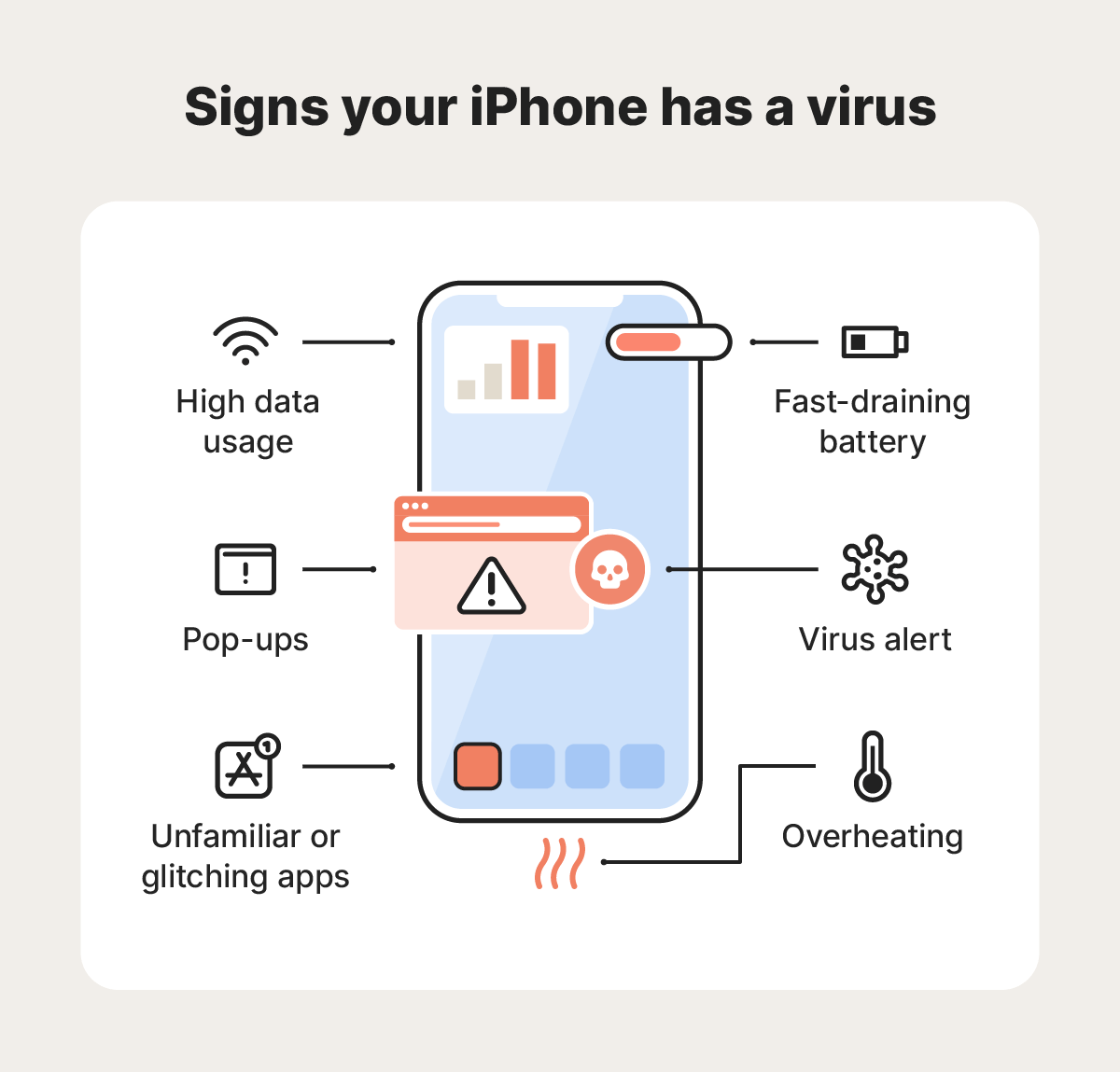
While many of these signs can also indicate legitimate software issues or aging hardware, a combination of them, especially if sudden, could point to a problem:
- Unusual Battery Drain or Overheating: Malware often runs in the background, consuming significant power.
- Slow Performance: Your iPhone might become sluggish, apps crash frequently, or the device struggles with basic tasks.
- Unexplained Data Usage: Increased cellular data consumption could indicate malware communicating with command-and-control servers.
- Pop-ups or Strange Behavior: Unusual ads, apps installing themselves, or settings changing without your input.
- Suspicious Messages or Calls: Your iPhone sending texts or making calls you didn’t initiate.
Remedial Steps and Data Recovery
If you suspect your iPhone is compromised, act swiftly:
- Isolate the Device: Disconnect your iPhone from Wi-Fi and cellular data to prevent further data transmission or spreading of malware.
- Change Critical Passwords: Using another secure device, immediately change passwords for your Apple ID, email, banking apps, and any other critical online services. Enable 2FA if you haven’t already.
- Review and Remove Suspicious Apps and Profiles: Go through your installed apps and delete anything you don’t recognize or don’t remember installing. Check
Settings > General > VPN & Device Managementfor any configuration profiles you didn’t authorize and remove them. - Restore from a Clean Backup: If you have a backup from before you noticed the suspicious activity, restoring from it might remove the malware. Be cautious not to restore from an infected backup.
- Factory Reset (Last Resort): If all else fails, a factory reset will wipe your device clean and reinstall iOS. This is the most drastic measure but ensures any persistent malware is removed. You can then restore your data from a clean backup or set up as new.
- Contact Apple Support: If you’re unsure or believe you’re dealing with a highly sophisticated attack, reaching out to Apple Support can provide expert guidance.
In conclusion, while iPhones are remarkably secure, the belief that they are 100% immune to malware is a myth. Apple’s brand reputation for digital security is well-earned, but sophisticated threats, combined with human vulnerability, mean that no device is truly impregnable. By understanding the intricate security mechanisms of iOS, recognizing the potential attack vectors, and diligently applying best practices for digital security, users can significantly reduce their risk. Staying informed about technology trends, protecting personal finance data, and exercising vigilance remain the most powerful defenses in an ever-evolving digital landscape.
aViewFromTheCave is a participant in the Amazon Services LLC Associates Program, an affiliate advertising program designed to provide a means for sites to earn advertising fees by advertising and linking to Amazon.com. Amazon, the Amazon logo, AmazonSupply, and the AmazonSupply logo are trademarks of Amazon.com, Inc. or its affiliates. As an Amazon Associate we earn affiliate commissions from qualifying purchases.