
In the intricate world of database management and optimization, performance is paramount. As data volumes explode and query complexity increases, traditional database structures often struggle to keep pace, leading to slow response times and frustrated users. This challenge led to the development of powerful tools, among which the materialized view stands out as a crucial technique for supercharging data retrieval. At its core, a materialized view is a database object that stores the result of a query, effectively pre-calculating and caching data for faster access. Unlike a standard view, which is merely a stored query definition executed on demand, a materialized view holds the actual data, making it an invaluable asset for analytical systems, data warehousing, and any application demanding high-speed access to aggregated or transformed data.
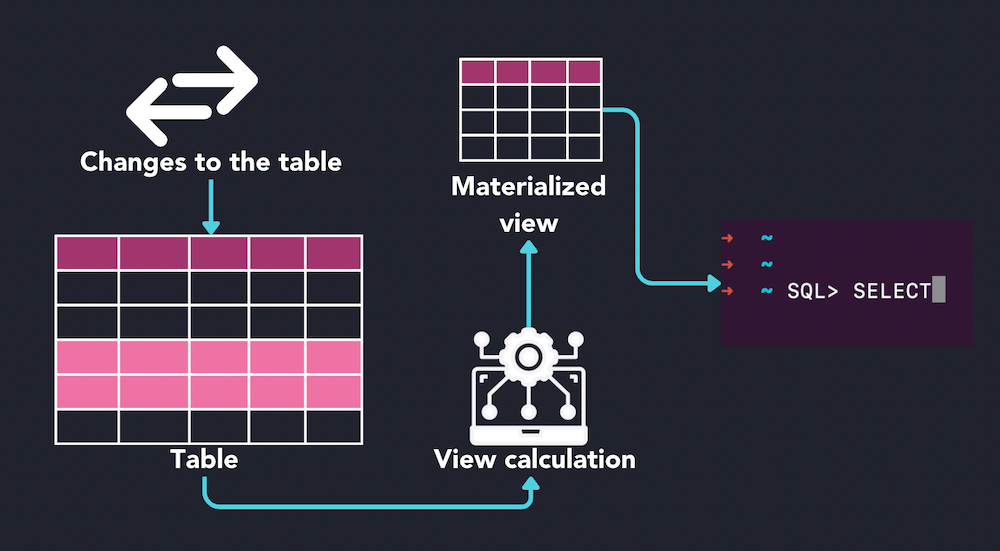
Understanding the Foundation: Views vs. Materialized Views
To truly grasp the power and purpose of a materialized view, it’s essential to first understand its conceptual predecessor: the standard database view. By contrasting these two, the unique advantages of materialization become clear.
The Concept of a Standard View
A standard view, often simply called a “view,” is a virtual table based on the result-set of an SQL query. It does not store data itself; rather, it is a logical representation of data retrieved from one or more base tables. When you query a view, the underlying SQL statement defined in the view is executed, and the results are presented as if they were coming from a physical table.
Views serve several critical purposes: they simplify complex queries by encapsulating joins and filtering logic, enhance data security by restricting user access to specific rows and columns, and provide data independence by insulating applications from changes in base table structure. However, their primary drawback lies in performance. Every time a view is queried, its defining SQL statement must be re-executed against the base tables. For simple queries, this overhead is negligible, but for complex queries involving numerous joins, aggregations, or large datasets, this repeated execution can significantly impact performance, making real-time reporting or frequent analytical tasks agonizingly slow.
Introducing the Materialized View
A materialized view takes the concept of a view a step further by physically storing the result of its defining query. Instead of re-executing the query every time it’s accessed, the database retrieves the pre-computed data directly from storage. Think of it as a pre-calculated, cached version of a complex query result.
The key distinction is that a materialized view is a physical snapshot of data, occupying disk space just like a regular table. This stored data represents the state of the base tables at the time the materialized view was last refreshed. While this provides a dramatic boost in query performance—because the heavy lifting of joining and aggregating has already been done—it introduces a new challenge: ensuring the stored data remains current with changes in the underlying base tables. Managing this data consistency is a central aspect of working with materialized views.
Why Use Materialized Views? The Performance Imperative
The primary motivation behind implementing materialized views is performance. They are strategically employed in scenarios where query speed is critical and the underlying data changes are acceptable to be reflected with some latency.
Accelerating Complex Queries
One of the most common and impactful applications of materialized views is in accelerating complex queries, particularly those found in online analytical processing (OLAP), business intelligence (BI), and data warehousing environments. These queries often involve:
- Aggregations: Calculating sums, averages, counts, minimums, and maximums across vast numbers of rows.
- Complex Joins: Combining data from multiple large tables.
- Groupings: Summarizing data based on various dimensions.
By pre-computing these expensive operations and storing the results in a materialized view, subsequent queries against the view can retrieve the aggregated or joined data almost instantly, bypassing the need to scan and process potentially billions of rows from the base tables. This significantly reduces I/O and CPU usage, freeing up resources for other database operations.
Optimizing Remote Data Access
Materialized views are also incredibly useful for optimizing access to data located in remote databases. In distributed systems, querying remote tables incurs network latency and places a load on the source system. A materialized view can act as a local cache for remote data.
By creating a materialized view that periodically pulls data from a remote source, applications can query the local materialized view instead of constantly reaching out across the network. This not only dramatically improves query response times but also reduces the burden on the remote database, making the overall system more robust and efficient. It’s a common strategy for consolidating data from various operational systems into a central data warehouse without directly impacting the performance of the source systems.
Supporting Data Warehousing and BI
Data warehouses are designed for analytical queries, often involving historical data and complex aggregations. Materialized views are cornerstones of data warehouse architecture. They are frequently used to:
- Create Summary Tables: Pre-calculating common aggregates (e.g., daily sales totals, monthly customer counts) into smaller, faster-to-query summary tables that can directly feed dashboards and reports.
- Implement Dimensional Models: Preparing data in a star or snowflake schema format for efficient querying by BI tools.
- Speed Up ETL Processes: By pre-staging transformed data, subsequent ETL steps can operate on smaller, already processed datasets.
The ability to pre-process and store aggregated data allows BI tools and end-users to run reports and perform ad-hoc analysis with significantly reduced query times, leading to quicker insights and a more responsive analytical platform.
The Mechanics of Materialized Views: Creation and Refreshment
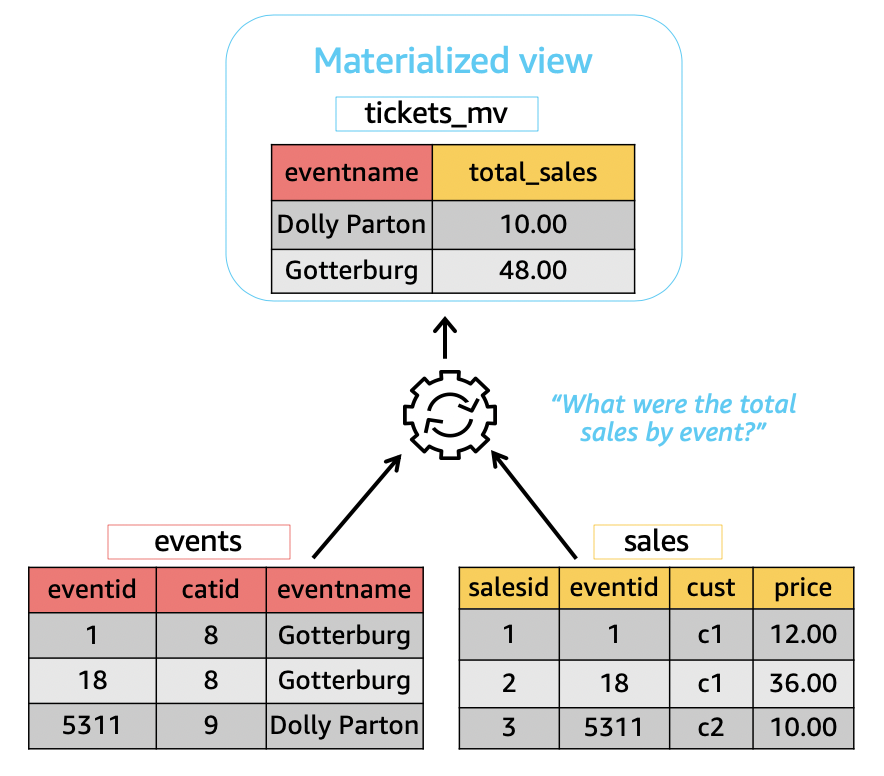
While the benefits of materialized views are substantial, their effective use hinges on understanding their creation and, more importantly, their refreshment mechanisms. Data in a materialized view can become “stale” if the base tables change, and the materialized view is not updated.
Creation Syntax and Options
Creating a materialized view typically involves a CREATE MATERIALIZED VIEW statement followed by its name, optional storage parameters, and the AS SELECT statement that defines the query whose results will be materialized.
A key option during creation is BUILD IMMEDIATE versus BUILD DEFERRED:
BUILD IMMEDIATE: The materialized view is populated immediately upon creation. This is the default and most common choice, ensuring the view is ready for use right away.BUILD DEFERRED: The materialized view is created but not populated initially. It remains empty until the first refresh operation is explicitly executed. This can be useful for very large views where initial population might be time-consuming, allowing it to be scheduled during off-peak hours.
Refresh Strategies
The process of updating a materialized view with changes from its base tables is called “refreshment.” Databases offer various strategies to manage this crucial aspect:
COMPLETERefresh: This is the simplest but most resource-intensive method. The entire defining query of the materialized view is re-executed, and the existing materialized view data is completely replaced with the new results. It’s essentially a full rebuild of the materialized view. While straightforward, it can be very slow for large datasets.FAST(orINCREMENTAL) Refresh: This is the more sophisticated and efficient method. Instead of re-executing the entire query, the database only applies the changes that have occurred in the base tables since the last refresh. To enable fast refresh, the base tables typically need special logging mechanisms (e.g., materialized view logs in Oracle, change tracking in SQL Server, or specific indexing likeWITH ROWIDorWITH PRIMARY KEYon the materialized view itself). Fast refresh significantly reduces the resources and time required for updates.ON COMMITRefresh: This option dictates that the materialized view is automatically refreshed whenever a transaction on one of its base tables is committed. This provides near real-time data freshness but can add overhead to transaction commit times, potentially impacting OLTP systems. It’s generally only feasible for fast refreshes and relatively small materialized views.ON DEMANDRefresh: This requires an explicit command to refresh the materialized view. This allows administrators to schedule refreshes during off-peak hours or when data consistency requirements allow for a longer latency.
Considerations for Refresh Frequency
Choosing the right refresh frequency is a critical balancing act between data freshness and system overhead.
- High Freshness Requirements: If applications need data to be as current as possible (e.g., near real-time dashboards),
ON COMMITor very frequentFASTrefreshes are necessary. However, this comes at the cost of increased resource utilization during refreshes and potential impact on base table operations. - Moderate Freshness Requirements: For daily or hourly reports, scheduled
FASTrefreshes (e.g., once a day overnight) are often sufficient and minimize impact on production systems. - Low Freshness Requirements: For historical analysis where data changes infrequently or daily aggregates are sufficient, a weekly or even monthly
COMPLETErefresh might be acceptable.
Understanding the data’s volatility and the business’s freshness requirements is key to designing an effective refresh strategy that optimizes both performance and resource usage.
Trade-offs and Best Practices
While materialized views offer compelling performance benefits, they are not a silver bullet. Their implementation comes with inherent trade-offs that must be carefully considered.
The Cost of Materialization
The primary costs associated with materialized views include:
- Storage Overhead: Materialized views store data, meaning they consume disk space. For large materialized views, this can be significant, potentially leading to increased storage costs and backup times.
- Refresh Overhead: The process of updating materialized views (refreshing) consumes CPU, I/O, and sometimes network resources. If not managed properly, frequent or large refreshes can become resource bottlenecks, impacting the performance of other database operations or source systems.
- Stale Data: Unlike standard views, materialized views present data that is only as current as its last refresh. There will always be a period of time during which the data in the materialized view does not perfectly reflect the most recent changes in the base tables. Applications consuming data from materialized views must be designed with this potential for data staleness in mind.
- Increased Complexity: Materialized views add another layer of complexity to the database schema. They need to be monitored, managed, and understood by developers and administrators. Incorrectly configured materialized views or inefficient refresh schedules can negate their benefits or even degrade overall system performance.
When to Opt for a Materialized View
Given these trade-offs, materialized views are best suited for specific scenarios:
- When Queries Are Very Complex or Slow: If a particular query consistently takes too long to execute and involves heavy aggregation, joins, or extensive data scanning, it’s a strong candidate for materialization.
- When Queries Are Executed Frequently: If a complex query is run dozens or hundreds of times a day, materializing its results can yield substantial performance gains across the application.
- When Data Freshness Requirements Allow for Some Latency: Materialized views are ideal when the application can tolerate data that is not absolutely real-time, such as for daily reports, weekly summaries, or historical analysis.
- When Base Tables Are Stable or Have Predictable Change Patterns: Fast refresh mechanisms work best when changes to base tables are manageable and can be efficiently tracked.

Design Best Practices
To maximize the benefits and mitigate the drawbacks of materialized views, adhere to these best practices:
- Keep MVs Focused: Don’t try to materialize every possible query. Identify the most performance-critical and frequently used complex queries. Materialize only what is necessary.
- Monitor Performance: Regularly monitor both the query performance against the materialized view and the performance of the refresh operations. Ensure the materialized view is being utilized by the query optimizer and that refreshes are completing within acceptable windows without impacting other operations.
- Choose Refresh Strategy Wisely: Carefully select the refresh method (complete vs. fast, on commit vs. on demand) based on data volatility, freshness requirements, and available system resources. Fast refreshes, where feasible, are almost always preferred.
- Index MVs: Treat materialized views like regular tables. Create appropriate indexes on the materialized view columns that are frequently used in
WHEREclauses,JOINconditions, orORDER BYclauses to further accelerate queries against them. - Manage Storage: Periodically review the size and necessity of materialized views. Remove those that are no longer beneficial or optimize their definitions to reduce storage footprint. Consider partitioning large materialized views for better manageability and performance.
In conclusion, a materialized view is a powerful tool in a database administrator’s and developer’s arsenal, offering a significant pathway to enhanced query performance, particularly in data-intensive analytical environments. By understanding its mechanics, benefits, and inherent trade-offs, organizations can strategically leverage materialized views to build more responsive, efficient, and scalable data systems.
aViewFromTheCave is a participant in the Amazon Services LLC Associates Program, an affiliate advertising program designed to provide a means for sites to earn advertising fees by advertising and linking to Amazon.com. Amazon, the Amazon logo, AmazonSupply, and the AmazonSupply logo are trademarks of Amazon.com, Inc. or its affiliates. As an Amazon Associate we earn affiliate commissions from qualifying purchases.