
In the intricate world of computer storage management, understanding the foundational differences between various disk configurations is paramount for optimizing performance, ensuring data integrity, and maximizing flexibility. One such pivotal distinction lies between basic discs and dynamic discs, and the decision to “convert to dynamic disc” is a significant one with profound implications for how data is stored and managed on a system. This conversion fundamentally changes the way your operating system interacts with and organizes partitions, opening up a realm of advanced capabilities not available with traditional basic disc structures.
Understanding Basic vs. Dynamic Discs
To truly grasp the concept of converting to a dynamic disc, one must first understand the two primary states of a physical hard drive as recognized by Windows operating systems: basic and dynamic. Each type serves different purposes and offers distinct functionalities.
The Fundamentals of Basic Discs
Basic discs are the most common storage type found in personal computers and are the default initialization for new hard drives. They utilize partition tables, primarily Master Boot Record (MBR) or GUID Partition Table (GPT), to manage all partitions on the disc. A basic disc can contain up to four primary partitions, or three primary partitions and one extended partition, which can then be subdivided into multiple logical drives. The structure of basic discs is straightforward: partitions are fixed-size, independent segments of the disk.
The simplicity of basic discs makes them ideal for most everyday computing needs. They are universally compatible with all Windows operating systems and are often required for boot volumes (the drive from which the operating system starts). While reliable and easy to manage, basic discs have limitations in terms of volume management, particularly when it comes to creating volumes that span multiple physical disks or implementing software-level RAID (Redundant Array of Independent Disks) solutions.
Introducing Dynamic Discs
Dynamic discs, in contrast, offer a more flexible and robust approach to volume management. Instead of using a traditional partition table, dynamic discs employ a hidden database on the disk to track information about all dynamic volumes on the computer. This database allows for greater flexibility in creating and resizing volumes, extending beyond the fixed partition limitations of basic discs.
The primary advantage of dynamic discs lies in their ability to create software-managed volumes that can span multiple physical hard drives. This capability enables advanced storage configurations, such as simple, spanned, striped (RAID-0), mirrored (RAID-1), and RAID-5 volumes, directly within the operating system, without requiring specialized hardware RAID controllers. This makes dynamic discs particularly appealing for servers, workstations with multiple drives, or any scenario demanding enhanced data redundancy, performance, or flexible storage allocation.
Key Differences and Why They Matter
The core distinction between basic and dynamic discs boils down to how they manage partitions and volumes. Basic discs use a static partitioning scheme with limitations on the number and type of partitions, best suited for single-drive setups or simple multi-partition needs. Dynamic discs, however, provide a dynamic partitioning scheme, allowing for highly flexible volume creation that can span multiple physical drives and offer advanced features like striping and mirroring.
The decision to convert to a dynamic disc fundamentally changes the underlying architecture of your storage. It shifts from a fixed, MBR/GPT-based partitioning system to a more adaptive, database-driven volume management system. This shift is crucial for unlocking advanced storage functionalities that are simply impossible to achieve with basic discs.
The Benefits and Use Cases of Dynamic Discs
The conversion to a dynamic disc is typically motivated by the need for advanced storage features that enhance performance, provide redundancy, or enable more flexible allocation of disk space. These benefits are particularly pronounced in environments where data integrity, speed, and scalability are critical.
Enhanced Volume Management: Simple, Spanned, Stripped, Mirrored, and RAID-5 Volumes
Dynamic discs unlock a suite of advanced volume types that offer significant advantages:
- Simple Volume: Similar to a basic partition, a simple volume occupies space on a single dynamic disc. However, unlike a basic partition, a simple volume on a dynamic disc can be easily extended (if contiguous free space is available) or shrunk without requiring a complete reformat.
- Spanned Volume: This type of volume combines free space from two or more physical dynamic discs into a single logical volume. Data is written sequentially to fill the space on one disc before moving to the next. Spanned volumes increase storage capacity by consolidating disparate free spaces but offer no performance or fault tolerance benefits. If one disc in a spanned volume fails, all data on the entire spanned volume is lost.
- Stripped Volume (RAID-0): A stripped volume, also known as RAID-0, combines areas of free space from two or more physical dynamic discs (up to 32) into one logical volume. Data is written across all discs in small, equal-sized blocks (stripes) simultaneously. This parallel writing significantly improves read and write performance because multiple disc heads are working concurrently. However, like spanned volumes, striped volumes offer no fault tolerance; if any single disc in the set fails, all data on the striped volume is lost.
- Mirrored Volume (RAID-1): Mirrored volumes, or RAID-1, provide data redundancy by duplicating data from one dynamic disc to a second dynamic disc. Essentially, two identical copies of the data are maintained on two separate discs. If one disc fails, the system can continue operating using the mirrored copy, ensuring high availability and data integrity. While offering excellent fault tolerance, mirrored volumes utilize 50% of the total disc space for redundancy, meaning a 1TB mirrored volume requires two 1TB physical discs.
- RAID-5 Volume: This advanced volume type requires a minimum of three physical dynamic discs. RAID-5 volumes stripe data across multiple discs, similar to RAID-0, but also calculate and store parity information. This parity data allows the system to reconstruct data if one of the discs in the array fails. RAID-5 offers a balance between performance, storage efficiency (losing only the capacity of one disc for parity), and fault tolerance, making it a popular choice for servers and critical data storage.
Increased Flexibility and Scalability
Dynamic discs inherently offer greater flexibility. You can easily extend or shrink volumes, add new discs to existing volumes (for spanned or striped volumes), or break mirrors without restarting the system in many cases. This adaptability is invaluable in environments where storage needs fluctuate, allowing administrators to adjust storage configurations on the fly to meet evolving demands. Scalability is also enhanced, as you can add more physical disks and integrate them into existing dynamic volumes to expand capacity or improve performance/redundancy.
Redundancy and Performance Improvements
The ability to create mirrored (RAID-1) and RAID-5 volumes directly within the operating system provides crucial data redundancy, protecting against single-drive failures. This minimizes downtime and prevents catastrophic data loss, a fundamental requirement for business-critical applications and sensitive data. Simultaneously, striped (RAID-0) and RAID-5 volumes significantly boost I/O performance by distributing read/write operations across multiple physical drives, leading to faster data access and application responsiveness.
The Conversion Process: What to Expect
Converting a basic disc to a dynamic disc is a relatively straightforward process in Windows, typically performed through Disk Management. However, it’s a decision that should not be taken lightly, as it involves fundamental changes to the disk’s structure.
Prerequisites and Important Considerations Before Conversion
Before initiating the conversion, several critical points must be addressed:
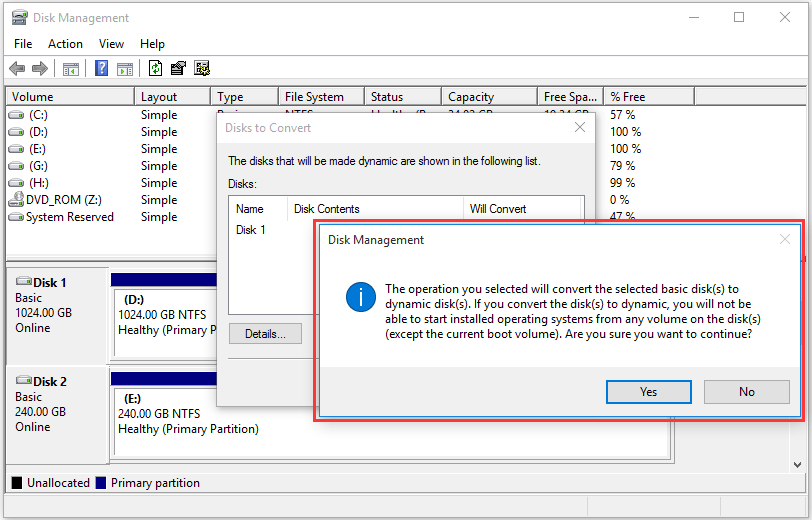
- Backup Data: This is the most crucial step. While the conversion process itself is generally non-destructive to data on existing partitions, unforeseen errors or power outages during the conversion could lead to data loss. A complete, verified backup of all critical data is absolutely essential.
- Understand Reversibility: Converting from basic to dynamic is easy; converting back from dynamic to basic is not without data loss. To convert a dynamic disc back to a basic disc, you must delete all dynamic volumes on it, which erases all data.
- No OS Drive Conversion (with caution): While technically possible to convert a basic drive containing the operating system to dynamic, it is generally not recommended for the primary boot drive. Some legacy bootloaders or recovery environments might not recognize dynamic discs, potentially rendering the system unbootable. For system drives, it’s often better to stick with basic discs.
- No Mixed Environments: Once a disk is converted to dynamic, all partitions on that disk become dynamic volumes. You cannot have a mix of basic partitions and dynamic volumes on the same physical disk.
- Operating System Support: Dynamic discs are supported by Windows 2000, XP Professional, Server 2003/2008/2012/2016/2019/2022, Vista Business/Enterprise/Ultimate, Windows 7/8/10/11 Professional/Enterprise/Ultimate. Home editions of Windows typically do not support dynamic discs.
Step-by-Step Overview of the Conversion
The conversion process is initiated via the Disk Management utility in Windows:
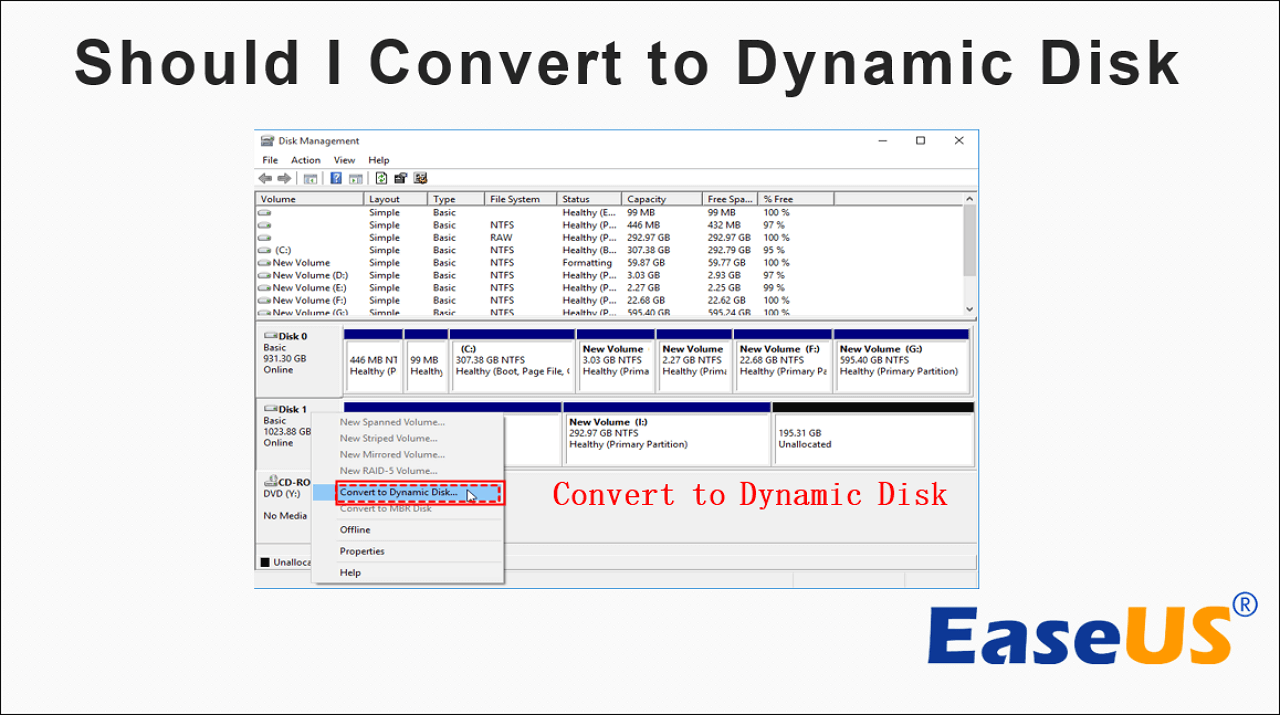
- Open Disk Management (right-click Start, select Disk Management).
- Locate the basic disc you wish to convert.
- Right-click on the disc (not a partition) and select “Convert to Dynamic Disk.”
- A wizard will guide you through selecting the disks to convert. Confirm your selections.
- Review the operation and click “Convert.”
- You will receive a warning about potential boot issues if the system partition is on the disk. Confirm to proceed.
The system will then perform the conversion. This process usually takes only a few moments, after which the disk’s status in Disk Management will change from “Basic” to “Dynamic.” Existing basic partitions will become simple dynamic volumes.
Potential Risks and How to Mitigate Them
The primary risk is data loss if a backup is not performed, or if the system crashes during the conversion. Ensuring a stable power supply and performing a full backup are the best mitigation strategies. Another risk involves boot issues if the system’s boot drive is converted, especially in older systems or complex multi-boot setups. It’s best to convert non-boot drives first to familiarize yourself with the process and its implications.
Limitations and When Not to Convert
While dynamic discs offer powerful features, they come with certain limitations and are not suitable for every scenario. Understanding these constraints is crucial before making the conversion.
Operating System Compatibility
As mentioned, dynamic discs are not supported by all operating systems or editions. Windows Home editions (XP Home, Vista Home Basic/Premium, Windows 7/8/10/11 Home) cannot manage or even recognize dynamic discs. This means if you convert a drive to dynamic, a computer running a Home edition of Windows will not be able to access the data on it. Linux and macOS also have limited or no native support for Windows dynamic discs, making data sharing across these OSes problematic.
Boot Volume Restrictions
The primary boot drive (the disk containing the active system partition that boots Windows) generally remains a basic disc. While Windows allows conversion of a boot disk to dynamic, it’s often fraught with potential boot issues, especially if the system contains multiple operating systems or uses specific recovery tools. Many system recovery environments or third-party boot managers may not recognize dynamic volumes, rendering the OS unbootable or inaccessible. It is strongly advised to keep the primary boot drive as a basic disc to avoid complexities.
Data Recovery Complexities and Backup Imperatives
While dynamic discs enhance redundancy through mirroring and RAID-5, they can complicate traditional data recovery efforts. If a dynamic disc fails in a non-redundant configuration (like a simple or striped volume), data recovery can be significantly more challenging and expensive than with a basic disc, often requiring specialized software or services. This underscores the absolute necessity of robust backup strategies, even when using redundant dynamic volumes, as RAID is not a substitute for backup.
Multi-Boot Environments
In systems configured for multi-booting (e.g., Windows and Linux), converting a shared data drive to dynamic can introduce significant compatibility problems. Since non-Windows operating systems generally do not support dynamic discs, they will be unable to access any data on them. This necessitates careful planning if you intend to share data across different operating systems.
Managing Dynamic Discs: Best Practices
Once a disc is converted to dynamic, effective management becomes key to leveraging its benefits and maintaining system health.
Tools for Dynamic Disk Management
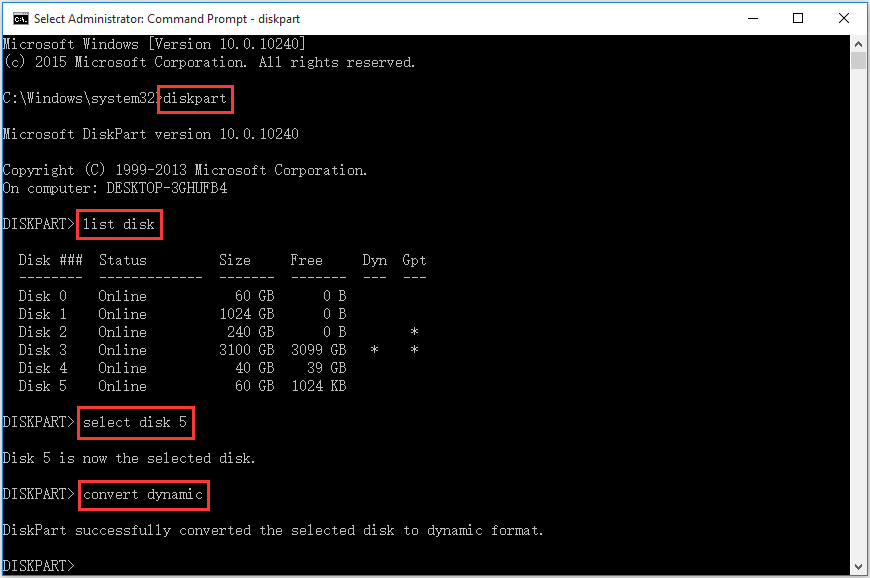
The primary tool for managing dynamic discs in Windows is Disk Management. Through its intuitive graphical interface, you can create new dynamic volumes (simple, spanned, striped, mirrored, RAID-5), extend or shrink existing volumes, assign drive letters, and delete volumes. For more advanced scripting or automation, the diskpart command-line utility offers extensive control over dynamic discs and volumes. Third-party disk management software may also offer enhanced features or easier interfaces.
Regular Monitoring and Maintenance
Just like basic discs, dynamic discs require regular monitoring. Keep an eye on disk health using tools like S.M.A.R.T. (Self-Monitoring, Analysis, and Reporting Technology) reports. For mirrored and RAID-5 volumes, regularly check the status in Disk Management to ensure all members are healthy and no discs have failed or become offline. Promptly replace any failing drives in redundant arrays to prevent data loss. Periodically defragment traditional hard drives within dynamic volumes (though not necessary for SSDs) and ensure file system integrity with tools like chkdsk.
Strategic Planning for Storage Growth
Dynamic discs excel in adaptability, but effective planning still pays dividends. When setting up multi-disc volumes, consider future expansion needs. For instance, if you anticipate needing more space for a striped volume, ensure you have sufficient physical drive bays and budget for additional drives that match the performance characteristics of your existing ones. For mirrored volumes, always ensure you have a spare drive on hand, or easily procurable, for quick replacement in case of failure. Think strategically about which types of dynamic volumes best suit specific data needs – performance for scratch disks, redundancy for critical data, and capacity for archives.
In conclusion, converting to a dynamic disc is a powerful step towards a more flexible and robust storage infrastructure. It’s a strategic choice for users and administrators who require advanced volume management capabilities, improved performance, or critical data redundancy, provided they understand its implications and diligently follow best practices for backup and management.
aViewFromTheCave is a participant in the Amazon Services LLC Associates Program, an affiliate advertising program designed to provide a means for sites to earn advertising fees by advertising and linking to Amazon.com. Amazon, the Amazon logo, AmazonSupply, and the AmazonSupply logo are trademarks of Amazon.com, Inc. or its affiliates. As an Amazon Associate we earn affiliate commissions from qualifying purchases.