
In the vast ecosystem of digital data, various file formats serve specific purposes, from documents and images to audio and video. Among these, the .eml file holds a unique and crucial position, acting as a snapshot of a single email message. Often encountered when archiving emails, forwarding them as attachments, or during digital forensic investigations, understanding what an .eml file is and how it functions is fundamental for anyone navigating the complexities of digital communication and cybersecurity.
The Anatomy of Digital Correspondence
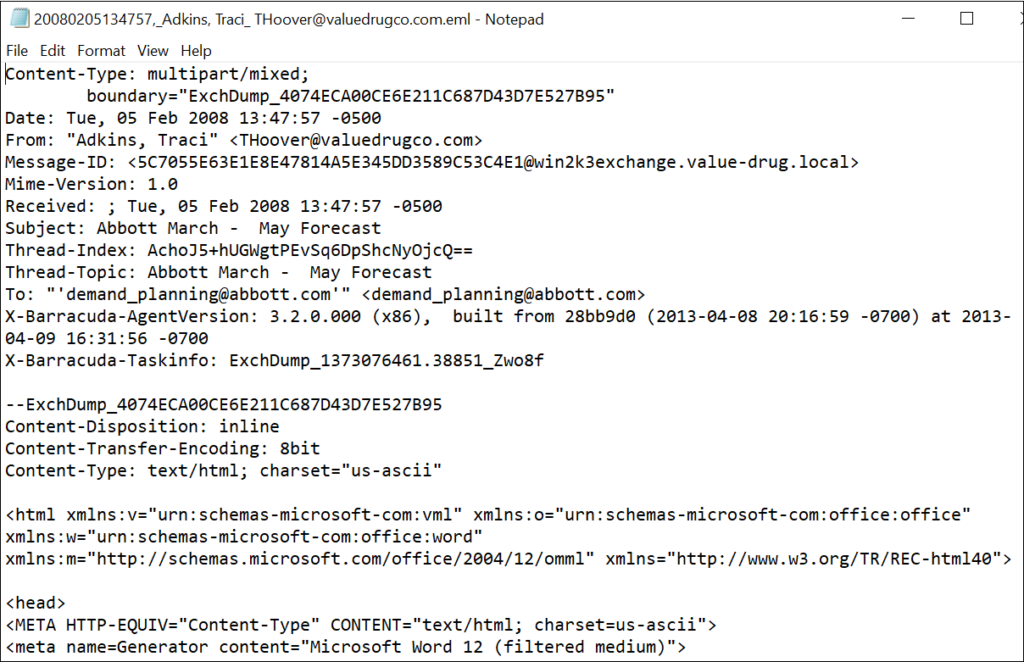
An .eml file is not just a random collection of data; it’s a meticulously structured plain text file that encapsulates a complete email message, including its headers, body, and any attachments. This standardized format allows for the preservation and independent viewing of an email outside of the original email client or server environment.
Understanding the .eml Format
The .eml file format was originally developed by Microsoft for its Outlook Express email client, but its simplicity and effectiveness led to its widespread adoption across many other email applications and platforms. Its primary purpose is to store a single email message in a self-contained unit, making it highly portable and universally readable by any application capable of parsing the standard MIME (Multipurpose Internet Mail Extensions) format.
When an email client saves an email as an .eml file, it essentially serializes the entire message content and metadata into a single file. This process ensures that every detail, from who sent the email and when, to its textual content and embedded files, is preserved exactly as it appeared to the sender and recipient.
Key Components of an .eml File
To grasp the full utility of an .eml file, it’s essential to dissect its primary components:
Headers
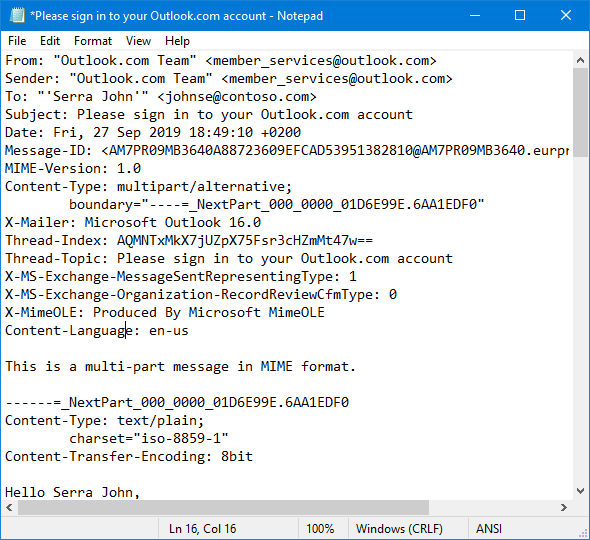
The header section is the metadata powerhouse of an .eml file. It resides at the very top and contains critical information about the email’s journey and characteristics. These headers are human-readable and typically include:
- Sender and Recipient(s): The ‘From’, ‘To’, ‘Cc’, and ‘Bcc’ fields identify who sent the email and who received it.
- Subject: The topic of the email.
- Date: The timestamp when the email was sent.
- Message-ID: A unique identifier for the specific email message, often used for tracking and referencing.
- MIME-Version: Indicates the version of the MIME standard used, which dictates how the message content is structured.
- Content-Type: Specifies the nature of the content in the email body, such as
text/plainfor plain text,text/htmlfor HTML formatted emails, ormultipart/mixedfor emails containing attachments or multiple body parts. - Content-Transfer-Encoding: Describes how the message body and attachments are encoded (e.g., Base64, quoted-printable) to ensure they can be transmitted reliably over different systems and decoded correctly.
- Received: A series of headers that trace the path the email took through various mail servers, providing valuable information for troubleshooting and security analysis, including IP addresses and timestamps.
- Authentication Headers: Modern email systems include headers like ‘Authentication-Results’, which show the outcome of sender authentication checks such as SPF (Sender Policy Framework), DKIM (DomainKeys Identified Mail), and DMARC (Domain-based Message Authentication, Reporting, and Conformance). These are crucial for combating spam and phishing.
Body
The body section contains the actual message content that the sender intended to convey. Depending on the Content-Type header, this can be:
- Plain Text: Simple, unformatted text.
- HTML Content: Richly formatted text, including fonts, colors, images, and hyperlinks. Many emails are sent in a
multipart/alternativeformat, meaning they contain both plain text and HTML versions. This allows email clients to display the version they best support or the user prefers.
Attachments
Attachments are files (documents, images, videos, executables, etc.) sent along with the email. Within an .eml file, attachments are not directly embedded in their native format. Instead, they are typically encoded using schemes like Base64, which converts binary data into a text-based format suitable for inclusion in an email. The .eml file includes headers specific to each attachment, detailing its filename, Content-Type, and Content-Transfer-Encoding. When an email client opens an .eml file, it decodes these sections to reconstruct and present the attachments in their original form.
Why .eml Files Matter in the Digital Landscape
The existence and continued relevance of .eml files extend beyond mere email storage. They play a vital role in several critical areas of digital operations and security.
Archiving and Backup
For both individuals and organizations, preserving email communications is paramount. .eml files offer a robust method for:
- Long-term Archiving: They provide a self-contained, standardized format for storing emails indefinitely, independent of specific email client versions or server availability. This is crucial for historical records and knowledge retention.
- Legal and Compliance Requirements: Many industries and jurisdictions mandate the retention of electronic communications for legal discovery, regulatory compliance, and audit trails.
.emlfiles simplify this process by providing verifiable, immutable records of individual messages. - Offline Access: By saving emails as
.emlfiles, users can access their correspondence even without an internet connection or access to their mail server.
Forensics and Digital Security
In the realm of cybersecurity, .eml files are invaluable tools for investigators and security analysts:
- Malware Analysis: Suspicious emails suspected of containing malware or phishing attempts can be saved as
.emlfiles for safe, isolated analysis. This allows security professionals to examine headers, extract attachments, and analyze links without risking infection to their primary system. - Phishing Detection: The detailed headers within an
.emlfile can reveal the true origin of an email, exposing spoofed sender addresses, non-standard mail routes, and authentication failures (SPF, DKIM, DMARC), all of which are indicators of phishing attempts. - Tracing Email Origin: By meticulously examining the ‘Received’ headers, investigators can trace the path of an email through various mail servers, identifying its true source IP address and potentially uncovering malicious actors.
Email Migration and Portability
When transitioning between email clients, migrating mailboxes, or simply needing to share a specific email without forwarding it from an active account, .eml files provide excellent portability:
- They allow for the transfer of individual email messages between different email applications that may not natively support each other’s proprietary formats.
- This format ensures that the entire context of the email, including attachments and formatting, is maintained during the transfer, unlike simply copying and pasting the text.
Interoperability
The standardization provided by the MIME format, which .eml files adhere to, ensures that emails can be exchanged and interpreted consistently across a vast array of email clients and systems. This interoperability is fundamental to the global reach and functionality of email as a communication medium.
How to Open and Manage .eml Files
Working with .eml files is straightforward, thanks to their widespread support.
Native Email Clients
The most common and convenient way to open an .eml file is by simply double-clicking it. Most modern email clients, including Microsoft Outlook, Mozilla Thunderbird, Apple Mail, and even webmail interfaces through browser extensions, are designed to recognize and parse .eml files. When opened, the email client reconstructs the message, displaying it as if it were still in your inbox, complete with formatting and accessible attachments.
Text Editors
Since .eml files are essentially plain text, any text editor (e.g., Notepad, VS Code, Sublime Text, Vim) can open them. This method is particularly useful for:
- Raw Header Analysis: Viewing the unvarnished headers without any interpretation by an email client, which can sometimes hide or simplify certain fields.
- Troubleshooting: Identifying encoding issues or malformed content.
- Forensic Review: Examining the underlying code for suspicious elements or unusual structures.
While text editors show all the raw data, including encoded attachments, they do not decode or display attachments in their original form.
Specialized .eml Viewers
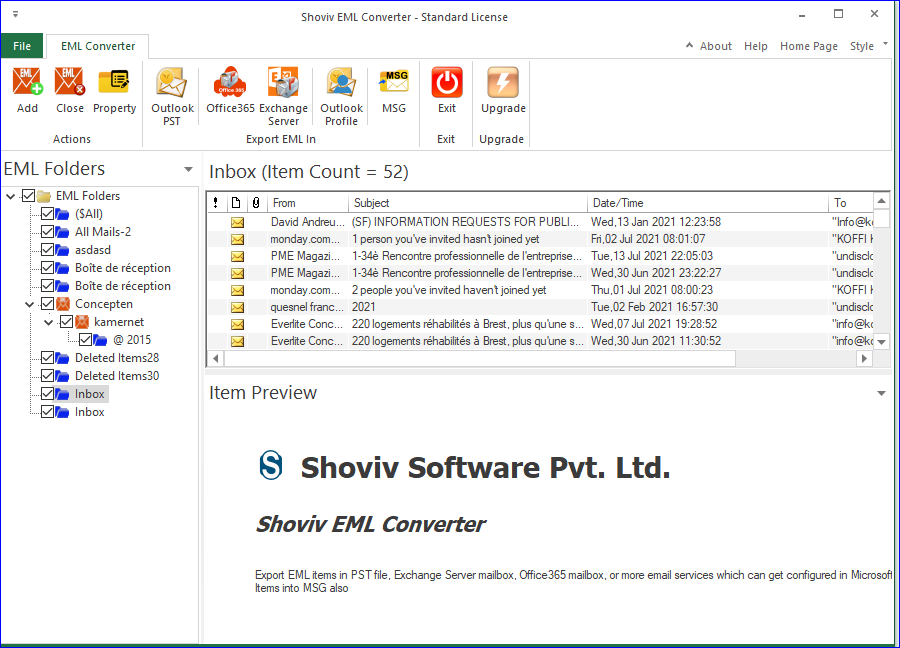
For users who frequently work with .eml files, especially in professional contexts like legal discovery or IT support, specialized .eml viewers and management tools exist. These applications often offer advanced features such as:
- Bulk Viewing: Opening and managing multiple
.emlfiles simultaneously. - Enhanced Search: Searching within the content and headers of many
.emlfiles. - Attachment Extraction: Easily extracting attachments from single or multiple files.
- Metadata Analysis: Providing structured views of headers and other metadata.
- Security Sandboxing: Opening potentially malicious
.emlfiles in a secure, isolated environment.
Converting .eml Files
There are scenarios where converting an .eml file to another format is beneficial:
- To PDF: For easy sharing, printing, and long-term archival as a non-editable document. Many tools and even some email clients offer this conversion.
- To MSG (Outlook Message File): If deeper integration with Microsoft Outlook’s proprietary features is required, converting
.emlto.msgcan be useful. - To HTML or TXT: For extracting the message content in a more universally editable or viewable format, often for use in other applications or reports.
Numerous online converters and dedicated software utilities facilitate these conversions, each with varying capabilities and security considerations.
Security Considerations and Best Practices
While .eml files are highly functional, they are not without security implications. Because they encapsulate entire email messages, they can carry the same risks as live emails.
The Risks of Opening Unknown .eml Files
- Malware: An
.emlfile can contain malicious attachments (e.g., executable files, infected documents) or embedded scripts that can compromise your system upon opening if your email client or viewer is vulnerable. - Phishing: Malicious
.emlfiles can be crafted to perfectly mimic legitimate emails, complete with convincing branding and links designed to steal credentials or personal information. - Information Disclosure: Even without active threats, an
.emlfile might contain sensitive personal or corporate data within its body or attachments, which could be exposed if the file falls into the wrong hands.
Safe Handling Techniques
- Verify the Sender: Always confirm the legitimacy of the sender, especially if the
.emlfile was unexpected or contains unusual requests. - Use Antivirus Software: Keep your antivirus and anti-malware software up to date and scan any suspicious
.emlfiles before opening. - Sandbox Environment: For highly suspicious
.emlfiles, consider opening them in a virtual machine or a dedicated sandboxed environment that isolates potential threats from your main operating system. - Disable Automatic Attachment Download: Configure your email client to prevent automatic downloading or opening of attachments.
- Be Wary of Links: Before clicking any links within an
.emlfile, hover over them to see the actual URL and ensure it points to a legitimate domain. If unsure, manually type the known legitimate URL into your browser. - Use Reputable Viewers: If using third-party
.emlviewers, ensure they are from trusted sources and have good security practices.
Importance of Email Authentication
The authentication headers (SPF, DKIM, DMARC) within an .eml file provide critical clues about the email’s legitimacy. Understanding how to interpret these headers can help discern whether an email truly originated from the claimed sender or if it’s a spoofed message. A failed DMARC check, for instance, is a strong indicator of a fraudulent email.
The Future and Evolution of Email Archiving
While cloud-based email services and sophisticated archiving platforms have become prevalent, streamlining the storage and retrieval of communications, the .eml format retains its fundamental value. Cloud solutions often abstract the underlying file formats, providing seamless access and robust search capabilities. However, for true data portability, offline access, legal evidentiary purposes, and forensic analysis, a standardized, client-agnostic format like .eml remains indispensable.
The longevity of .eml files underscores the persistent need for open standards in digital communication. As technology evolves, new methods for storing and transmitting data may emerge, but the core principles of preserving message integrity and accessibility, which the .eml format champions, will continue to be cornerstones of effective digital management. Its simplicity and universality ensure that, for the foreseeable future, the .eml file will remain a critical component in understanding, securing, and managing our digital correspondence.