
In the intricate architecture of Database Management Systems (DBMS), the concept of a “view” stands as a powerful and often indispensable tool for data manipulation, security, and abstraction. Far from being a physical table that stores data, a view is a virtual table whose content is defined by a query. It’s a derived relation, generated dynamically when referenced, offering a tailored perspective into the underlying data without replicating it. Understanding views is crucial for anyone working with relational databases, providing a pathway to enhanced data management and more robust application development.
The Fundamental Concept of a Database View
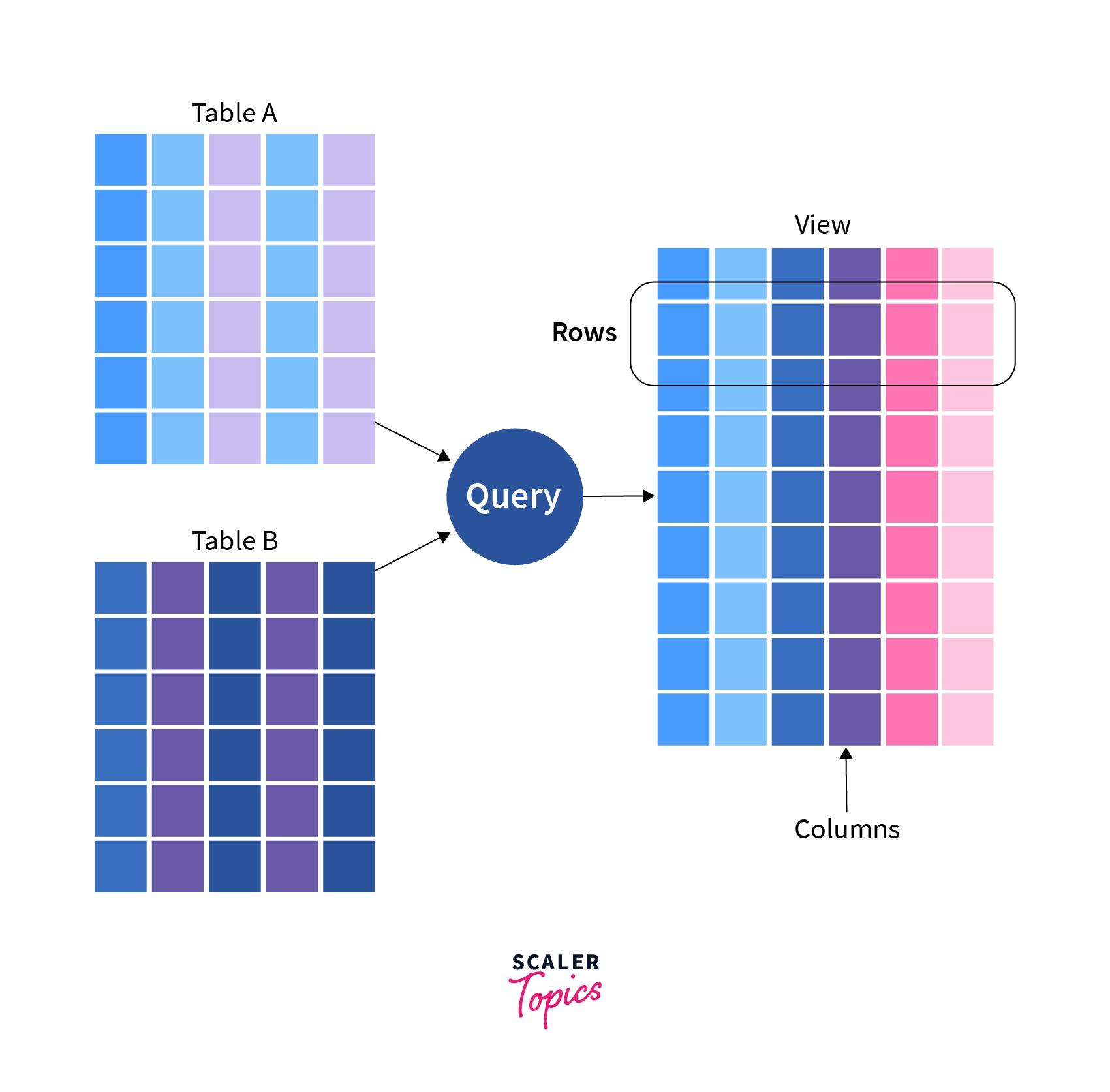
At its core, a view is an abstraction layer. It doesn’t hold data itself, but rather presents a window into data that resides in one or more base tables. This virtual nature is key to its utility and distinguishes it from conventional tables.
Views as Virtual Tables
Imagine a spreadsheet that doesn’t actually store numbers, but instead contains formulas that pull and calculate numbers from other spreadsheets. That’s a helpful analogy for a view. When you query a view, the DBMS doesn’t look for a stored dataset named after the view; instead, it executes the SQL query definition associated with that view. The result set of this underlying query is what constitutes the “content” of the view, appearing to the user or application as a standard table.
For instance, if you have a table Employees with columns like EmployeeID, FirstName, LastName, Salary, and DepartmentID, you could create a view called SalesTeamSalaries that only shows FirstName, LastName, and Salary for employees in the ‘Sales’ department. When you select from SalesTeamSalaries, the database runs the original query to fetch only the specified columns and rows from the Employees table.
How Views are Stored (or Not Stored)
This virtual nature implies that views do not typically consume significant storage space for data. What is stored is the definition of the view – the SQL query that defines it. This metadata is maintained within the database’s data dictionary or system catalog. Every time a view is queried, its defining query is re-executed, effectively compiling the desired data on the fly. This “on-demand” generation is central to how views operate, ensuring that they always reflect the most current state of the underlying base tables. It also means that changes to the base tables are immediately reflected in the view, without any need for the view itself to be updated or refreshed.
Key Benefits of Using Views
The strategic application of views delivers a multitude of benefits, enhancing database security, simplifying data access, and promoting reusability.
Data Security and Access Control
One of the most compelling reasons to use views is for granular access control. Database administrators can grant users access to specific views rather than granting direct access to sensitive base tables. This allows users to see only a subset of rows and columns that are relevant to their role, effectively hiding confidential information. For example, a human resources manager might have access to a view that displays all employee details, including salaries, while a departmental manager might only have access to a view showing employee names, job titles, and contact information, but not salaries. This minimizes the risk of unauthorized data exposure.
Simplicity and Abstraction
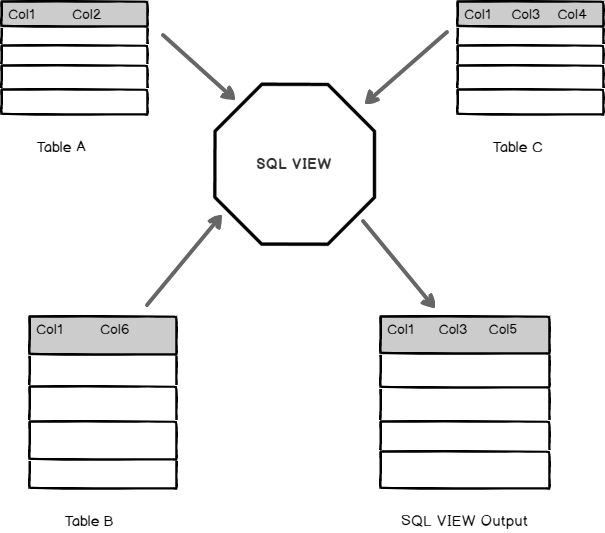
Views simplify complex queries. If an application or a user frequently needs to query data from multiple joined tables with specific filtering criteria, defining a view for that complex query can save a significant amount of effort. Instead of writing the intricate JOINs and WHERE clauses repeatedly, users can simply SELECT from the view as if it were a single, straightforward table. This abstraction hides the underlying complexity, making the database easier to interact with for developers and end-users alike.
Data Consistency and Reusability
By encapsulating complex logic, views ensure consistency. If a particular data derivation or calculation needs to be performed consistently across various reports or application modules, defining it once within a view guarantees that everyone accessing that view will retrieve data based on the same rules. This also promotes code reusability; instead of duplicating the logic in different application components, the logic is centralized within the view definition. Should the underlying data structure change (e.g., a column name changes), only the view definition needs to be updated, rather than every application component that uses that data.
Hiding Data Complexity
Views can transform and combine data from several tables into a single, cohesive structure that is more intuitive for users or applications. This can involve renaming columns, performing aggregate functions, or combining disparate data sources into a unified perspective. For instance, a view could present sales data from Orders, Customers, and Products tables as a single logical entity, simplifying reporting for a sales analyst who doesn’t need to understand the underlying table relationships.
Types of Views
While the core concept remains consistent, views can be categorized based on their complexity, updatability, and how they store (or don’t store) data.
Simple Views
A simple view is typically based on a single table, without any aggregate functions, grouping, or complex joins. They are often used to restrict column or row access, acting as a direct filter or projection of a base table. Simple views are frequently updatable, meaning you can insert, update, or delete data through the view, and these changes will be propagated to the underlying base table.
Complex Views
Complex views involve multiple tables (via joins), aggregate functions (like SUM(), AVG(), COUNT()), GROUP BY clauses, or subqueries. They provide more powerful data aggregation and transformation capabilities but are generally not directly updatable. The database struggles to determine which specific row in which base table should be modified when an update is attempted on a complex view that involves multiple aggregated or derived values.
Updatable Views vs. Non-Updatable Views
The distinction between updatable and non-updatable views is critical.
- Updatable Views: These views allow
INSERT,UPDATE, andDELETEoperations to be performed directly on them, with the changes automatically reflecting in the underlying base tables. Generally, a view is updatable if it:- Is based on a single table.
- Does not contain aggregate functions,
GROUP BY,DISTINCT, orHAVINGclauses. - Does not involve complex joins (though some DBMS allow certain single-table-per-row-insertable/updatable joins).
- Does not contain subqueries in the
SELECTlist.
- Non-Updatable Views: Most complex views, those involving multiple tables, aggregate functions, or distinct clauses, fall into this category. The DBMS cannot reliably translate an update operation on such a view back to a specific, unambiguous change in the base tables. For instance, if a view calculates an average salary, how would updating that average translate to individual employee salaries?
Materialized Views (Brief Mention)
It’s also worth noting “materialized views” in some DBMS (like Oracle, PostgreSQL, SQL Server’s indexed views). Unlike standard views, materialized views do store the query result physically on disk. They are pre-calculated and stored to improve query performance, especially for complex analytical queries. However, they introduce the overhead of needing to be periodically refreshed to reflect changes in the base tables, balancing performance gains against data freshness. Standard views, by contrast, are always “live.”

Creating and Managing Views (Conceptual Examples)
Working with views involves straightforward SQL commands. The principles are consistent across most relational database systems, though syntax may vary slightly.
The CREATE VIEW Statement
To create a view, you use the CREATE VIEW statement followed by the view name and the defining SELECT statement.
CREATE VIEW SalesTeamSalaries AS
SELECT FirstName, LastName, Salary
FROM Employees
WHERE Department = 'Sales';
This view SalesTeamSalaries would then only show employees from the Sales department with their first name, last name, and salary.
Another example demonstrating data abstraction:
CREATE VIEW CustomerOrderSummary AS
SELECT
    c.CustomerID,
    c.CustomerName,
    COUNT(o.OrderID) AS TotalOrders,
    SUM(od.Quantity * od.Price) AS TotalRevenue
FROM
    Customers c
JOIN
    Orders o ON c.CustomerID = o.CustomerID
JOIN
    OrderDetails od ON o.OrderID = od.OrderID
GROUP BY
    c.CustomerID, c.CustomerName;
This CustomerOrderSummary view provides a high-level overview of customer activity by joining three tables and performing aggregations, simplifying reporting for business intelligence tools.
Querying a View
Once a view is created, you can interact with it just like a regular table using standard SELECT statements.
SELECT * FROM SalesTeamSalaries;
SELECT CustomerName, TotalRevenue
FROM CustomerOrderSummary
WHERE TotalOrders > 10;
The database engine, upon receiving these queries, substitutes the view name with its underlying SELECT statement and executes the combined query.
Modifying and Deleting Views
To alter the definition of an existing view, you typically use CREATE OR REPLACE VIEW (available in many DBMS) or ALTER VIEW.
CREATE OR REPLACE VIEW SalesTeamSalaries AS
SELECT EmployeeID, FirstName, LastName, Salary
FROM Employees
WHERE Department = 'Sales' AND Status = 'Active';
This command would update the SalesTeamSalaries view to include EmployeeID and filter for active employees.
To remove a view from the database, the DROP VIEW command is used:
DROP VIEW SalesTeamSalaries;
This only deletes the view definition, leaving the underlying base tables and their data untouched.
Best Practices and Considerations
While views offer significant advantages, their implementation requires careful consideration to avoid potential pitfalls.
Performance Implications
Because a view’s defining query is executed every time the view is accessed, overly complex views, especially those involving many joins or expensive operations, can negatively impact query performance. The optimizer must process the view’s query along with the user’s query against the view. For frequently accessed, highly complex views, especially in data warehousing scenarios, materialized views or other performance optimization techniques might be more appropriate. It’s essential to profile queries against views to ensure they meet performance requirements.
View Overuse
While powerful, views should be used judiciously. Creating too many views, especially redundant or slightly different ones, can lead to a cluttered database schema and make maintenance challenging. It’s important to design views that genuinely simplify access, enhance security, or abstract complexity efficiently, rather than just duplicating base table structures with minor modifications.
Documentation
As with any database object, proper documentation of views is critical. Understanding what each view represents, its underlying tables, and any business logic embedded within its definition helps future developers and administrators maintain the database effectively. Clear naming conventions and comments within the view’s definition SQL can significantly aid in comprehension and long-term manageability.
In conclusion, views are an indispensable feature of modern DBMS, offering a flexible and robust mechanism for managing data access, simplifying complex data models, and enforcing security policies. By leveraging their virtual nature, organizations can present tailored, secure, and intuitive data interfaces to various users and applications, streamlining operations and enhancing the overall integrity of their data landscape.
aViewFromTheCave is a participant in the Amazon Services LLC Associates Program, an affiliate advertising program designed to provide a means for sites to earn advertising fees by advertising and linking to Amazon.com. Amazon, the Amazon logo, AmazonSupply, and the AmazonSupply logo are trademarks of Amazon.com, Inc. or its affiliates. As an Amazon Associate we earn affiliate commissions from qualifying purchases.