
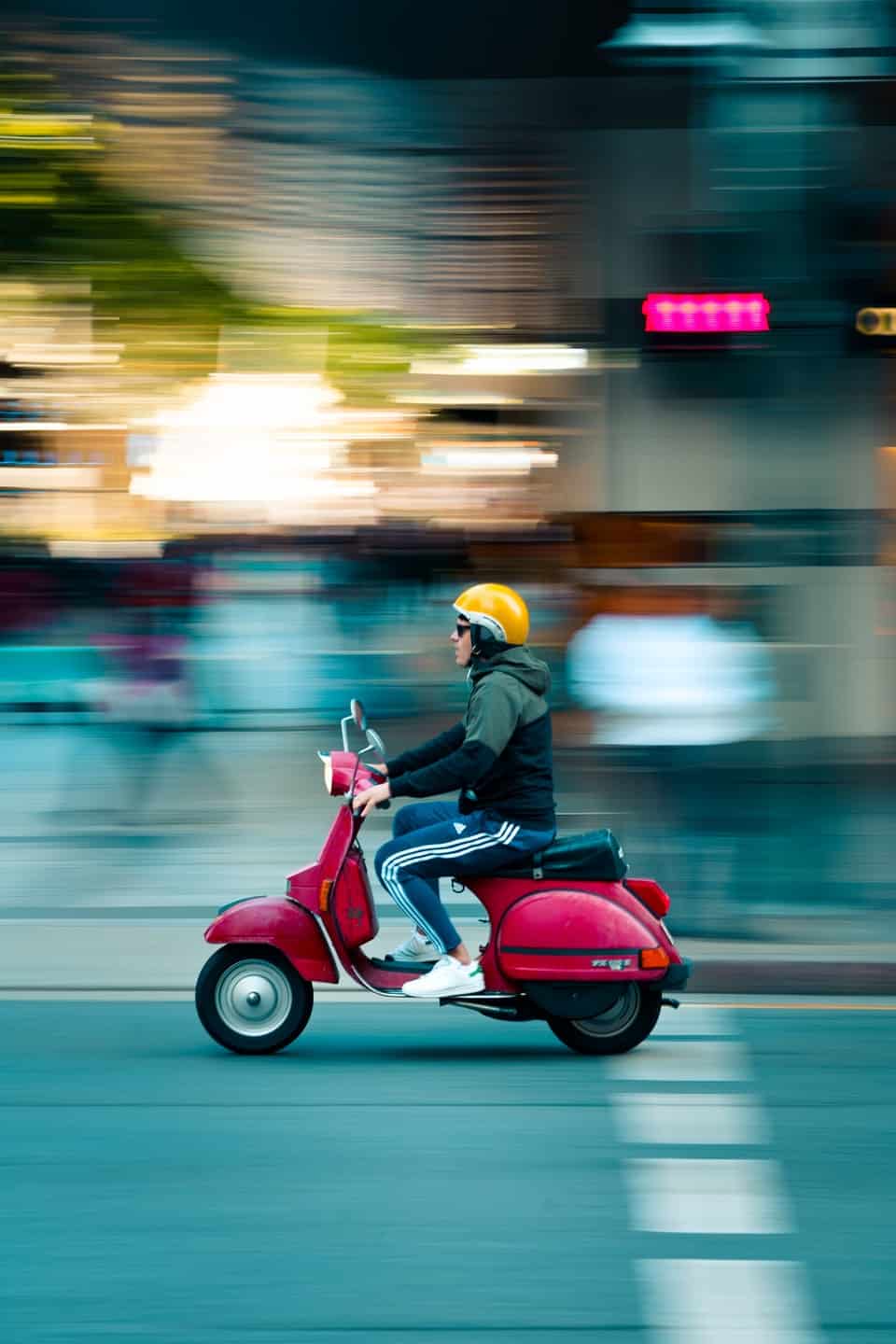
Panning, in the realm of photography and videography, is a dynamic camera technique employed to capture a moving subject with compelling clarity against a blurred background. This deliberate motion blur in the background serves to emphasize the subject’s speed and movement, drawing the viewer’s eye and creating a sense of action and fluidity within a static image or a video sequence. Far from being an accidental blur, successful panning is a testament to a photographer’s control over their equipment and understanding of motion.
The Art and Science of Panning Photography
At its core, panning is about synchronization. It involves moving the camera horizontally (or sometimes vertically) along the same axis and at a similar speed as the subject, while the shutter is open. The result is a sharp subject that appears to “pop” from its surroundings, which are rendered as streaks of color and light. This technique transforms an ordinary capture of movement into an artistic statement, conveying narrative and emotion through visual dynamics.

Defining the Panning Technique
Technically, panning relies on a relatively slow shutter speed – slower than what would typically be used to freeze the action. The precise shutter speed varies greatly depending on the subject’s speed, distance, and the desired level of background blur. As the photographer tracks the subject, the subject remains in roughly the same position on the sensor throughout the exposure, hence appearing sharp. Meanwhile, everything else in the scene, which is moving relative to the camera’s path, blurs into streaks. This selective blur is what differentiates panning from simply shooting a moving subject with a slow shutter speed, which would result in blur across the entire frame.
The Creative Intent Behind Panning
The primary creative intention behind panning is to convey a sense of motion and speed that a static, perfectly sharp image cannot. By blurring the background, the photographer isolates the subject, removing distracting elements and focusing attention squarely on the primary point of interest. This technique is widely used in sports photography, wildlife photography, and automotive photography, where the essence of the subject often lies in its movement. It can also be employed in street photography to add an artistic, dreamlike quality to everyday scenes, suggesting the hustle and bustle of urban life without explicitly showing every detail. Beyond merely demonstrating speed, successful panning imbues an image with energy, making the viewer feel as if they are part of the action, even if just for a fleeting moment.
Mastering the Panning Motion: Essential Techniques
Achieving a successful panning shot requires a delicate balance of camera settings, physical technique, and often, a touch of patience and practice. It’s a skill that improves significantly with repetition and deliberate experimentation.
Camera Settings for Successful Panning
The most critical setting for panning is shutter speed. It must be slow enough to create significant background blur but fast enough to maintain some level of sharpness on the subject. A common starting point for medium-speed subjects (like a person walking or a slow-moving car) is often between 1/30th and 1/60th of a second. For faster subjects (race cars, birds in flight), one might start around 1/125th or 1/250th, while very slow subjects might require 1/15th or even slower. Experimentation is key.
Aperture (f-stop) plays a secondary but important role. A narrower aperture (higher f-number) increases depth of field, which can be useful to ensure more of the subject remains in focus, but it also reduces the amount of light, potentially forcing an even slower shutter speed. Conversely, a wider aperture (lower f-number) allows more light, potentially allowing for faster shutter speeds, but narrows the depth of field, making precise focus more critical.
ISO should generally be kept as low as possible to minimize noise, especially with longer exposures. Adjust ISO only if necessary to achieve the desired shutter speed and aperture combination in challenging light conditions.
Focusing is crucial. Continuous autofocus (AF-C on Nikon, AI Servo on Canon) is highly recommended. This mode allows the camera to continuously track the subject as it moves, maintaining focus as you pan. Pre-focusing on a spot where the subject will pass can also be effective for predictable movements.
Achieving Smooth Movement
The physical act of panning is as important as the camera settings.
- Stance: Stand with your feet shoulder-width apart, and slightly bend your knees. This provides a stable base and allows for smooth body rotation.
- Tracking: Bring the camera to your eye before the subject enters your desired frame. Begin tracking the subject smoothly, matching its speed. Your entire upper body should rotate from the hips, rather than just moving your arms.
- Shutter Press: Press the shutter button during the motion, continuing to track the subject even after the shutter has fired (this is often called “following through”). This follow-through helps to ensure the smoothest possible motion during the actual exposure time.
- Burst Mode: Using burst mode (continuous shooting) can significantly increase your chances of getting a sharp shot. Take a series of photos as you pan, increasing the likelihood that one of them will have perfect subject sharpness.
Post-Processing Considerations
Even with excellent technique, post-processing can refine a panning shot.
- Cropping and Straightening: Correcting horizons and composing for impact.
- Sharpening: Applying a subtle amount of selective sharpening to the subject can enhance its crispness against the blurred background. Be cautious not to over-sharpen, which can introduce artifacts.
- Noise Reduction: If a higher ISO was necessary, noise reduction might be applied, especially in the blurred background areas.
- Vignetting or Radial Filters: Drawing further attention to the subject by subtly darkening the edges or enhancing the subject’s brightness.
Gear and Tools for Panning Success
While panning is fundamentally a technique, certain gear can significantly aid in its execution, making it easier to achieve consistent, high-quality results.
Camera Bodies and Lenses
- Fast Autofocus Systems: Camera bodies with advanced, fast, and accurate autofocus systems (especially those with robust tracking capabilities) are invaluable for subjects moving at high speeds.
- Image Stabilization: In-body image stabilization (IBIS) or optical image stabilization (OIS) in lenses can help smooth out minor jitters during the pan, particularly at slower shutter speeds. However, some stabilization systems need to be set to a “panning mode” (often indicated by a “Mode 2” or horizontal-only stabilization) to avoid counteracting the intended horizontal camera movement.
- Lenses: Mid-range zoom lenses (e.g., 24-70mm, 70-200mm) are versatile for panning various subjects. Lenses with wide apertures are useful in lower light conditions or when a very shallow depth of field is desired, but are not strictly necessary if ample light is available. Telephoto lenses are often used for distant subjects, making the tracking motion more pronounced and requiring even smoother control.
Tripods and Monopods with Panning Heads
While many successful panning shots are handheld, a tripod or monopod can significantly improve stability and consistency, especially with heavy gear or very slow shutter speeds.
- Fluid Heads: For videography, a fluid head on a tripod is almost essential for super-smooth panning movements. These heads offer adjustable drag, allowing for extremely controlled rotation.
- Ball Heads/Gimbal Heads: For photography, a quality ball head can be locked down to allow only horizontal rotation, or a gimbal head, particularly useful for long, heavy telephoto lenses, allows for very free and smooth tracking of subjects. Using a tripod or monopod ensures that the camera’s movement is confined to a single plane, reducing vertical shake and focusing the blur strictly horizontally.
Software for Enhancement and Correction
Digital image processing tools play a crucial role in perfecting panning shots.
- Adobe Lightroom/Photoshop: These industry-standard tools offer precise control over sharpening, noise reduction, color correction, and cropping. Photoshop’s layers and masking capabilities allow for very selective adjustments, such as applying sharpening only to the subject.
- Specialized Sharpening Software: Programs like Topaz Sharpen AI use artificial intelligence to intelligently sharpen images, which can be particularly useful for retrieving detail in a slightly soft subject from a panning shot.
- Video Editing Software (e.g., Adobe Premiere Pro, DaVinci Resolve): For video panning, these tools are used for stabilizing footage, correcting color, and assembling sequences. Modern video editors also offer advanced tracking features that can be used for selective effects or for enhancing the overall smoothness of the panning motion.
Common Challenges and Troubleshooting
Despite its rewarding results, panning comes with its own set of challenges that can frustrate beginners and seasoned professionals alike.
Dealing with Motion Blur Inconsistencies
One of the most common issues is inconsistent background blur. This can happen if the camera’s speed doesn’t perfectly match the subject’s speed throughout the exposure, or if the subject changes speed.
- Troubleshooting: Practice tracking. Focus on maintaining a consistent speed before, during, and after pressing the shutter. Use burst mode to increase the chances of capturing that perfect moment of synchronization. Choose predictable subjects first.
Achieving Sharpness on the Subject
The ultimate goal is a sharp subject. If your subject consistently appears blurry, several factors could be at play:
- Shutter Speed Too Slow: While panning requires slow shutter speeds, if it’s too slow for the subject’s speed, the subject itself will blur.
- Troubleshooting: Increase your shutter speed. Even a slight increase (e.g., from 1/30 to 1/60) can make a significant difference. Ensure your continuous autofocus is working correctly and your focus point is consistently on the subject. Also, check your technique for any vertical movement during the pan.
Environmental Factors
Wind, uneven terrain, and rapidly changing light conditions can all impact the success of a panning shot.
- Wind: Can cause camera shake, even when using a tripod.
- Troubleshooting: Use a faster shutter speed if possible, or seek sheltered locations. A heavier tripod can also help.
- Light: As panning often uses specific shutter speeds, changing light can quickly make your exposure inconsistent.
- Troubleshooting: Shoot in manual mode with auto-ISO, or use aperture priority with exposure compensation, constantly monitoring your settings. Shooting under consistent lighting (e.g., overcast days) can simplify the process.

The Evolving Role of Panning in Digital Media
In the age of digital photography and videography, panning continues to be a highly valued technique. While advanced stabilization technologies in cameras and lenses can mimic some aspects of smooth camera movement, the artistic blur unique to panning remains a manual skill. Computational photography and AI are beginning to explore ways to simulate or enhance motion blur, but the authenticity of a true, in-camera panning shot is still highly prized. Moreover, with the rise of social media and video platforms, dynamic visuals that convey energy and emotion are more sought after than ever. Panning, with its ability to transform mundane movement into an exciting visual narrative, finds new applications in vlogging, short-form video content, and immersive digital storytelling, solidifying its place as an enduring and powerful photographic technique.
aViewFromTheCave is a participant in the Amazon Services LLC Associates Program, an affiliate advertising program designed to provide a means for sites to earn advertising fees by advertising and linking to Amazon.com. Amazon, the Amazon logo, AmazonSupply, and the AmazonSupply logo are trademarks of Amazon.com, Inc. or its affiliates. As an Amazon Associate we earn affiliate commissions from qualifying purchases.