
Understanding Presbyopia: The Digital Age Imperative
The ubiquitous presence of digital screens in our daily lives has fundamentally reshaped how we use our vision. From smartphones and tablets to laptops and desktop monitors, the near-vision demands placed on our eyes have intensified dramatically. This constant engagement with digital content often brings to the forefront a natural age-related condition known as presbyopia. Typically starting in the early to mid-40s, presbyopia is the gradual loss of your eyes’ ability to focus on nearby objects. The lens inside your eye stiffens, losing its flexibility and making it difficult to shift focus from distant to near vision.

For those immersed in the digital landscape, the onset of presbyopia can manifest as digital eye strain, characterized by blurred vision at reading distance, headaches, fatigue, and even difficulty focusing on text size adjustments within apps or software. Recognizing the symptoms early and accurately identifying the right reading glasses becomes not just a matter of comfort, but a crucial element for maintaining productivity, optimizing screen time, and ensuring long-term visual health in our hyper-connected world. Understanding your specific needs for reading glasses is no longer a simple errand but an informed decision, often aided by various technological tools and insights into modern lens capabilities.
Leveraging Digital Tools for Self-Assessment
In an era where technology streamlines countless aspects of our lives, it’s no surprise that digital tools have emerged to assist in the initial stages of determining your reading glass requirements. While these tools are not a substitute for a comprehensive eye examination by a qualified professional, they can provide valuable preliminary data and empower users with a foundational understanding of their visual needs.
Online Vision Charts and Apps
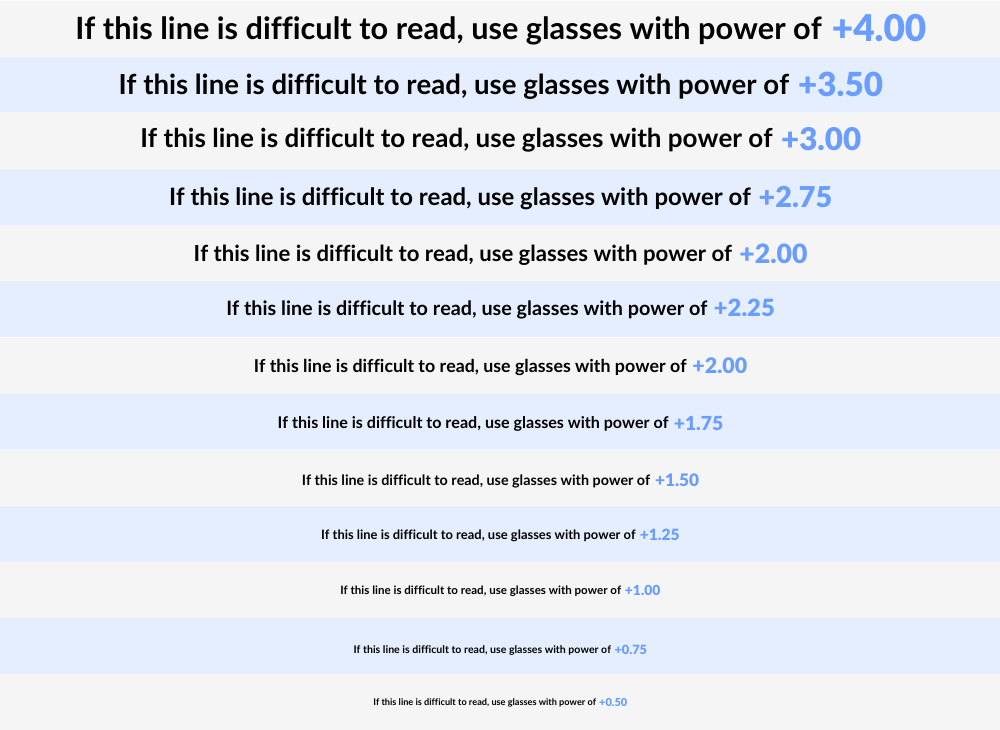
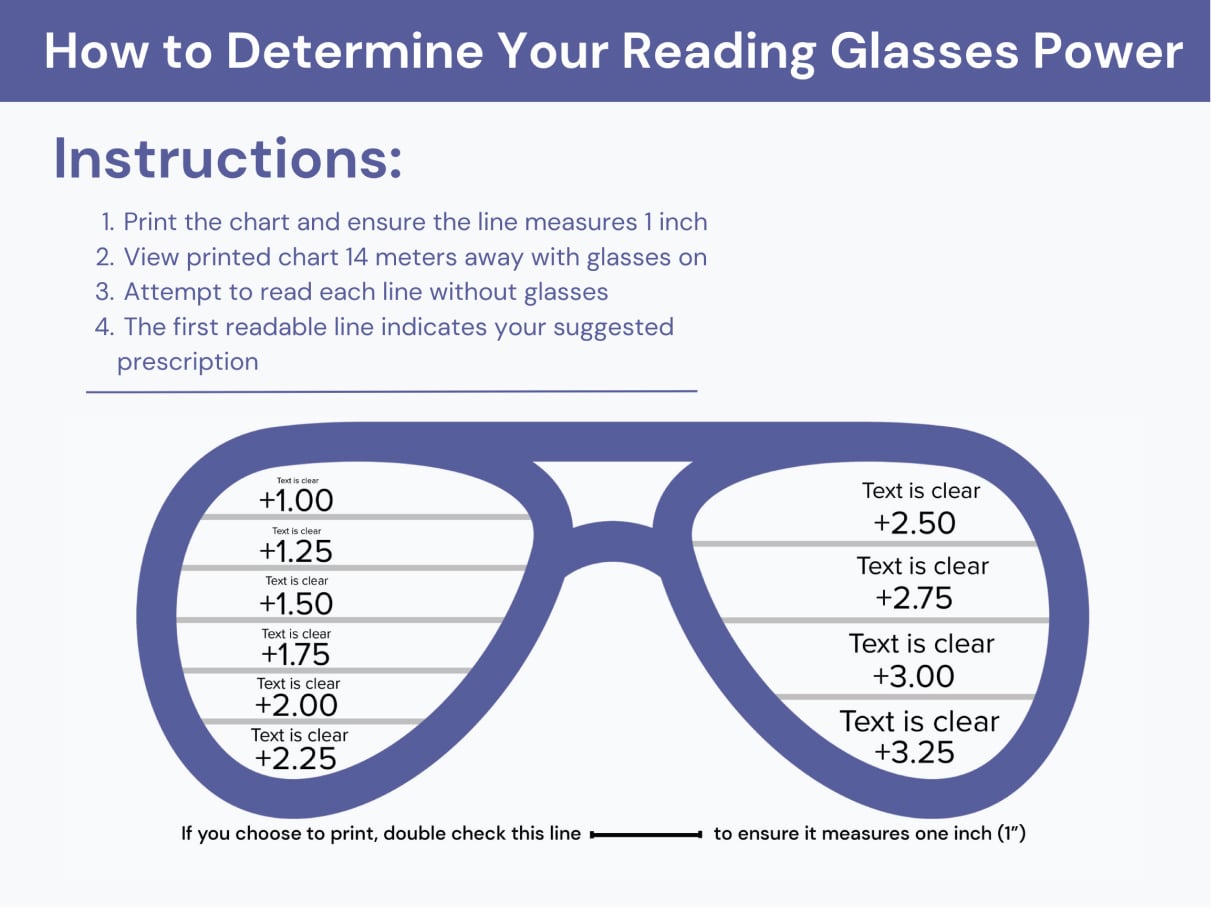
A common starting point for self-assessment involves online vision charts and dedicated mobile applications. Many websites and apps offer simplified versions of traditional eye charts, specifically designed for near vision testing. These typically involve displaying text of varying sizes and asking the user to identify the smallest legible line at a comfortable reading distance (usually 14-16 inches). Some apps go a step further, guiding users through a series of tests to estimate their required diopter strength. For instance, they might present numbers or letters and ask at what distance they become clear, or provide a sliding scale to adjust text size until it’s readable, then correlate that to a diopter value. While convenient, the accuracy of these tools depends heavily on proper screen calibration, consistent lighting, and the user’s adherence to instructions, highlighting their role as preliminary indicators rather than definitive prescriptions.
Virtual Try-On and AI-Powered Recommendations
Beyond basic vision tests, technology now extends to the aesthetic and practical aspects of selecting reading glasses. E-commerce platforms specializing in eyewear frequently incorporate virtual try-on features, leveraging augmented reality (AR) to allow users to “wear” different frames using their device’s camera. While primarily focused on style, some advanced platforms integrate this with AI-powered recommendation engines. By analyzing user input about their age, perceived difficulty with reading, and sometimes even their performance on integrated mini-vision tests, these AI systems can suggest not only frame styles but also initial diopter strengths. This fusion of AR for aesthetics and AI for functional recommendations provides a more holistic, tech-driven approach to pre-purchase evaluation, helping users narrow down options before committing to a physical purchase.
DIY Pupillary Distance (PD) Measurement Tools
An often-overlooked yet critical parameter when ordering glasses, especially online, is pupillary distance (PD). PD is the measurement in millimeters between the centers of your pupils. Accurate PD ensures that the optical center of your lenses aligns precisely with the center of your pupils, preventing visual distortion and discomfort. Many mobile applications and web-based tools now offer DIY PD measurement capabilities. These tools typically utilize your smartphone’s camera, often asking you to place a standard-sized card (like a credit card) against your forehead for scale, or to take a selfie while looking straight ahead. The app then uses image recognition and geometric algorithms to calculate your PD. While these tools offer a practical solution for at-home measurements, professional verification is always recommended for optimal accuracy, particularly for more complex prescriptions.
Decoding Lens Strengths and Digital Lens Features
Understanding the technical specifications of reading glasses and the advanced features available in modern lenses is paramount for making an informed choice, especially for those with significant digital screen exposure. The right combination of strength and features can significantly enhance comfort and performance in a digital environment.
Understanding Diopter Ratings
Reading glasses strengths are measured in diopters, indicated by a “+” sign followed by a number (e.g., +1.00, +2.50). This number represents the optical power of the lens. The higher the diopter number, the stronger the magnification and the closer an object needs to be for clear vision. For example, someone who needs a +1.00 diopter might find clear vision at about 16-20 inches, while someone needing a +2.50 diopter might require objects to be as close as 10-12 inches. Self-assessment tools aim to approximate this value based on your ability to read text at a comfortable distance. It’s crucial to select a strength that allows comfortable reading without requiring you to hold material excessively close or far away, as an incorrect diopter can exacerbate eye strain. Many people starting with presbyopia begin with lower strengths, like +0.75 or +1.00, and gradually increase as their eyes’ natural focusing ability diminishes further over time.
The Role of Blue Light Filtering Technology
Given the extensive use of digital screens, blue light filtering technology has become a prominent feature in modern reading glasses. Digital devices emit a significant amount of high-energy visible (HEV) blue light, which can contribute to eye strain, disrupt sleep patterns, and potentially have long-term effects on eye health. Lenses with blue light filtering technology are designed to block or absorb a portion of this blue light spectrum. These coatings or embedded materials can reduce glare, enhance contrast, and minimize the digital eye strain often associated with prolonged screen time. For individuals who spend hours daily on computers, tablets, or smartphones, incorporating blue light filtering into their reading glasses can be a valuable investment for enhanced visual comfort and protection, directly addressing a critical aspect of modern tech use.
Progressive vs. Single Vision Lenses in a Multi-Screen World
When considering reading glasses, users also face a choice between single-vision and progressive lenses. Single-vision reading glasses have one uniform magnification power across the entire lens, optimized for a specific reading distance. They are ideal for tasks that keep objects at a consistent close range, like reading a book or a tablet held at arm’s length.
However, in a multi-screen environment, where one might simultaneously view a desktop monitor (arm’s length), a phone (closer), and occasionally glance at distant objects, single-vision lenses can be limiting. This is where progressive lenses (often called no-line bifocals or multifocals) offer a sophisticated technological solution. Progressive lenses provide a seamless gradient of vision, transitioning from distance vision at the top, to intermediate vision (for computer screens) in the middle, and finally to near vision (for reading) at the bottom. This allows users to view objects clearly at various distances without switching glasses. While they require an adaptation period due to the visual shifts, progressive lenses are a highly efficient and technologically advanced solution for individuals navigating a dynamic visual landscape, providing an ergonomic advantage for complex digital workflows.
When to Seek Professional Guidance (and How Tech Supports It)
While digital tools offer an excellent starting point for self-assessment and understanding your visual needs, they are not a substitute for professional medical advice. An eye care professional possesses the expertise and advanced diagnostic technology necessary for a precise and comprehensive evaluation.
Optometrists and ophthalmologists utilize sophisticated diagnostic equipment that goes far beyond what any app can offer. Automated refractors quickly measure your basic prescription, while digital phoropters allow for highly precise, incremental adjustments during the subjective refraction process. Retinal scanners and ocular coherence tomography (OCT) devices can detect underlying eye health issues that might influence your vision, such as glaucoma, cataracts, or macular degeneration, which are invisible during a self-test. These advanced technologies ensure that any reading glasses prescription not only corrects your immediate vision problem but also accounts for overall eye health.
However, the insights gained from your preliminary tech-aided self-assessment can significantly benefit your professional consultation. By understanding terms like diopter strength, pupillary distance, and the potential benefits of blue light filtering or progressive lenses, you can engage in a more informed discussion with your eye care professional. You can explain how your current reading glasses (or lack thereof) impact your digital productivity, mention specific distances you struggle with (e.g., monitor vs. smartphone), and articulate your interest in specific lens technologies. This collaborative approach, where personal tech exploration meets professional medical expertise, leads to the most accurate and beneficial solution for your reading glasses needs.
Integrating Your Choice with Your Digital Lifestyle
Ultimately, the goal of knowing what reading glasses you need is to enhance your daily life, particularly your interaction with technology. The right pair of reading glasses should be viewed as an essential tool in your digital toolkit, much like an ergonomic keyboard or a high-resolution monitor. They are designed to improve comfort, reduce strain, and optimize your visual performance across all your digital devices.
Consider your primary digital activities. If you spend most of your day on a desktop computer, a pair of “computer glasses” with an optimized intermediate focus (often slightly weaker than traditional reading glasses) and blue light filtering may be ideal. If you frequently switch between a laptop, phone, and occasionally paper documents, progressive lenses might offer the most seamless experience. Some individuals even benefit from having multiple pairs: one optimized for their primary workstation, and another, perhaps a simpler single-vision pair, for casual reading on a tablet or phone.
Ensuring your vision correction is precise and tailored to your digital habits is a fundamental aspect of maintaining overall well-being and productivity in the modern technological landscape. By leveraging both self-assessment technologies and professional guidance, you can make an informed choice that integrates seamlessly with your unique digital lifestyle, transforming a common age-related change into an opportunity for optimized visual clarity and comfort.
aViewFromTheCave is a participant in the Amazon Services LLC Associates Program, an affiliate advertising program designed to provide a means for sites to earn advertising fees by advertising and linking to Amazon.com. Amazon, the Amazon logo, AmazonSupply, and the AmazonSupply logo are trademarks of Amazon.com, Inc. or its affiliates. As an Amazon Associate we earn affiliate commissions from qualifying purchases.