
In the intricate landscape of modern digital infrastructure, understanding identifiers is paramount. Among these, the “tenant ID” stands as a crucial concept, particularly for anyone operating within cloud environments, Software-as-a-Service (SaaS) platforms, or complex enterprise systems. A tenant ID isn’t just a random string of characters; it’s a fundamental identifier that delineates your operational space, ensures data isolation, and facilitates seamless interaction with shared resources. For developers, IT administrators, and even end-users managing sophisticated applications, knowing how to find and utilize your tenant ID is essential for everything from troubleshooting to advanced system integration.
Understanding the Core Concept of a Tenant ID
At its heart, a tenant ID is a unique identifier assigned to a “tenant” within a multi-tenant architecture. To fully grasp its significance, it’s vital to understand the multi-tenancy model itself.
Multi-Tenancy in Cloud Computing and SaaS
Multi-tenancy is a software architecture where a single instance of a software application serves multiple customers, or “tenants.” Each tenant shares the same underlying infrastructure, database, and application code, but their data and configurations remain logically separated. This model is ubiquitous in today’s cloud-first world, powering popular services from CRM systems like Salesforce to cloud platforms such as Microsoft Azure and Google Cloud.
The core benefit of multi-tenancy is efficiency: resources are pooled, reducing costs for service providers and, consequently, for customers. It also simplifies maintenance, updates, and scaling, as these operations can be performed on a single instance benefiting all tenants simultaneously. However, to make this possible while preserving data privacy and operational independence, each tenant requires a distinct identifier – the tenant ID.
Why Tenant IDs are Essential for Isolation and Security
The tenant ID acts as a digital partition key. When a user authenticates or an API request is made, the system uses the tenant ID to direct the request to the correct tenant’s data and configurations. This ensures that:
- Data Isolation: Your data is kept separate and inaccessible to other tenants sharing the same application instance. This is a critical security feature, preventing cross-tenant data leakage.
- Configuration Management: Each tenant can have unique settings, customizations, and user permissions. The tenant ID ensures that the correct set of configurations is applied to your environment.
- Resource Allocation: While resources are shared, the tenant ID can help in monitoring and, in some advanced systems, even dynamically allocating resources specific to a tenant’s load or subscription tier.
- Auditing and Compliance: For regulatory purposes, tracing actions back to a specific tenant is crucial. The tenant ID provides the necessary link for audit trails, demonstrating adherence to compliance standards.
Without a robust tenant identification system, multi-tenant environments would be insecure, chaotic, and impractical.
Distinguishing Tenant ID from User ID
It’s common for newcomers to confuse a tenant ID with a user ID, but they serve distinct purposes:
- Tenant ID: Identifies your organization or specific instance within the larger multi-tenant system. It represents the “company” or “account” level. For example, “Microsoft” in Microsoft 365.
- User ID: Identifies an individual user within a specific tenant. It represents a “person” or “individual login.” For example, “john.doe@contoso.com” within the “Contoso” tenant.
Multiple users can belong to a single tenant, all sharing the same tenant ID but possessing unique user IDs. When you log in, both your tenant ID (often implicitly derived from your email domain or a dedicated login field) and your user ID are used to grant you access to your specific data within your organization’s environment.
Common Scenarios Where You Need Your Tenant ID
Knowing your tenant ID is not merely an academic exercise; it’s a practical necessity in many operational and development contexts.
Troubleshooting and Support Requests
When encountering issues with a SaaS application or cloud service, the first piece of information a support technician will often request, after your name and user ID, is your tenant ID. This allows them to quickly locate your specific environment within their extensive multi-tenant infrastructure. Without it, diagnosing tenant-specific problems, examining logs, or applying targeted fixes becomes significantly more challenging and time-consuming. It’s the key to unlocking support that understands your unique setup.
API Integrations and Development
For developers building integrations with third-party services, the tenant ID is an indispensable component. When making API calls to retrieve data, update records, or manage resources, the API often requires a tenant ID as part of the request header, URL path, or payload. This ensures that the API request targets the correct organization’s data. For instance, an API key might be tenant-specific, or certain API endpoints are designed to operate exclusively within the scope of a given tenant ID. Accurate tenant identification is critical for successful and secure programmatic interactions.
Compliance and Auditing
In regulated industries, or simply as part of good governance, organizations must maintain audit trails of activities. The tenant ID provides the necessary context for these trails, linking specific actions, data modifications, or access events to the correct organizational entity. When external auditors or internal compliance teams review system logs, they rely on the tenant ID to verify that data access and processing align with policies and regulations, such as GDPR, HIPAA, or SOC 2. It forms a fundamental element of accountability.
Data Migration and Management
Whether you’re migrating data between different instances of the same service, backing up your organizational data, or managing large datasets, the tenant ID is crucial. It ensures that data is extracted from, or imported into, the correct tenant environment. In scenarios involving mergers, acquisitions, or divestitures, correctly identifying and managing data associated with specific tenant IDs is paramount to avoid data mix-ups or loss. It guarantees that data operations are performed on the intended organizational partition.
Practical Steps to Locate Your Tenant ID

Finding your tenant ID can vary depending on the specific service or platform you are using. However, several common methods can help you pinpoint this critical identifier.
Within the Application Interface (Admin Panels, Account Settings)
The most straightforward way to find your tenant ID is often directly within the application’s user interface, especially if you have administrative privileges.
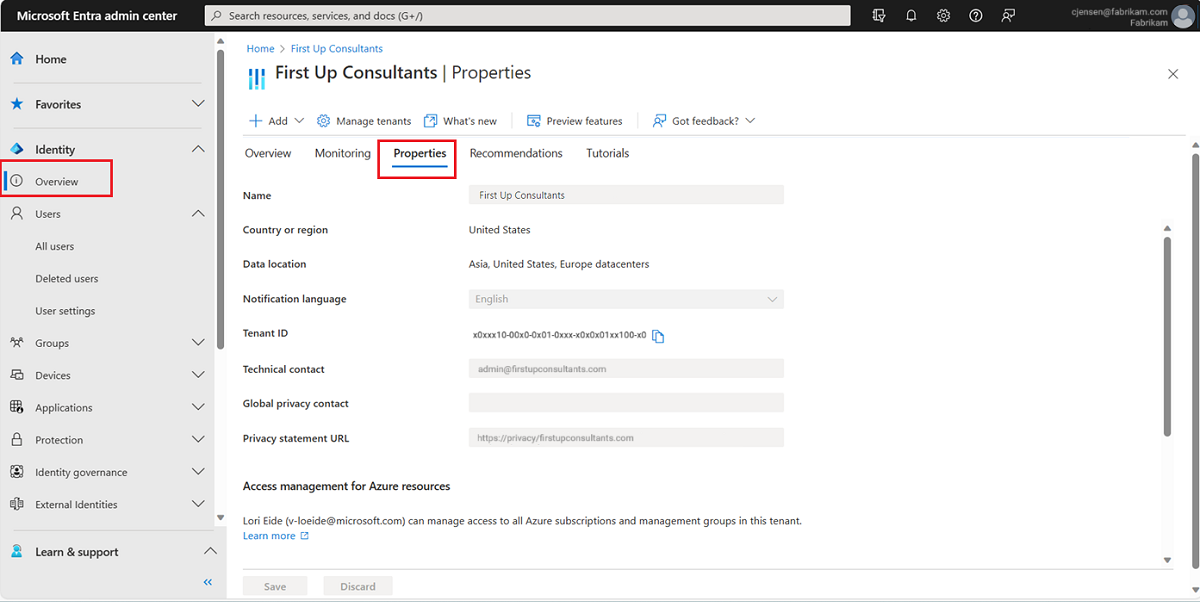
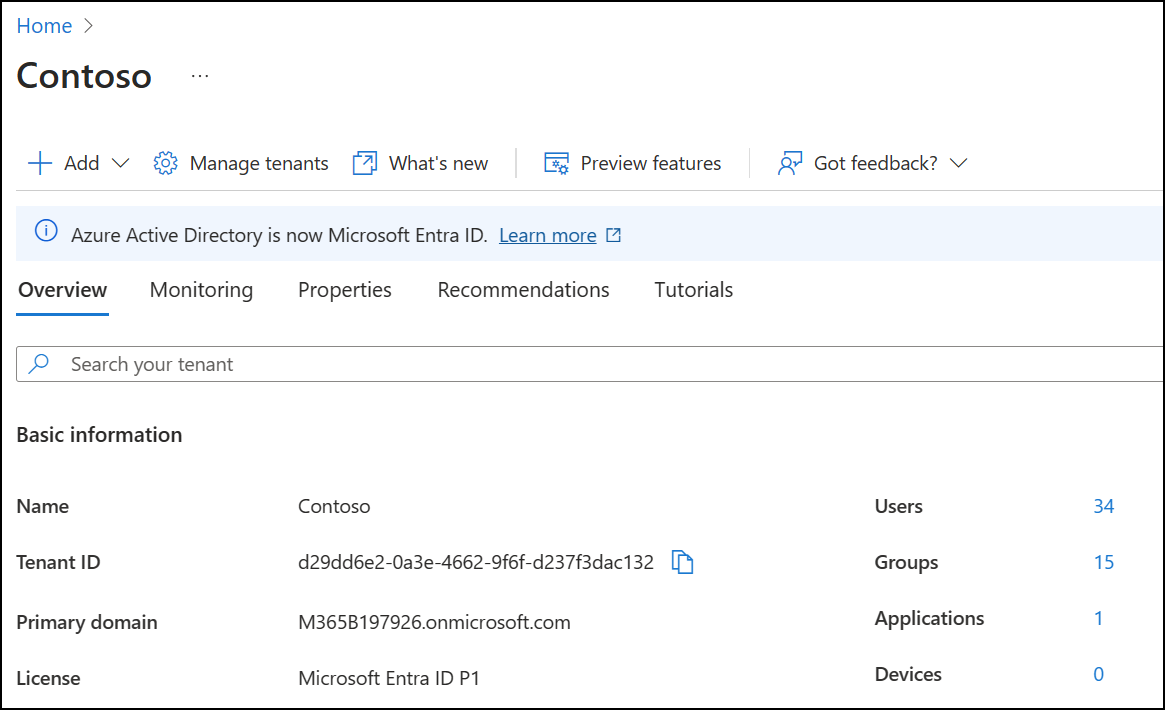
- Admin Portals: Many enterprise applications, particularly cloud platforms like Microsoft Azure, AWS, or Google Cloud Platform, feature dedicated “Admin Centers” or “Portals.” Within these portals, look for sections related to “Tenant Information,” “Organization Settings,” “Account Details,” or “Directory Properties.” For example, in Azure Active Directory, the “Tenant ID” is clearly displayed under “Overview” or “Properties” of your AAD tenant.
- Account Settings: For SaaS applications, navigate to your account settings, profile, or subscription details. Sometimes the tenant ID is listed there, although it might be labelled differently, such as “Organization ID” or “Instance ID.”
- Help or About Sections: Less commonly, some applications might list technical details, including the tenant ID, in their “Help,” “About,” or “System Information” sections.
From Your Service Provider’s Documentation
If you’re struggling to find it within the UI, consult the official documentation provided by your service vendor. SaaS providers and cloud platforms almost always have detailed guides on how to find your tenant ID, especially for common use cases like API integration or support. Searching their knowledge base for “how to find tenant ID” along with the service name (e.g., “Salesforce how to find organization ID,” “AWS account ID,” “Microsoft 365 tenant ID”) will typically yield precise instructions.
Via API Calls or Developer Tools
For technical users, developers, or system administrators, the tenant ID can often be retrieved programmatically or through developer tools:
- API Endpoints: Many services provide dedicated API endpoints designed to return tenant-specific information, including the tenant ID. For instance, in Microsoft Graph API, you can query for tenant details.
- Browser Developer Tools: When logged into a web application, open your browser’s developer tools (F12). Inspect network requests (under the “Network” tab) as you navigate the application. Often, the tenant ID will be present in request headers, payloads, or URL parameters as a globally unique identifier (GUID) or similar string.
- SDKs and CLIs: Command-Line Interfaces (CLIs) and Software Development Kits (SDKs) for cloud platforms (like Azure CLI, AWS CLI) can often retrieve account or tenant IDs using specific commands, typically after you’ve authenticated.
Contacting Support Directly
If all else fails, reaching out to the customer support team of your service provider is a reliable option. Be prepared to verify your identity and account ownership. They will be able to provide you with your tenant ID, often after a quick verification process.
Examining URLs and Session Information
In some web-based multi-tenant applications, the tenant ID might be visible directly in the URL when you are logged in. Look for long, alphanumeric strings (often GUIDs) that appear consistently in the URL path or as a query parameter after yourdomain.com/ or ?tenantId=. Similarly, inspecting cookies or local storage via browser developer tools might reveal session-specific information that includes the tenant ID.
Security Implications and Best Practices for Tenant IDs
While a tenant ID is primarily an identifier, its role in demarcating your data makes its security critical.
Protecting Your Tenant ID
While a tenant ID isn’t a secret credential in the same way a password is, it’s part of your organization’s digital footprint. It helps identify your resources. Avoid unnecessarily publishing it in public forums or sharing it with unverified entities. It should be treated as a semi-sensitive piece of information that, combined with other data, could potentially aid malicious actors in targeting your organization.
Role-Based Access Control and Tenant Isolation
The concept of the tenant ID goes hand-in-hand with robust Role-Based Access Control (RBAC). Even within your own tenant, not all users should have access to all resources. RBAC ensures that permissions are granular, limiting what an individual user can do within their tenant. Furthermore, the multi-tenant architecture itself, leveraging tenant IDs, is designed to provide strong logical isolation between different tenants, preventing one tenant from accessing another’s data, even if they share the same physical hardware. Service providers invest heavily in securing these isolation boundaries.
Secure API Key Management
When using tenant IDs in API integrations, ensure that any associated API keys or tokens are managed securely. These keys often grant programmatic access within a specific tenant and should be treated with the highest level of confidentiality. Use environment variables, secret management services, and strong access policies to protect them, rotating them regularly.
The Future of Tenant Identification and Multi-Cloud Environments
As technology evolves, so does the sophistication of tenant identification and management.
Federated Identity and Cross-Tenant Operations
The trend towards federated identity management means that tenant IDs will increasingly play a role in seamless authentication across different services and even different cloud providers. Imagine a scenario where a user authenticates once with their corporate identity provider (which implicitly knows their tenant ID) and gains access to multiple SaaS applications and cloud resources, all correctly scoped to their organization’s tenant. This simplifies user experience while maintaining stringent security. Cross-tenant operations, where services from one tenant might legitimately need to interact with services in another (e.g., business partners), will rely on advanced secure authorization mechanisms built upon these foundational tenant IDs.
Challenges in Hybrid and Multi-Cloud Scenarios
The rise of hybrid cloud (on-premises and public cloud) and multi-cloud (using multiple public cloud providers simultaneously) strategies introduces new complexities for tenant identification. An organization might have different “tenant IDs” or analogous identifiers across AWS, Azure, Google Cloud, and their on-premises data centers. Orchestrating identities, access, and data across these disparate environments requires sophisticated identity management solutions that can map and reconcile these different organizational identifiers, ensuring consistent policy enforcement and data integrity, irrespective of where the workload resides. The tenant ID, in its various forms, will remain a cornerstone of managing these distributed digital estates.
aViewFromTheCave is a participant in the Amazon Services LLC Associates Program, an affiliate advertising program designed to provide a means for sites to earn advertising fees by advertising and linking to Amazon.com. Amazon, the Amazon logo, AmazonSupply, and the AmazonSupply logo are trademarks of Amazon.com, Inc. or its affiliates. As an Amazon Associate we earn affiliate commissions from qualifying purchases.