
In the current era of Software as a Service (SaaS), managing the myriad of digital subscriptions has become a core component of digital literacy. YouTube Premium, Google’s flagship subscription service, offers a seamless, ad-free experience, background play, and offline downloads. However, as user needs evolve or as one streamlines their digital ecosystem, knowing how to efficiently terminate or pause these services is essential. This guide provides an in-depth technical walkthrough of the cancellation process across various platforms, addresses common synchronization hurdles, and explores the implications for your associated Google services.
1. Navigating the Subscription Architecture Across Platforms
YouTube’s architecture is designed to be cross-platform, but the billing logic often varies depending on the gateway used to sign up. Whether you are navigating a web browser on a Linux distribution or using a mobile application on an iPad, the interface for subscription management follows specific UI/UX patterns that must be understood to ensure a successful cancellation.
Cancelling via Desktop Browser (Web Interface)
The desktop version of YouTube provides the most direct access to Google’s subscription management tools. Because the web interface bypasses third-party app store APIs, it reflects the most accurate state of your account.
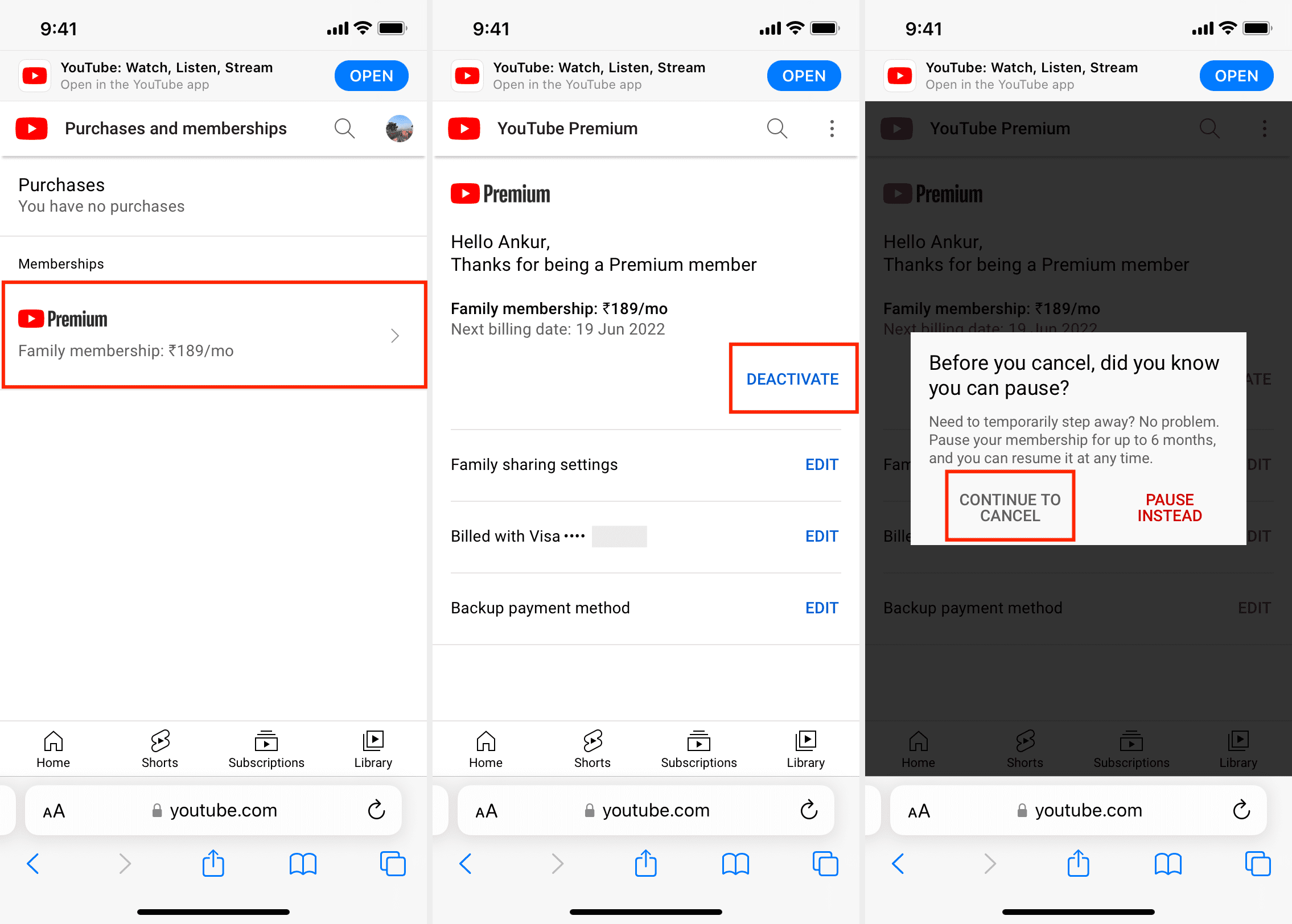
To initiate the process, navigate to your profile icon in the top right corner and select “Purchases and memberships.” This section acts as the centralized hub for all financial transactions within the YouTube ecosystem. From here, locate the “Premium” section and select “Manage Membership.” Google typically utilizes a multi-step confirmation process—often referred to in UX design as “friction points”—to ensure the user is making a deliberate choice. You will be prompted to either “Deactivate” or “Pause” the membership. Selecting “Deactivate” and then “Continue to Cancel” will move the request to the final confirmation phase.
Mobile App Management: Android vs. iOS App Store Hurdles
The process on mobile devices is bifurcated by operating system policies. On Android, the YouTube app communicates directly with the Google Play Store’s billing API. You can manage the subscription through the YouTube app’s settings or directly via the “Subscriptions” tab in the Google Play Store.
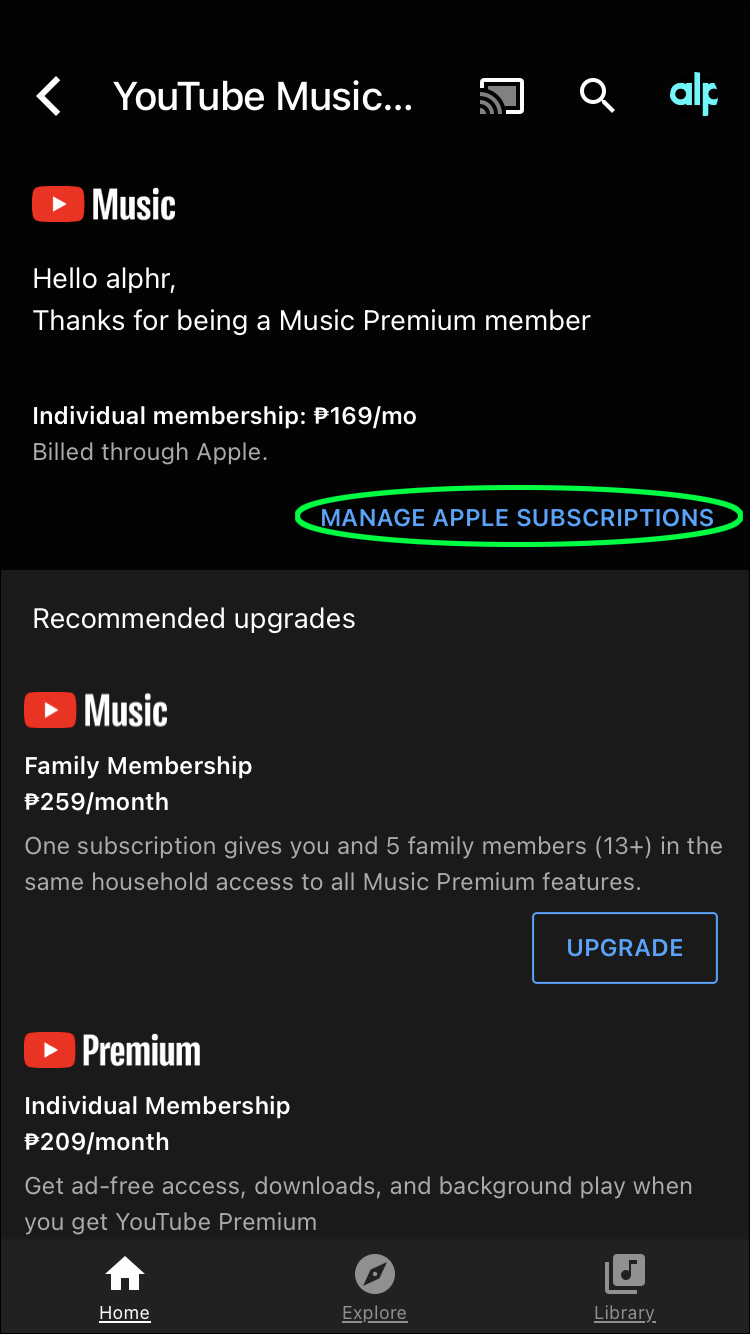
However, iOS users face a more complex technical landscape. If you subscribed to YouTube Premium through the iOS app, your billing is handled by Apple’s App Store via an In-App Purchase (IAP). In this scenario, the YouTube app cannot cancel the subscription directly due to Apple’s sandboxed environment. Users must navigate to their iOS “Settings,” tap on their Apple ID at the top, and select “Subscriptions.” From there, YouTube must be selected and the “Cancel Subscription” command issued. This distinction is critical; failing to recognize who handles your billing (Google vs. Apple) is the primary reason users encounter “missing” cancellation buttons.
2. The Technical Logic of Billing Cycles and Account States
When a user triggers a cancellation, the backend does not immediately terminate access. Understanding the underlying logic of account states can help users time their cancellation to maximize their remaining service period.
Understanding the Grace Period and End-of-Cycle Logic
YouTube Premium operates on a “pre-paid” model. When you cancel, you are essentially notifying the server not to initiate the next billing transaction. Your account status transitions from “Active” to “Pending Cancellation.” During this period, all “Premium” flags remain active on your account metadata.
This means you will retain access to ad-free viewing, YouTube Music Premium, and background play until the exact timestamp of your next scheduled billing date. For example, if your cycle renews on the 15th and you cancel on the 2nd, the server-side permissions will remain valid for the remaining 13 days. This grace period is a standard technical implementation in most subscription-based tech stacks to prevent disputes over partial-month service.
Paused Subscriptions vs. Permanent Deactivation
Google introduced the “Pause” functionality as a retention tool, but it serves a specific technical purpose for the user. When you pause a membership, you can choose a duration between 1 and 6 months. Technically, this suspends the billing API calls while preserving your “Offline Downloads” and “YouTube Music” preferences.
The advantage of a pause over a full deactivation is the preservation of local data. If you have gigabytes of music or videos downloaded for offline use, a full cancellation will eventually trigger a cleanup script that deletes these cached files once the grace period ends. Pausing keeps these files indexed, though they remain encrypted and inaccessible until the subscription is resumed.

3. Troubleshooting Common Technical Hurdles in Cancellation
Despite a seemingly straightforward UI, various technical conflicts can prevent a user from successfully cancelling their YouTube Premium account. These often stem from synchronized account conflicts or third-party billing integrations.
Resolving Third-Party Billing Conflicts
In many regions, YouTube Premium is bundled with mobile carrier plans or ISP packages (e.g., T-Mobile, Verizon, or Orange). When a subscription is tethered to a third-party service, the “Manage Membership” button on YouTube may be greyed out or point to an external URL.
In these cases, the cancellation must occur within the third-party’s management portal. This creates a “Handshake” requirement between the third-party API and Google’s API. If you cancel through your carrier but your YouTube account still shows as Premium, there is likely a latency in the API sync. Waiting 24 to 48 hours usually resolves this, but if it persists, a manual refresh of the account tokens (by signing out and back in) can force the app to fetch the updated membership status.
Clearing Cache and Cookie Interference
Sometimes, the “Cancel” button may appear to malfunction—clicking it results in a spinning loader or an error message. This is frequently caused by corrupted browser cookies or cached scripts that are interfering with the JavaScript execution on the page.
From a technical perspective, the cancellation process involves several POST requests to Google’s servers. If your browser’s cache is holding an outdated version of the page’s scripts, these requests may fail. The recommended troubleshooting step is to attempt the cancellation in an “Incognito” or “Private” window. This ensures that no extensions (like ad blockers or script managers) are interfering with the transaction and that you are working with a clean session state.
4. Evaluating the Digital Impact of Cancellation
Cancelling YouTube Premium is more than just reintroducing advertisements; it alters the technical performance of the YouTube ecosystem across your devices. Understanding these shifts helps in managing the transition back to the “Free” tier.
Impact on YouTube Music and Data Synchronization
YouTube Premium includes a full subscription to YouTube Music. Upon cancellation, the YouTube Music app reverts to its ad-supported version. The primary technical loss here is the “Audio-only” mode and the bit-rate selection. Premium users can stream at 256kbps AAC (High Quality). Once the subscription ends, the stream may default to a lower bit-rate to conserve bandwidth on the ad-supported tier.
Furthermore, any “Smart Downloads”—a feature where the app uses machine learning to download music you might like—will cease to function. The algorithm will still maintain your “Likes” and “Playlists,” as these are tied to your primary Google account, but the ability to play them without an active data connection will be revoked server-side.
The Return of the Ad-Serving Engine
Once the “Premium” flag is removed from your account, the YouTube ad-serving engine resumes its integration into your video feed. This involves the injection of mid-roll, pre-roll, and display ads. For users on limited data plans, this is a technical consideration: ads consume additional bandwidth.
If you have grown accustomed to the background play feature (the ability to lock your phone while the audio continues), it is important to note that this is a software lock implemented by the app. Technically, the app is capable of background play, but it checks for the “Premium” entitlement before allowing the OS to keep the audio process active while the UI is minimized.
Conclusion: Maintaining Digital Sovereignty
The ability to easily enter and exit subscription agreements is a vital part of maintaining digital sovereignty. While YouTube Premium offers a high-fidelity, ad-free experience, the technical process of cancellation is a necessary skill for any savvy tech user. By understanding the platform-specific UI paths, the logic of billing cycles, and how to troubleshoot API and cache issues, you can ensure that your digital footprint remains under your control. Whether you are switching to a different media stack or simply auditing your digital services, a clean, technical approach to cancellation ensures a smooth transition without unintended charges or data loss.
aViewFromTheCave is a participant in the Amazon Services LLC Associates Program, an affiliate advertising program designed to provide a means for sites to earn advertising fees by advertising and linking to Amazon.com. Amazon, the Amazon logo, AmazonSupply, and the AmazonSupply logo are trademarks of Amazon.com, Inc. or its affiliates. As an Amazon Associate we earn affiliate commissions from qualifying purchases.