
Understanding time formats is a fundamental skill in an increasingly interconnected and digitally driven world. While the 12-hour clock (AM/PM) is prevalent in daily civilian life, the 24-hour clock, commonly known as military time, serves as a cornerstone for precision, clarity, and unambiguous communication across a multitude of professional and technical domains. For anyone wondering “what is 4:30 in military time,” the answer hinges on whether it’s 4:30 in the morning or the afternoon, and the implications of this conversion extend far beyond a simple numerical change, especially within technological ecosystems.
The immediate answer is straightforward: 4:30 AM is 04:30 in military time, and 4:30 PM is 16:30 in military time. This simple conversion underscores a broader principle: the elimination of ambiguity that the 24-hour clock inherently provides. In digital systems, software applications, and global operations, such clarity is not merely a preference but a critical requirement, preventing costly errors, miscommunications, and operational delays.
The Precision of the 24-Hour Clock in Digital Systems
The adoption of the 24-hour clock across various technical sectors is not arbitrary; it is a deliberate choice driven by the need for absolute temporal accuracy and efficiency. Unlike the 12-hour format, which necessitates the addition of AM or PM designators to differentiate between morning and afternoon, the 24-hour system uses a single sequence of numbers from 00 to 23, leaving no room for misinterpretation.
Decoding Military Time: A Foundational Overview
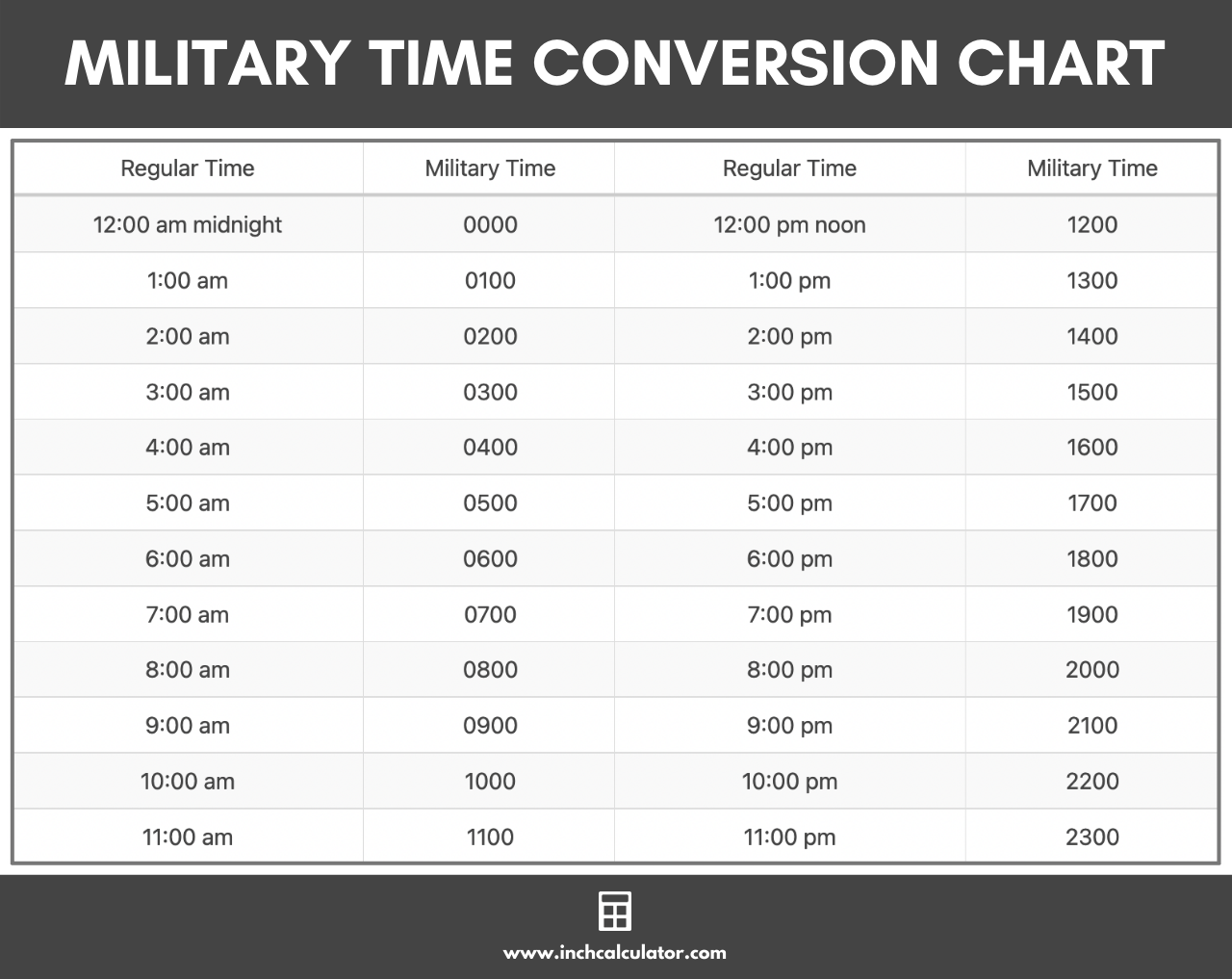
At its core, military time operates on a cycle of 24 distinct hours, beginning at midnight (00:00) and concluding just before the next midnight (23:59). Each hour is numbered sequentially.
- Midnight to 12:59 AM corresponds to 00:00 to 00:59.
- 1:00 AM to 11:59 AM directly maps to 01:00 to 11:59.
- Noon (12:00 PM) is 12:00.
- From 1:00 PM onwards, you add 12 to the standard hour. So, 1:00 PM becomes 13:00, 2:00 PM becomes 14:00, and so forth, until 11:59 PM which is 23:59.
The benefit here for digital systems is profound. When a server logs an event, a database timestamps a transaction, or an application schedules a task, using a 24-hour format ensures that the time entry is self-contained and unequivocally understood, regardless of the geographic location of the system or the user. This eliminates the need for additional logic to parse AM/PM, simplifying data processing and reducing the potential for bugs related to time zone or format conversions.
The Simple Conversion: 4:30 PM to 16:30
To convert any time from the 12-hour format to the 24-hour format:
- For AM times (12:00 AM to 12:59 PM):
- If it’s 12:00 AM (midnight), it becomes 00:00.
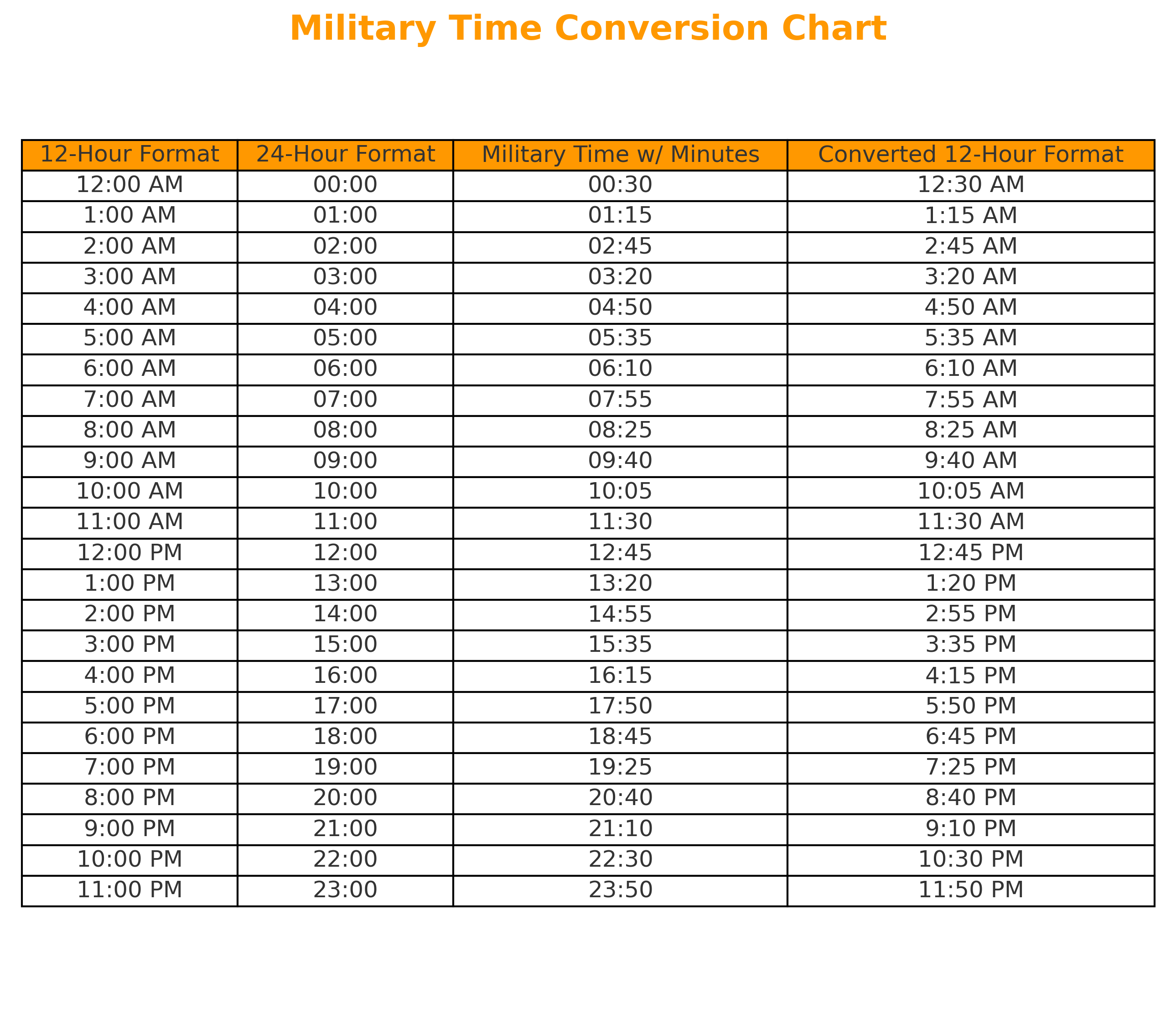
- For 1:00 AM through 11:59 AM, simply retain the hour and minute, adding a leading zero if the hour is a single digit. So, 4:30 AM is 04:30.
- For PM times (12:00 PM to 11:59 PM):
- If it’s 12:00 PM (noon), it remains 12:00.
- For 1:00 PM through 11:59 PM, add 12 to the hour. So, 4:30 PM becomes 4 + 12 = 16. Therefore, 4:30 PM is 16:30.
This systematic approach makes conversion easy to automate in software, whether through built-in functions in programming languages (like Python’s strftime or JavaScript’s Date object methods) or through system-level configurations. For instance, most operating systems allow users to switch between 12-hour and 24-hour display formats, facilitating a seamless transition for individuals working in environments where military time is standard.
Why Tech Professionals Adopt 24-Hour Time
In the world of technology, from software development to network administration, and from data science to cybersecurity, precision in timekeeping is paramount. The stakes are often high, ranging from ensuring critical system uptime to preventing data loss or security breaches. The 24-hour clock offers several distinct advantages that make it the preferred standard.
Mitigating Ambiguity in Global Operations
Many tech companies operate on a global scale, with development teams, support staff, and users distributed across different time zones. Scheduling virtual meetings, coordinating software releases, or deploying updates across multiple regions becomes inherently complex when relying on a 12-hour clock. “Schedule a call for 9:00” could mean 9 AM or 9 PM, leading to missed appointments and productivity losses. With 24-hour time, “09:00” unambiguously refers to 9 AM, and “21:00” refers to 9 PM, eliminating the need for further clarification or mental conversion based on AM/PM context. This clarity is crucial for project managers orchestrating global sprints and for DevOps teams ensuring continuous integration and delivery pipelines run smoothly worldwide.
Streamlining Data Logging and System Timestamps
Every action within a digital system — a user login, a file modification, an error message, a network packet transmission — is typically accompanied by a timestamp. These timestamps are vital for debugging, auditing, security analysis, and performance monitoring. Imagine a distributed database where logs from different servers, perhaps in different countries, are aggregated. If some logs use AM/PM and others don’t, or if there’s inconsistency in how AM/PM is handled, chronological ordering and event correlation become incredibly difficult, if not impossible. By standardizing on 24-hour time (often in conjunction with UTC for time zone neutrality), all system logs provide a universally consistent and unambiguous record of events, greatly simplifying analysis and troubleshooting. This is foundational for site reliability engineers (SREs) and security analysts who rely on precise event sequencing to diagnose issues or detect anomalies.
Essential for Scheduling and Project Management Software
Modern project management tools (e.g., Jira, Asana, Microsoft Project), calendar applications (e.g., Google Calendar, Outlook Calendar), and task schedulers (e.g., cron jobs, Kubernetes cron jobs) inherently lean on 24-hour time, often displaying it as a user preference. These systems need to calculate durations, identify overlaps, and send timely notifications. Building this logic on a 24-hour foundation simplifies the underlying algorithms and reduces edge cases associated with AM/PM transitions, especially across midnight boundaries. For software developers, integrating date and time pickers that support 24-hour input and display is a common practice, enhancing the usability and reliability of their applications for professional users.
Digital Tools and Methodologies for Time Mastery
The modern tech landscape offers a plethora of tools and methodologies that facilitate the accurate handling and conversion of time, particularly when working with the 24-hour format and across various time zones.
Leveraging OS Settings and Productivity Apps
Most contemporary operating systems (Windows, macOS, Linux, iOS, Android) provide explicit settings to switch the system clock display between 12-hour and 24-hour formats. For tech professionals, configuring their primary devices to display 24-hour time reinforces familiarity and reduces cognitive load when dealing with professional communications or system logs.
Beyond OS settings, many productivity applications, such as calendar clients, email platforms, and communication tools (e.g., Slack, Microsoft Teams), also offer options to display time in the 24-hour format. This consistency across the digital ecosystem streamlines workflow and minimizes potential misunderstandings. There are also numerous browser extensions and dedicated time zone converter apps that make quick conversions effortless, allowing users to input a time in one format and immediately see its equivalent in another, often across multiple time zones.
Programming and Scripting for Time Zone and Format Handling
For developers and system administrators, direct manipulation of time formats is a daily task. Programming languages offer robust libraries and functions for handling dates and times:
- Python: The
datetimemodule provides powerful objects for representing dates and times, with methods likestrftime()for formatting output into 24-hour strings (%H:%M) andstrptime()for parsing them. It also supportspytzfor time zone awareness. - JavaScript: The
Dateobject and its methods (e.g.,getHours(),toLocaleTimeString()) allow developers to get and format time. TheIntl.DateTimeFormatobject offers advanced localization capabilities, including 24-hour format display based on locale. - Java: The
java.timepackage (JSR 310, introduced in Java 8) provides a comprehensive API for dates, times, instances, and durations, withDateTimeFormatterbeing central to custom formatting, including 24-hour displays. - SQL Databases: Most databases have
DATETIMEorTIMESTAMPdata types that store time in an internal, unambiguous format, often UTC. Functions likeFORMAT()or specificTO_CHAR()(PostgreSQL/Oracle) allow retrieval of this data in a 24-hour format.
These tools are crucial for building applications that correctly handle time-sensitive data, schedule automated tasks, or display user-friendly timestamps across diverse audiences.
Ensuring Accuracy in Distributed Teams
In globally distributed teams, standardizing on UTC (Coordinated Universal Time) in conjunction with the 24-hour format is a best practice. While 24-hour time removes AM/PM ambiguity, UTC removes time zone ambiguity. For instance, an event scheduled at “16:30 UTC” is unequivocally understood by everyone, regardless of their local time zone. Each team member can then convert 16:30 UTC to their local 24-hour time. Many collaboration tools offer features that display meeting times in attendees’ local time zones based on a UTC reference, greatly simplifying coordination and reducing scheduling errors. This approach is fundamental for ensuring synchronized releases, coordinated maintenance windows, and effective incident response across continents.
Best Practices for Integrating 24-Hour Time in Your Workflow
Adopting the 24-hour clock effectively in a professional or technical workflow involves more than just knowing how to convert times; it requires consistent application and clear communication.
Training and Adoption Strategies
For teams transitioning to or working in environments that mandate 24-hour time, providing clear training and resources is essential. This can include quick reference guides for conversion, reminders in shared calendars, and encouraging internal communications to always use the 24-hour format. Over time, consistent exposure makes the conversion intuitive and natural. For software users, designing interfaces that clearly present 24-hour time or offer easy toggling between formats can enhance adoption.
Cross-Cultural Communication Considerations
While military time is a global standard in many professional contexts, especially aviation, military, and IT, it’s worth noting that some cultures primarily use the 12-hour clock in daily life. When communicating with stakeholders outside a strict technical domain, it might be necessary to provide both formats or clearly state the time zone to avoid confusion. However, within technical documentation, code comments, and system specifications, the 24-hour format (and ideally UTC) should remain the undisputed standard.

The Future of Time Standardization in an Interconnected World
As digital transformation accelerates and global collaboration becomes the norm, the role of precise and unambiguous timekeeping will only grow. The 24-hour clock, underpinned by UTC, provides a robust framework for managing time in complex digital environments. Its continued adoption and integration into software, hardware, and operational protocols are crucial for maintaining the efficiency, reliability, and security of the interconnected systems that power our modern world. From a simple query like “what is 4:30 in military time,” we uncover a foundational principle guiding digital clarity and operational excellence.
aViewFromTheCave is a participant in the Amazon Services LLC Associates Program, an affiliate advertising program designed to provide a means for sites to earn advertising fees by advertising and linking to Amazon.com. Amazon, the Amazon logo, AmazonSupply, and the AmazonSupply logo are trademarks of Amazon.com, Inc. or its affiliates. As an Amazon Associate we earn affiliate commissions from qualifying purchases.