
Modern smartphones are remarkably sophisticated devices, designed to seamlessly integrate into our lives and anticipate our needs. One of their less-noticed but critical functions is the automatic adjustment of time, particularly concerning daylight saving time (DST). For most users, this transition happens without a hitch, making the biennial time shift a non-event from a digital perspective. However, understanding the underlying technology that enables this precision offers valuable insight into the interconnectedness of our digital world and the robust engineering behind our everyday gadgets.
The Automatic Time Adjustment Mechanism
The accuracy of your smartphone’s clock is not merely a convenience; it’s a fundamental requirement for countless applications, from scheduling and communication to transaction security and location services. When daylight saving time begins or ends, your device doesn’t simply guess the new time; it employs a precise, multi-layered system to ensure it aligns with the global standard.
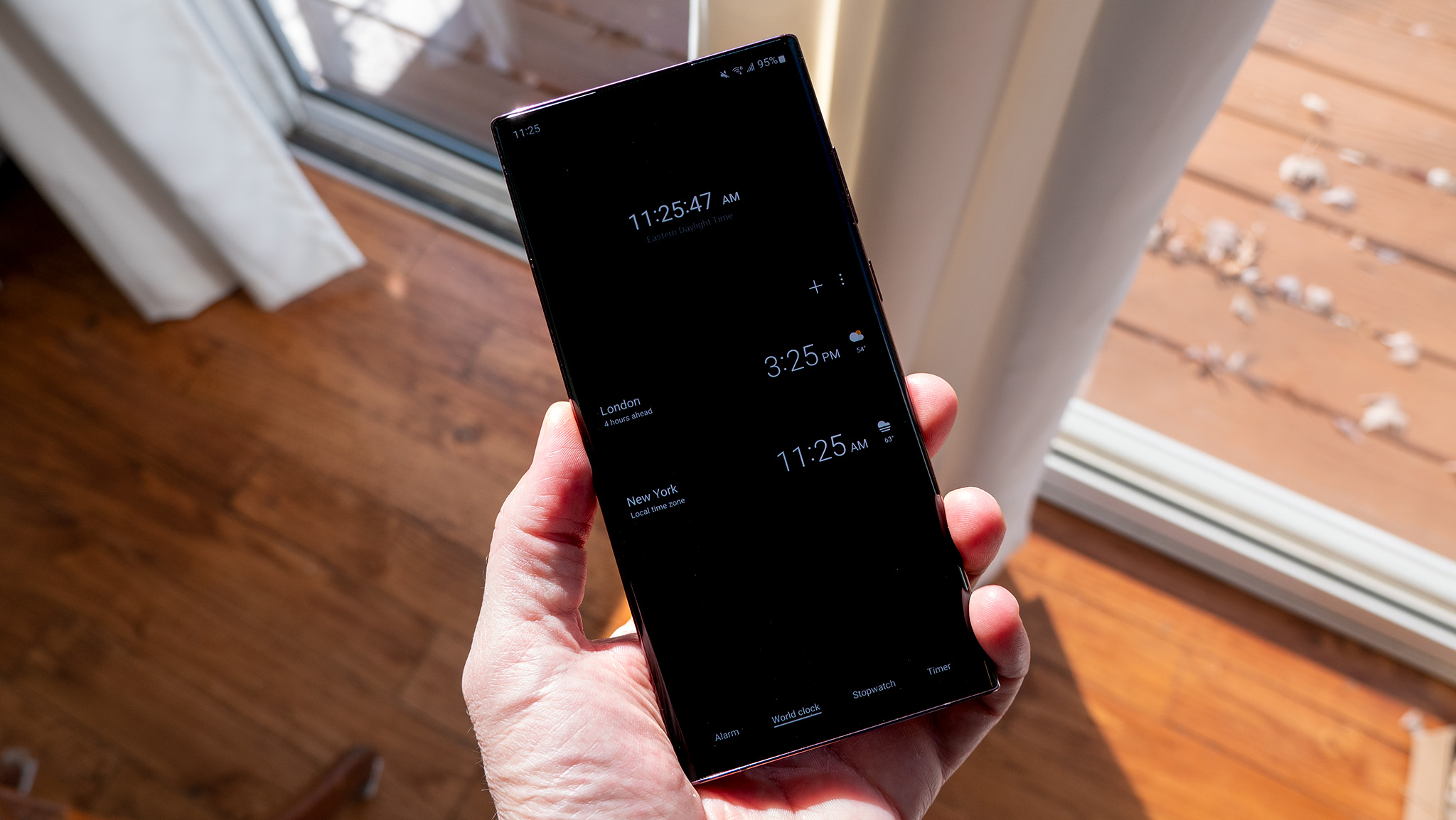
How Smartphones Detect Time Zones and DST
At its core, a smartphone determines its location and thus its time zone and DST status through a combination of technologies. The Global Positioning System (GPS) provides highly accurate geographical coordinates, while cellular network triangulation offers a faster, though slightly less precise, initial location fix. Once the device knows its approximate location, it queries its operating system’s internal database, which contains comprehensive information about every time zone on Earth, including their DST rules and historical changes.
Beyond geographical data, the phone also interacts with its carrier’s network. Mobile network operators maintain Network Time Protocol (NTP) servers that provide synchronized time information to connected devices. These servers are constantly updated with the correct local time, including DST adjustments, and transmit this data to your phone. This redundancy ensures that even if one method fails, the others provide a reliable backup, ensuring time accuracy. The operating system (whether iOS, Android, or others) then processes this information, cross-referencing it with its own time zone rules to make the necessary adjustment.
The Role of Network Time Protocol (NTP)
Network Time Protocol (NTP) is the unsung hero behind internet time synchronization. It’s a networking protocol for clock synchronization between computer systems over packet-switched, variable-latency data networks. In simpler terms, NTP is the mechanism that allows your phone to communicate with dedicated time servers, usually maintained by internet service providers, cellular carriers, or national metrology laboratories. These servers provide extremely accurate time, often synchronized with atomic clocks, ensuring that your device’s internal clock is continually adjusted to the global standard.
For your smartphone, NTP is crucial because it provides the authoritative time. When a DST change occurs, the NTP server communicates the new correct time to your device. This isn’t just a simple offset; the NTP data includes information about the time zone and whether DST is currently in effect for that zone. This prevents discrepancies and ensures that all networked devices observing a particular time zone adjust simultaneously and correctly. Without NTP, maintaining accurate time across a global network of devices would be virtually impossible, leading to chaos in scheduling, data logging, and secure communication protocols.
Understanding Daylight Saving Time Transitions
While the underlying technology aims for seamless transitions, understanding the mechanics of DST changes is crucial, especially for avoiding minor disruptions. These changes are not uniform globally and have specific implications for how your device behaves.
Spring Forward: The Transition Forward
In regions observing DST, the “spring forward” transition typically occurs in the early hours of a Sunday morning, often at 2:00 AM local time. At this precise moment, the clock jumps forward by one hour, meaning 2:00 AM instantly becomes 3:00 AM. For your phone, this adjustment is handled by its operating system, which uses the NTP server data and its internal time zone rules to make the jump.
The primary impact of “spring forward” is a perceived loss of an hour. While your phone handles this gracefully for its internal clock, it’s important to consider external factors. Alarms set for times between 2:00 AM and 3:00 AM on the day of the change might behave unexpectedly or be skipped entirely, depending on the alarm app’s logic. Similarly, any scheduled events or reminders within that hour will be affected. Most well-designed calendar and alarm apps account for this, but double-checking critical appointments is a prudent measure.
Fall Back: The Transition Backward
The “fall back” transition, which marks the end of DST, is arguably more complex for digital systems. This typically occurs in the early hours of a different Sunday morning, also often at 2:00 AM local time. At this point, the clock reverts backward by one hour, meaning 2:00 AM becomes 1:00 AM, effectively repeating an hour.
The challenge for devices here lies in the ambiguity of the repeated hour. If an event is scheduled for 1:30 AM on that Sunday, which 1:30 AM is it referring to? Sophisticated operating systems and applications handle this by using timestamps that account for the DST transition, ensuring that events are tied to a unique point in time, not just a displayed clock reading. For instance, events might be internally marked with a specific UTC (Coordinated Universal Time) timestamp, which is unaffected by local DST changes. Nonetheless, for users, this can cause minor confusion, especially with manually set reminders or logs that don’t account for the unique nature of the “repeated” hour.
Geographical and Legislative Variations
A critical factor in how your phone manages time is the sheer diversity of DST rules worldwide. Not all countries or even all regions within a country observe daylight saving time. For example, in the United States, Arizona (with the exception of the Navajo Nation) and Hawaii do not observe DST. Globally, many countries in Africa, Asia, and South America also opt out. Furthermore, among countries that do observe DST, the specific start and end dates can vary significantly. For instance, European countries typically observe DST from the last Sunday in March to the last Sunday in October, while North America observes it from the second Sunday in March to the first Sunday in November.
Your phone’s operating system maintains a vast, regularly updated database of these global time zone rules, including current and historical DST schedules. When your phone establishes its location and receives time zone information from the network, it cross-references this with its internal database to apply the correct DST rules for that specific region and period. This intricate system is why your phone can accurately adjust its clock whether you’re in London, New York, or Phoenix.
Ensuring Your Device is Ready: Best Practices
While your smartphone is designed to handle DST transitions autonomously, a few best practices can help ensure a smooth, worry-free adjustment every time. These steps primarily revolve around maintaining your device’s software and verifying its settings.
Verifying Automatic Date & Time Settings
The cornerstone of seamless DST transitions is ensuring your phone’s automatic time settings are enabled. On iOS devices, navigate to Settings > General > Date & Time and ensure “Set Automatically” is toggled on. For Android users, the path is typically Settings > System > Date & Time (or similar, depending on the Android version and manufacturer) where you should confirm “Set time automatically” or “Network-provided time” is enabled.
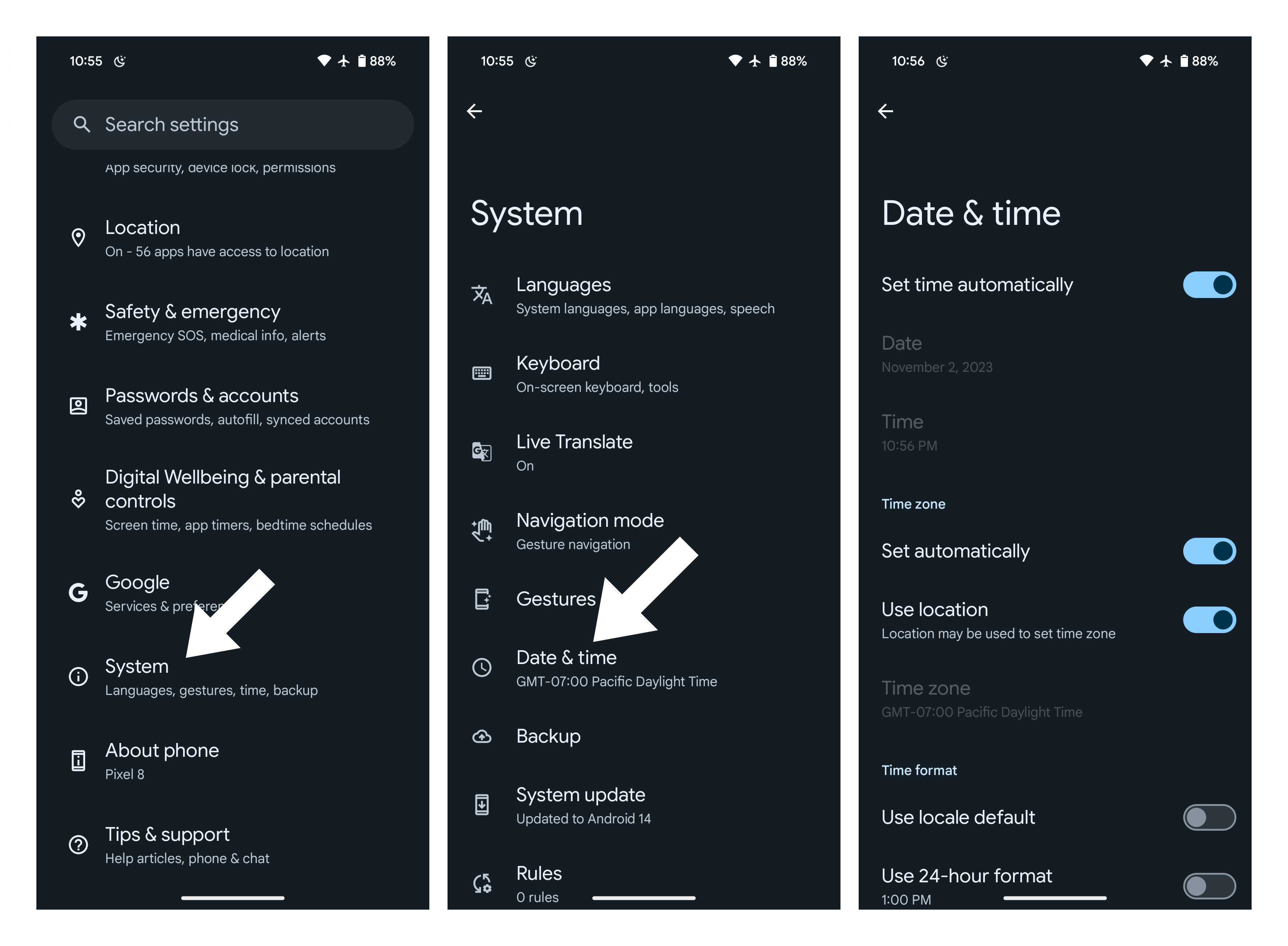
These settings allow your device to synchronize with NTP servers and leverage network-provided time zone information. Disabling them forces your phone to rely on its internal clock and manually set time, making it susceptible to human error and rendering it unable to adjust for DST on its own. It’s a fundamental setting that should remain active for virtually all users.
Software Updates and Firmware
Keeping your phone’s operating system (OS) and applications updated is not just about new features or security patches; it’s also crucial for accurate time management. OS updates often include critical revisions to time zone databases, incorporating recent legislative changes to DST rules, correcting historical anomalies, or refining the logic for specific regions. A device running outdated firmware might have an older, incorrect DST schedule stored in its system, leading to improper time adjustments.
Regularly check for and install available software updates for your iOS or Android device. These updates ensure your phone has the most current and accurate information to perform its automatic time adjustments correctly, mitigating the risk of your phone being out of sync with the rest of the world.
Calendar and Alarm App Considerations
While system-level time changes are generally robust, the interaction with third-party applications, particularly calendar and alarm apps, warrants attention. Most reputable apps are designed to handle DST transitions gracefully, but it’s always wise to exercise caution for critical appointments or alarms.
For “spring forward,” double-check any alarms set for the hour that will be skipped (e.g., between 2:00 AM and 3:00 AM). Some apps might skip these, while others might shift them. For recurring events, calendar applications typically tie events to specific UTC timestamps, ensuring they remain accurate regardless of local DST changes. However, if you’ve manually overridden any settings or used a less common app, a quick verification can prevent missed appointments. It’s especially important if you travel across time zones frequently, as your phone will also adjust for new local time and DST rules simultaneously.
Syncing Other Devices and Smart Home Ecosystems
Your smartphone is often the central hub for a larger ecosystem of digital devices. Smartwatches, tablets, laptops, and even smart home devices (like thermostats, lighting systems, or coffee makers with schedules) rely on accurate time synchronization. While many of these devices also connect to NTP servers or their own proprietary time services, ensuring consistency across all your tech is vital.
Check that your smartwatches and tablets are also set to “automatic” time. For smart home devices, consult their respective apps or manuals to confirm they sync with internet time servers or can receive time updates from your smartphone. A mismatch in time across devices can lead to confusion, missed alarms, or automated routines executing at the wrong hour, disrupting the seamless experience that integrated technology aims to provide.
Troubleshooting Common Time Change Issues
While modern smartphones are highly reliable, occasional glitches can occur. Knowing how to troubleshoot common time change issues can quickly restore accuracy and prevent disruption.
When Your Phone Doesn’t Change Automatically
If your phone fails to adjust its time for daylight saving, the first step is to check if “Set Automatically” (iOS) or “Network-provided time” (Android) is enabled, as discussed above. If it’s off, toggle it on. If it’s already on, try toggling it off and then back on. This can force a refresh of the time synchronization.
Next, verify that your phone has a stable network connection (Wi-Fi or cellular data). Without network access, it cannot reach NTP servers to get the updated time. A simple restart of your device can also resolve temporary software hang-ups preventing the time change. In rare cases, especially after traveling or significant carrier changes, you might need to manually select your time zone and then re-enable automatic settings.
Dealing with Incorrect Time Zone Display
Sometimes, your phone might show the correct time but with an incorrect time zone label. This can happen if your location services are slightly off, or if your carrier’s network information is temporarily ambiguous. Navigate to your phone’s date and time settings and check the “Time Zone” field. If it’s incorrect, try turning off “Set Automatically” for time zone, manually selecting the correct one, and then re-enabling “Set Automatically.” This can often force the system to re-evaluate its time zone detection. Ensure your location services are enabled for system services if you rely on GPS-based time zone detection.
Impact on App Functionality
Incorrect time settings can have ripple effects beyond your clock display. Many apps, particularly those with time-sensitive features, can malfunction. Gaming apps with daily bonuses or specific event windows might not trigger correctly. Ride-sharing or delivery apps rely on precise timestamps for dispatch and tracking, and a mismatched phone clock could lead to delays or confusion. Even security protocols, like two-factor authentication or secure logins, use timestamps that could be compromised if your device’s time is significantly out of sync with the server. If an app seems to be misbehaving after a time change, verifying your phone’s time accuracy should be one of your first troubleshooting steps.
The Future of Time: Beyond Daylight Saving
The debate over the continued relevance and impact of daylight saving time is ongoing globally. Various legislative bodies, including in the U.S. and the European Union, have discussed either abolishing DST altogether or making it permanent.
Ongoing Debates and Potential Abolition of DST
From a technological standpoint, the abolition of DST would simplify many aspects of time synchronization. Eliminating the bi-annual shifts would remove a layer of complexity from operating system databases, NTP server configurations, and application logic. It would reduce the potential for errors and user confusion, streamlining global timekeeping. However, such a change would also require a massive, coordinated update across all devices and systems worldwide to ensure a smooth transition to a new permanent standard. The technological readiness for such a shift is certainly there, but the political and logistical challenges remain substantial.

Advanced Time Synchronization Technologies
While NTP remains the gold standard, research continues into even more precise and robust time synchronization technologies. The increasing reliance on highly accurate time for critical infrastructure, such as financial markets, smart grids, and emerging technologies like autonomous vehicles and advanced IoT devices, drives this innovation. Future systems might leverage satellite-based time signals more directly or employ more sophisticated algorithms to account for network latency and environmental factors, ensuring an even higher degree of precision. As our world becomes more interconnected and time-sensitive, the technology ensuring your phone always shows the correct time will only continue to evolve and become more integral to our daily lives.
aViewFromTheCave is a participant in the Amazon Services LLC Associates Program, an affiliate advertising program designed to provide a means for sites to earn advertising fees by advertising and linking to Amazon.com. Amazon, the Amazon logo, AmazonSupply, and the AmazonSupply logo are trademarks of Amazon.com, Inc. or its affiliates. As an Amazon Associate we earn affiliate commissions from qualifying purchases.