
Multi Stream Transport (MST) represents a fundamental technological advancement designed to enhance data transmission capabilities, particularly within display and peripheral connectivity standards. At its core, MST enables the transmission of multiple independent video, audio, and data streams over a single physical cable or connection. This innovation addresses significant limitations inherent in older, single-stream transmission methods, paving the way for more versatile, efficient, and streamlined digital environments. Understanding MST is crucial for anyone engaging with modern computing, from setting up multi-monitor workstations to optimizing peripheral integration with contemporary devices.
Deciphering the Core Concept of MST
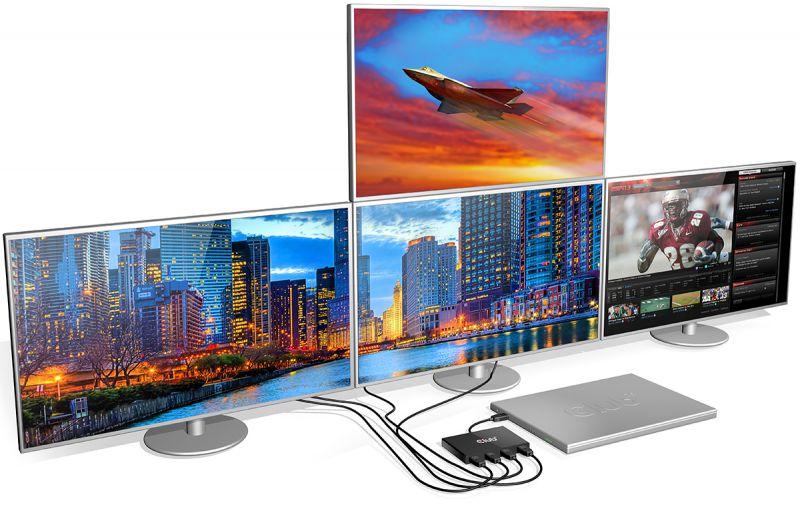
The advent of Multi Stream Transport was a direct response to the escalating demands for higher bandwidth, increased display real estate, and simplified connectivity in an increasingly complex digital landscape. Before MST, many display interfaces, such as DVI or older HDMI versions, were fundamentally limited to transmitting one video signal per cable. This restriction necessitated multiple cables for multi-monitor setups, leading to cluttered workspaces and increased hardware complexity.
The Problem of Single-Stream Limitations
Traditional single-stream architectures dictated that each display required its own dedicated port and cable from the source device (e.g., a graphics card or laptop). While functional, this approach quickly became cumbersome as users began to adopt multiple monitors for productivity, gaming, or content creation. Beyond the aesthetic issue of cable clutter, single-stream setups often consumed a significant number of available ports on a device, limiting the capacity for other peripherals. Furthermore, managing resolution and refresh rate settings across multiple independent outputs could be less intuitive, and the hardware itself had to dedicate distinct pathways for each signal, potentially increasing design complexity and cost. The demand for higher resolutions like 4K and beyond, coupled with a desire for multiple displays, pushed these single-stream limitations to a breaking point, necessitating a more elegant and efficient solution.
The Promise of Concurrent Data Transmission
MST directly tackles these challenges by enabling the intelligent multiplexing of multiple data streams into a single outgoing signal. This aggregated signal is then transmitted over a single cable, where it can be demultiplexed at the receiving end, typically by a compatible hub or display. For instance, a single DisplayPort 1.2 or later output can carry the data for two 2560×1600 displays or four 1920×1200 displays simultaneously. This capability extends beyond just video, encompassing audio and other data signals relevant to the connected devices. The promise of MST lies in its ability to vastly simplify connectivity, reduce cabling, and expand the practical limits of display configurations, all while maintaining high fidelity and performance. It transforms a single physical connection into a versatile conduit for an array of digital information, fostering a more integrated and scalable hardware ecosystem.
The Mechanics Behind Multi Stream Transport
While the concept of MST might seem abstract, its implementation relies on well-defined protocols and hardware capabilities. The most prominent and widely adopted manifestations of MST are found within the DisplayPort and USB-C standards, leveraging their inherent bandwidth and flexibility to deliver its benefits.
How DisplayPort MST Functions
DisplayPort was designed with extensibility in mind, making it an ideal candidate for MST. DisplayPort MST operates by taking advantage of the standard’s high bandwidth and packetized data transmission. Instead of dedicating fixed channels, DisplayPort bundles video, audio, and auxiliary data into a series of micro-packets. With MST, the source device (e.g., a GPU) can generate multiple independent video streams, encapsulate them, and send them down a single DisplayPort cable.
When this aggregated signal reaches an MST-compatible device, such as an MST hub or a daisy-chainable DisplayPort monitor, that device intelligently reads the packet headers to identify and separate the individual streams. It then routes each stream to its intended display. In a daisy-chain setup, the first monitor in the chain extracts its own video stream and passes the remaining streams down the same cable to the next monitor, and so on. This intelligent routing and demultiplexing are managed by an MST hub controller integrated into the monitors or external hubs, ensuring each display receives its specific data payload without interference. The total bandwidth available on the DisplayPort connection dictates the maximum number and resolution of displays that can be supported simultaneously.
USB-C and Alternate Modes
USB-C’s versatility is greatly enhanced by its “Alternate Mode” functionality, and DisplayPort Alternate Mode (often referred to as “Alt Mode”) is a prime example of where MST plays a critical role. A single USB-C port, through its Alt Mode capabilities, can carry a DisplayPort signal alongside USB data and power. When a USB-C port supports DisplayPort Alt Mode with MST, it means that a single USB-C cable can not only deliver video to one display but also leverage DisplayPort MST to drive multiple external displays, often through a compatible USB-C dock or hub.
In this scenario, the USB-C cable essentially carries an embedded DisplayPort signal, and the MST functionality within that DisplayPort stream allows for the distribution of multiple video outputs. This is particularly beneficial for laptops and ultrabooks with limited port real estate, as a single USB-C connection can power the device, provide USB data connectivity, and extend to multiple monitors simultaneously, creating a powerful and tidy workstation from a single port. The intelligent negotiation between the source and the USB-C dock or monitor determines how the shared bandwidth is allocated between USB data, DisplayPort video (including MST), and power delivery.
Underlying Protocol Layer
At a more fundamental level, the efficiency of MST is rooted in the packetized nature of the DisplayPort protocol. Unlike older analog or even some digital interfaces that used dedicated wires for each signal component, DisplayPort transmits data in discrete packets, similar to how data travels over a network. This packetization allows for dynamic allocation of bandwidth and the seamless interleaving of different data streams. An MST-enabled source device constructs a transport stream containing multiple virtual DisplayPort links, each corresponding to an independent video/audio output. The sinks (displays or hubs) then parse this transport stream, extract the relevant virtual links, and convert them back into standard DisplayPort signals for their respective panels. This layered approach ensures robust, high-performance multi-stream transmission without sacrificing quality or introducing significant latency.
Unlocking Efficiency: Key Benefits of MST
The implementation of Multi Stream Transport delivers a multitude of practical benefits, transforming how users interact with their digital environments and how hardware manufacturers design their products. These advantages range from simplified user experience to optimized resource utilization.
Simplified Cable Management and Port Consolidation
One of the most immediate and tangible benefits of MST is the dramatic reduction in cabling. Instead of running a separate cable from the computer to each display, MST allows a single DisplayPort or USB-C cable to extend to multiple monitors. In a daisy-chain configuration, only one cable connects to the computer, and subsequent monitors connect to the preceding one. This significantly cleans up the workspace, reduces clutter, and simplifies the setup process. For devices like thin-and-light laptops, which often have a limited number of output ports, MST via USB-C docks offers a crucial advantage by consolidating power, data, and multiple display outputs through a single, versatile connection. This consolidation not only improves aesthetics but also enhances the overall portability and deployability of workstations.

Enhanced Productivity Through Multi-Monitor Setups
For professionals, gamers, and content creators alike, multi-monitor setups are indispensable for productivity and immersion. MST makes these configurations more accessible and easier to implement. By enabling a single source port to drive multiple displays, users can create expansive desktop environments without requiring multiple graphics card outputs or complex splitter hardware. This allows for applications to be spread across several screens, facilitating multitasking, comparative analysis, and a broader view of complex data or creative projects. Developers can have code on one screen and documentation on another, while video editors can dedicate separate monitors to their timeline, preview, and tools, all powered efficiently through MST.
Optimized Bandwidth Utilization
MST is inherently designed for efficient bandwidth utilization. Instead of requiring redundant dedicated channels for each display signal, it intelligently aggregates multiple streams into a single high-bandwidth pipe. The DisplayPort standard, especially versions 1.2 and higher, offers substantial bandwidth capacity. MST allows this capacity to be dynamically shared among the connected displays. For example, if a user connects two 1080p monitors, MST allocates the necessary bandwidth for each from the total available. If one display is subsequently disconnected, the remaining bandwidth can theoretically be reallocated or simply remains available. This dynamic and packetized approach ensures that the digital pipeline is used effectively, preventing bottlenecks and ensuring smooth, high-quality video and audio transmission across all connected screens.
Future-Proofing Connectivity Standards
The design philosophy behind MST contributes significantly to the future-proofing of connectivity standards. By embracing a flexible, packetized, and multi-stream approach, DisplayPort and USB-C are better equipped to handle evolving demands for higher resolutions, faster refresh rates, and more complex peripheral ecosystems. As new display technologies emerge that require even greater data throughput, MST provides a scalable framework that can adapt by simply requiring higher underlying bandwidth in subsequent standard revisions, rather than a complete overhaul of the multi-display architecture. This forward-looking design ensures that current investments in MST-compatible hardware can continue to provide value as technology advances.
Real-World Applications and Implementations
Multi Stream Transport is not merely a theoretical concept; it is widely integrated into a vast array of modern technology, empowering users across various sectors. Its practical applications underscore its importance in contemporary digital infrastructures.
Desktop Computing and Workstations
Perhaps the most common application of MST is in desktop computing environments, particularly for users who require multiple monitors. Modern graphics cards often feature DisplayPort outputs that fully support MST, allowing users to connect several displays to a single port, either directly to MST-enabled monitors that support daisy-chaining or through external MST hubs. This is invaluable for professionals in finance, design, engineering, and any field that benefits from expanded screen real estate. Gamers also leverage MST for panoramic gaming setups, where multiple monitors create a wider field of view, enhancing immersion. The ease of setup and reduced cable clutter make MST an indispensable feature for high-performance workstations.
Mobile Devices and Docking Solutions
The rise of powerful yet thin and light laptops, tablets, and even smartphones has made USB-C and its Alt Modes critically important. MST, via DisplayPort Alt Mode over USB-C, is the backbone of many advanced docking stations. A single USB-C cable from a laptop can connect to a dock, which then uses MST to output video to two or even three external monitors, simultaneously providing power delivery to the laptop and connectivity to various USB peripherals, Ethernet, and audio. This transforms a highly portable device into a full-fledged desktop workstation with minimal fuss, making it ideal for hot-desking, remote work setups, and professional presentations where multiple displays are required.
Pro AV and Digital Signage
In professional Audio/Visual (Pro AV) installations and digital signage deployments, MST offers significant advantages. For applications requiring multiple displays to show different content or extend a single large image across several panels, MST simplifies the cabling and hardware requirements. Instead of needing a separate media player or signal extender for each display, a single source device can distribute content to a series of daisy-chained displays using MST. This reduces installation costs, minimizes potential points of failure, and streamlines maintenance for video walls, retail displays, corporate lobbies, and control rooms. The ability to manage multiple streams from a single point of origin offers flexibility and efficiency for large-scale visual communication.
Navigating the Future of Multi Stream Transport
As technology continues its relentless pace of evolution, Multi Stream Transport is poised to remain a critical component of connectivity, though its implementation and the standards it supports will naturally evolve.
Compatibility and Interoperability Considerations
While MST offers significant benefits, ensuring compatibility and interoperability remains a key consideration. Not all DisplayPort or USB-C devices support MST, and even among those that do, the specific capabilities (e.g., maximum resolution and number of displays) can vary based on the version of DisplayPort implemented and the bandwidth available. Users must check the specifications of their source devices (graphics cards, laptops), cables, hubs, and monitors to confirm MST support and desired performance. Firmware updates for MST hubs and monitors can also be crucial for resolving compatibility issues and optimizing performance. The ecosystem’s fragmentation often requires careful selection of components to achieve the desired multi-display setup.
Evolving Standards and Performance
The underlying DisplayPort standard, which powers MST, continues to evolve. Newer versions, such as DisplayPort 2.0 and beyond, offer significantly increased bandwidth, enabling support for even higher resolutions (e.g., 8K at higher refresh rates) and a greater number of displays through MST. This continuous advancement ensures that MST remains relevant in a world demanding more visual fidelity and screen real estate. As bandwidth limits increase, the capabilities of MST will expand proportionally, allowing for more ambitious multi-monitor configurations without compromising performance. Furthermore, integration with other emerging standards and protocols will likely refine how MST is implemented and utilized.

The Path to Universal Connectivity
The trajectory of MST aligns with the broader industry trend towards universal connectivity and port consolidation. As USB-C becomes ubiquitous across an ever-wider range of devices, the ability of MST to multiplex multiple display streams, power, and data over a single cable positions it as a cornerstone for future docking and peripheral ecosystems. The goal is to create a seamless user experience where any device can connect to any display or peripheral setup with a single, intelligent connection. While challenges remain in achieving true universal plug-and-play functionality across all devices and operating systems, MST provides a powerful and robust framework that moves the industry closer to this ideal, driving efficiency and enhancing user productivity across all facets of digital interaction.
aViewFromTheCave is a participant in the Amazon Services LLC Associates Program, an affiliate advertising program designed to provide a means for sites to earn advertising fees by advertising and linking to Amazon.com. Amazon, the Amazon logo, AmazonSupply, and the AmazonSupply logo are trademarks of Amazon.com, Inc. or its affiliates. As an Amazon Associate we earn affiliate commissions from qualifying purchases.