
In the evolving landscape of digital health and personal medical technology, continuous glucose monitoring (CGM) systems have emerged as pivotal tools for managing diabetes. At the heart of many such systems, particularly those offered by pioneers like Dexcom, lies a dedicated device known as the receiver. Far more than just a display unit, a Dexcom receiver is a sophisticated piece of medical technology designed to provide real-time, actionable insights into an individual’s glucose levels, serving as a critical component in the daily management of a complex chronic condition.
The Core Functionality of a Dexcom Receiver
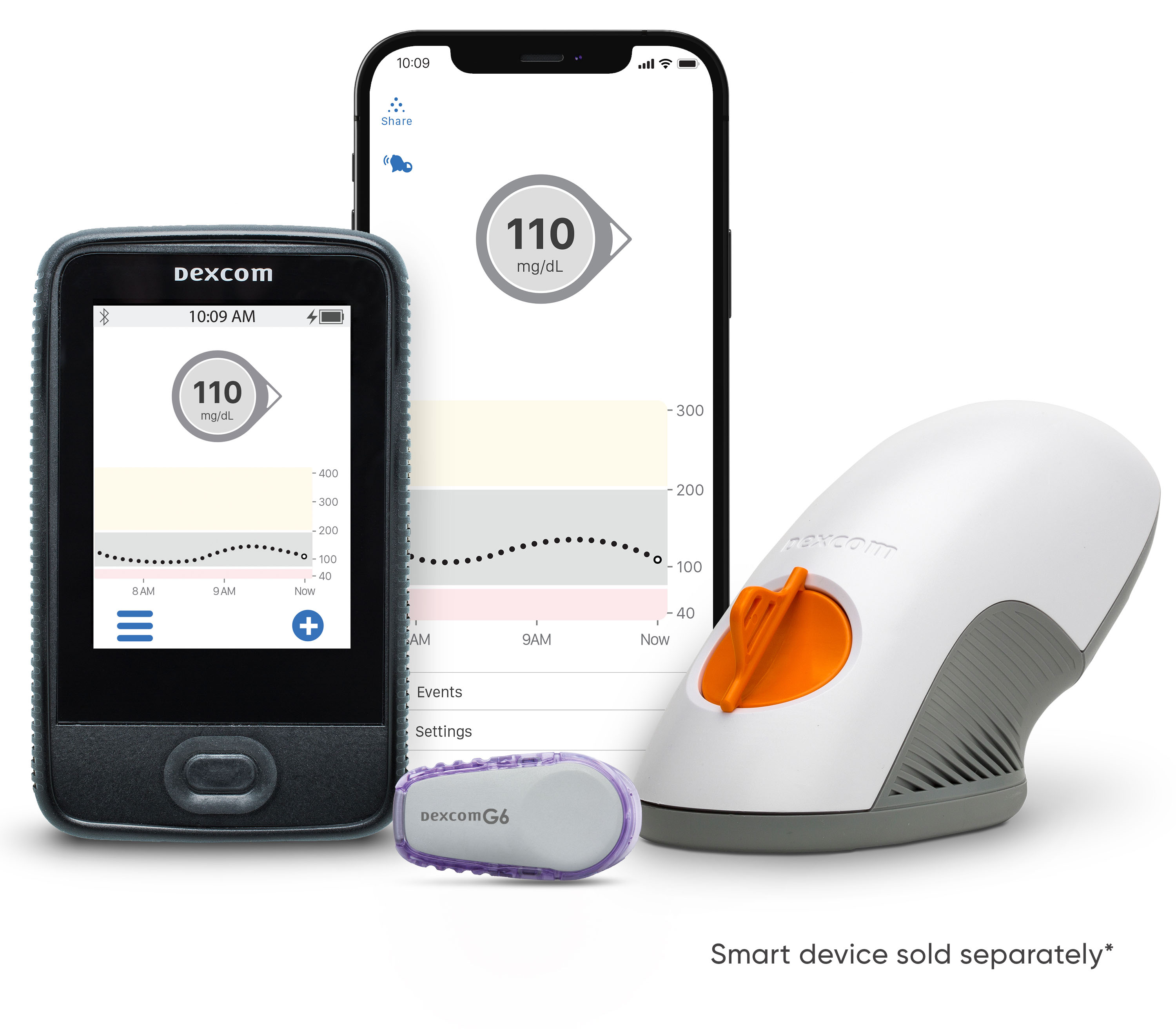
A Dexcom receiver is purpose-built to act as the primary display and alert system for the glucose data transmitted from a Dexcom CGM sensor. This small, handheld electronic device performs several vital functions, ensuring users have immediate access to their glucose information without needing to rely on another smart device. Its design prioritizes reliability, clarity, and ease of use, making it an indispensable tool for many individuals living with diabetes.
Bridging Sensor Data to User Insights
The fundamental role of a Dexcom receiver is to wirelessly collect glucose readings from the small, disposable sensor inserted under the skin. This sensor continuously measures interstitial fluid glucose levels and transmits data at regular intervals, typically every five minutes. The receiver acts as the primary conduit for this data, receiving the signals, processing them, and then presenting the glucose values in a clear, understandable format.
Beyond merely displaying a number, the receiver interprets this continuous stream of data to provide a dynamic picture of glucose trends. It shows not just the current glucose level, but also the direction and rate of change—indicated by trend arrows. These arrows are crucial, as they allow users to anticipate future glucose movements, enabling proactive management rather than reactive responses. For instance, a downward-pointing arrow indicates a rapid drop in glucose, prompting the user to take preventative measures against hypoglycemia.
Real-time Glucose Monitoring Explained
The essence of a Dexcom receiver’s utility lies in its capability for real-time monitoring. Unlike traditional blood glucose meters (BGMs) that provide a snapshot of glucose at a single moment, the receiver offers a continuous stream of data throughout the day and night. This constant flow of information empowers users and their caregivers with unprecedented visibility into glucose fluctuations, which can be influenced by diet, exercise, stress, medication, and other factors.
Real-time monitoring on the receiver means users can:
- Track Patterns: Observe how different foods, activities, or medications impact their glucose levels over time.
- Avoid Hypo/Hyperglycemia: Receive immediate alerts when glucose levels are trending too low or too high, allowing for timely intervention.
- Optimize Treatment: Work with healthcare providers to fine-tune insulin dosages, meal plans, and exercise routines based on comprehensive data.
- Improve Quality of Life: Reduce the burden of frequent fingersticks and gain peace of mind through constant vigilance.
The technology underpinning this real-time capability often involves Bluetooth Low Energy (BLE) for communication between the sensor and receiver, ensuring efficient data transfer with minimal power consumption. The receiver’s internal software then rapidly processes this raw data into user-friendly displays and alerts.
Key Features and User Experience
Dexcom receivers are engineered with specific features to enhance the user experience, focusing on clarity, safety, and data accessibility. These devices are designed to be intuitive, ensuring that critical glucose information is always readily available and easy to interpret.
Display and Interface
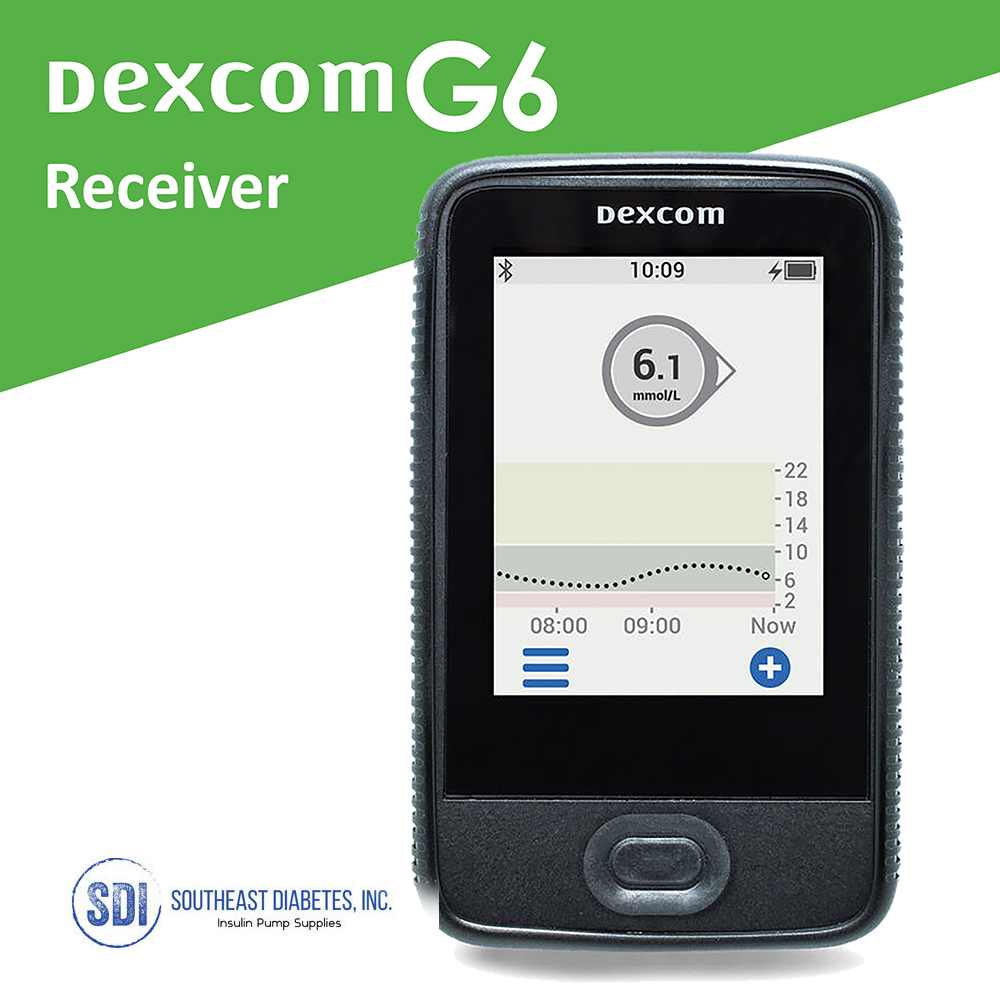
The physical interface of a Dexcom receiver is typically designed for simplicity and immediate readability. It features a clear, often color LCD screen that prominently displays the current glucose reading, trend arrows, and a graph showing glucose history over several hours. The size and brightness of the display are optimized for quick glances, even in varying lighting conditions.
Navigation is usually managed through a few tactile buttons, allowing users to scroll through historical data, acknowledge alerts, and access settings without complexity. The user interface is streamlined to minimize cognitive load, an essential consideration for a medical device that needs to be accessible under potentially stressful circumstances. Some models may offer touchscreen capabilities, further modernizing the interaction. The overall goal is to present complex physiological data in a straightforward and actionable manner.
Alerts and Alarms: Safety First
Perhaps one of the most critical safety features of a Dexcom receiver is its robust system of customizable alerts and alarms. These auditory and/or vibratory notifications are designed to warn users of impending or actual glucose excursions, both high and low. Users can set personalized thresholds for low glucose (hypoglycemia) and high glucose (hyperglycemia) alerts, tailoring the system to their individual medical needs and lifestyle.
Key alert functionalities include:
- Urgent Low Glucose Alarm: A mandatory alert for dangerously low glucose levels, designed to be difficult to miss.
- Predictive Alerts: Notifications that warn users when their glucose is trending towards a low or high level, providing a window for intervention before reaching the threshold.
- Customizable High/Low Alerts: User-defined ranges for non-urgent low or high glucose levels.
- Rate of Change Alerts: Warnings if glucose levels are rising or falling too rapidly.
- Loss of Signal Alarm: Notifies the user if the receiver loses communication with the sensor, prompting them to check placement or battery.
These alerts are crucial for preventing severe hypoglycemic events, which can be life-threatening, and for managing hyperglycemia effectively to avoid long-term complications. The receiver’s dedicated nature means these alerts are prioritized and less likely to be missed due to other notifications, as might occur on a multi-purpose smartphone.
Data Storage and Accessibility
A Dexcom receiver not only displays real-time data but also stores a significant amount of historical glucose information. This internal memory typically holds several weeks to months of glucose readings, trends, and event markers. This stored data is invaluable for retrospective analysis, allowing users and their healthcare teams to review glucose patterns, identify triggers, and assess the effectiveness of treatment plans.
The data stored on the receiver can usually be downloaded to a computer or directly uploaded to cloud-based platforms via a USB connection. This facilitates easy sharing with healthcare providers and integrates into broader diabetes management software suites. Such accessibility transforms raw data into meaningful reports, graphs, and statistics, which are essential for informed decision-making regarding diabetes care.
The Dexcom Ecosystem: Receiver vs. Smart Devices
The world of CGM technology is dynamic, with continuous advancements in how glucose data is delivered and interpreted. While dedicated receivers remain a cornerstone, the increasing ubiquity of smart devices has introduced alternative display options. Understanding the distinct roles and benefits of each is key to selecting the most appropriate solution.
Evolution of Monitoring Devices
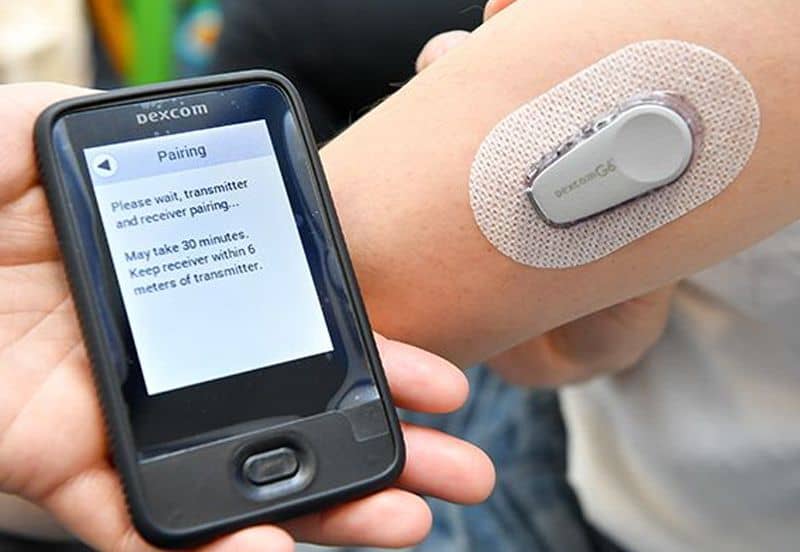
Initially, dedicated receivers were the sole method for viewing CGM data. These devices represented a significant leap from traditional fingerstick monitoring, offering unprecedented insight into glucose dynamics. As smartphone technology advanced, particularly with robust Bluetooth capabilities, CGM manufacturers began developing apps that could receive and display glucose data directly on a user’s phone or even a smartwatch.
Today, many Dexcom CGM systems offer the flexibility to use either a dedicated receiver, a compatible smart device (or both concurrently), as the primary display. This choice allows users to tailor their monitoring setup to their personal preferences, lifestyle, and specific needs.
Advantages of a Dedicated Receiver
Despite the allure of using a familiar smartphone, dedicated Dexcom receivers offer distinct advantages, particularly in situations where reliability and simplicity are paramount:
- Dedicated Functionality: The receiver’s sole purpose is glucose monitoring. This means no competing apps, notifications, or battery drain from other functions, ensuring critical glucose alerts are always prioritized and not missed.
- Reliability: Designed purely for medical use, receivers are often built to be robust and less prone to software conflicts or operating system updates that can sometimes affect app performance on smart devices.
- Battery Life: Optimized for continuous operation, receivers typically offer extended battery life compared to smartphones, which are often used for multiple power-intensive tasks.
- Simplicity: For individuals who prefer a straightforward device without the complexities of a smartphone, or for younger children and older adults, a dedicated receiver can be much easier to manage.
- No Smartphone Required: It provides an essential option for users who do not own a compatible smartphone, prefer not to carry one, or live in environments where smartphone usage might be impractical or prohibited.
- Medical Device Classification: As a dedicated medical device, the receiver is rigorously tested and regulated, ensuring a high standard of performance and safety.
Integration with Insulin Delivery Systems
An increasingly important aspect of CGM technology, including the Dexcom receiver, is its potential for integration with automated insulin delivery (AID) systems, often referred to as “closed-loop” systems or artificial pancreases. In these advanced setups, the glucose data from the Dexcom sensor is sent not just to a display device (like the receiver) but also to an insulin pump. The pump then uses this real-time glucose information, often via algorithms running on a compatible device, to automatically adjust insulin delivery, further reducing the burden of diabetes management.
While some AID systems might use a smartphone as the controller, the foundational role of reliable, continuous glucose data provided by the Dexcom sensor—and displayed on a receiver—remains critical. The reliability of the CGM data is paramount for the safe and effective operation of these advanced insulin delivery technologies.
Who Benefits from a Dexcom Receiver?
The utility of a Dexcom receiver extends across various user groups, each benefiting from its specific features in different ways. Its design caters to a broad spectrum of needs within the diabetes community.
Individuals with Diabetes
The primary beneficiaries are, of course, individuals living with type 1 or type 2 diabetes who require insulin and benefit from intensive glucose management. For these users, the receiver provides:
- Empowerment: Greater control over their condition through continuous, real-time data.
- Reduced Hypoglycemia Fear: Alerts help prevent dangerous lows, improving confidence and quality of life.
- Improved Glycemic Control: The ability to see trends and patterns aids in making better daily decisions about food, activity, and medication.
- Flexibility: The choice to use a dedicated device offers an alternative to relying solely on a smartphone.
Parents and Caregivers
For parents of children with diabetes or caregivers of adults who need assistance with diabetes management, the Dexcom receiver is an invaluable tool:
- Peace of Mind: Real-time data and alerts allow caregivers to monitor glucose levels remotely (when combined with sharing features via a smartphone app) or directly on the receiver, reducing anxiety, especially overnight.
- Proactive Intervention: The ability to see trends and receive alerts enables timely intervention, preventing severe highs or lows.
- Simpler Management: For children, a receiver can be a less distracting and more durable option than a smartphone for daily monitoring.
Healthcare Professionals
Healthcare professionals, including endocrinologists, diabetes educators, and nurses, leverage the data provided by Dexcom receivers to:
- Personalize Treatment Plans: The comprehensive glucose data, particularly the historical trends downloaded from the receiver, allows for highly individualized adjustments to medication, diet, and exercise.
- Identify Patterns: Reports generated from receiver data help identify glucose variability, nocturnal hypoglycemia, and post-meal spikes that might be missed with intermittent fingerstick readings.
- Educate Patients: Visual graphs and trend arrows on the receiver serve as excellent educational tools to help patients understand the impact of various factors on their glucose.
Setting Up and Maintaining Your Receiver
Optimizing the performance and longevity of a Dexcom receiver involves simple yet crucial setup and maintenance practices, ensuring the device consistently provides accurate and timely glucose data.
Initial Setup and Pairing
Upon acquiring a new Dexcom receiver, the initial setup typically involves charging the device, setting the date and time, and then pairing it with the first sensor. The pairing process usually involves entering a unique code from the sensor applicator into the receiver, establishing a secure wireless connection. Clear on-screen prompts guide users through this process, which is designed to be straightforward. It is essential to ensure the receiver is within range of the sensor for successful pairing and continuous data transmission.
Charging and Battery Life
Dexcom receivers are powered by rechargeable lithium-ion batteries, similar to those found in smartphones. They are typically charged via a standard USB cable and adapter. Users should integrate regular charging into their routine, perhaps nightly, to ensure the device remains operational throughout the day and night. While battery life varies by model and usage, receivers are generally designed to last several days on a single charge, providing a buffer against unexpected power outages or missed charging opportunities. Adhering to manufacturer guidelines for charging is key to maintaining battery health over the device’s lifespan.
Tips for Optimal Performance
To ensure the Dexcom receiver functions reliably and provides the most accurate data, consider these tips:
- Keep it Charged: Consistent charging prevents data gaps.
- Stay Within Range: Ensure the receiver is kept relatively close to the sensor (e.g., within 20 feet without obstructions) to maintain consistent signal reception.
- Protect the Device: Treat the receiver like any sensitive electronic gadget. Avoid dropping it, exposing it to extreme temperatures, or getting it wet (unless the specific model is waterproof).
- Regular Cleaning: Gently clean the screen and casing with a soft, damp cloth to keep it free of dust and grime.
- Software Updates: Periodically check for software updates from Dexcom, as these can introduce new features, improve performance, or enhance security.
- Data Download: Regularly download stored data to a computer or cloud service, not only for analysis but also as a backup.
By understanding what a Dexcom receiver is, its technological underpinnings, and how to effectively integrate it into daily life, users can unlock its full potential as a powerful tool in managing diabetes and achieving better health outcomes.
aViewFromTheCave is a participant in the Amazon Services LLC Associates Program, an affiliate advertising program designed to provide a means for sites to earn advertising fees by advertising and linking to Amazon.com. Amazon, the Amazon logo, AmazonSupply, and the AmazonSupply logo are trademarks of Amazon.com, Inc. or its affiliates. As an Amazon Associate we earn affiliate commissions from qualifying purchases.