
Every time you hit the “send” button on an email, a sophisticated piece of digital architecture springs into action. At the heart of this process lies the email address—a string of characters that acts as a unique digital passport for individuals and organizations alike. While most users recognize their email address as a simple way to communicate, many fail to grasp the technical significance of its structure. Central to this structure is the “domain.” Understanding what the domain of an email address is, how it functions, and why it is critical to modern digital security and professional branding is essential for anyone navigating the online world.

The Anatomy of an Email Address
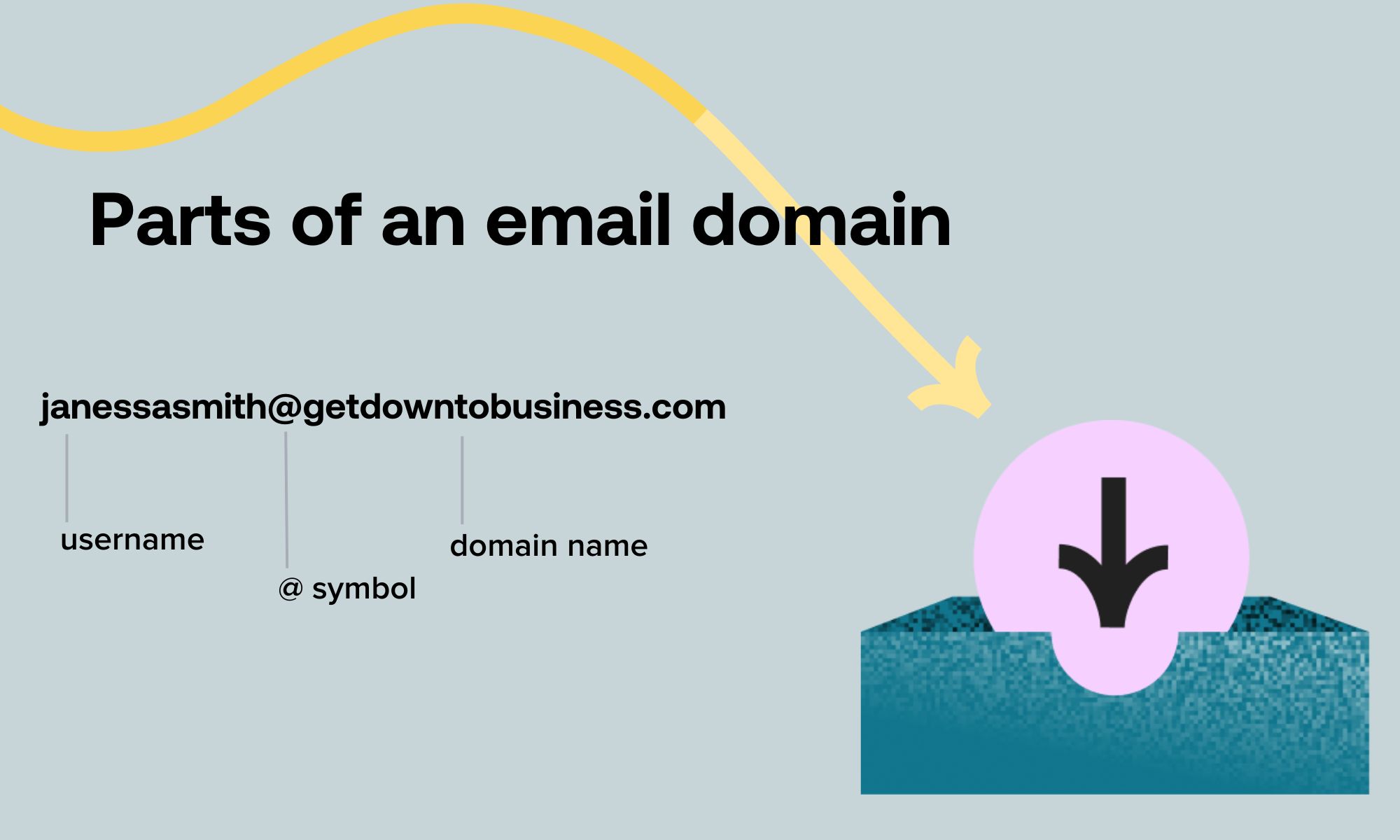
An email address is composed of two primary segments, separated by the “@” symbol. This symbol, colloquially referred to as “at,” serves as the delimiter that tells the mail server where the user identifier ends and the server location begins.
The Local Part
The portion preceding the “@” symbol is known as the “local part.” This is the unique identifier for the specific mailbox holder. It can contain alphanumeric characters, periods, underscores, or plus signs, depending on the rules set by the email provider. For example, in the address john.doe@example.com, john.doe is the local part.
The Domain Part
The portion following the “@” symbol is the domain. In the example above, example.com is the domain. The domain represents the specific server or network where the mailbox resides. It is the destination address that mail transfer agents (MTAs) use to route your message across the internet. Without a valid domain, the email has no “house” to deliver to, and the message would bounce back to the sender as undeliverable.
How Domains Function as Digital Routing Labels
When you send an email, your email client does not simply “know” where your recipient lives. Instead, it relies on a complex system known as the Domain Name System (DNS). The DNS functions as the internet’s phonebook, translating human-readable domain names into machine-readable IP addresses.
DNS Lookup and MX Records
When an email is sent, the sender’s mail server performs a DNS lookup on the domain part of the recipient’s address. Specifically, it searches for “Mail Exchanger” (MX) records. An MX record is a type of DNS record that specifies which mail servers are responsible for accepting email on behalf of that domain.
If you send an email to someone at company.org, your server asks the DNS, “Who is the mail server for company.org?” The DNS responds with an IP address, and your server then establishes a connection with that destination server to deposit the email into the correct account.
Subdomains and Hosting
Sometimes, you may encounter domains that look slightly more complex, such as marketing.company.com. In this case, marketing is a subdomain of company.com. Organizations use subdomains to partition their email traffic. For instance, a company might use support.company.com for customer service tickets and hr.company.com for internal communications. Each of these subdomains can be configured to point to different mail servers or organizational departments, allowing for highly efficient traffic management.
The Strategic Importance of Custom Domains
While many users rely on free providers like Gmail, Yahoo, or Outlook—which utilize generic domains—businesses and professionals often opt for custom domains. A custom domain is one that a person or organization owns and manages, such as @yourname.com or @yourbusiness.com.
Establishing Professional Credibility
In the professional sphere, your email domain is your digital storefront. An email address like contact@creativeagency.com carries an inherent level of trust and authority that a generic creativeagency@gmail.com lacks. It signals to clients and partners that you have invested in your digital infrastructure, own your brand identity, and are serious about your business. When you use a custom domain, you are not merely renting space on someone else’s platform; you are asserting control over your professional correspondence.
Ownership and Portability
One of the most significant advantages of using a custom domain is portability. If you use a generic email provider, you are tethered to their terms of service, storage limits, and potential account shutdowns. If you decide to change providers, you may have to deal with the headache of migrating your data and updating your contact information across all your professional profiles.
Conversely, if you own your domain, you can switch email hosting providers at any time without changing your email address. You simply update the DNS settings to point to your new provider. Your contacts remain the same, your business cards remain valid, and your digital footprint remains uninterrupted. This is a critical factor for long-term digital security and brand consistency.
Security, Privacy, and Domain Reputation
The domain of an email address is not just a routing label; it is also a vital security component. Email authentication protocols rely heavily on the domain to verify the legitimacy of a sender.
SPF, DKIM, and DMARC
To prevent spammers from “spoofing” your domain (impersonating you to send malicious emails), administrators use three key protocols:
- SPF (Sender Policy Framework): A list of IP addresses authorized to send email on behalf of your domain.
- DKIM (DomainKeys Identified Mail): A digital signature that ensures the email content has not been tampered with in transit.
- DMARC (Domain-based Message Authentication, Reporting, and Conformance): A policy that dictates what the receiving server should do if an email fails SPF or DKIM checks (e.g., mark it as spam or reject it entirely).
These protocols exist because the domain is the source of truth for an email’s reputation. If your domain is associated with high volumes of spam or phishing attempts, email providers will lower its “sender score.” Once a domain’s reputation is damaged, emails originating from that domain are likely to be filtered directly into spam folders, severely impacting your ability to communicate effectively.
Phishing and Domain Spoofing
Understanding the domain part of an email address is the best defense against phishing. Scammers often use “look-alike” domains—a technique known as typosquatting. For instance, they might send an email from security@bank-support.com instead of the legitimate security@bank.com. By carefully inspecting the domain portion of an email address, users can spot these discrepancies. If the domain does not match the organization the sender claims to represent, it is almost certainly a malicious attempt to steal sensitive information.
Conclusion
The domain of an email address is far more than just the suffix after the “@” symbol. It is the backbone of digital communication, the foundation of professional identity, and a critical gatekeeper of network security. Whether you are a business owner looking to solidify your brand, or an individual hoping to better understand the technology behind your inbox, recognizing the role of the domain empowers you to take better control of your digital presence. By understanding how domains route messages, the importance of owning your domain name, and how these tags function within security protocols, you can navigate the complex ecosystem of modern email with confidence and clarity. As the digital landscape continues to evolve, the domain will remain a fundamental pillar of how we connect, communicate, and identify ourselves in the vast world of the internet.
aViewFromTheCave is a participant in the Amazon Services LLC Associates Program, an affiliate advertising program designed to provide a means for sites to earn advertising fees by advertising and linking to Amazon.com. Amazon, the Amazon logo, AmazonSupply, and the AmazonSupply logo are trademarks of Amazon.com, Inc. or its affiliates. As an Amazon Associate we earn affiliate commissions from qualifying purchases.