
In an era where digital communication has largely shifted toward instant messaging, email, and social media platforms, the traditional voicemail system remains an oddly persistent relic of the telecommunications age. Despite its relative decline, it continues to serve as a critical repository for professional inquiries, personal messages, and essential two-factor authentication codes. Consequently, finding yourself locked out of your own voicemail inbox due to a forgotten password can be a surprisingly disruptive experience. Whether you are dealing with a critical business lead or simply trying to clear your notification badge, regaining access is usually a straightforward process if you know where to look.
Understanding the Mechanisms of Voicemail Security
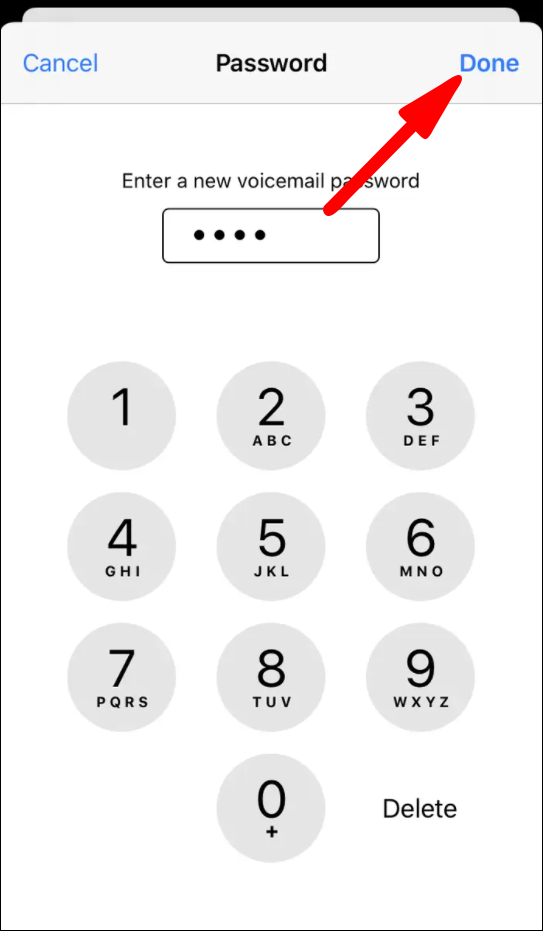
Voicemail systems are essentially server-based answering machines managed by your mobile service provider. Unlike local files on your smartphone, your voicemail is stored in the cloud, protected by a PIN (Personal Identification Number) that verifies your identity whenever you attempt to access your messages from a different device or through your carrier’s dedicated interface.
The Role of Carrier-Specific Protocols
Because voicemail is a service provided by your carrier (such as Verizon, T-Mobile, AT&T, or their various MVNO subsidiaries), the security protocols are determined by their individual infrastructure. While the interface you see on your iPhone or Android device—often referred to as “Visual Voicemail”—is a software layer that simplifies the experience, the underlying security credentials remain tethered to the carrier’s backend.
When you forget your PIN, the “Forgot Password” function is not a feature of your phone’s operating system, but rather a bridge to the carrier’s automated support system. This is why the method to reset a password varies significantly depending on which wireless provider you use.
Standard Methods for Resetting Your Credentials
For the vast majority of smartphone users, regaining access is a matter of utilizing the carrier’s self-service tools. Most modern cellular accounts allow you to bypass a forgotten PIN through the carrier’s mobile application or by triggering a verification process via your SIM card’s unique identifier.
Leveraging the Carrier’s Mobile App
Most major wireless carriers have transitioned away from clunky, keypad-driven menus in favor of intuitive mobile applications. If you have the carrier’s app installed on your device, this is the most efficient route.
- Open your provider’s official app (e.g., My Verizon, T-Mobile, myAT&T).
- Navigate to the “Device” or “Manage Plan” section.
- Look for “Voicemail Settings” or “Reset Voicemail PIN.”
- Most of these apps will allow you to define a new four-to-six-digit code without requiring you to remember the old one, as the app is already authenticated via your device’s active SIM card.
Using the Automated Dial-In System
If you do not have the app, or if you prefer the traditional method, you can call your carrier’s automated management line. By dialing the designated voicemail management number for your provider, you can often navigate a voice-prompt menu to reset your PIN.
- The Identity Verification Hurdle: When you use the automated system, the carrier will typically require verification of your identity. This usually involves entering the last four digits of the account holder’s Social Security number or the billing zip code associated with the account.
- Safety Precaution: Be aware that using an automated system requires you to be in a secure environment. Because you may be asked to input sensitive account information, avoid performing these steps on a public network or in a crowded space where your verbal responses could be overheard.
Troubleshooting Visual Voicemail Sync Issues
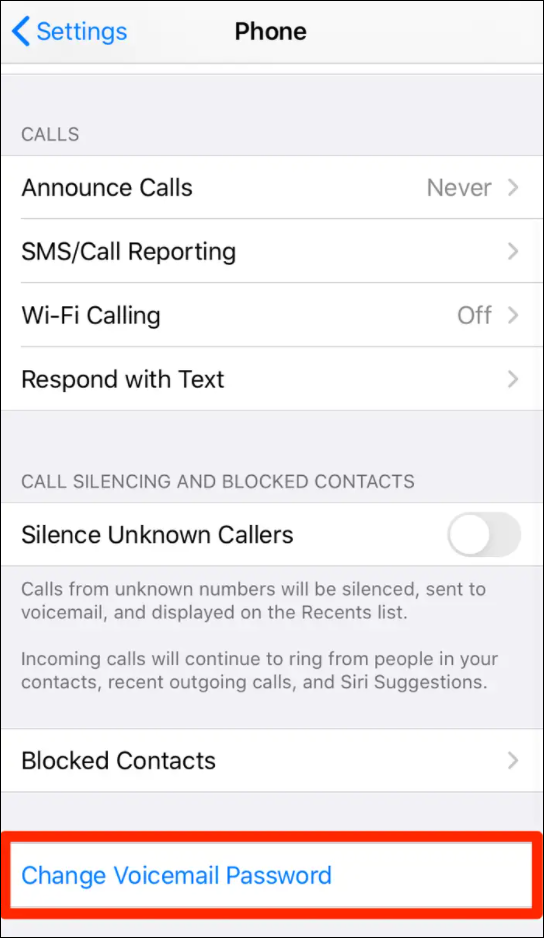
Sometimes, the issue isn’t that you’ve forgotten your password, but that your phone’s Visual Voicemail interface has lost its synchronization with the carrier server. If you find yourself in a loop where your password is being rejected even though you are certain of it, the problem may be software-related.
Clearing the Cache and Re-Syncing
For Android users, the Visual Voicemail app acts as a local client. Sometimes, the cache becomes corrupted, leading to authentication errors.
- Go to Settings > Apps.
- Find your Voicemail app.
- Select Storage & Cache and choose Clear Cache.
- Restart your device. This often forces the application to re-authenticate with the server, sometimes bypassing the need for a manual PIN entry by pulling the credentials directly from the SIM card.
Network Settings Reset
If your voicemail interface refuses to connect, performing a network settings reset is a common “nuclear option.” Note that this will erase saved Wi-Fi passwords and Bluetooth connections, but it will refresh your phone’s connection to the cellular towers.
- Navigate to General Management or System Settings.
- Locate Reset Options.
- Select Reset Network Settings.
Once the phone reboots and reconnects to your carrier’s 4G or 5G network, try opening the voicemail app again. The network handshake should re-establish the link to your inbox without requiring the forgotten PIN.
Security Best Practices for Voicemail PINs
Once you have successfully regained access to your voicemail, it is imperative to secure your account against future unauthorized access. A surprising number of users leave their voicemail PINs at the default setting—often the last four digits of their phone number—which makes them highly susceptible to “SIM Swapping” attacks and social engineering.
Why Complexity Matters
Voicemail hacks are rarely the result of brute-force attacks on the phone itself; rather, they occur when an unauthorized party accesses your voicemail remotely by guessing your PIN. If an attacker gains access to your voicemail, they may be able to intercept one-time passcodes (OTPs) sent by banks or email services that offer “voice call verification” as a recovery method.
- Avoid Sequential Numbers: Refrain from using “1234,” “0000,” or repeating digits.
- Avoid Personal Data: Do not use the last four digits of your phone number, your birth year, or your house number. These are the first things a malicious actor will attempt.
- Use Unique Sequences: Choose a PIN that is not used for any other service, such as your banking app or your email account.
The “Remote Access” Risk
Many voicemail systems allow you to access your inbox from a different phone by calling your own number and pressing the pound (#) or asterisk (*) key. If you do not require this feature, check with your carrier to see if it can be disabled. By restricting voicemail access to only the primary device (the one with the SIM card), you eliminate the primary vector for unauthorized remote access.
When to Contact Professional Support
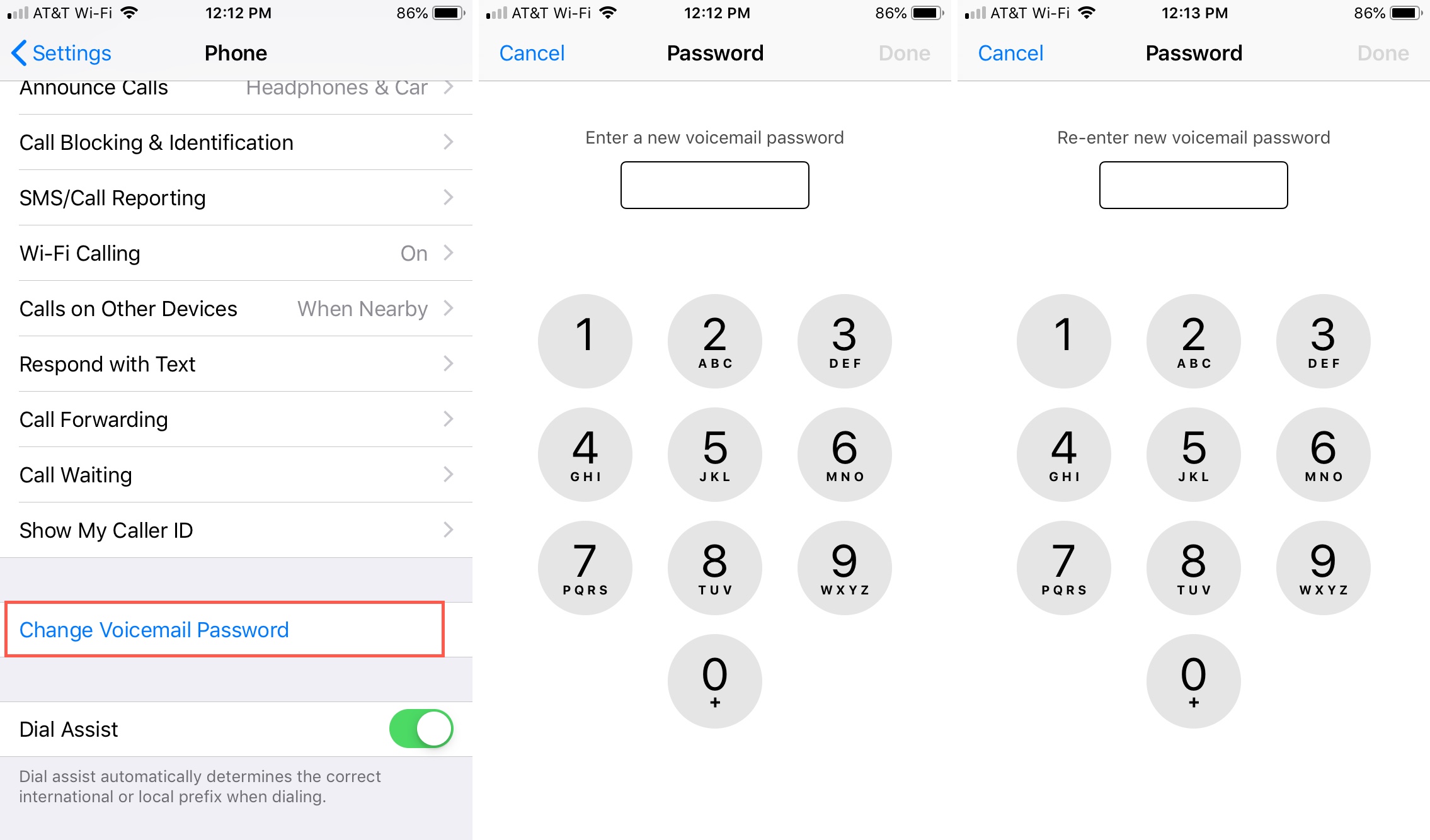
If you have attempted the self-service resets, verified your network connection, and consulted the carrier’s mobile application to no avail, you may have triggered a temporary security lockout. Carriers often disable account modifications for 24 hours if multiple incorrect password attempts are made.
If you are locked out for an extended period, it is time to contact customer support directly. When speaking with a representative:
- Verification: Be prepared to provide the account PIN or a government-issued ID if visiting a physical retail store.
- System Refresh: Sometimes, the carrier must manually “re-provision” your voicemail feature on their end. This acts as a hard reset for your entire messaging service, effectively clearing out any persistent bugs that might be causing the authentication failure.
Remember that while voicemail might feel like an antiquated tool, it remains a pillar of identity verification in our modern digital infrastructure. Maintaining a secure, updated, and accessible voicemail system is not just about listening to missed calls—it is a fundamental aspect of your overall digital hygiene and account security. By taking the time to manage your credentials properly, you ensure that this essential gateway remains a tool for your convenience rather than a source of technological frustration.
aViewFromTheCave is a participant in the Amazon Services LLC Associates Program, an affiliate advertising program designed to provide a means for sites to earn advertising fees by advertising and linking to Amazon.com. Amazon, the Amazon logo, AmazonSupply, and the AmazonSupply logo are trademarks of Amazon.com, Inc. or its affiliates. As an Amazon Associate we earn affiliate commissions from qualifying purchases.