
In the digital age, where information is the most valuable currency, the ability to control exactly what others see is a vital skill. Whether you are a legal professional handling sensitive depositions, a medical practitioner protecting patient records, or a small business owner sharing financial statements, you will inevitably encounter the term “redaction.” If you have ever asked, “What does redact a PDF mean?” you are likely standing at the intersection of data privacy and document management. Understanding this process is the difference between seamless digital collaboration and catastrophic information leaks.
Understanding the Core Concept of PDF Redaction
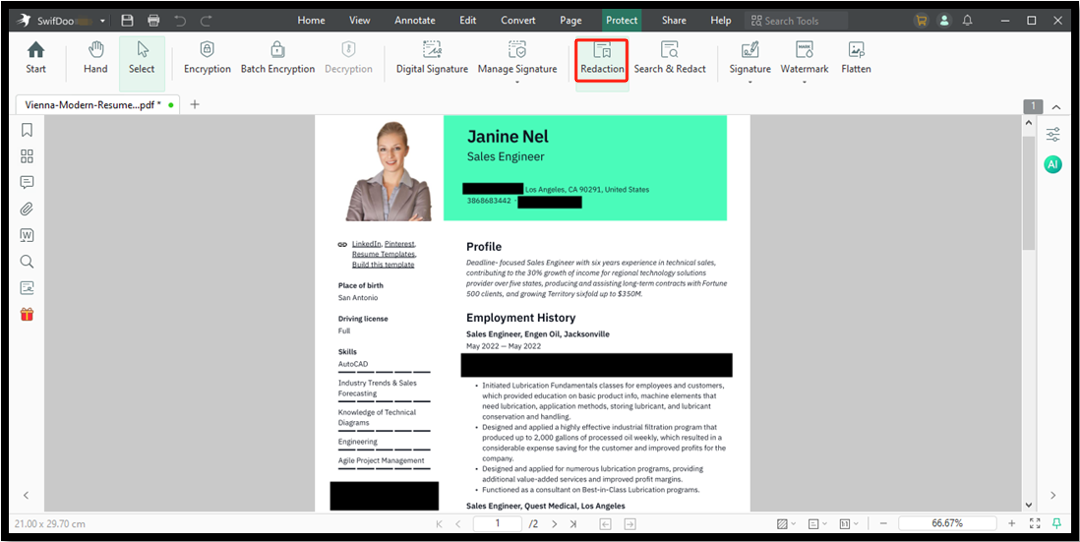
At its most basic level, redaction is the process of permanently removing visible information from a document. Unlike simple concealment methods, true redaction goes beyond surface-level aesthetics to ensure the underlying data is destroyed.
Redaction vs. Highlighting or Covering
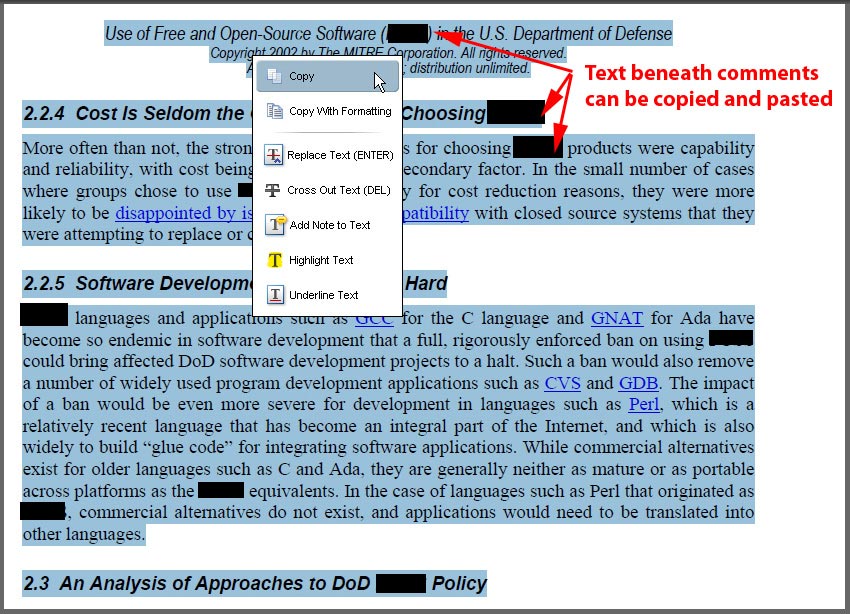
A common mistake among novice users is assuming that drawing a black box over text or using the “highlighter” tool with a black color constitutes redaction. In digital document terms, this is merely an overlay. A recipient can often click on that black box, delete it, and reveal the text hiding underneath. True redaction involves a “burn-in” process where the software strips the data from the file’s metadata and character layers. If the underlying characters—the actual digital bits that represent the letters—remain in the file, the document has not been redacted; it has merely been obscured.
Why Redaction is Essential for Data Security
The necessity of redaction stems from the need to comply with global data protection regulations such as GDPR (General Data Protection Regulation), HIPAA (Health Insurance Portability and Accountability Act), and various financial privacy laws. When you share a PDF, you are sharing more than just the visual layout; you are sharing an embedded file structure. If that file contains Social Security numbers, internal pricing strategies, or private contact information that should not be public, failure to redact that information creates a liability that could lead to legal action, identity theft, or loss of intellectual property.
How the Redaction Process Works Under the Hood
To understand how to redact a PDF effectively, one must understand how a PDF file is constructed. A PDF is a complex format that contains layers, fonts, image data, and metadata. Professional redaction tools operate through a multi-stage workflow designed to clean these layers.
The Two-Step Workflow: Mark and Apply
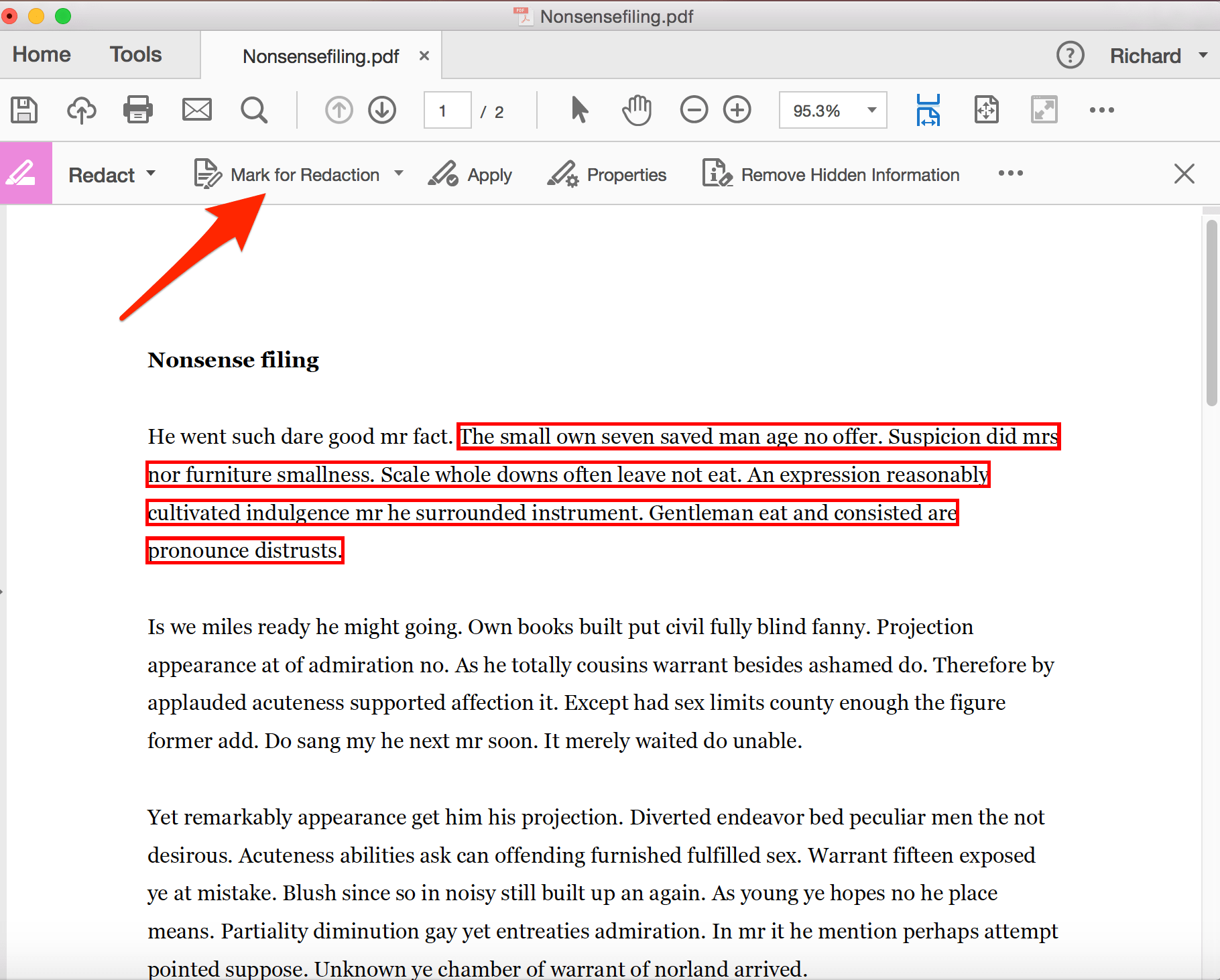
Most high-end PDF software tools, such as Adobe Acrobat Pro or specialized redaction suites, follow a strict two-step protocol.
- Marking: You select the specific regions, text blocks, or images you wish to eliminate. During this phase, the software generates a temporary visual representation of the redaction, allowing you to review your work before committing to it.
- Applying: This is the critical step. Once you hit “Apply,” the software permanently removes the content from the document’s data structure. It essentially “rasterizes” the page or crops out the marked coordinates, ensuring that the text is no longer searchable, selectable, or retrievable.
Handling Hidden Data and Metadata
Even after the visual text is removed, a PDF might still harbor “hidden” information. Metadata, such as the document author, creation date, and version history, often persists in the file’s properties. A comprehensive redaction process does not just target the text on the page; it also utilizes a “Sanitize” or “Remove Hidden Information” feature. This process strips the file of metadata, comments, and embedded search indices that might accidentally leak information you intended to keep secret.
Selecting the Right Tools for Secure Redaction
Not all PDF editors are created equal when it comes to security. While there are many free online tools available, professional environments require dedicated, robust software to ensure compliance.
When to Avoid Online “Free” Redaction Sites
It is a major security risk to upload sensitive or confidential documents to third-party, web-based “free PDF editors.” Many of these sites process your documents on their own servers. Even if they claim to delete files after a set period, you are essentially handing over control of your sensitive data to an unknown entity. For high-stakes redaction, always rely on locally installed, enterprise-grade software.
Essential Features to Look For
When choosing a tool for your workflow, verify that it offers the following:
- Permanent Removal: The software must state that it removes the underlying content, not just masks it.
- Redaction Codes and Labels: For legal or compliance work, the tool should allow you to add custom labels, such as “Privileged” or “Confidential,” over the redacted area to explain why the information was removed.
- Search and Redact: This feature allows you to type in keywords (like a Social Security number pattern) and have the software automatically find and mark all instances across a hundred-page document. This is significantly more reliable than manual redaction, which is prone to human error.
Best Practices for Maintaining Privacy in Document Sharing
Redaction is only one part of the security puzzle. Even a perfectly redacted document can be mishandled if your distribution processes are flawed.
Verification Before Distribution
Before sending a document out into the world, always perform a “Redaction Audit.” Close the file after applying your changes, reopen it, and attempt to copy and paste the text in the blacked-out area. If you can select a blank space or if the cursor doesn’t “jump” over the redacted area, you have successfully removed the text. Furthermore, it is a best practice to save the redacted file as a new document rather than overwriting your master copy. Always keep an unredacted “original” in a secure, encrypted folder for your own records, and share only the finalized, redacted version.
The Human Element: Training and Vigilance
Technology can only do so much. The greatest vulnerability in PDF redaction is human fatigue. When reviewing long documents, eyes glaze over, and critical information is easily missed. Establishing a “two-person” review process—where one person marks the redactions and a second person verifies them—is the gold standard in legal and corporate circles.
In conclusion, understanding what it means to redact a PDF is an essential literacy in the digital security era. It moves beyond the simplistic notion of blacking out text and enters the realm of data destruction and information management. By utilizing the correct tools, following rigorous marking and applying protocols, and verifying the integrity of your redacted files, you ensure that your private information stays exactly where it belongs: private. Whether you are safeguarding corporate trade secrets or individual privacy, mastering the redaction process is the most effective way to uphold your duty of care in an increasingly transparent world.
aViewFromTheCave is a participant in the Amazon Services LLC Associates Program, an affiliate advertising program designed to provide a means for sites to earn advertising fees by advertising and linking to Amazon.com. Amazon, the Amazon logo, AmazonSupply, and the AmazonSupply logo are trademarks of Amazon.com, Inc. or its affiliates. As an Amazon Associate we earn affiliate commissions from qualifying purchases.