
In the fast-evolving landscape of modern technology, the term “refresh rate” has moved from the technical manuals of high-end PC monitors to the center stage of mainstream smartphone marketing. If you have been shopping for a new television, laptop, or mobile device recently, you have likely encountered the specification “120Hz.” But what does 120 hertz actually represent, and how does it fundamentally alter the way we perceive digital media?
At its core, 120 hertz (Hz) is a measurement of frequency. In the context of display technology, it dictates how many times per second a screen updates its image. A 120Hz display refreshes its content 120 times every single second. To understand why this matters, we must look at how digital motion is constructed. Everything you see on a screen is essentially a series of static images shown in rapid succession. When the rate of these updates is low, the brain can perceive the transitions, which leads to the “choppy” motion often seen on older monitors. By doubling the standard 60Hz refresh rate to 120Hz, displays provide a significantly higher level of visual fluidness that impacts everything from scrolling through social media to competitive gaming.

The Science of Motion: Understanding Refresh Rates
To grasp the impact of 120Hz, one must distinguish between two similar but distinct metrics: frame rate and refresh rate. While they are inextricably linked, they are controlled by different parts of your hardware.
Frame Rate vs. Refresh Rate
The frame rate is the speed at which your computer’s graphics processing unit (GPU) or a device’s chipset generates frames of a video or game. This is measured in frames per second (FPS). The refresh rate, conversely, is the fixed speed at which your monitor can display those frames. If your GPU is outputting 60 frames per second but your monitor is 120Hz, the monitor will simply repeat frames to fill the gap. If the GPU outputs 120 FPS on a 60Hz screen, the monitor will be physically unable to display the full fluidity of that data, essentially “wasting” the extra frames.
Persistence of Vision and Visual Smoothing
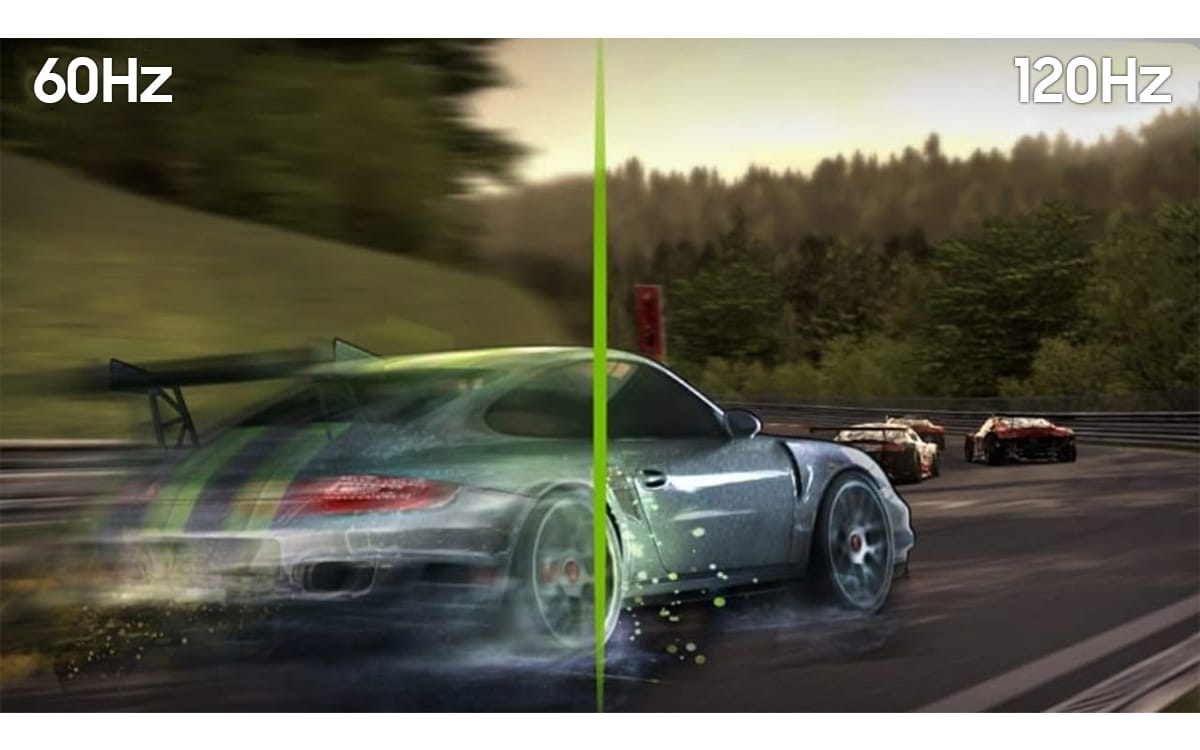
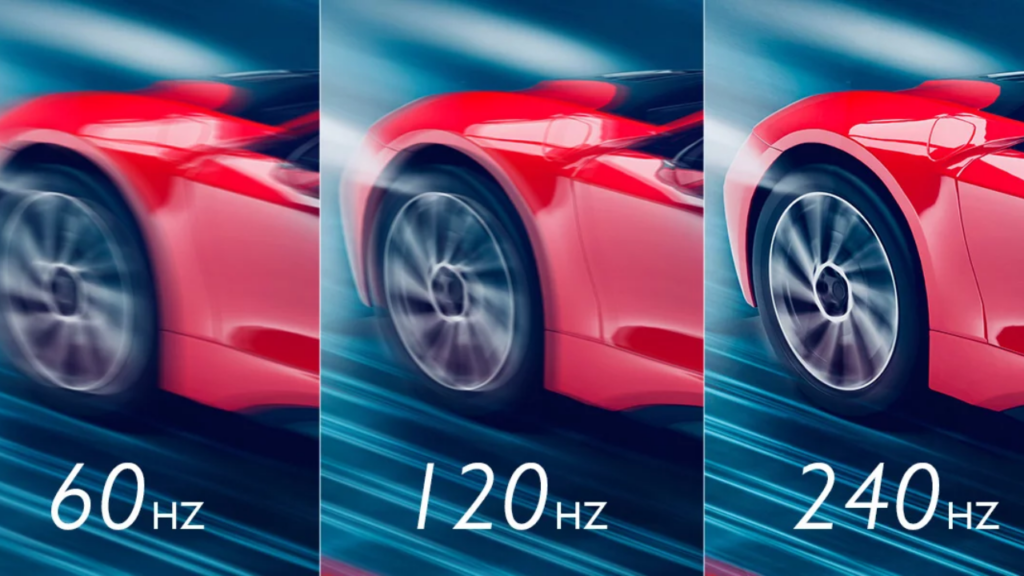
The human eye is remarkably adept at detecting flicker and motion blur. On a standard 60Hz display, fast-moving objects across the screen can appear to stutter or blur because the gap between one frame and the next is long enough for the brain to register the discontinuity. At 120Hz, the time between each update is halved. This tighter interval creates a sense of “visual silkiness.” When you scroll through a webpage, the text remains readable even while it is in motion, and in high-intensity gaming, the movement of a character or camera feels grounded, immediate, and responsive.
Why 120Hz Has Become the New Gold Standard
The transition to 120Hz is not merely a marketing gimmick; it represents a tangible improvement in user experience. Whether you are a professional using a high-end workstation or a casual user scrolling through a feed, the benefits of a higher refresh rate permeate various aspects of daily digital interaction.
The Competitive Edge in Gaming
For gamers, 120Hz is often considered the threshold for serious play. In fast-paced genres like first-person shooters or racing simulators, milliseconds matter. When a screen refreshes at 120Hz, the visual information provided to the player is more current. A monitor running at 60Hz updates every 16.6 milliseconds, whereas a 120Hz monitor updates every 8.3 milliseconds. This reduced input latency means the player sees an enemy or an obstacle slightly sooner, allowing for faster reaction times. It is the difference between missing a target and landing a critical shot.
Professional Productivity and Ergonomics
Beyond gaming, 120Hz offers significant ergonomic benefits. A higher refresh rate reduces the strain on the eyes caused by perceived flicker and motion blur. For professionals who spend eight to ten hours a day staring at text-heavy documents, spreadsheets, or code editors, the “scrolling experience” is vastly improved. Instead of text turning into a smear of pixels while moving, the characters remain sharp, allowing the eye to track the movement without constant refocusing. This subtle reduction in visual fatigue can lead to higher productivity and less eye strain by the end of the workday.
The Aesthetic of Fluidity
User Interface (UI) design has also adapted to high-refresh-rate hardware. Modern operating systems, such as iOS, Android, and Windows, utilize physics-based animations. When you open a menu, minimize a window, or swipe between screens, the software utilizes these higher refresh rates to ensure the animation is “buttery.” This makes the software feel faster and more premium. Even if a processor is not objectively more powerful, a 120Hz screen makes the device feel snappier, creating a more intuitive and tactile relationship between the user’s finger and the screen.
Considerations Before Making the Switch
While 120Hz is a substantial upgrade, it is important to weigh the trade-offs. Transitioning to a higher refresh rate is not an entirely cost-free endeavor, particularly in the mobile and portable computing sectors.
Battery Life and Power Consumption
The most significant drawback to 120Hz technology is power consumption. Refreshing a display 120 times per second requires more energy than doing so 60 times. In laptops and smartphones, this puts a higher load on the battery. To mitigate this, most modern devices now feature “Adaptive Refresh Rate” or “Variable Refresh Rate” (VRR) technology. This smart software lowers the refresh rate to 1Hz or 60Hz when you are reading a static article or looking at a photo, and ramps it up to 120Hz the moment you begin to scroll or play a video. This hybrid approach allows users to enjoy the benefits of 120Hz without sacrificing their entire battery life.
Hardware Requirements
It is crucial to remember that a 120Hz monitor or phone screen is only as good as the hardware driving it. If your device’s GPU lacks the power to maintain a high frame rate, you will encounter screen tearing or inconsistent motion. For PC users, upgrading to a 120Hz monitor often requires a secondary investment in a capable graphics card that can consistently output 120 FPS. Similarly, for smartphone users, older or budget-tier processors may struggle to keep the UI smooth at 120Hz, resulting in stuttering that negates the very benefits the feature is meant to provide.
Content Availability
Finally, consider the media you consume. While the interface and gaming benefit immediately, much of the video content on the internet—including Netflix, YouTube, and broadcast television—is still recorded at 24, 30, or 60 frames per second. While a 120Hz screen will still make these videos look clean, it cannot magically add detail that isn’t there. The primary value of 120Hz is in the interactivity and the responsiveness of the device, rather than the consumption of legacy video formats.
The Future of Display Technology
As we look toward the future, 120Hz is rapidly becoming the baseline rather than the exception. We are already seeing the emergence of 144Hz, 240Hz, and even 360Hz displays in professional esports. While these higher tiers offer diminishing returns for the average consumer, the move to 120Hz marks a permanent shift in our expectations of technology.
We no longer accept “laggy” interfaces or sluggish scrolling as the norm. As hardware becomes more efficient and prices continue to drop, the “high-refresh-rate” premium will vanish, eventually reaching a point where 120Hz (or higher) is standard on every device, from the most affordable entry-level smartphone to the largest office monitor. Ultimately, 120 hertz is about closing the gap between the digital world and the human experience. By providing smoother, more responsive, and less fatiguing visuals, this technology makes our digital interactions feel less like interacting with a machine and more like a seamless extension of our natural perception.
aViewFromTheCave is a participant in the Amazon Services LLC Associates Program, an affiliate advertising program designed to provide a means for sites to earn advertising fees by advertising and linking to Amazon.com. Amazon, the Amazon logo, AmazonSupply, and the AmazonSupply logo are trademarks of Amazon.com, Inc. or its affiliates. As an Amazon Associate we earn affiliate commissions from qualifying purchases.