
The world of cryptocurrency, built on the revolutionary blockchain technology, often presents a steep learning curve for newcomers and seasoned users alike. At its core, interacting with digital assets hinges on understanding and utilizing one fundamental element: the crypto wallet address. This alphanumeric string acts as your digital mailbox for receiving various cryptocurrencies, much like an email address for digital correspondence or a bank account number for traditional wire transfers. However, unlike these traditional counterparts, a crypto wallet address is unique to the blockchain ecosystem and requires specific technical understanding to locate and manage effectively.
This guide delves into the technical aspects of finding your crypto wallet address across different types of wallets and platforms, ensuring secure and efficient digital asset management within the vast technological landscape of Web3. Our focus remains squarely on the technology, processes, and tools involved in this crucial operation.
Understanding the Crypto Wallet Address Ecosystem
Before diving into the “how-to,” it’s essential to grasp the underlying technical concepts that define a crypto wallet address. This foundational knowledge is key to navigating the diverse world of digital asset management.
What is a Crypto Wallet Address?
At its most fundamental, a crypto wallet address is a unique identifier derived from a cryptographic public key. In public-key cryptography, a pair of keys is generated: a public key and a private key. The public key can be openly shared and is used to derive your wallet address, which allows others to send you cryptocurrency. The private key, on the other hand, must be kept secret and is used to authorize outgoing transactions, proving ownership of the funds associated with that public key.
An address serves as the destination for incoming transactions on a specific blockchain network. For instance, a Bitcoin address will only receive Bitcoin, and an Ethereum address will only receive Ethereum or ERC-20 tokens. These addresses are typically a long string of alphanumeric characters, often starting with specific prefixes (e.g., ‘1’, ‘3’, or ‘bc1’ for Bitcoin; ‘0x’ for Ethereum). Each character in the address is critical; even a single typo can lead to irretrievable loss of funds, as blockchain transactions are irreversible.
Types of Crypto Wallets and Their Address Generation
Crypto wallets are essentially software interfaces that allow users to interact with their blockchain assets. They don’t technically “store” cryptocurrencies (which reside on the blockchain), but rather store the keys necessary to access and manage them. The method of generating and accessing your address varies significantly based on the wallet type:
- Software Wallets (Hot Wallets): These are applications installed on your computer or mobile device, or browser extensions. Examples include MetaMask, Trust Wallet, Exodus, and Electrum. They are called “hot” because they are connected to the internet. Addresses are generated programmatically by the software upon wallet creation.
- Hardware Wallets (Cold Wallets): Physical devices designed for maximum security, keeping your private keys offline. Examples include Ledger and Trezor. They are “cold” because they are air-gapped from the internet. Addresses are generated by the device’s secure element and typically accessed through accompanying desktop or mobile software.
- Exchange Wallets (Custodial Wallets): When you sign up for a cryptocurrency exchange like Binance, Coinbase, or Kraken, the exchange creates a wallet for you. These are “custodial” because the exchange holds your private keys on your behalf. Addresses are generated and managed by the exchange’s backend infrastructure.
Understanding these distinctions is paramount because the technical steps to find your address differ for each.
The Significance of Your Wallet Address
Beyond merely being a receiver, your wallet address holds significant technical importance:
- Blockchain Identification: It’s your unique identifier on a particular blockchain, enabling anyone to view your transaction history (though not your identity) on public ledger explorers.
- Immutable Record: Every transaction involving your address is permanently recorded on the blockchain, providing an auditable, decentralized ledger.
- Security Perimeter: While public, it’s the gateway through which your digital assets flow. Any compromise of its associated private key means direct access to your funds.
Locating Your Address in Software Wallets (Hot Wallets)
Software wallets are the most common entry point for many users due to their convenience and accessibility. The process to find your address within these applications is generally intuitive, designed for user-friendliness.
Mobile Wallet Applications (e.g., MetaMask, Trust Wallet, Exodus)
Mobile wallets are designed for on-the-go access and often feature streamlined interfaces.
- Open the App: Launch your chosen mobile wallet application.
- Unlock Wallet: Enter your PIN, password, or use biometric authentication (fingerprint/face ID).
- Select Asset: Most wallets display a list of supported cryptocurrencies. Tap on the specific cryptocurrency for which you want to find the address (e.g., “Ethereum,” “Bitcoin,” “BNB”).
- Find “Receive” or “Deposit”: Look for a button or tab labeled “Receive,” “Deposit,” or an arrow pointing inwards. Tapping this will display your wallet address for that specific asset.
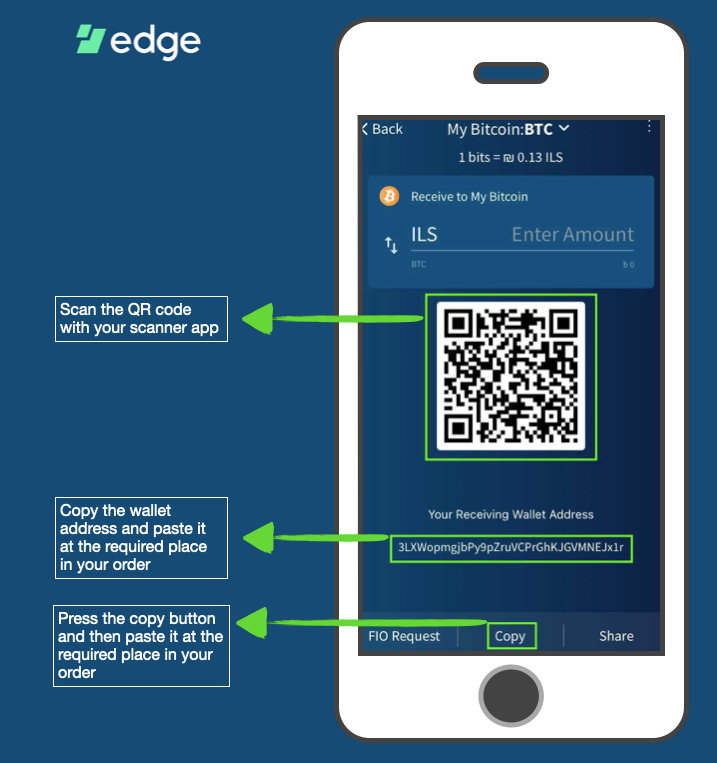
- Copy Address: The address will typically be displayed as a long string of characters and often accompanied by a QR code. There will usually be a “Copy” icon or button next to it. Tap this to copy the address to your device’s clipboard.
- Verify Network (Crucial): For many mobile wallets, especially those supporting multiple chains (like MetaMask for EVM chains or Trust Wallet), ensure you have selected the correct network (e.g., Ethereum Mainnet, Binance Smart Chain, Polygon) before copying the address. An address on one network often looks similar to an address on another, but sending funds to the wrong network’s address will result in loss.
Desktop Wallet Applications (e.g., Exodus, Electrum, Daedalus)
Desktop wallets offer a more robust interface and often more features. The process is similar to mobile wallets.
- Launch Software: Open the desktop application on your computer.
- Unlock Wallet: Enter your password.
- Navigate to Portfolio/Wallet: Find your list of assets, usually labeled “Portfolio” or “Wallet.”
- Select Coin: Click on the cryptocurrency for which you need the address.
- Locate “Receive” or “Deposit”: Similar to mobile apps, there will be a “Receive” or “Deposit” button. Clicking it will reveal your address.
- Copy and Verify: Copy the alphanumeric string and, if applicable, double-check the network selection if the wallet supports multiple chains (e.g., some multi-asset wallets like Exodus have built-in exchange features, but for receiving, the address is specific to the selected blockchain).
Browser Extension Wallets (e.g., MetaMask, Phantom)
These wallets integrate directly into your web browser, providing seamless interaction with decentralized applications (dApps).
- Click Extension Icon: Locate and click the wallet extension icon in your browser’s toolbar (e.g., the fox icon for MetaMask, the ghost icon for Phantom).
- Unlock Wallet: Enter your password.
- Main Account View: For many browser wallets (like MetaMask), your primary public address for the currently selected network is immediately visible at the top of the interface, often under your account name.
- Copy Address: Click on the address itself or a “Copy” icon next to it.
- Confirm Network: Ensure the correct network is selected from the dropdown menu (e.g., “Ethereum Mainnet,” “Polygon Mainnet”). The displayed address is specific to the selected network. Phantom Wallet specifically targets the Solana network, so its address is always a Solana address.
Retrieving Your Address from Centralized Exchanges (CEXs)
Centralized exchanges (CEXs) are a popular way for many users to buy, sell, and hold cryptocurrencies. While convenient, it’s crucial to remember that CEXs are custodial, meaning they manage your private keys. Therefore, finding your address here is slightly different as you are requesting a deposit address for their wallet that is associated with your account.
Navigating Exchange Interfaces (e.g., Binance, Coinbase, Kraken)
The specific steps may vary slightly between exchanges, but the general flow is consistent:
- Log In: Access your exchange account through their website or mobile app.
- Go to Wallet/Funds: Look for sections labeled “Wallet,” “Funds,” “Balances,” or “Assets.”
- Select “Deposit”: Within your wallet overview, you’ll see options for “Deposit,” “Withdraw,” and “Trade.” Click “Deposit.”
- Choose Cryptocurrency: Select the specific cryptocurrency you wish to receive (e.g., “BTC,” “ETH,” “USDT”).
- Select Network (Critical for ERC-20, BEP-20, etc.): This is perhaps the most important step for CEX deposits. If you are depositing a token that exists on multiple blockchains (e.g., USDT can be ERC-20, TRC-20, BEP-20, Polygon), you must select the correct network that matches the network from which you are sending. If you select “ERC-20” for USDT and send it from a “TRC-20” network, your funds will likely be lost.
- View and Copy Address: The exchange will then display a unique deposit address associated with your account for that specific coin and network. Copy this address. It will often come with a warning about sending only the chosen coin/token to this address.
Understanding Network Selection and its Impact
Many cryptocurrencies, especially stablecoins and altcoins, are issued on multiple blockchain networks. For example, the popular stablecoin USDT can exist as an ERC-20 token (on the Ethereum blockchain), a TRC-20 token (on the Tron blockchain), or a BEP-20 token (on the Binance Smart Chain). Each network requires a different type of address and uses a different underlying technology.
When finding your address on an exchange, if you select USDT and then choose “ERC-20” as the network, the exchange will provide an Ethereum-compatible address (starting with “0x”). If you then choose “TRC-20,” it will provide a Tron-compatible address (starting with “T”). Sending USDT from an Ethereum wallet to a TRC-20 address will result in permanent loss. Always ensure the sender’s network matches the recipient’s network for multi-chain assets.
Cautionary Notes for Exchange Addresses
- Custody: Remember that funds deposited into an exchange are under the exchange’s control, not yours. This introduces counterparty risk.
- Unique Addresses: Some exchanges may generate a new deposit address for you with each deposit, or after a certain period. While older addresses may still be valid, it’s always best practice to use the most recently generated address.
- Minimum Deposit: Exchanges often have minimum deposit amounts. Sending less than this amount may result in your funds not being credited.
Accessing Your Address on Hardware Wallets (Cold Wallets)
Hardware wallets represent the gold standard for cryptocurrency security, keeping your private keys offline. While the keys are stored securely on the device, you still need accompanying software to view your addresses and manage transactions.
Ledger Devices (e.g., Nano S/X)
Ledger devices utilize the Ledger Live application for managing assets.
- Connect Device: Plug your Ledger device into your computer and unlock it with your PIN.
- Open Ledger Live: Launch the Ledger Live application.
- Navigate to Accounts: In Ledger Live, go to the “Accounts” tab.
- Select Account: Click on the specific cryptocurrency account (e.g., “Bitcoin,” “Ethereum”) for which you want to find the address. If you haven’t added an account yet, you’ll need to do so first, which involves installing the relevant app on your Ledger device.
- Click “Receive”: Within the account details, click the “Receive” button.
- Verify on Device (Crucial for Security): Ledger Live will prompt you to connect and verify the address on your physical Ledger device. This is a critical security step to ensure the address displayed on your screen hasn’t been tampered with by malware. Confirm the address shown on your Ledger screen matches the one in Ledger Live.
- Copy Address: Once verified, you can copy the address from Ledger Live.
Trezor Devices (e.g., Model T/One)
Trezor wallets use Trezor Suite as their primary interface.
- Connect Device: Plug in your Trezor device and enter your PIN.
- Open Trezor Suite: Launch the Trezor Suite application or navigate to
suite.trezor.ioin your browser. - Select Account: In the Trezor Suite interface, select the specific cryptocurrency account from the left-hand sidebar.
- Go to “Receive”: Click on the “Receive” tab or button.
- Generate/Display Address: Trezor Suite will display your current receiving address. You may have the option to generate a new address for privacy reasons.
- Verify on Device: Similar to Ledger, Trezor Suite will show you the address and prompt you to verify it on the Trezor device’s screen. Confirm that both addresses match.
- Copy Address: After verification, copy the address from Trezor Suite.
Security Best Practices for Hardware Wallets
- Device Verification: Always verify the address on the physical hardware wallet screen itself. Never trust an address displayed solely on your computer screen, as malware could potentially swap it.
- Authenticity: Purchase hardware wallets directly from the manufacturer or authorized resellers to avoid compromised devices.
- Seed Phrase Safety: While not directly about finding an address, the seed phrase (or recovery phrase) is the master key to your hardware wallet. Keep it offline, secure, and never share it. It’s the ultimate backup for restoring access to your addresses and funds.
Advanced Considerations and Best Practices for Address Management
While finding your address might seem straightforward, applying best practices enhances security and privacy within the complex blockchain environment.
The Importance of Double-Checking Addresses
Blockchain transactions are irreversible. A single incorrect character in a wallet address means your funds will be sent to an unintended recipient, often an unrecoverable address, and will be permanently lost.
- Copy-Paste, Don’t Type: Always use the copy function. Manually typing addresses is highly prone to errors.
- Verify First and Last Characters: After pasting, make it a habit to quickly check the first 4-5 and last 4-5 characters of the pasted address against the source address. This simple step can catch most copy-paste errors or sophisticated clipboard-hijacking malware.
- Small Test Transactions: For large transfers, especially when sending to a new or unfamiliar address, consider sending a very small test amount first. Once confirmed received, proceed with the larger transaction.
Address Reuse vs. New Addresses
- Privacy: For privacy reasons, particularly with UTXO-based cryptocurrencies like Bitcoin, many wallets generate a new receiving address for each transaction. This makes it harder to link all your transactions to a single identity. While previous addresses typically remain valid, using a new address enhances your financial privacy.
- Account-Based Chains: For account-based blockchains like Ethereum, your primary address (starting with “0x”) generally remains the same. However, you can create multiple accounts (sub-wallets) within a single wallet application, each with its own unique address, to manage different portions of your assets.
QR Codes for Simplified Sharing
Most wallet interfaces provide a QR code representation of your address. This is incredibly useful for sending and receiving funds:
- Easy Scanning: Instead of manually copying and pasting, another user can simply scan your QR code with their wallet app’s “send” function to auto-populate the recipient address.
- Reduced Error: QR codes significantly reduce the risk of human error during address entry.

Protecting Your Seed Phrase and Private Keys
While this guide focuses on finding the public wallet address, it’s imperative to remember that this address is useless without the corresponding private key or, more commonly, the seed phrase (a human-readable representation of your private keys) that grants access to your funds. The security of your addresses ultimately rests on the security of your seed phrase and private keys. Keep them offline, backed up, and utterly secret. Losing them means losing access to your funds, and compromising them means losing your funds to a malicious actor.
Navigating the technical landscape of cryptocurrency requires diligence and understanding. By mastering the process of finding your crypto wallet address and adhering to best practices, you empower yourself with the essential knowledge to participate securely and effectively in the decentralized digital economy.
aViewFromTheCave is a participant in the Amazon Services LLC Associates Program, an affiliate advertising program designed to provide a means for sites to earn advertising fees by advertising and linking to Amazon.com. Amazon, the Amazon logo, AmazonSupply, and the AmazonSupply logo are trademarks of Amazon.com, Inc. or its affiliates. As an Amazon Associate we earn affiliate commissions from qualifying purchases.