
In an ever-evolving digital landscape, accessing your favorite television shows and movies has become a personalized and on-demand experience. Gone are the days when viewers were tethered to linear broadcast schedules; today, the power of streaming puts a vast library of content at your fingertips. Among the myriad of premium entertainment providers, AMC stands out for its critically acclaimed dramas, genre-defining series, and a curated selection of films. From the apocalyptic tension of The Walking Dead universe to the intricate narratives of Better Call Saul and the dark humor of Killing Eve, AMC’s programming slate consistently delivers compelling storytelling.
However, navigating the various platforms and services to reliably stream AMC content can sometimes feel like a puzzle. Is it available on a standalone app? Do you need a cable subscription? What devices are compatible? This comprehensive guide aims to demystify the process, providing a clear roadmap for anyone looking to tap into AMC’s rich content library, ensuring you can enjoy award-winning entertainment whenever and wherever you choose. We’ll delve into the technical avenues, compatible devices, and best practices to optimize your streaming experience, all strictly within the realm of technology.
Understanding AMC’s Streaming Ecosystem
To effectively stream AMC, it’s crucial to understand the distinct ways its content is delivered in the modern digital age. AMC has strategically positioned itself across various platforms to cater to diverse viewing preferences, moving beyond its traditional cable television roots.
AMC+ vs. Traditional Cable Channels
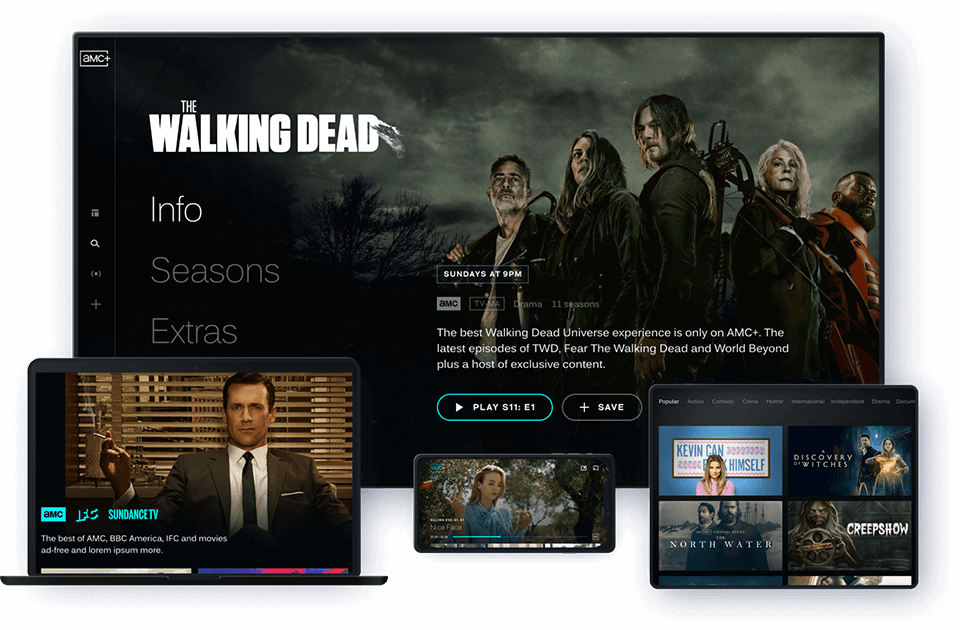
Historically, AMC was primarily a cable television network, requiring a subscription through a traditional cable or satellite provider to access its live broadcast and on-demand content. While this option still exists, the rise of direct-to-consumer streaming services led AMC to launch AMC+. This premium streaming bundle serves as the flagship digital destination for AMC content, offering a significantly enhanced experience compared to merely streaming the linear cable channel.
AMC+ provides ad-free access to a deeper catalog of AMC’s current and past series, often including early access to new episodes before they air on the linear channel. Furthermore, it bundles content from AMC’s sister networks and curated streaming libraries, such as Shudder (horror), SundanceNow (indie films/series), and IFC Films Unlimited. This makes AMC+ a more comprehensive and feature-rich option for dedicated fans, moving beyond the limitations of a standard cable subscription. Essentially, AMC+ is the dedicated app and service for comprehensive AMC content.
The Hub Model: Accessing AMC Through Other Services
Beyond its direct AMC+ offering, AMC content—specifically the linear channel and its on-demand library—can also be accessed through various “hub” services. These include live TV streaming services that mimic a traditional cable package, as well as add-on channels within larger streaming aggregators like Amazon Prime Video Channels or Apple TV Channels. This “hub model” provides flexibility, allowing users to consolidate their subscriptions or integrate AMC into an existing entertainment ecosystem. Each of these hubs comes with its own technical requirements and user interface, which we will explore in detail. Understanding these distinct pathways is the first step toward choosing the most suitable streaming solution for your needs.
Essential Platforms and Services for Streaming AMC
The technical landscape for streaming AMC is varied, offering multiple entry points depending on your preferences and existing subscriptions. Each platform provides a slightly different experience, from standalone apps to integrated channel bundles.
Direct Subscription via AMC+
The most direct and comprehensive way to access AMC’s premium content is through a standalone subscription to AMC+. This service is available as a dedicated application on a wide range of devices and provides ad-free access to all AMC content, including exclusive series, early premieres, and the full libraries of Shudder, SundanceNow, and IFC Films Unlimited.
- Subscription Process: Typically, you can subscribe directly through the AMC+ website or via in-app purchases on supported devices (e.g., Apple App Store, Google Play Store, Roku Channel Store, Amazon Appstore). A free trial is often available to new subscribers, allowing you to test the service before committing.
- Technical Features: AMC+ offers user profiles, watchlist functionality, and often supports offline downloads for mobile viewing. The interface is designed for easy navigation of its extensive library.
Bundled Options (Amazon Prime Video Channels, Apple TV Channels, Roku Channels)
For users already integrated into specific tech ecosystems, AMC+ is often available as an add-on subscription through existing platforms, simplifying billing and content management.
- Amazon Prime Video Channels: If you have an Amazon Prime membership, you can subscribe to AMC+ as a Prime Video Channel. This integrates all AMC+ content directly into your Prime Video library and interface. You’ll access it through the Prime Video app on any compatible device.
- Apple TV Channels: Similarly, Apple TV users can subscribe to AMC+ directly within the Apple TV app. This consolidates your viewing experience under one umbrella, allowing you to watch AMC+ content alongside your other Apple TV purchases and subscriptions.
- Roku Channels: Roku users can also subscribe to AMC+ directly through the Roku Channel Store. This integrates the content within the Roku ecosystem, providing a streamlined experience for Roku device owners.
These bundled options leverage the host platform’s existing infrastructure for billing and content delivery, often resulting in a more unified user experience if you’re already deeply invested in that ecosystem.
Live TV Streaming Services (Sling TV, YouTube TV, FuboTV, Philo)
If your primary goal is to watch the live AMC channel as it airs, along with its associated on-demand library, a live TV streaming service is your go-to. These services aim to replace traditional cable packages, offering a bundle of channels over the internet.
- Sling TV: Offers AMC in both its “Sling Orange” and “Sling Blue” base packages. It’s a cost-effective option for channel bundles.
- YouTube TV: Includes AMC in its single, comprehensive channel lineup, along with a robust DVR feature.
- FuboTV: Primarily known for sports, FuboTV also includes AMC in its base plan, often with a good selection of other entertainment channels.
- Philo: A more budget-friendly option, Philo focuses on entertainment and lifestyle channels, with AMC being a core offering.
Each of these services requires its own subscription and provides its own app and interface. The ability to stream AMC live, rewind live TV, and access on-demand episodes directly after airing are key features of these platforms. When selecting one, consider the overall channel lineup, pricing, and specific DVR functionalities.
Devices Supported: Stream Anywhere, Anytime
The versatility of AMC’s streaming options extends to a wide array of devices, ensuring you can access your favorite shows whether you’re at home or on the go. Compatibility is a cornerstone of a seamless streaming experience.
Smart TVs and Streaming Sticks/Boxes
Dedicated streaming hardware forms the backbone of home entertainment, providing a robust and optimized viewing experience on larger screens.
- Roku Devices (Roku Streaming Stick, Roku Express, Roku Ultra, Roku TVs): Widely supported, Roku devices offer a user-friendly interface to download the AMC+ app or access AMC via live TV streaming service apps.
- Amazon Fire TV Devices (Fire TV Stick, Fire TV Cube, Fire TV Edition Smart TVs): Amazon’s ecosystem fully supports AMC+ and most live TV streaming apps. The integration with Alexa voice commands can enhance usability.
- Apple TV (4K and HD models): As mentioned, the Apple TV app is a central hub, allowing direct AMC+ subscription and access, as well as support for third-party streaming apps.
- Google Chromecast and Chromecast with Google TV: Chromecast allows casting from mobile devices and web browsers, while Chromecast with Google TV offers a full Android TV interface for native app installation.
- Samsung Smart TVs, LG Smart TVs, Vizio SmartCast TVs: Many newer models of these smart TVs come with built-in app stores that allow direct download of the AMC+ app and other compatible streaming services. Always check your specific TV model’s app store for availability.
Mobile Devices (iOS, Android)
For on-the-go viewing, mobile devices offer unparalleled flexibility.
- Apple iPhones and iPads (iOS): The AMC+ app, as well as apps for various live TV streaming services, are available for download from the Apple App Store. These apps often support features like offline downloads and AirPlay casting.
- Android Smartphones and Tablets: Similarly, the AMC+ app and other streaming service apps can be downloaded from the Google Play Store for Android devices. Chromecast integration is also a common feature.
Both iOS and Android apps are designed for touch-screen navigation and adapt content playback to smaller screens, making them perfect for commuting or casual viewing.
Web Browsers (Desktops & Laptops)
For those who prefer a larger screen without a dedicated streaming device or are working on their computer, web browser access is a convenient option.
- Supported Browsers: Most modern web browsers, including Chrome, Firefox, Safari, Edge, and Brave, are compatible with the AMC+ website (amcplus.com) and the websites of live TV streaming services.
- Functionality: Streaming via a web browser generally offers full functionality, including HD playback, user profile management, and access to the full content library. Ensure your browser is up-to-date for optimal performance.
Gaming Consoles
While not their primary function, some gaming consoles double as capable media centers.
- Xbox (One, Series X|S): The AMC+ app and many live TV streaming service apps are available for download on the Xbox platform.
- PlayStation (PS4, PS5): Similar to Xbox, PlayStation consoles often support a range of streaming applications, including AMC+.
Checking the respective console’s app store (Microsoft Store for Xbox, PlayStation Store for PlayStation) will confirm current app availability. This broad device support ensures that regardless of your preferred viewing method, AMC content is likely just a few clicks away.
Optimizing Your AMC Streaming Experience
Simply having access to AMC’s content is one thing; ensuring a smooth, high-quality, and enjoyable streaming experience is another. Several technical factors can significantly impact your viewing.
Internet Speed and Bandwidth Requirements
The foundation of any good streaming experience is a stable and sufficiently fast internet connection.
- Minimum Requirements: For standard definition (SD) streaming, most services recommend a minimum of 3-5 Mbps.
- High Definition (HD): For reliable High Definition (HD) streaming (720p or 1080p), an internet speed of at least 5-10 Mbps is typically required.
- Ultra High Definition (4K/UHD): If you’re planning to stream any 4K content available on AMC+ or through other platforms, you’ll need a much faster connection, usually 20-25 Mbps or higher.
- Bandwidth Considerations: Remember that these are per-stream recommendations. If multiple devices in your household are streaming simultaneously, or if you have other heavy internet usage (online gaming, large downloads), your total bandwidth needs will increase. A robust Wi-Fi network with good signal strength is also crucial to avoid buffering. Consider an Ethernet connection for your primary streaming device for the most stable experience.
Troubleshooting Common Streaming Issues
Even with a good connection, occasional glitches can occur. Here are some common issues and their technical solutions:
- Buffering/Lagging:
- Solution: Check your internet speed. Restart your router and modem. Close other bandwidth-intensive applications or devices on your network. Try reducing the streaming quality settings if available.
- Poor Picture Quality (Pixelation, Blurriness):
- Solution: Ensure your internet speed meets HD/4K requirements. Check the app or service settings to ensure video quality isn’t manually set too low. Some services dynamically adjust quality based on network conditions; wait a moment for it to improve.
- App Crashes/Freezes:
- Solution: Close and restart the app. Clear the app’s cache and data (accessible in device settings). Ensure the app and your device’s operating system are up to date. Restart the streaming device itself.
- Audio/Video Sync Issues:
- Solution: Restart the app or device. Check for any audio delay settings on your TV or sound system. Sometimes, switching to a different audio track (if available) and back can resolve it.
Enhancing Picture and Sound Quality
Beyond just fixing problems, you can actively enhance your viewing pleasure:
- TV Calibration: Properly calibrating your TV’s picture settings (brightness, contrast, sharpness, color) can make a significant difference. Many online guides or professional calibration services can help.
- Sound System: Invest in a soundbar or a full surround sound system for a more immersive audio experience. Ensure your streaming device and TV are configured to pass through the highest quality audio formats (e.g., Dolby Digital, Dolby Atmos if supported).
- High-Quality Cables: For devices connected via HDMI, use certified High-Speed HDMI cables, especially for 4K and HDR content, to ensure proper data transmission.
- HDR/Dolby Vision: If your TV and streaming device support HDR10 or Dolby Vision, ensure these settings are enabled on both devices and that the content you’re watching supports these formats for enhanced dynamic range and color.
Navigating the AMC+ Interface and Features
A well-designed interface significantly improves usability. The AMC+ app and website typically offer several key features:
- User Profiles: Allow multiple users to have personalized watchlists and viewing histories.
- Watchlist/My List: A crucial feature for saving shows and movies you want to watch later.
- Continue Watching: Automatically tracks your progress, allowing you to pick up where you left off.
- Search and Discovery: Robust search functions and curated categories help you find new content.
- Offline Downloads (Mobile Only): On mobile devices, this feature allows you to download select content to watch without an internet connection, perfect for travel.
Familiarizing yourself with these features will help you get the most out of your AMC+ subscription and streamline your content discovery.
The Value Proposition: Is AMC+ Right for You?
When considering whether to invest in AMC’s streaming offerings, particularly AMC+, the decision often boils down to a technical assessment of its features, content accessibility, and overall user experience relative to its cost. This is not a financial investment analysis, but rather a value assessment from a tech user’s perspective.
Exclusive Content and Ad-Free Viewing
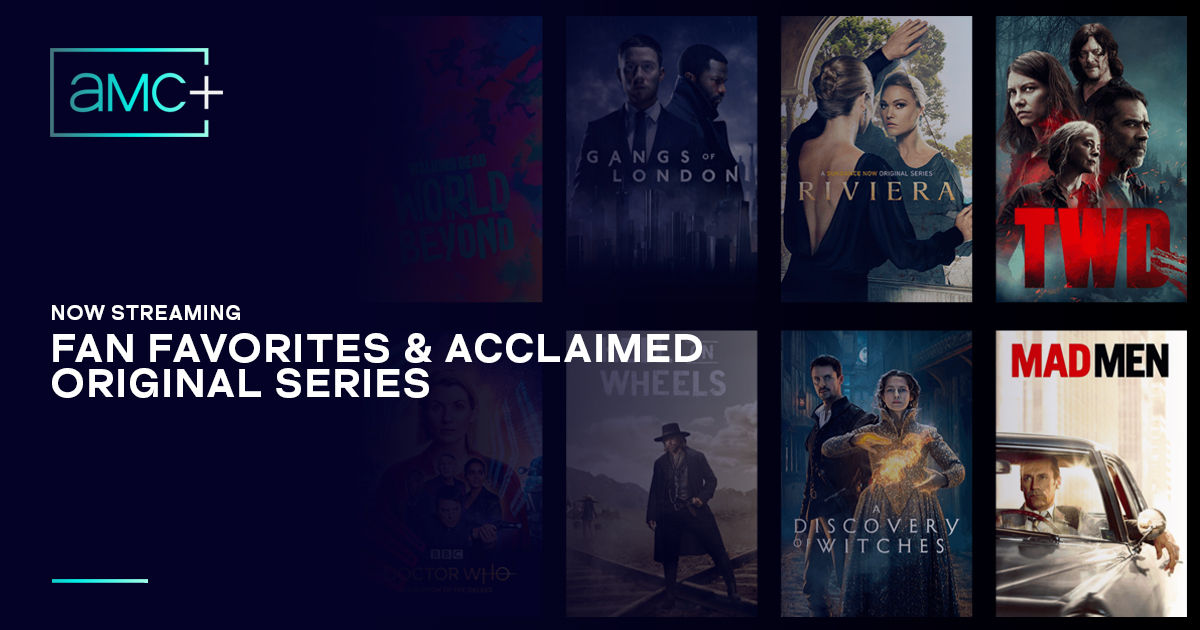
One of AMC+’s strongest technical selling points is its access to exclusive content and early episode premieres. For fans of flagship AMC franchises like The Walking Dead or new AMC Originals, having new episodes available a week before their linear broadcast or access to entire series not available elsewhere (like Gangs of London or Dark Winds) is a significant feature. This technical advantage provides viewers with a premium, first-look experience.
Furthermore, the ad-free viewing experience on AMC+ is a major benefit. Unlike the linear AMC channel, which is laden with commercials, AMC+ allows for uninterrupted storytelling. From a user experience standpoint, eliminating ads drastically improves engagement and immersion, directly enhancing the technical delivery of the content. This is a core differentiator that impacts viewer satisfaction and perceived value.

Cost-Benefit Analysis (Features vs. Price)
From a tech perspective, the cost of AMC+ or any streaming service should be weighed against the technical features and content it provides.
- Content Library Breadth: AMC+ bundles content from Shudder, SundanceNow, and IFC Films Unlimited. If you are a fan of horror, indie films, or international cinema, this multi-service bundle under one subscription offers a compelling content range that might otherwise require multiple separate subscriptions. This technical consolidation is a convenience feature that adds value.
- Device Compatibility and User Experience: As detailed earlier, AMC+ boasts broad device compatibility and a user-friendly interface with features like user profiles and offline downloads. The ease of access and robust functionality across various platforms directly contributes to its value proposition. A service that works seamlessly on your preferred devices without constant troubleshooting provides a superior user experience.
- Comparison to Cable: For cord-cutters, AMC+ offers a focused alternative to a potentially more expensive cable package, providing premium AMC content without the overhead of unwanted channels. The ability to subscribe à la carte to precisely the content you want is a technological shift that empowers consumers.
Ultimately, the “right” choice hinges on your specific content preferences, existing streaming subscriptions, and technical requirements. If AMC’s unique blend of premium dramas, genre programming, and exclusive content aligns with your viewing habits, and you value an ad-free, integrated experience across multiple devices, then AMC+ presents a technically sound and feature-rich option for your digital entertainment needs.
In conclusion, streaming AMC content is more accessible and versatile than ever before. By understanding the different platforms, ensuring device compatibility, and optimizing your home network, you can unlock a world of award-winning television and film. Whether you opt for the comprehensive AMC+ experience, integrate it into an existing hub, or subscribe through a live TV streaming service, the technical infrastructure is in place to deliver AMC’s compelling narratives directly to your screen, on your terms.
aViewFromTheCave is a participant in the Amazon Services LLC Associates Program, an affiliate advertising program designed to provide a means for sites to earn advertising fees by advertising and linking to Amazon.com. Amazon, the Amazon logo, AmazonSupply, and the AmazonSupply logo are trademarks of Amazon.com, Inc. or its affiliates. As an Amazon Associate we earn affiliate commissions from qualifying purchases.