
In the rapidly evolving landscape of digital commerce, the seamless integration of sales channels is paramount for businesses aiming to expand their reach and streamline operations. Connecting Instagram to Shopify is not merely a marketing tactic; it’s a fundamental technical integration that empowers direct-to-consumer (DTC) brands to transform social media engagement into tangible sales through a robust e-commerce platform. This guide provides an in-depth, technical walkthrough for establishing and optimizing this critical connection, ensuring your digital storefront and social presence work in unison.
Understanding the Synergies: Why Integrate Instagram with Shopify?
The decision to integrate Instagram with Shopify stems from a clear understanding of the technical and operational benefits each platform offers when combined. Instagram, with its visual-first approach and vast user base, acts as a dynamic discovery engine, while Shopify provides the stable, scalable e-commerce infrastructure for transaction processing, inventory management, and fulfillment.
The Power of Visual Commerce and Direct Shopping
Instagram has evolved far beyond a photo-sharing app; it’s a powerful visual commerce platform where products are discovered organically through engaging content. By technically integrating with Shopify, businesses can bridge the gap between inspiration and purchase. This means enabling users to tap on a product within an Instagram post or story and be directed instantly to a product page on your Shopify store, bypassing cumbersome manual searches. From a technical standpoint, this connection relies on robust product data feeds and accurate URL redirection, ensuring a smooth handoff between the social browsing experience and the e-commerce transaction funnel.
Streamlining the Customer Journey with Integrated Platforms
A key technical advantage of this integration is the significant reduction in friction during the customer journey. Without integration, a potential customer might see a product on Instagram, navigate away to a browser, search for your store, find the product, and then proceed to checkout. Each of these steps introduces potential drop-off points. With a connected Shopify and Instagram, product tags and the dedicated Shop tab allow for a direct, in-app shopping experience. This streamlining is achieved through predefined API connections and data synchronization protocols that link product metadata, pricing, and inventory status directly to Instagram’s commerce features, ensuring real-time accuracy and a cohesive user experience.
Leveraging Instagram’s E-commerce Features: Shopping Tags and Shop Tab
Instagram provides several technical features designed specifically for e-commerce, all of which are unlocked through integration with platforms like Shopify.
- Shopping Tags: These allow businesses to tag products directly within images and videos in feed posts and stories. When a user taps a tag, a product detail page (PDP) appears within Instagram, populated with data pulled directly from your Shopify product catalog, including product name, price, and a direct link to purchase. The underlying technology involves mapping Instagram’s product identifiers to Shopify’s SKUs.
- Product Stickers: Similar to shopping tags but designed for Instagram Stories, these provide an interactive element for users to explore products shown in fleeting content.
- Instagram Shop Tab: This dedicated section within a business’s Instagram profile serves as a full-fledged mobile storefront, showcasing all tagged products. It’s dynamically populated by your Shopify product catalog via Facebook Commerce Manager, offering a curated shopping destination directly within the Instagram application. The technical implementation here involves persistent data feeds and real-time updates from Shopify to Facebook’s catalog infrastructure, which then syncs with Instagram.
Data Synchronization and Analytics Benefits
Integrating Instagram with Shopify provides a unified view of customer interactions and sales data. When transactions occur through Instagram Shopping features that link back to Shopify, the sales data is accurately recorded within Shopify’s analytics. Furthermore, by linking through Facebook Business Manager, you gain access to comprehensive insights into product engagement on Instagram, conversion rates, and customer behavior across both platforms. This allows for data-driven optimization of product listings, content strategy, and advertising campaigns, leveraging analytics tools from both Facebook (Meta) and Shopify. The technical backend ensures consistent data schemas and tracking pixels (like the Facebook Pixel, implemented on Shopify) to attribute conversions accurately.
Pre-Integration Checklist: Preparing Your Platforms
Before initiating the technical connection, it’s crucial to ensure both your Instagram presence and Shopify store meet specific prerequisites. Skipping these preparatory steps can lead to integration failures or suboptimal performance.
Instagram Business Profile Requirements
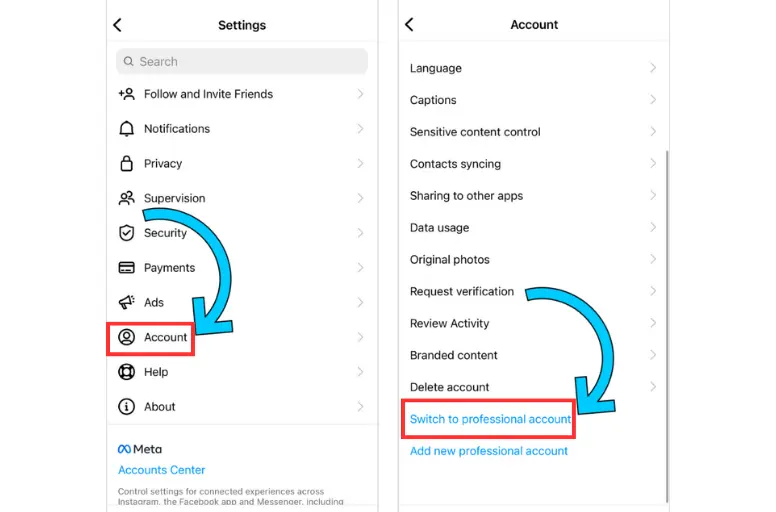
The foundation of Instagram-Shopify integration is an Instagram Business Account. If you currently have a personal profile, you must switch it to a business profile. This is typically done within Instagram’s settings and requires linking it to a Facebook Page. From a technical perspective, a business profile unlocks API access necessary for commerce features and allows for categorization and contact information specific to commercial entities. Ensure your Instagram account is publicly visible; private accounts cannot utilize shopping features.
Shopify Store Setup Essentials
Your Shopify store must be fully functional and open to the public. Key technical considerations include:
- Active Sales Channel: Ensure your Shopify store is not password-protected and is accessible online.
- Product Information: All products intended for Instagram should have complete and accurate details, including high-quality images, descriptions, prices, and inventory levels. Missing product data can cause synchronization errors.
- Shipping & Payment Gateways: Configure reliable shipping methods and payment gateways within Shopify to ensure a smooth checkout process once customers are redirected from Instagram.
Facebook Business Manager: The Central Hub
Facebook Business Manager (now Meta Business Suite) serves as the indispensable central hub for managing your business assets across Facebook and Instagram. It’s where you will connect your Instagram profile, your Facebook Page, and crucially, your product catalog.
- Admin Access: Ensure you have administrator access to the Facebook Business Manager that will manage these assets.
- Connected Assets: Verify that your Instagram Business Profile is connected to the correct Facebook Page within Business Manager. This linkage is a prerequisite for activating commerce features.
Product Catalog Creation and Optimization
A robust product catalog is the technical backbone of Instagram Shopping. This catalog resides within Facebook Commerce Manager (accessed via Business Manager) and acts as the master database for all products you wish to display on Instagram.
- Manual vs. Data Feed: You can technically create a catalog manually, but for a Shopify store, using a data feed is highly recommended. Shopify offers direct integration that automatically syncs your product inventory to the Facebook catalog. This ensures real-time updates for product availability, pricing, and details, preventing discrepancies.
- Catalog Fields: Optimize your product data. Ensure titles are descriptive, descriptions are concise yet informative, and product images adhere to Instagram’s guidelines. Categorization is also vital for discoverability. Missing attributes like GTINs (Global Trade Item Numbers) or MPNs (Manufacturer Part Numbers) can impact product visibility and approval.
Step-by-Step Technical Integration Process

The integration process involves a series of sequential steps primarily conducted within Shopify and Facebook Business Manager.
Connecting Instagram to Your Facebook Page
- From Instagram: Go to your Instagram Profile, tap the three horizontal lines (menu icon), select “Settings,” then “Account,” and finally “Share to Other Apps.” Select “Facebook” and follow the prompts to connect your Instagram profile to your desired Facebook Page.
- From Facebook Page Settings: Alternatively, on your Facebook Page, navigate to “Settings,” then “Instagram.” Click “Connect Account” and input your Instagram login credentials. This establishes the necessary programmatic link between the two social entities.
Creating/Selecting a Catalog in Facebook Commerce Manager
- Access Commerce Manager: Go to Facebook Business Manager, then select “Commerce Manager.”
- Create New Catalog: If you don’t have one, click “Add Catalog.” Select “E-commerce” as the catalog type.
- Choose Upload Method: Select “Connect a Partner Platform” and choose “Shopify.” This initiates the automated product data feed setup.
- Assign Business Assets: Link the catalog to your Facebook Page and Instagram Business Profile within Commerce Manager settings.
Linking Shopify to Facebook for Sales Channel Activation
This is where the direct API connection between Shopify and Facebook (and by extension, Instagram) is established.
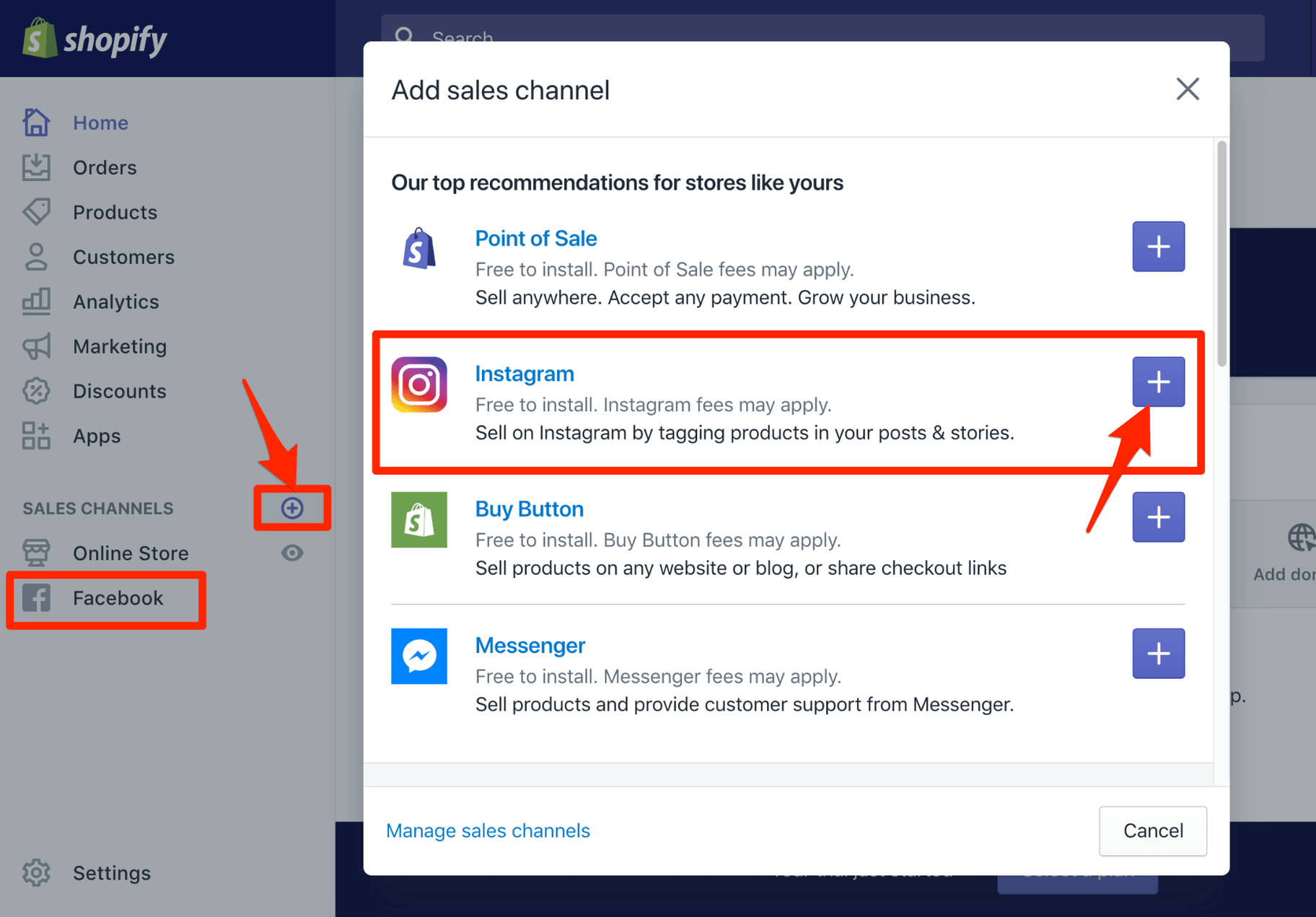
- Add Facebook & Instagram Sales Channel in Shopify: In your Shopify admin, go to “Sales Channels” and click the plus (+) button. Search for and select “Facebook & Instagram.”
- Connect Account: Follow the prompts to connect your Shopify store to your Facebook Business Manager account. You’ll need to grant permissions for Shopify to access and manage your Facebook Page, Instagram account, and product catalog. This authorizes Shopify to create and manage the product data feed that Facebook’s Commerce Manager requires.
- Confirm Settings: Review and confirm the connected Facebook Page, Instagram Business Profile, and the designated product catalog. Shopify will then begin syncing your product inventory to this catalog. Ensure the sync is active and that all desired products are included.
Enabling Instagram Shopping Features
Once the product catalog is successfully synced from Shopify to Facebook Commerce Manager, and approved by Facebook (which can take a few days for review), you can enable Instagram Shopping.
- Access Instagram Settings: On your Instagram Business Profile, go to “Settings,” then “Business,” and select “Shopping.”
- Select Product Catalog: Choose the Shopify-fed product catalog you linked in Facebook Commerce Manager.
- Submit for Review: Your account will typically undergo a final review by Instagram to ensure compliance with their commerce policies.
- Activate Tagging: Once approved, you will see a “Shopping” section in your post creation screen, allowing you to tag products directly.
- Product Tagging in Posts and Stories: When creating a new Instagram post or story, tap on the image where you want to add a tag. Search for the product from your synced Shopify catalog. You can tag up to 5 products per image post and one product sticker per story.
- Activating the Instagram Shop Tab: The Shop tab will automatically appear on your profile once Instagram Shopping is enabled and your catalog is linked, provided your account meets visibility criteria.
Setting Up Instagram Checkout (If Available and Desired)
Instagram Checkout allows customers to complete purchases directly within the Instagram app without navigating to your Shopify store. This feature is currently limited to certain regions and specific eligibility criteria.
- Eligibility Check: Verify if your business is eligible for Instagram Checkout within your Facebook Commerce Manager settings.
- Payment Integration: If eligible, you’ll need to configure payment processing directly within Commerce Manager, which may involve linking to payment gateways supported by Meta. While it provides an in-app experience, the backend inventory and order management often still rely on your Shopify platform through advanced API integrations.
Optimizing Your Integrated Shopping Experience
Establishing the connection is the first step. Ongoing optimization is crucial for maximizing the technical and commercial benefits.
Maintaining Product Synchronization
Regularly monitor the synchronization status between Shopify and your Facebook product catalog. Any changes in product details, pricing, or inventory on Shopify should reflect accurately and promptly on Instagram. Shopify’s native integration typically handles this automatically, but intermittent checks in Facebook Commerce Manager can confirm data integrity. Troubleshoot any sync errors immediately, often by reviewing the data feed health in Commerce Manager.
Leveraging Instagram Ads with Shopify Products
The integration also powers dynamic advertising campaigns. You can create Instagram ads that pull product information directly from your Shopify-fed catalog, automatically showcasing relevant products to segmented audiences. This includes:
- Collection Ads: Displaying multiple products in a scrollable format.
- Dynamic Product Ads: Retargeting users who viewed products on your Shopify store but didn’t purchase, displaying those specific products on Instagram.
- Shopping Ads: Specific ad formats designed to drive direct purchases through Instagram Shopping.
These campaigns rely on the Facebook Pixel installed on your Shopify store to track user behavior and the accuracy of your product catalog for ad delivery.
Monitoring Performance and Troubleshooting Common Issues
Regularly review performance metrics from both Shopify analytics and Facebook (Meta) Business Suite. Key metrics include product views, clicks on shopping tags, add-to-carts, and conversion rates attributed to Instagram. Common technical issues include:
- Product Disapproval: Products failing to meet Instagram’s commerce policies. Review guidelines and edit product details in Shopify.
- Sync Errors: Discrepancies between Shopify inventory and the Facebook catalog. Check the data feed status in Commerce Manager.
- Shopping Feature Not Appearing: Ensure all prerequisites are met, accounts are public, and the account is approved for shopping. Re-link accounts if necessary.
- Broken Links: Verify product URLs in Shopify are correct and that the Facebook catalog is updating them properly.
Future-Proofing Your Integration: Updates and New Features
The digital landscape is constantly evolving. Both Instagram and Shopify frequently roll out new features and updates. Stay informed about these changes, particularly those related to e-commerce functionalities, API changes, and data synchronization protocols. Regularly review your integration settings and explore new options that could enhance your shopping experience or streamline your backend operations. For instance, new checkout flows, AR shopping experiences, or live shopping features may become available and require specific technical configurations.
Conclusion
Connecting Instagram to Shopify is a powerful technical undertaking that bridges the gap between social engagement and direct e-commerce. By meticulously following the integration steps, maintaining accurate data synchronization, and continuously optimizing the shopping experience, businesses can unlock a significant channel for product discovery and sales. This technical synergy not only streamlines the customer journey but also provides valuable data insights, ensuring your brand remains competitive and agile in the ever-expanding digital marketplace. The future of retail is integrated, and mastering this connection is a cornerstone of modern e-commerce success.
aViewFromTheCave is a participant in the Amazon Services LLC Associates Program, an affiliate advertising program designed to provide a means for sites to earn advertising fees by advertising and linking to Amazon.com. Amazon, the Amazon logo, AmazonSupply, and the AmazonSupply logo are trademarks of Amazon.com, Inc. or its affiliates. As an Amazon Associate we earn affiliate commissions from qualifying purchases.