
In the rapidly evolving digital landscape, establishing an online presence is no longer a luxury but a necessity for businesses aiming to thrive. Shopify stands as a formidable platform, empowering entrepreneurs to build, run, and scale their e-commerce operations with relative ease. However, beneath its user-friendly interface lies a robust technical infrastructure that requires meticulous setup to ensure optimal performance, security, and scalability. This guide will delve into the technical intricacies of setting up a Shopify store, providing a detailed roadmap for a robust and efficient online shop.

Initial Account Setup and Core Platform Configuration
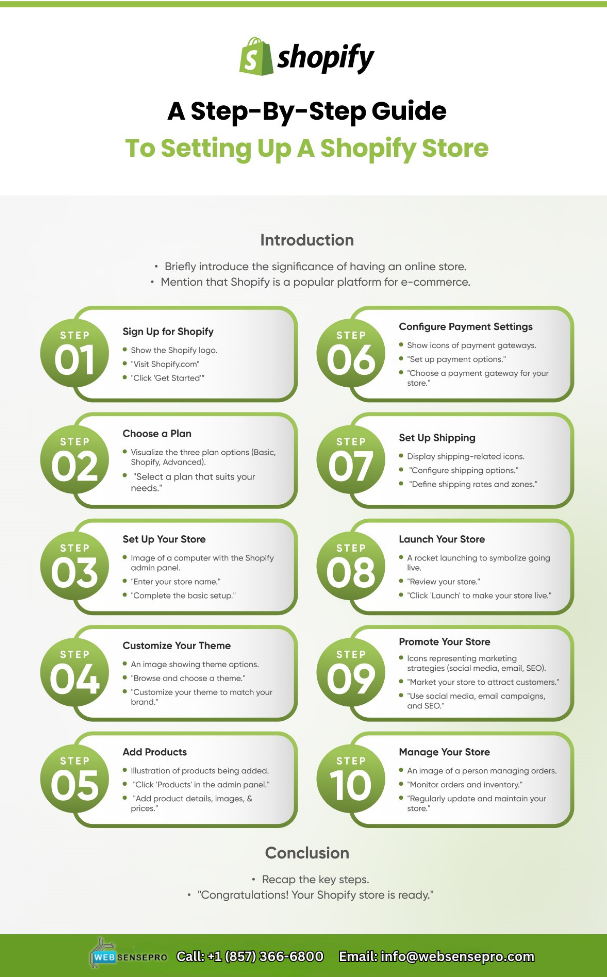
The journey to launching a successful Shopify store begins with laying a solid technical foundation. This involves more than just signing up; it encompasses a series of critical configurations that dictate your store’s fundamental operations and technical capabilities.
Creating Your Shopify Account and Initial Orientation
The first step is a straightforward account creation process. Navigate to Shopify’s website and opt for a trial. This initial phase involves providing basic contact information and selecting an initial store name. While seemingly simple, this establishes your primary admin URL (e.g., yourstorename.myshopify.com), which will serve as your technical backbone before a custom domain is configured. Once inside, familiarize yourself with the Shopify admin dashboard. This centralized interface is your command center for all technical configurations, from product management to analytics integration. Understanding its layout—the left-hand navigation for core functions like “Orders,” “Products,” “Customers,” “Analytics,” and “Settings”—is paramount for efficient store management.
Navigating the Shopify Admin Dashboard and Key Settings
The “Settings” section within the admin is where the bulk of your initial technical setup resides. Here, you will configure essential global parameters that govern your store’s behavior. Key areas include “General Settings,” where you input your store’s legal name, contact information, and ensure the correct industry and time zone are selected. Incorrect time zone settings, for example, can lead to discrepancies in order timestamps and analytics reporting, impacting data accuracy. Under “Payments,” you will define the payment gateways your store will use, a crucial technical integration discussed further below. The “Shipping and Delivery” section is where you configure the complex logic of how products reach your customers. Every setting here has technical implications for data flow, user experience, and backend processing.
Configuring General Store Settings: Currency, Time Zone, and Legal Details
Beyond contact information, accurate currency and time zone settings are non-negotiable. Shopify uses these to process transactions, display prices, and timestamp events. Selecting the primary currency for your store is fundamental; while you can offer multi-currency options, the base currency impacts all financial reporting. Legal details, such as your store’s legal name and address, are also technically integrated into various system-generated documents and tax calculations. Furthermore, configuring essential legal pages like “Terms of Service,” “Privacy Policy,” and “Refund Policy” is a backend content management task that ensures your store adheres to regulatory requirements and builds customer trust by providing clear operational guidelines. These pages, though content-driven, require correct placement and linking within the store’s navigation structure to be technically accessible.
Choosing a Store Name and Domain Configuration
While the initial .myshopify.com domain is functional, a custom domain is essential for professional branding and search engine optimization (SEO). Shopify provides straightforward technical pathways for domain management. You can either purchase a new domain directly through Shopify, which simplifies the DNS (Domain Name System) configuration process, or connect an existing domain. Connecting an existing domain involves updating DNS records (A record and CNAME record) with your domain registrar to point to Shopify’s servers. This technical step is critical for ensuring your store is accessible via your chosen URL and for enabling SSL (Secure Sockets Layer) encryption, which Shopify automatically provisions for custom domains, securing data transmission and displaying the crucial padlock icon in browsers.
Designing Your Store’s Technical Layout and User Experience
The technical framework of your Shopify store extends beyond backend settings into its visual presentation and interactive elements. A well-designed technical layout ensures not only aesthetic appeal but also optimal performance, accessibility, and user experience.
Selecting and Customizing Your Theme
Shopify themes are the backbone of your store’s visual identity, dictating its front-end structure and functionality. Each theme comes with a specific technical architecture, pre-built sections, and layout options. When selecting a theme, consider its responsiveness across various devices (desktop, tablet, mobile), loading speed, and compatibility with your planned product catalog. Shopify’s theme editor allows for extensive customization without needing to delve into code. You can manipulate sections, colors, fonts, and layout options. For advanced users, accessing the theme’s Liquid code (Shopify’s templating language) provides granular control over functionality and design, enabling custom features or integrations that aren’t natively supported. Understanding theme architecture, including JavaScript and CSS files, is crucial for technical optimization.
Structuring Navigation and Menus
Effective navigation is paramount for guiding users through your store and ensuring all technical pages (product pages, collections, policies) are easily discoverable. The “Navigation” section in your Shopify admin allows you to create and manage menus. Structuring these logically, typically with a main menu (for primary categories) and a footer menu (for legal pages, contact info), is a critical technical consideration for user experience and SEO. Proper hierarchical structuring of menus, utilizing parent and child links, enhances site crawlability for search engines and improves user flow. Broken links or confusing navigation paths are technical deficiencies that can significantly impact conversion rates.
Utilizing Shopify’s Content Management System for Pages and Blog Posts
Shopify includes a robust content management system (CMS) that allows you to create static pages (e.g., “About Us,” “Contact Us”) and dynamic blog posts. While seemingly simple content tasks, their technical implementation affects SEO and user engagement. Pages can be linked directly into navigation menus, and blog posts, when tagged and categorized effectively, can generate internal links and topical authority, which are important SEO signals. Understanding the rich text editor’s capabilities, including embedding images, videos, and custom HTML, allows for richer content experiences. Furthermore, the technical setup of page templates and their associated metadata (title tags, meta descriptions) directly influences how your content performs in search engine results.
Integrating Essential Apps and Plugins
The Shopify App Store is a vast ecosystem of third-party applications that extend your store’s functionality, ranging from marketing automation to inventory management and customer support. Technically, integrating these apps often involves granting permissions to access your store’s data via Shopify’s API. Careful consideration should be given to an app’s impact on site speed, its security protocols, and its compatibility with your chosen theme. Overloading your store with too many apps can introduce technical overhead, leading to slower load times and potential conflicts. Review app documentation for installation instructions, data privacy policies, and any specific technical requirements or limitations. Managing app permissions and reviewing installed apps regularly is a crucial technical maintenance task.
Configuring Products, Payments, and Shipping
The core functionality of any e-commerce store revolves around its ability to sell products, process payments, and deliver goods. This section focuses on the technical setup required to operationalize these critical processes within Shopify.
Adding Products and Managing Inventory
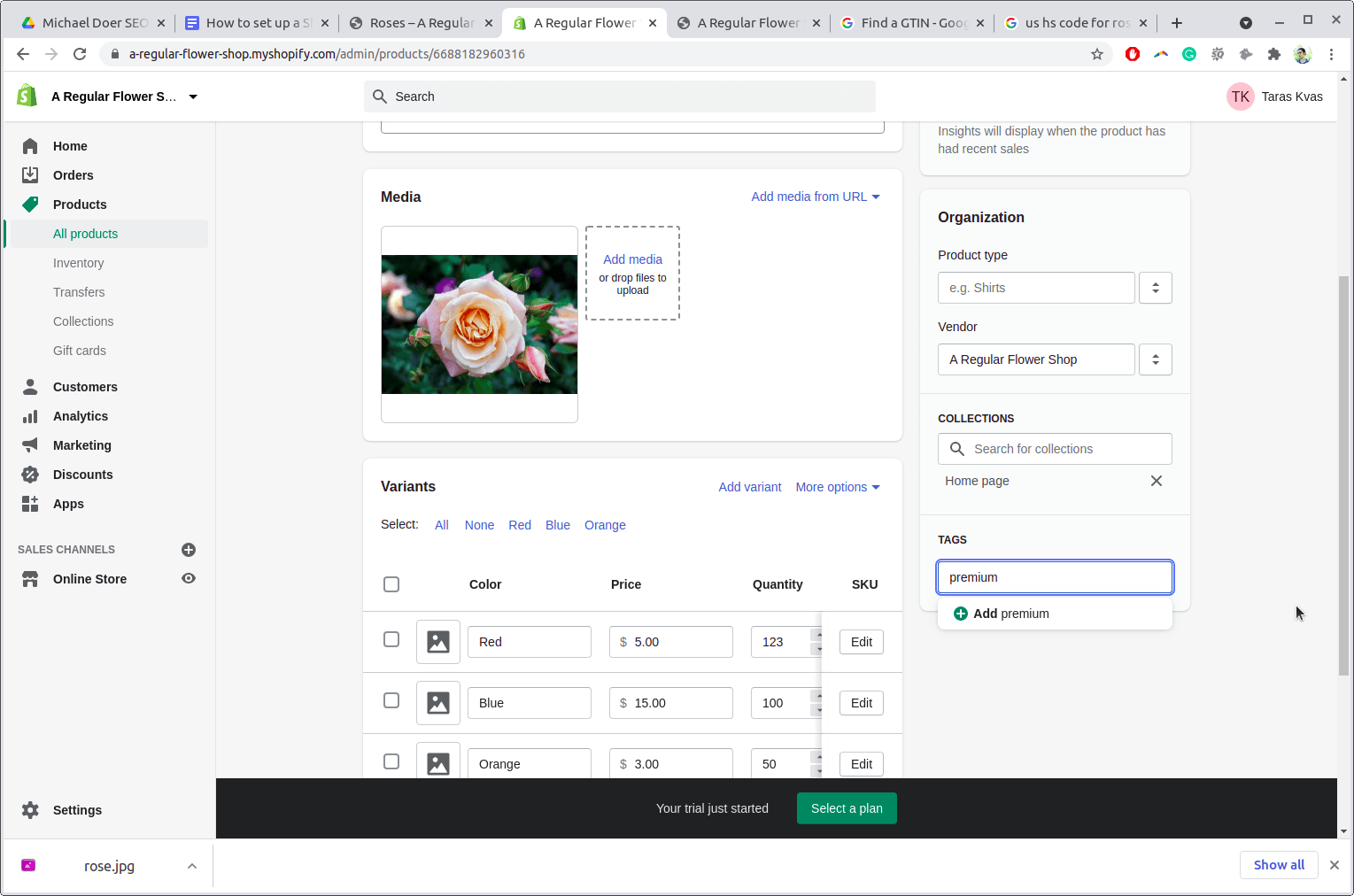
Adding products to your Shopify store is a foundational technical task. Each product requires detailed information: title, description, images (optimized for web, considering file size and dimensions), pricing, inventory tracking (SKU, barcode), and variants (sizes, colors, materials). Configuring inventory policies, such as whether to continue selling when out of stock, directly impacts order fulfillment logic. For stores with large catalogs, Shopify supports CSV (Comma Separated Values) import/export for bulk product management, a highly technical process that requires precise data formatting to avoid errors. Understanding how product data fields map to your chosen theme’s display and how they integrate with inventory management apps is vital.
Setting Up Payment Gateways
Payment processing is perhaps the most critical technical integration for an e-commerce store. Shopify Payments, the platform’s native gateway, offers simplified setup and integrated reporting. Alternatively, you can integrate third-party payment gateways like PayPal, Stripe, or various regional processors. Each integration involves a technical handshake—typically through API keys and secure credentials—to ensure seamless and secure transaction processing. PCI DSS (Payment Card Industry Data Security Standard) compliance is automatically handled by Shopify and integrated gateways, but understanding this security standard is important. You’ll also configure payment capture settings (manual vs. automatic) and transaction fees, which have direct technical and financial implications.
Defining Shipping Zones, Rates, and Carriers
Shipping configuration is a complex technical undertaking that directly impacts customer satisfaction and operational costs. Shopify allows you to define shipping zones based on geographic regions. Within these zones, you can set up various shipping rates: flat rates, weight-based rates, price-based rates, or calculated rates through integrated shipping carriers (like USPS, FedEx, UPS). Integrating with carrier services often involves API connections to fetch real-time rates and generate shipping labels. Understanding the interplay between product weight, dimensions, packaging, and carrier services is key to accurate shipping cost calculations and avoiding shipping-related technical issues. Clearly defining handling fees and delivery options (standard, express) is also crucial.
Configuring Taxes and Legal Pages
Tax configuration is another technically intricate aspect, especially for stores selling globally. Shopify offers automatic tax calculations based on location, product type, and tax settings, but it’s essential to verify these settings and ensure they align with local tax laws. For specific scenarios, manual tax overrides or integrations with specialized tax calculation services might be necessary. Beyond product-specific taxes, the platform also requires the display and accessibility of legal pages such as a “Refund Policy,” “Privacy Policy,” and “Terms of Service.” While primarily content, their proper linking and presence in the footer or main navigation are critical technical steps for legal compliance and consumer trust.
Optimizing for Performance and Security
Beyond basic setup, a robust Shopify store demands continuous technical optimization to ensure speed, security, and discoverability. These aspects directly influence user experience, conversion rates, and search engine rankings.
Enhancing Store Speed and Responsiveness
Website speed is a critical factor for user retention and SEO. Technical optimizations include compressing images before uploading them, minifying CSS and JavaScript files (often handled by themes or specialized apps), and judiciously auditing installed apps for performance impact. Lazy loading for images and videos, browser caching, and content delivery networks (CDNs) are also key technical strategies employed by Shopify themes and platform architecture to enhance loading times. Regularly monitoring your store’s performance using tools like Google PageSpeed Insights provides actionable technical insights for improvement. Ensuring your chosen theme is responsive across all device types is also paramount for a consistent and fast user experience.
Implementing SEO Best Practices within Shopify
Search Engine Optimization (SEO) is a technical process aimed at increasing your store’s visibility in search results. Shopify provides built-in SEO features. You can customize title tags, meta descriptions, and URL handles for products, collections, pages, and blog posts. Generating a sitemap (automatically handled by Shopify, usually at yourdomain.com/sitemap.xml) and submitting it to Google Search Console is a foundational technical SEO step. Implementing structured data (Schema Markup) for products, reviews, and local business information, often supported by themes or apps, helps search engines better understand your content. Regularly optimizing image alt text, building internal links, and ensuring your site is mobile-friendly are ongoing technical SEO efforts crucial for long-term success.
Securing Your Store and Customer Data
Security is paramount in e-commerce. Shopify automatically provides an SSL certificate for all stores, encrypting data between your store and visitors. Enabling two-factor authentication (2FA) for all admin accounts is a critical technical measure to prevent unauthorized access. Regular password changes and using strong, unique passwords for staff accounts are also essential. Furthermore, understanding Shopify’s PCI DSS compliance—which protects credit card data—is important. While Shopify handles the server-side security, it’s the merchant’s responsibility to manage app permissions, keep themes updated, and be wary of phishing attempts. Regularly reviewing your store’s activity logs can help identify suspicious technical behavior.
Analytics and Tracking Integration
Integrating robust analytics and tracking tools provides invaluable data for technical performance monitoring and strategic decision-making. Shopify has its own analytics dashboard, but integrating Google Analytics 4 (GA4) offers deeper insights into user behavior, traffic sources, and conversion funnels. This involves adding GA4 tracking code to your theme’s theme.liquid file or using Shopify’s native integration fields. For advertising and remarketing, setting up the Facebook Pixel (or Meta Pixel) and other ad platform tracking pixels requires adding specific JavaScript code snippets to your store. Proper implementation of these tracking codes ensures accurate data collection, which is vital for optimizing marketing spend and understanding the technical journey of your customers.
Launch and Post-Setup Technical Management
The final stage of setting up your Shopify store involves a meticulous pre-launch checklist and establishing a routine for ongoing technical maintenance and management.
Pre-Launch Technical Checklist
Before officially launching, a comprehensive technical review is essential. This includes:
- Testing Checkout Process: Place test orders with various payment methods and shipping options to ensure everything functions correctly. This involves simulating customer actions, applying discounts, and verifying order processing.
- Mobile Responsiveness: Thoroughly test your store’s appearance and functionality on multiple mobile devices and screen sizes to guarantee a seamless experience.
- Broken Link Check: Use online tools to scan for any broken internal or external links that could harm user experience or SEO.
- Favicon Setup: Ensure your store’s favicon is uploaded and correctly displayed in browser tabs.
- Reviewing All Legal Pages: Double-check that all policy pages are accessible, accurate, and up-to-date.
- SEO Audit: Perform a final check of all meta titles, descriptions, and image alt tags.
- App Functionality: Verify that all integrated apps are working as expected and not causing conflicts.
Removing Password Protection and Going Live
Once your pre-launch checklist is complete and you’re confident in your store’s technical readiness, the final step is to disable password protection. This setting is found under “Online Store” > “Preferences” > “Password protection.” Unchecking the box and saving makes your store publicly accessible. At this point, ensure your custom domain is correctly pointing to Shopify, and your SSL certificate is active. A “soft launch” approach, perhaps by slowly rolling out marketing efforts, can be beneficial to monitor for any unforeseen technical glitches in a live environment.
Ongoing Technical Maintenance and Updates
The technical health of your Shopify store requires continuous attention. This includes:
- Regular Theme Updates: Keep your theme updated to benefit from new features, performance improvements, and security patches. Back up your theme before any major update.
- App Management: Regularly review installed apps, remove any that are no longer needed, and update those that provide updates. Monitor app permissions to ensure they are appropriate.
- Broken Link Monitoring: Continuously monitor for broken links using webmaster tools.
- Inventory Audits: Perform regular inventory checks to ensure accuracy between your physical stock and your Shopify records.
- Security Audits: Review admin access logs and conduct periodic security checks.
- Performance Monitoring: Continuously monitor your store’s loading speed and responsiveness, addressing any bottlenecks promptly.
Backup and Data Management Strategies
While Shopify provides robust platform infrastructure, understanding data backup and management is crucial. Shopify automatically backs up your store data, but merchants often opt for third-party backup apps for additional granular control and recovery options (e.g., restoring specific products or collections). Regularly exporting critical data like customer lists, product information, and order history via CSV files provides an additional layer of data security. Understanding Shopify’s API limits and data retention policies is also important for advanced data management strategies.
By meticulously navigating these technical setup phases and committing to ongoing maintenance, you can establish a robust, high-performing, and secure Shopify store that is well-positioned for sustained growth and success in the competitive e-commerce landscape.
aViewFromTheCave is a participant in the Amazon Services LLC Associates Program, an affiliate advertising program designed to provide a means for sites to earn advertising fees by advertising and linking to Amazon.com. Amazon, the Amazon logo, AmazonSupply, and the AmazonSupply logo are trademarks of Amazon.com, Inc. or its affiliates. As an Amazon Associate we earn affiliate commissions from qualifying purchases.