
In an increasingly digital world, the ability to seamlessly send, receive, and manage money online is not just a convenience—it’s a necessity. At the forefront of this digital transformation stands PayPal, a pioneering platform that has redefined online transactions for millions globally. Far more than just a payment processor, PayPal is a sophisticated digital ecosystem, designed to bridge the gap between traditional banking and the instantaneity of the internet. Setting up an account on PayPal is the first crucial step towards unlocking a suite of powerful digital financial tools, enhancing both personal and business transactions with unparalleled ease and robust security.
This comprehensive guide will walk you through the entire process, from understanding the core technology that underpins PayPal to configuring your account for optimal performance and security. We’ll delve into the technical nuances of account creation, explore the various features designed to protect your digital assets, and prepare you to navigate the future of online payments with confidence. Whether you’re looking to shop online, freelance internationally, or manage your business’s digital finances, mastering PayPal begins here.
Understanding PayPal: Your Digital Wallet’s Foundation
Before diving into the mechanics of account creation, it’s essential to grasp what PayPal truly is and why it has become an indispensable tool in the modern digital landscape. At its core, PayPal is a technology company that facilitates secure electronic payments and money transfers via the internet. It acts as a digital intermediary, allowing users to send and receive funds without directly sharing sensitive financial information with third parties. This technological innovation underpins its widespread adoption and trust.
What is PayPal and Why You Need It
PayPal essentially functions as a digital wallet that is accessible from virtually any internet-connected device, be it a desktop computer, a smartphone, or a tablet. It allows you to link your bank accounts, credit cards, and debit cards, creating a centralized hub for your financial transactions. When you make a payment using PayPal, the platform encrypts your financial data, ensuring that your card numbers or bank details are not exposed to the merchant. This layer of abstraction is a fundamental technological advantage, providing a significant boost to digital security.
You need PayPal for a multitude of reasons that stem directly from its technological capabilities:
- Global Reach: It facilitates international transactions, making cross-border payments as simple as domestic ones, often with integrated currency conversion tools.
- Convenience: Payments and transfers can be completed in mere seconds, eliminating the delays associated with traditional banking methods.
- Security: Advanced encryption and fraud detection technologies protect your financial information from unauthorized access and fraudulent activities.
- Versatility: Beyond simple payments, PayPal offers tools for invoicing, subscription management, charitable donations, and even cryptocurrency services, showcasing its expanding technological ecosystem.
- Dispute Resolution: Its buyer and seller protection programs leverage algorithmic analysis and human intervention to mediate disputes, offering a safety net for digital transactions.
Key Benefits of a PayPal Account
The technological prowess of PayPal translates into tangible benefits for its users:
- Enhanced Digital Security: PayPal employs industry-leading encryption (such as 128-bit SSL) and real-time fraud monitoring systems. This means your sensitive financial data is heavily guarded, minimizing the risk of identity theft or financial fraud when transacting online. The platform acts as a shield, preventing merchants from directly accessing your credit card or bank details.
- Simplified Online Shopping: With a PayPal account, checking out from thousands of online stores becomes a one-click affair. You don’t need to re-enter your payment details repeatedly, streamlining the e-commerce experience significantly. This integration across various platforms highlights PayPal’s role as a ubiquitous digital payment gateway.
- Effortless Money Transfers: Sending money to friends, family, or service providers, both domestically and internationally, is incredibly straightforward. The technology behind instant transfers ensures that funds arrive quickly, often within minutes, making it ideal for splitting bills, paying for services, or supporting loved ones abroad.
- Business Tools Integration: For entrepreneurs and businesses, PayPal offers a robust suite of tools including invoicing, recurring payments, and point-of-sale solutions. These features are designed to integrate seamlessly into existing business operations, leveraging technology to automate and simplify financial management.
- Mobile Accessibility: The dedicated PayPal mobile app ensures that all account functionalities are available on the go. From checking balances to making payments, the app provides a secure and intuitive interface, making digital finance highly accessible regardless of location.
The Step-by-Step Guide to Creating Your PayPal Account
Setting up a PayPal account is a straightforward process, designed with user experience in mind. The platform guides you through each stage, ensuring that even those new to digital financial tools can complete the setup without significant hurdles.
Navigating to the PayPal Website or App
Your journey begins by accessing the PayPal platform. You have two primary interfaces:
- Web Browser: Open your preferred web browser (Chrome, Firefox, Safari, Edge) and navigate to the official PayPal website (
www.paypal.com). Be sure to double-check the URL to avoid phishing sites. - Mobile App: Download the official PayPal app from your device’s app store (Google Play Store for Android or Apple App Store for iOS). The app provides a streamlined, mobile-optimized experience, often with features like biometric login for enhanced security.
Once on the website or in the app, look for the “Sign Up” or “Get Started” button, typically located prominently in the top right corner.
Choosing Your Account Type: Personal vs. Business
PayPal offers two main account types, each tailored to different user needs. Understanding the distinction is crucial for optimizing your digital financial operations.
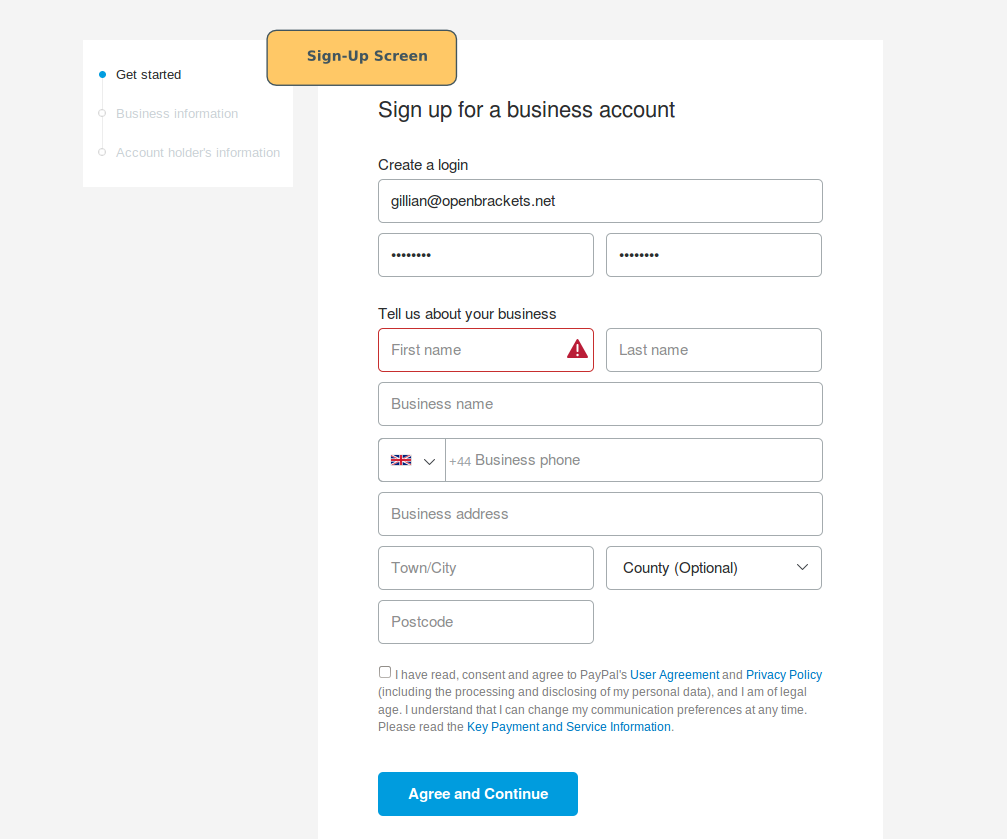
- Personal Account: Ideal for individuals who primarily use PayPal for online shopping, sending money to friends and family, or receiving occasional payments for services. This account type is designed for casual users and offers simplified functionality.
- Business Account: Geared towards merchants, freelancers, and businesses of all sizes. It includes advanced features such as accepting payments from customers, creating invoices, managing multiple users, and accessing detailed transaction reports. If you plan to sell goods or services regularly, a business account is the more appropriate choice as it provides dedicated technological tools for commerce.
Select the account type that best aligns with your anticipated usage. You can often upgrade a Personal account to a Business account later if your needs change.
Entering Personal Information and Security Details
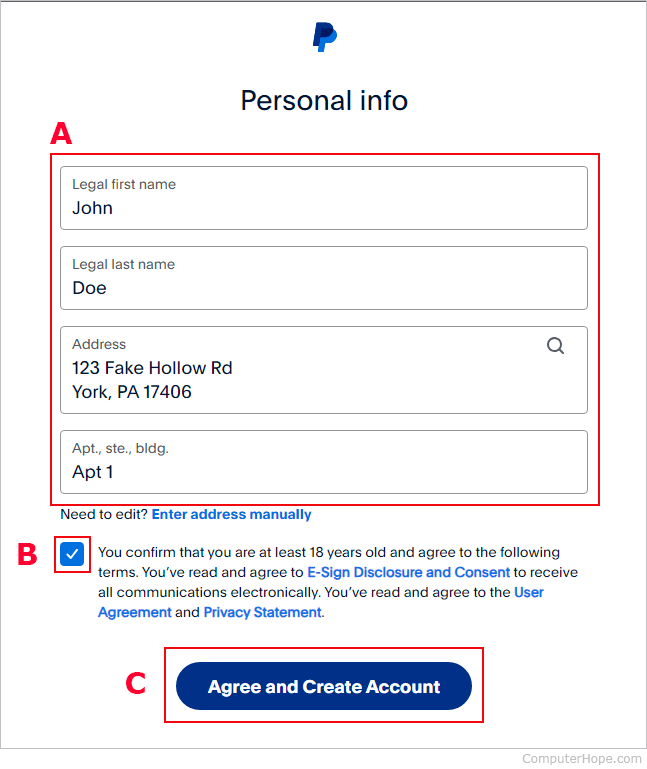
After selecting your account type, you’ll be prompted to provide some essential personal and security information. This data is critical for identity verification and account protection.
- Email Address: This will serve as your primary PayPal identifier and username. Choose an email address you check regularly and one that is secure.
- Phone Number: A valid phone number is required for security purposes, including two-factor authentication and account recovery.
- Personal Details: You’ll need to provide your legal name, date of birth, and physical address. These details are used to comply with financial regulations (Know Your Customer – KYC) and to verify your identity.
- Password Creation: Create a strong, unique password. A robust password typically includes a mix of uppercase and lowercase letters, numbers, and special characters. Avoid easily guessable information like birthdays or common phrases. PayPal’s system will usually provide strength indicators to guide you.
- Agree to Terms and Conditions: Before proceeding, you must review and agree to PayPal’s User Agreement and Privacy Policy. It’s recommended to read these documents to understand your rights and obligations within the PayPal ecosystem.
Linking Your Financial Instruments
To fully utilize your PayPal account, you’ll need to link a funding source. This allows you to add money to your PayPal balance or draw funds directly from your bank or card when making payments.
- Link a Debit or Credit Card: Enter your card number, expiration date, and CVV code. PayPal will perform a small authorization charge (which is usually refunded) to verify the card belongs to you. This is a common security protocol for digital payment platforms.
- Link a Bank Account: You’ll typically be asked to provide your bank’s routing number and your account number. PayPal may verify this through a small deposit and withdrawal process, or by allowing you to log directly into your bank account through a secure portal (an increasingly common and faster method for digital verification). Linking a bank account often removes sending limits and provides a direct conduit for transferring funds to and from your PayPal balance.
These linking processes are protected by advanced encryption to ensure your financial data remains secure during transmission and storage.
Securing and Verifying Your PayPal Account

Security is paramount in the digital finance realm. PayPal integrates several layers of protection to safeguard your account. Proactive steps from your side can further fortify these defenses.
Email and Phone Verification: The First Line of Defense
Upon creating your account, PayPal will send an email to the address you provided. This email contains a verification link or code that you must click or enter to confirm ownership of the email address. Similarly, you may receive a text message (SMS) with a code to verify your phone number. These steps are fundamental for ensuring that the contact information linked to your account is legitimate and accessible only by you, preventing unauthorized individuals from controlling your account.
Enabling Two-Factor Authentication (2FA)
Two-Factor Authentication (2FA), also known as two-step verification, is one of the most effective security measures you can enable. When 2FA is active, logging into your PayPal account requires two distinct pieces of evidence:
- Something you know: Your password.
- Something you have: A code sent to your registered phone via SMS or generated by an authenticator app (like Google Authenticator or Authy).
Enabling 2FA significantly reduces the risk of unauthorized access, even if your password is compromised. You can typically find this option in your PayPal “Security Settings” or “Login and Security” section. It’s a non-negotiable feature for any savvy digital user.
Understanding PayPal’s Security Measures
Beyond individual user actions, PayPal itself employs a comprehensive suite of technological security measures:
- Advanced Data Encryption: All sensitive information exchanged between your device and PayPal’s servers is encrypted using Transport Layer Security (TLS) and Secure Sockets Layer (SSL) protocols, typically with 128-bit encryption keys. This makes it incredibly difficult for third parties to intercept and read your data.
- Fraud Protection and Monitoring: PayPal utilizes sophisticated algorithms and machine learning to continuously monitor transactions for unusual activity. If a suspicious pattern is detected, the system may flag the transaction, pause it, or even contact you for verification. This proactive fraud detection is a cornerstone of its security framework.
- Buyer and Seller Protection: This program acts as a safety net. If an eligible item doesn’t arrive or is significantly not as described for buyers, or if a seller faces an unauthorized transaction, PayPal’s resolution center steps in, often leveraging data forensics to mediate and resolve disputes.
- Account Protection Against Unauthorized Use: PayPal commits to protecting users from unauthorized transactions. If an unauthorized purchase occurs, and you report it promptly, PayPal investigates and can often reimburse the funds, provided you’ve followed security best practices.
Initial Setup and Beyond: Optimizing Your PayPal Experience
Once your account is set up and secured, there are additional steps you can take to personalize your experience and leverage PayPal’s full suite of features.
Customizing Your Profile and Notification Settings
Tailoring your PayPal profile and notification preferences can significantly enhance your user experience:
- Profile Customization: While primarily a functional platform, you can add a profile picture or customize your name display (for business accounts) to make transactions more recognizable.
- Notification Preferences: Manage how PayPal communicates with you. You can choose to receive email or SMS notifications for transactions, security alerts, balance changes, and promotional offers. Striking the right balance prevents inbox clutter while ensuring you stay informed about critical account activities. Access these settings in your account’s “Notifications” or “Settings” section.
Exploring PayPal’s Integrated Features
PayPal is continuously evolving, integrating new technologies and services into its platform. Beyond sending and receiving money, consider exploring:
- Invoicing: For freelancers and small businesses, PayPal’s integrated invoicing tool simplifies billing clients, allowing for professional, trackable invoices with direct payment links.
- Money Pools: A convenient feature for group payments, allowing multiple people to contribute to a common fund for events, gifts, or expenses.
- Cryptocurrency: In select regions, PayPal allows users to buy, sell, and hold certain cryptocurrencies directly within their accounts, reflecting its embrace of emerging digital asset technologies.
- Donations: Facilitates easy donations to charities, often with integrated receipt generation.
- QR Code Payments: For in-person transactions, PayPal supports QR code scanning, offering a contactless payment solution through its mobile app.
Troubleshooting Common Setup Issues
While PayPal setup is generally smooth, you might encounter minor technical glitches.
- Verification Delays: If email or SMS verification codes don’t arrive, check your spam folder or ensure your phone number is correct. You might need to request a resend.
- Linking Financial Accounts: If your bank account or card won’t link, double-check all details. Banks sometimes have specific security protocols that might temporarily block connections. Contact PayPal support or your bank if issues persist.
- Browser/App Issues: Clear your browser cache and cookies, or try a different browser. For app issues, ensure it’s updated to the latest version, or try reinstalling it.
- Account Limitations: Newly created accounts may have initial sending or withdrawal limits. Fully verifying your identity and linking a bank account usually resolves these.
PayPal’s customer support resources, including an extensive help center and direct contact options, are available to assist with any technical difficulties.
The Future of Digital Payments with PayPal
Having set up and secured your PayPal account, you’re not just ready for today’s digital transactions; you’re positioned to embrace the future of digital payments. PayPal’s continuous innovation in technology ensures it remains at the forefront of this evolving landscape.
PayPal’s Role in E-commerce and Online Transactions
PayPal has played a pivotal role in shaping modern e-commerce. Its secure, efficient payment gateway has been instrumental in building consumer trust in online shopping. As e-commerce continues to grow globally, PayPal’s integrated solutions for merchants (like “PayPal Checkout” and “Braintree”) enable businesses of all sizes to accept payments securely across various channels and devices. Its technological infrastructure supports millions of transactions daily, solidifying its status as a critical component of the global digital economy. The platform’s commitment to API integration and developer tools further ensures its adaptability and relevance for future online businesses.
Embracing New Digital Payment Technologies
PayPal isn’t resting on its laurels. The company consistently invests in research and development to integrate new technologies and services. From its ventures into cryptocurrency to exploring blockchain applications and enhancing its AI-driven fraud detection systems, PayPal is actively shaping the next generation of digital finance. Users with a PayPal account are therefore positioned to benefit from these advancements, gaining access to cutting-edge payment solutions as they become available. As the digital world continues to blur the lines between traditional banking, e-commerce, and emerging financial technologies, your PayPal account serves as a versatile and secure gateway to this ever-expanding ecosystem.
By diligently following these steps to set up, secure, and understand your PayPal account, you’ve not only gained a powerful tool for managing your digital finances but also a secure entry point into the dynamic and innovative world of online payments.
aViewFromTheCave is a participant in the Amazon Services LLC Associates Program, an affiliate advertising program designed to provide a means for sites to earn advertising fees by advertising and linking to Amazon.com. Amazon, the Amazon logo, AmazonSupply, and the AmazonSupply logo are trademarks of Amazon.com, Inc. or its affiliates. As an Amazon Associate we earn affiliate commissions from qualifying purchases.