
Tracking a flight, especially when anticipating a trip or picking up loved ones, has evolved significantly with technological advancements. No longer confined to airport information screens, real-time flight data is now readily accessible through various digital platforms. For American Airlines passengers and those monitoring their flights, understanding the most effective digital tools and methods is key to staying informed. This guide delves into the tech-driven solutions for tracking American Airlines flights, from official airline channels to robust third-party applications, ensuring you have the most up-to-date information at your fingertips.
Utilizing Official American Airlines Channels for Real-Time Updates
The most authoritative source for flight information directly from American Airlines itself, its official digital platforms offer comprehensive and immediate updates. These channels are designed to provide the most accurate status, often ahead of third-party aggregators, as they draw directly from the airline’s operational data.

The American Airlines Mobile App: Your Digital Hub
The American Airlines mobile application is an indispensable tool for travelers and those monitoring AA flights. Available for both iOS and Android devices, it consolidates a wealth of information and functionality, making it the primary digital interface for passengers.
Upon downloading and installing the app, users are greeted with an intuitive interface. To track a flight, you can typically navigate to a “Flight Status” or “My Trips” section. The app allows you to search for flights using several key identifiers:
- Confirmation Code: If you have a reservation, entering the 6-character confirmation code will pull up your specific itinerary, including all flight details.
- Flight Number: For a general flight status, inputting the specific AA flight number (e.g., AA1234) is highly effective.
- Route: If you don’t have a specific flight number, searching by origin and destination airports, along with the date, will display all American Airlines flights on that route for the given day, allowing you to select the correct one.
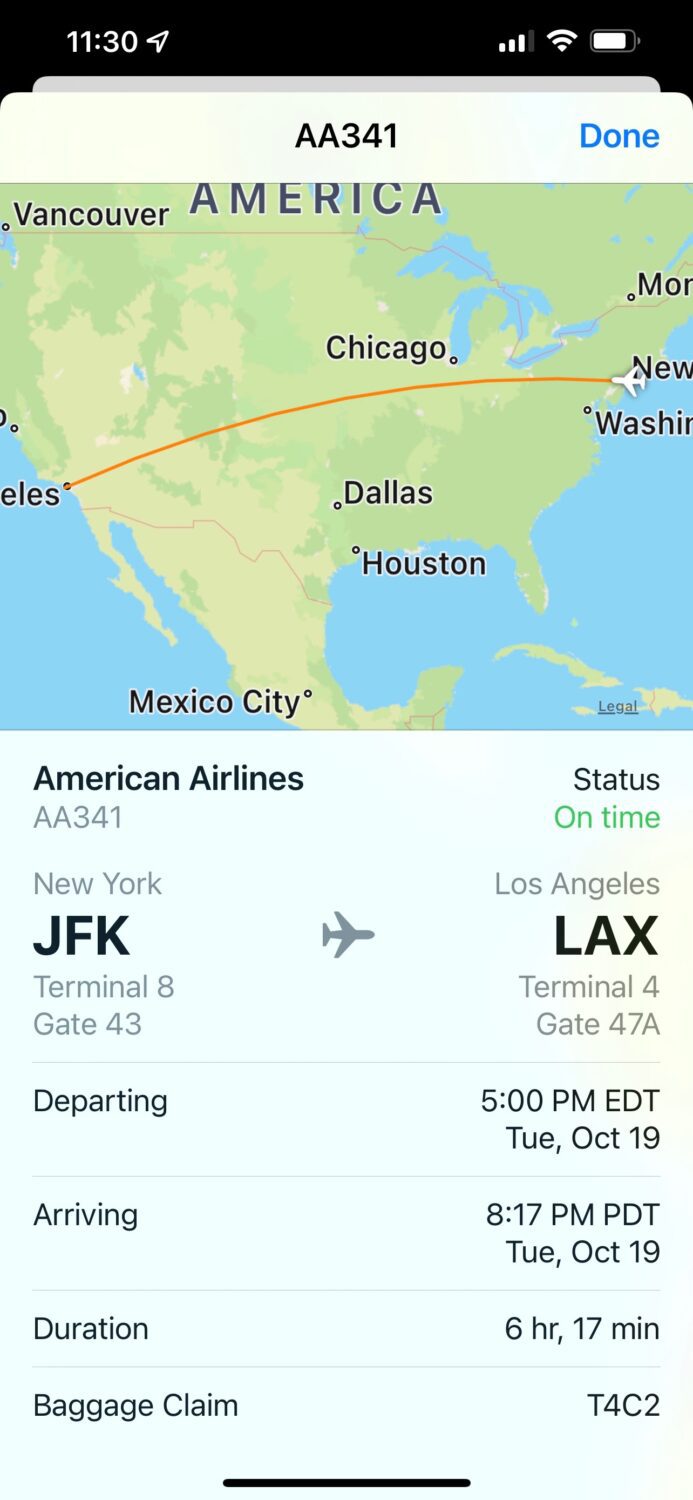
Once identified, the app provides a real-time status display. This includes critical information such as:
- Departure and Arrival Times: Both scheduled and estimated (or actual) times.
- Gate Information: Crucial for airport navigation, this updates dynamically.
- Delay Status: Clear indications if a flight is delayed, often with estimated new departure/arrival times and the reason for the delay (e.g., “aircraft maintenance,” “weather”).
- Baggage Claim Information: For arriving flights, the carousel number is often displayed.
- Aircraft Information: Details about the specific aircraft operating the flight.
One of the most valuable features of the American Airlines app is its push notification system. By enabling notifications, you can receive instant alerts for gate changes, delays, cancellations, and even boarding announcements. This proactive system significantly reduces the need for constant manual checking and is particularly useful during irregular operations or tight connections. The app also integrates features like seat maps, airport maps, and boarding pass access, further cementing its role as a comprehensive digital travel companion.
Navigating AA.com: Desktop Tracking Power
For those who prefer a larger screen or are assisting others from a desktop environment, American Airlines’ official website, AA.com, offers robust flight tracking capabilities. It mirrors much of the information available on the mobile app but provides a more expansive layout.
To access flight status on AA.com, navigate to the “Flight Status” section, typically found prominently on the homepage or via the main navigation menu. Similar to the app, you can input a flight number, origin/destination, or a confirmation code.
The website’s status display is comprehensive, offering all the real-time details mentioned for the app. The benefit of using AA.com often lies in its utility for non-travelers. Individuals picking up arriving passengers can easily monitor the flight’s progress, exact arrival time, and even the terminal and baggage claim details, all without needing a specific reservation code. This is particularly useful for coordinating airport pickups, allowing for precise timing and reducing waiting periods.
Harnessing Third-Party Flight Tracking Applications and Websites
While official airline channels offer the most direct data, a plethora of third-party applications and websites provide enhanced features, aggregated data from multiple sources, and often a more visually engaging experience for tracking flights across all airlines, including American Airlines. These tools can offer unique insights, historical data, and advanced alert options.
Comprehensive Tracking with FlightAware
FlightAware is arguably one of the most widely recognized and powerful flight tracking platforms. It offers both a robust website and dedicated mobile apps, appealing to aviation enthusiasts and casual trackers alike.
Key features of FlightAware include:
- Live Map Tracking: A visually rich map that displays the real-time position of aircraft, complete with flight paths and estimated progress. You can zoom in on specific regions or airports.
- Predicted Delays: FlightAware utilizes algorithms and historical data to predict potential delays even before the airline officially announces them, giving users an early warning.
- Historical Data: Access to past flight performance, including actual departure/arrival times, delays, and even the specific tail number of the aircraft used for a route.
- Aircraft Information: Detailed specifications about the specific plane operating a flight, including its age, type, and previous routes.
- Alerts: Beyond basic notifications, FlightAware allows for highly customizable alerts via email or SMS for specific events like gate changes, diversions, takeoffs, and landings.
To track an American Airlines flight on FlightAware, simply enter the AA flight number into the search bar. The platform will then display the live map, estimated times, and a detailed flight history. Its comprehensive nature makes it an excellent supplementary tool to the official American Airlines app, especially for deeper insights and predictive analysis.
Instant Updates via FlightStats

FlightStats, a product of Cirium, is another industry-leading provider of global flight and airport information. It prides itself on the accuracy and breadth of its data, drawing from a vast network of global sources.
FlightStats offers:
- Global Coverage: Its database spans nearly all commercial flights worldwide, including all American Airlines operations.
- Data Accuracy: Known for its precise data, often used by businesses and logistics professionals.
- Airport Delay Information: Beyond individual flights, FlightStats provides comprehensive real-time data on airport-wide delays, closures, and weather impacts, which can indirectly affect American Airlines flights.
- Subscription Benefits: While a free version is available for basic tracking, premium subscriptions unlock advanced analytics, historical data trends, and more detailed operational insights, valuable for frequent travelers or industry professionals.
Tracking an American Airlines flight on FlightStats involves entering the flight number, and the platform will provide status updates, gate information, and any relevant delay information. Its strength lies in its reliable data aggregation and airport-centric information.
Google Flights and Other Web-Based Trackers
For quick and easy flight status checks, general web search engines, particularly Google, offer integrated flight tracking. Simply typing “American Airlines flight [flight number]” into Google Search will often yield immediate results directly within the search page, including current status, departure/arrival times, and terminal information.
While convenient for a rapid check, these web-based trackers typically offer a simpler, less detailed view compared to dedicated apps like FlightAware or FlightStats. They are excellent for a one-off query but lack the advanced features like customizable alerts, historical data, or interactive maps. Other similar web-based trackers include FlightStats.com (the web version), FlightStats.com, and various travel aggregators that may show real-time status for flights booked through them.
Understanding Flight Status Information and Advanced Features
Interpreting the data provided by these tracking tools goes beyond simply seeing “on time” or “delayed.” A deeper understanding of the terminology and leveraging advanced features can enhance your flight tracking experience.
Deciphering Flight Status Terminology
Flight tracking platforms use a standardized set of terms to describe a flight’s status:
- On Time: The flight is expected to depart and arrive according to its published schedule.
- Delayed: The flight’s departure or arrival is behind schedule. The reasons are often displayed (e.g., “aircraft change,” “weather,” “late arriving aircraft”).
- Departed: The flight has left the gate and is airborne or has already taken off.
- Arrived: The flight has landed and is at the gate.
- Canceled: The flight will not operate.
- Diverted: The flight has landed at an airport other than its scheduled destination, usually due to weather, mechanical issues, or medical emergencies.
- Estimated vs. Actual Times: Most platforms will show both the originally scheduled times and the estimated or actual times for departure and arrival, providing a clear picture of any changes.
Beyond Basic Tracking: Predictive Analytics and Alerts
Modern flight tracking tools, especially the more advanced apps, leverage data science to offer features that go beyond simple status updates:
- AI-powered Delay Predictions: Some platforms use artificial intelligence and machine learning to analyze historical performance, weather patterns, air traffic control data, and other factors to predict potential delays even before they are officially announced by the airline. This foresight can be invaluable for travelers.
- Gate Change Notifications: In busy airports, gate changes are common. Proactive alerts from apps can save passengers from rushing to the wrong gate.
- Connection Information: For itineraries with layovers, some apps can integrate connection information, alerting you if a delay on the first leg jeopardizes your second flight, or providing real-time gate information for your next segment.
- Baggage Tracking Integration: The American Airlines app, for example, can sometimes show the status of checked baggage, including when it was loaded onto the aircraft and which carousel to expect it on upon arrival. This leverages digital tagging and scanning technology.
Best Practices for Reliable Flight Tracking
To ensure you’re always equipped with the most accurate and timely information for American Airlines flights, adopting a few best practices is advisable.
Cross-Referencing Multiple Sources
While the official American Airlines app or website is generally the most authoritative source for its flights, cross-referencing with a reputable third-party tracker like FlightAware can provide a more holistic view. Third-party apps sometimes offer different perspectives, predictive insights, or quicker graphical updates. However, in case of discrepancies, always prioritize the information directly from American Airlines. Their data is drawn straight from their operational control center, making it the definitive word on flight status.
Proactive Setup of Alerts
Don’t wait until the day of travel to set up alerts. Configure push notifications or email/SMS alerts through the American Airlines app and a chosen third-party tracker well in advance. This ensures you’ll receive crucial updates without actively checking, especially important for early morning flights or when managing multiple travel plans. Verify that your device’s notification permissions are correctly enabled for the apps you’re using.
Connectivity Considerations
Reliable flight tracking depends on a stable internet connection. While most modern airports offer Wi-Fi, it’s wise to ensure your mobile data plan is active and sufficient for real-time updates while on the go. Downloading necessary apps and checking preliminary flight details before heading to the airport can also save data and time, especially in areas with poor cellular reception.
By leveraging these technological tools and understanding their capabilities, tracking American Airlines flights becomes a seamless and stress-free process, empowering you with precise information whether you’re traveling or waiting to greet someone.
aViewFromTheCave is a participant in the Amazon Services LLC Associates Program, an affiliate advertising program designed to provide a means for sites to earn advertising fees by advertising and linking to Amazon.com. Amazon, the Amazon logo, AmazonSupply, and the AmazonSupply logo are trademarks of Amazon.com, Inc. or its affiliates. As an Amazon Associate we earn affiliate commissions from qualifying purchases.