
In the evolving landscape of media consumption, live TV streaming services have emerged as a prominent alternative to traditional cable television. Among these, YouTube TV stands out for its comprehensive channel lineup, user-friendly interface, and robust features like unlimited cloud DVR. However, for many consumers contemplating a switch or evaluating their existing subscriptions, the primary question revolves around its financial implications: “How much does YouTube TV actually cost?” Understanding the price structure, potential add-ons, and its financial value proposition is crucial for effective personal budgeting and smart financial decision-making in the digital age.
Understanding the Core Subscription: Base Plans and Value Proposition
The foundational element of YouTube TV’s cost is its base subscription plan. This plan serves as the entry point, offering a substantial package of live television channels, a powerful DVR, and user profiles, all designed to replace or significantly augment a traditional cable setup.
The Standard YouTube TV Subscription: A Detailed Breakdown
Currently, the standard YouTube TV subscription typically costs around $72.99 per month (prices are subject to change, and it’s always wise to check the most current pricing directly on YouTube TV’s official site). This monthly fee grants subscribers access to over 100 live channels, encompassing major broadcast networks (ABC, CBS, FOX, NBC), popular cable channels across news, sports, entertainment, and lifestyle genres.
A significant financial benefit included in this base price is the unlimited cloud DVR storage. Unlike some competitors or traditional cable, there are no limits on how much content you can record, and recordings are typically saved for nine months. This feature alone can represent substantial value, eliminating the need for expensive physical DVR units or storage upgrades. Furthermore, the base plan allows for up to three simultaneous streams and six individual accounts (family members within the same household), making it a potentially cost-effective solution for larger families or shared living arrangements, effectively distributing the financial burden while maximizing utility.
Why the Price Changes: Market Dynamics and Content Costs
YouTube TV, like many streaming services, has experienced several price adjustments since its inception. What might seem like an arbitrary increase from a consumer’s perspective is often a direct reflection of the escalating costs of content acquisition. Media companies demand higher fees for their channels, especially for popular sports, news, and entertainment networks. As YouTube TV aims to maintain a competitive and comprehensive channel lineup, these increased operational costs are inevitably passed on to subscribers.
From a personal finance standpoint, understanding these dynamics is crucial. Each price increase directly impacts a household’s monthly expenditure. While initially pitched as a significant saving over cable, these incremental increases necessitate regular re-evaluation of one’s streaming budget. It highlights the importance of not just looking at the initial cost but also anticipating future adjustments and their potential impact on your long-term financial planning.
Beyond the Base: Optional Add-Ons and Premium Features
While the base plan is robust, YouTube TV offers a plethora of add-on options that allow subscribers to tailor their viewing experience. However, these customizations come with additional costs, requiring careful consideration to avoid unexpectedly inflated monthly bills.
Channel Bundles and Individual Add-Ons: Expanding Your Library
For those with specific viewing preferences, YouTube TV offers various premium channel add-ons and specialized bundles. These can include:
- Premium Networks: Channels like HBO Max (now Max), Showtime, Starz, and Cinemax are available for an additional monthly fee, typically ranging from $5 to $15 per service.
- Sports Packages: Dedicated sports packages, such as the popular NFL Sunday Ticket, can be added, often incurring a significant seasonal or monthly cost. Other sports-specific channels or regional sports networks might also be available for extra fees.
- Genre-Specific Bundles: YouTube TV sometimes offers bundles focused on specific genres like Spanish-language content, entertainment, or documentaries, providing a curated selection of channels at a combined price, which might be slightly less than subscribing to each channel individually.
Each of these add-ons, while enhancing content variety, directly increases your total monthly expenditure. It’s essential to scrutinize whether the value derived from these additional channels justifies their cost within your personal budget. Are you truly watching enough content on these premium channels to warrant the extra financial outlay?
4K Plus Add-On: Elevating the Viewing Experience
For audiophiles and videophiles, the 4K Plus add-on provides a premium viewing experience at an extra cost, typically around $9.99 per month. This upgrade offers several key benefits:
- 4K Resolution: Access to content in stunning 4K Ultra High Definition, primarily for live sports and select on-demand shows, provided your internet connection and display devices support it.
- Enhanced Streaming: Unlimited simultaneous streams within your home network (compared to the base plan’s three simultaneous streams).
- Offline Downloads: The ability to download recorded content to mobile devices for offline viewing.
The financial decision to opt for 4K Plus should be weighed against actual usage. Do you have a 4K TV and internet speed capable of consistently streaming 4K content? Do you frequently need more than three simultaneous streams or the ability to download content? For many, the base plan’s features are more than sufficient, making the 4K Plus add-on an optional luxury rather than a necessity.
The Financial Impact of Customization: Mindful Spending
The ability to customize your YouTube TV experience is a double-edged sword from a financial perspective. While it allows for tailored content, the accumulation of add-ons can quickly escalate your monthly bill. A subscriber starting at $72.99 could easily find themselves paying $100, $120, or even more per month with just a few premium channels and the 4K Plus upgrade. At these higher price points, the financial savings relative to traditional cable might diminish significantly, or even disappear entirely for some users. This emphasizes the need for regular financial audits of your subscriptions, ensuring that every dollar spent aligns with your perceived value and actual consumption.
Comparing YouTube TV’s Cost: A Financial Perspective
To truly understand YouTube TV’s financial value, it’s imperative to benchmark its cost against its primary competitors: traditional cable and other live TV streaming services. This comparative analysis aids in making an informed financial decision.
YouTube TV vs. Traditional Cable: The Cord-Cutting Calculus
Historically, the primary motivation for “cord-cutting” was financial savings. Traditional cable TV packages are often burdened with high base prices, equipment rental fees, hidden taxes, and long-term contracts. A typical cable bill could easily exceed $150–$200 per month, not including internet.
YouTube TV’s base price of around $73 offers a stark contrast. It eliminates equipment rental fees, hidden taxes are usually minimal or included, and there are no long-term contracts, offering month-to-month flexibility. This flexibility means you can pause or cancel your subscription at any time, a financial advantage unheard of with most cable providers. While YouTube TV’s price has increased over time, it generally remains a more financially flexible and often cheaper alternative, especially when considering the totality of charges from cable companies. However, for those who heavily customize YouTube TV with numerous add-ons, the financial gap can narrow, requiring a careful summation of all costs before declaring a definitive winner in the savings department.
YouTube TV vs. Other Live TV Streaming Services: A Competitive Look
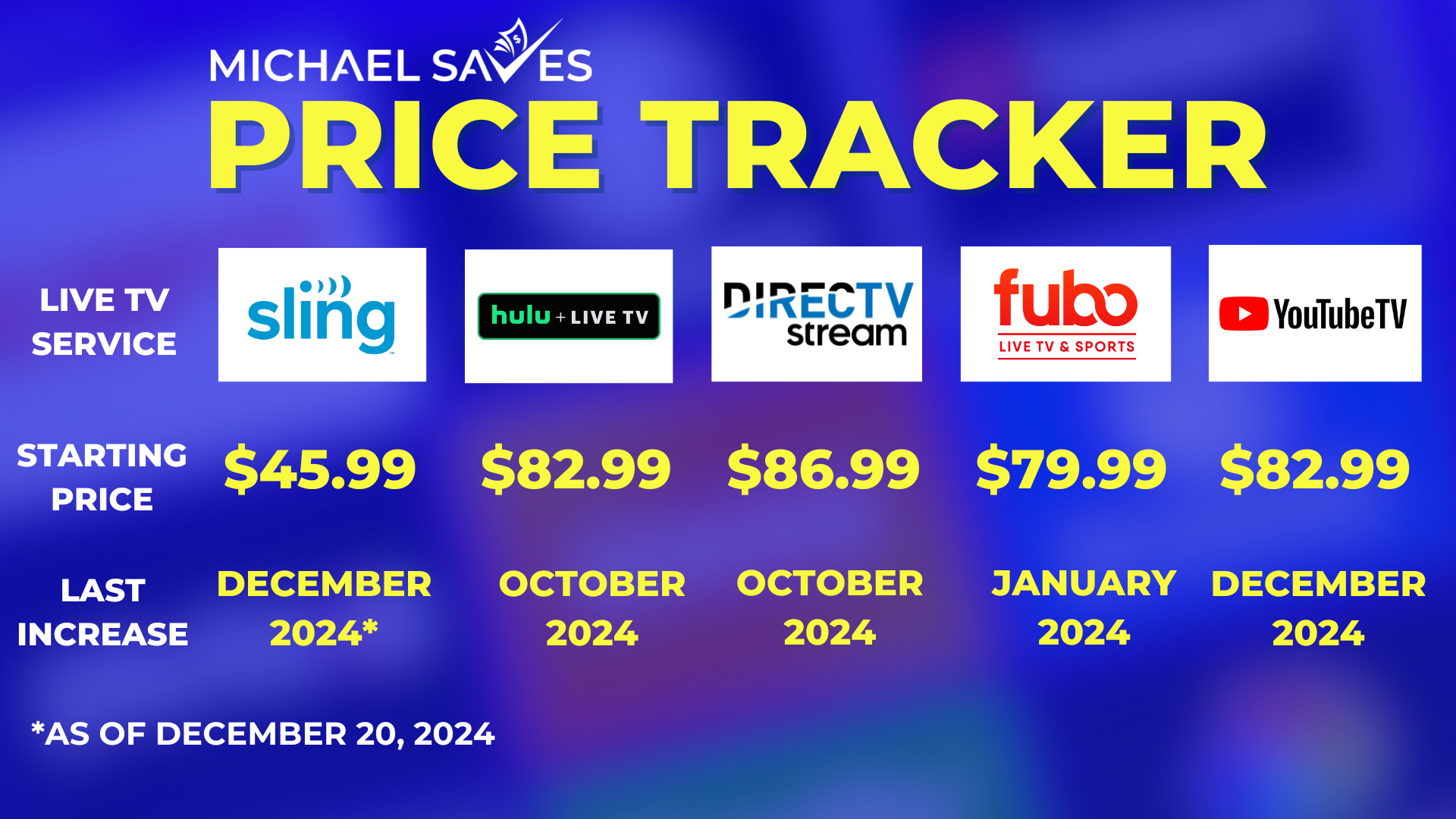
The live TV streaming market is competitive, with services like Hulu + Live TV, Sling TV, FuboTV, and DirecTV Stream all vying for subscribers. Each has its own pricing structure, channel lineup, and unique features, making a direct cost comparison complex but necessary for financial due diligence.
- Hulu + Live TV: Often comparable in price to YouTube TV, it typically includes access to the extensive Hulu on-demand library and Disney+ and ESPN+ bundles, offering a different value proposition for a similar price point.
- Sling TV: Known for its more à la carte approach with lower starting prices (e.g., Sling Orange, Sling Blue, or a combination), but often requires multiple add-ons to match YouTube TV’s channel breadth, potentially leading to similar or higher costs depending on customization.
- FuboTV: Heavily focused on sports, it can be more expensive than YouTube TV, especially for its premium plans, but offers a vast selection of sports channels.
- DirecTV Stream: Often positions itself as a premium cable replacement, with higher starting prices, particularly for packages that include regional sports networks, making it potentially more expensive than YouTube TV.
From a financial perspective, subscribers must align their content priorities with the pricing structure of each service. YouTube TV generally sits in the middle-to-upper tier of live TV streaming service pricing, justified by its extensive channel list, unlimited DVR, and strong user experience. The “best” financial choice depends entirely on individual viewing habits and budget constraints.
Evaluating the “Cord-Cutting” Savings: A Holistic View
The promise of cord-cutting often comes with the expectation of significant financial savings. However, many find themselves accumulating multiple streaming services (Netflix, Disney+, Apple TV+, Amazon Prime Video, along with a live TV service like YouTube TV). When summing up all these individual subscription costs, the total can sometimes rival or even exceed the original cable bill. A robust personal budget should account for all recurring digital entertainment expenses. Periodically auditing these subscriptions and canceling those that aren’t frequently used is a sound financial practice to ensure true savings.
Maximizing Value and Managing Your YouTube TV Budget
Efficiently managing your YouTube TV subscription, like any financial commitment, involves strategic planning and regular review. Maximizing value means getting the most out of your expenditure while minimizing unnecessary costs.
Free Trials and Promotions: Testing the Waters
Before committing financially, always take advantage of free trials. YouTube TV frequently offers extended free trial periods (e.g., 7, 14, or even 21 days), allowing you to explore the channel lineup, test the DVR, and assess the overall user experience without any financial obligation. This hands-on evaluation is crucial for determining if the service genuinely meets your needs and justifies its cost. Additionally, keep an eye out for promotional offers, such as discounted rates for the first few months, which can provide initial savings.
Sharing Accounts (Within Terms of Service): A Household Strategy
YouTube TV’s allowance for six individual accounts and three simultaneous streams is a significant financial advantage for households. If multiple adults or families within the same physical household use the service, splitting the cost can drastically reduce the individual financial burden. For instance, if two individuals in the same household share the $72.99 monthly cost, each pays approximately $36.50, representing considerable savings over individual subscriptions or traditional cable for each person. Always ensure you are adhering to YouTube TV’s terms of service regarding household residency when sharing accounts.
Regular Financial Review: Auditing Your Subscriptions
Just as you would review your bank statements, it’s prudent to regularly audit all your streaming subscriptions, including YouTube TV and its add-ons. Are you still watching the premium channels you added? Do you still utilize the 4K Plus feature? If not, canceling these add-ons can instantly reduce your monthly bill. Moreover, consider pausing your base YouTube TV subscription during periods of travel or low usage. The ability to easily manage your subscription month-to-month is a key financial advantage over rigid cable contracts. This proactive approach to subscription management is a cornerstone of effective personal finance.

The Long-Term Financial Outlook: Small Costs, Big Impact
While a monthly subscription fee of $72.99 might seem manageable, it translates to nearly $876 annually. When combined with other streaming services, internet costs, and mobile phone plans, these “small” recurring expenses add up significantly. Incorporating these costs into a comprehensive personal budget helps paint a clear picture of your monthly outgoings. By understanding “how much is YouTube TV cost” in its entirety – base price, potential add-ons, and its place within your broader financial landscape – you can make informed decisions that align with your financial goals and ensure that your entertainment budget is both satisfying and sustainable.
aViewFromTheCave is a participant in the Amazon Services LLC Associates Program, an affiliate advertising program designed to provide a means for sites to earn advertising fees by advertising and linking to Amazon.com. Amazon, the Amazon logo, AmazonSupply, and the AmazonSupply logo are trademarks of Amazon.com, Inc. or its affiliates. As an Amazon Associate we earn affiliate commissions from qualifying purchases.