
For many, the mere mention of “tax season” conjures images of complex forms, confusing jargon, and the looming fear of making a mistake. It’s a period often associated with stress and procrastination, leading countless individuals to outsource the task to professional accountants or tax preparers. While there’s certainly a place for expert assistance, the reality is that for a significant portion of the population, preparing and filing taxes independently is not only feasible but also incredibly empowering and cost-effective.
Doing your own taxes offers a unique opportunity to gain a deeper understanding of your personal finances, identify potential savings, and take full ownership of your financial responsibilities. It demystifies a process that many find intimidating, transforming it into a manageable annual task. This comprehensive guide will break down the seemingly daunting process into simple, actionable steps, equipping you with the knowledge and confidence to navigate tax season successfully, all on your own. Say goodbye to anxiety and hello to financial autonomy.

Understanding the Fundamentals of Tax Season
Before diving into the specifics of tax preparation, it’s crucial to grasp the foundational elements that govern tax season. Familiarizing yourself with key dates, filing requirements, and necessary documentation will lay a solid groundwork for a smooth experience.
Key Dates and Deadlines
The U.S. tax calendar revolves around several critical dates that every taxpayer should be aware of. Missing a deadline can result in penalties, so mark these on your calendar:
- April 15th (or the next business day): This is the most significant date, marking the deadline for filing your federal income tax return and paying any taxes owed for the previous calendar year. It’s also the deadline for filing an extension (Form 4868), which typically gives you until October 15th to file, though it does not extend the time to pay taxes owed.
- January 31st: Employers must send out W-2 forms by this date. Financial institutions must also send out 1099-MISC, 1099-NEC, and various other 1099 forms (e.g., for interest, dividends, stock sales, independent contractor income) by this date. If you haven’t received these by early February, contact the issuer.
- Quarterly Estimated Tax Payments: If you’re self-employed, have significant investment income, or don’t have enough tax withheld from your paycheck, you may need to pay estimated taxes quarterly. The typical deadlines are April 15, June 15, September 15, and January 15 of the following year.
Who Needs to File?
Not everyone is required to file a federal income tax return. The IRS sets minimum income thresholds based on your filing status, age, and whether you are a dependent. Generally, if your gross income (all income you receive that isn’t exempt from tax) is above a certain amount, you must file. For instance, single individuals under 65 usually need to file if their gross income is above the standard deduction amount for their filing status. However, even if you’re not required to file, you might still want to if:
- You had federal income tax withheld from your pay: You might be due a refund.
- You qualify for refundable tax credits: Such as the Earned Income Tax Credit or the Child Tax Credit.
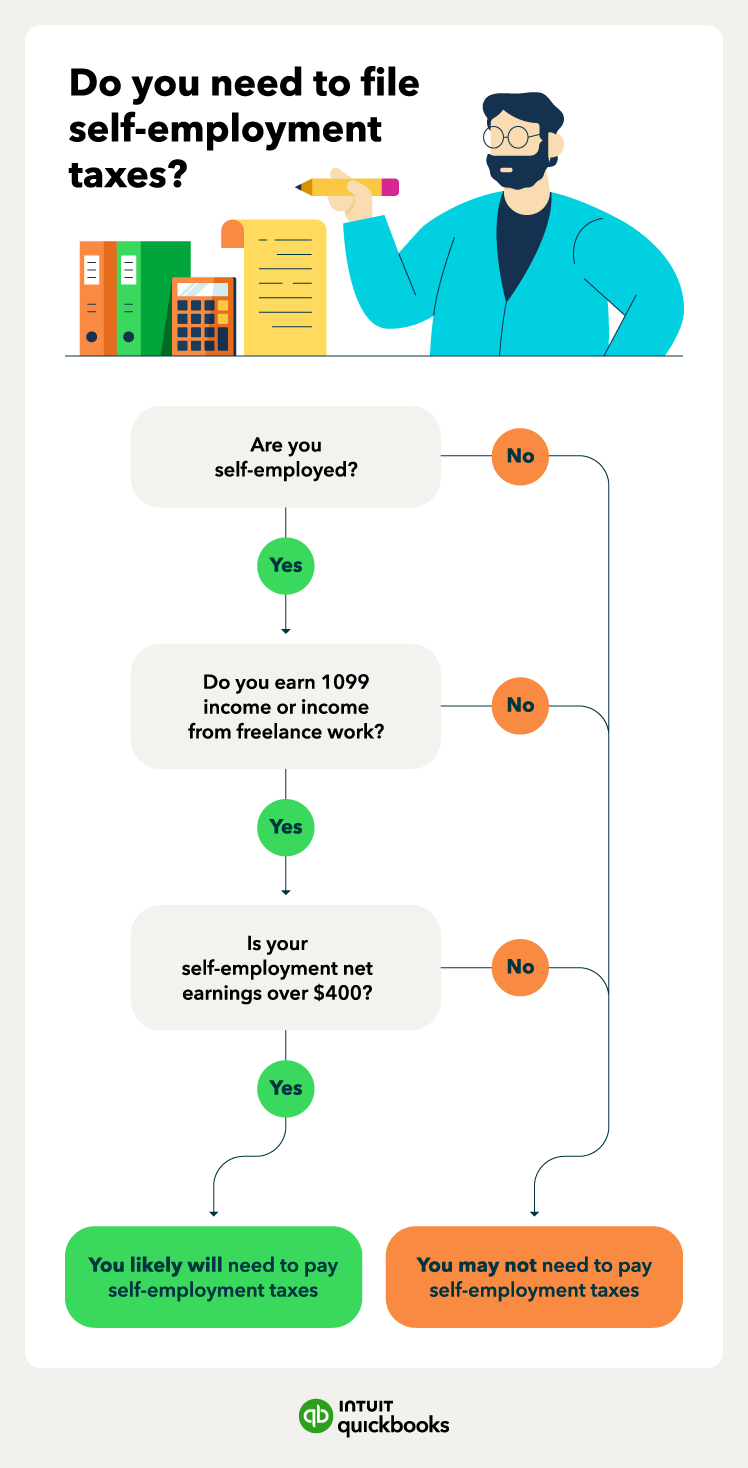
- You are self-employed and had net earnings of $400 or more.
Understanding your filing status (Single, Married Filing Jointly, Married Filing Separately, Head of Household, Qualifying Widow(er)) is also crucial, as it affects your standard deduction, tax rates, and eligibility for certain credits.
Essential Documents to Gather
The cornerstone of successful DIY tax preparation is thorough organization and having all your necessary documents at hand. Before you even open your tax software, create a dedicated folder (physical or digital) for the following:
- Income Documents:
- Form W-2: From your employer(s), reporting wages, tips, and other compensation.
- Form 1099-NEC: For nonemployee compensation (freelancers, contractors).
- Form 1099-MISC: For miscellaneous income (rent, royalties, prizes).
- Form 1099-INT: For interest income from banks.
- Form 1099-DIV: For dividend income from investments.
- Form 1099-B: For proceeds from broker and barter exchange transactions (stock sales, etc.).
- Form 1099-R: For distributions from pensions, annuities, retirement or profit-sharing plans, IRAs, etc.
- Form SSA-1099: For Social Security benefits.
- K-1s: From partnerships, S-corporations, or trusts.
- Records of any other income: Side hustles, gig economy earnings, rental income (with expense records).
- Deduction & Credit Documents:
- Form 1098-E: For student loan interest paid.
- Form 1098-T: For tuition and related educational expenses.
- Medical expense records: Receipts for doctors, prescriptions, health insurance premiums if not pre-tax.
- Mortgage interest statements (Form 1098): From your lender.
- Property tax statements.
- Charitable contribution receipts: For cash donations and non-cash items.
- Child care expenses: Provider’s name, address, and tax ID number.
- IRA contributions records.
- HSA contributions records.
- Business expenses: Receipts and mileage logs for self-employment.
- Personal Information:
- Your Social Security Number (SSN) or Taxpayer Identification Number (ITIN) and those of your spouse and dependents.
- Prior year’s tax return (useful for carryovers, comparisons, and AGI verification).
- Bank account information for direct deposit of refunds or direct debit of payments.
Choosing Your DIY Tax Filing Method
Once your documents are in order, the next step is to select the right tool or method for preparing your return. The landscape of tax filing has evolved significantly, offering various options to suit different levels of complexity and comfort.
Free vs. Paid Tax Software
The vast majority of DIY filers opt for tax preparation software, which guides users through the process with interview-style questions, automates calculations, and ensures accuracy.
- Free Options:
- IRS Free File: A partnership between the IRS and leading tax software companies, offering free federal tax filing for eligible taxpayers (generally those with adjusted gross income below a certain threshold). Several providers participate, like FreeTaxUSA and TaxSlayer. It’s often the best option for those who qualify.
- FreeTaxUSA: Offers free federal filing for all income levels, with a modest fee for state returns. It’s highly regarded for its straightforward interface and comprehensive coverage.
- Cash App Taxes (formerly Credit Karma Tax): Offers completely free federal and state filing for many situations.
- Pros: No cost, step-by-step guidance, accurate calculations, e-filing capabilities.
- Cons: May have income limitations for federal free filing, state filing often costs extra, customer support might be less extensive than paid versions.
- Paid Options:
- TurboTax: One of the most popular and user-friendly platforms, known for its intuitive interface and robust support. Offers various editions (Deluxe, Premier, Self-Employed) catering to different needs.
- H&R Block: Another industry giant, offering similar features and multiple service tiers, including in-person support options.
- TaxAct: A competitive alternative often praised for its value and comprehensive features, especially for more complex returns.
- Pros: Handles more complex tax situations (investments, self-employment), superior customer support, audit defense options, often includes state filing.
- Cons: Can be expensive, especially for higher-tier versions.
When choosing, consider your income level, the complexity of your tax situation, and whether you need state tax filing. Many free versions are sufficient for simple W-2 returns.
Manual Filing (IRS Forms)
While possible, manually filling out IRS forms (like Form 1040) is generally not recommended for most taxpayers due to the complexity and potential for errors. This method is typically only suitable for individuals with very straightforward tax situations and a deep understanding of tax law. Tax software significantly reduces the chances of errors and simplifies the calculation process.
State Tax Considerations
Don’t forget about state taxes! Most states with an income tax require you to file a separate state return. Many tax software programs offer the option to prepare your state return concurrently with your federal return, often for an additional fee (though some free federal options may also include free state filing). Be aware that state tax laws and forms vary widely, so relying on software is usually the most efficient way to ensure compliance. Some states do not have income tax (e.g., Florida, Texas, Nevada, Washington).
Navigating the Tax Preparation Process
With your chosen software and documents ready, you can now begin the actual tax preparation. The software will guide you, but understanding the core components will make the process smoother.
Entering Your Income Information
The first major section of any tax return involves reporting all your income. Your tax software will typically prompt you to enter information from your W-2s, 1099s, and any other income sources. Be meticulous here, as accurate income reporting is fundamental.
- W-2s: Enter the box numbers exactly as they appear.
- 1099 Forms: Similarly, input data from your various 1099s (interest, dividends, stock sales, self-employment income, etc.).
- Other Income: Don’t forget any other income not reported on a form, such as cash income from side gigs, rental income, or gambling winnings.

Identifying Deductions and Credits
This is where you can potentially save money by reducing your taxable income or your tax liability directly. Your tax software will ask questions to help you uncover eligible deductions and credits.
- Common Deductions:
- Standard Deduction vs. Itemized Deductions: You’ll choose whichever is greater. The standard deduction is a fixed amount based on your filing status. Itemized deductions (Schedule A) include things like state and local taxes (SALT cap of $10,000), mortgage interest, charitable contributions, and medical expenses (exceeding 7.5% of AGI). Most people take the standard deduction.
- Student Loan Interest Deduction: Up to $2,500 in student loan interest.
- IRA Contributions: Deductible traditional IRA contributions can reduce your taxable income.
- Health Savings Account (HSA) Contributions: Contributions to an HSA are tax-deductible.
- Self-Employment Expenses: If you’re self-employed, you can deduct legitimate business expenses (home office, supplies, mileage, software, etc.).
- Common Credits: Tax credits are generally more valuable than deductions because they directly reduce the amount of tax you owe, dollar-for-dollar.
- Child Tax Credit (CTC): For qualifying children under 17.
- Earned Income Tax Credit (EITC): For low-to-moderate income working individuals and families.
- Education Credits: American Opportunity Tax Credit and Lifetime Learning Credit for higher education expenses.
- Child and Dependent Care Credit: For expenses paid for the care of a qualifying individual so you can work or look for work.
- Premium Tax Credit: For individuals who purchase health insurance through the marketplace.
- Residential Energy Credits: For certain energy-efficient home improvements.
Be honest and thorough in answering the software’s questions about these items. Don’t claim anything you’re not eligible for, but also don’t leave money on the table.
Reviewing and Double-Checking Your Return
This is perhaps the most critical step. Before e-filing or mailing your return, take the time to review it carefully. Most tax software includes a review process that checks for common errors and missed deductions.
- Check personal information: Ensure names, SSNs, and addresses are accurate.
- Verify income figures: Match them against your W-2s and 1099s.
- Confirm deductions and credits: Make sure you’ve claimed everything you’re entitled to.
- Look for red flags: Does your refund or amount due seem unusually high or low? Are there any unexpected zeroes or missing entries?
- Read through the summary: Understand how your taxable income was calculated and what your final tax liability is.
Electronic Filing (e-filing) vs. Mail
Once satisfied, you’ll choose how to submit your return.
- E-filing: The IRS strongly encourages e-filing, and it’s the standard for tax software. It’s faster, more secure, and provides immediate confirmation of acceptance. Refunds are typically processed much quicker.
- Mail: You can print and mail your return if you prefer, but it’s slower and requires more effort. If mailing, ensure all necessary forms (like W-2s if required by your state) are attached, and send it to the correct IRS address (check the IRS website for the address based on your state).
What Happens After You File?
Filing your return isn’t the absolute end of the process. There are a few post-filing considerations.
Understanding Your Refund or Amount Due
- Refunds: If you’re due a refund, the quickest way to receive it is via direct deposit. The IRS typically issues refunds within 21 days for e-filed returns. You can track your refund status using the IRS “Where’s My Refund?” tool.
- Amount Due: If you owe taxes, you have several payment options: direct debit from your bank account (most common with e-filing), IRS Direct Pay, debit/credit card (via third-party processors, often with a fee), or check/money order. Ensure your payment is made by the April 15th deadline (or the extended deadline if you filed an extension for payment).
Keeping Good Records
After filing, don’t discard your documents. The IRS recommends keeping tax records for at least three years from the date you filed the original return or two years from the date you paid the tax, whichever is later. For certain situations (like claiming a loss from worthless securities or bad debt deduction), this period extends to seven years.
- Save a copy of your filed return: Both the federal and state returns.
- Retain all supporting documents: W-2s, 1099s, receipts for deductions, etc.
- Store them securely: Digitally (encrypted cloud storage, external hard drive) and/or physically (locked filing cabinet).
Amending a Return (If Necessary)
Mistakes happen. If you discover an error after filing, you may need to amend your return using Form 1040-X, Amended U.S. Individual Income Tax Return. You generally have three years from the date you filed your original return (or two years from the date you paid the tax, whichever is later) to file an amended return to claim a refund. If you owe more tax due to the error, file and pay as soon as possible to minimize penalties and interest. Tax software can often assist with preparing amended returns.
Tips for a Smoother Tax Season Next Year
Proactive planning can transform tax season from a dreaded chore into a manageable task.
Maintain Organized Records Year-Round
The biggest headache for DIY filers is often scrambling to find documents. Adopt a system to collect and organize tax-related documents throughout the year:
- Digital Folder: Create a digital folder on your computer or cloud storage (e.g., Google Drive, Dropbox) for the current tax year. As you receive W-2s, 1099s, medical bills, or donation receipts, scan them or save the digital versions directly into this folder.
- Physical Folder/Box: If you prefer physical copies, have a dedicated folder or accordion file where you immediately place any tax-related mail or receipts.
- Track Self-Employment Income/Expenses: Use accounting software (like QuickBooks Self-Employed), a spreadsheet, or a dedicated app to track income and expenses for any side hustles.
Adjusting Withholding or Estimated Payments
If you consistently owe a lot of tax or receive a very large refund, you might want to adjust your tax withholding or estimated payments.
- Form W-4 (for employees): Use the IRS Tax Withholding Estimator tool on IRS.gov to determine the right amount of tax to have withheld from your paychecks. Submit a new Form W-4 to your employer if adjustments are needed.
- Estimated Taxes (Form 1040-ES for self-employed/others): If you’re self-employed, have significant investment income, or other income not subject to withholding, calculate and pay estimated taxes quarterly to avoid underpayment penalties.
Staying Informed About Tax Law Changes
Tax laws can change annually. While tax software updates automatically to reflect these changes, it’s good practice to stay generally informed. Follow reputable financial news sources, check the IRS website for updates, or subscribe to newsletters from tax professionals. Understanding significant changes, such as new credits or deduction limits, can help you plan your finances more effectively.
Doing your own taxes doesn’t have to be a source of stress. By understanding the fundamentals, choosing the right tools, meticulously navigating the process, and maintaining good records, you can confidently prepare and file your own return. This journey not only saves you money on preparer fees but also empowers you with invaluable insights into your financial health, setting the stage for more informed decisions and a stronger financial future. Embrace the challenge, and you’ll find that taking control of your taxes is a rewarding step towards true financial independence.
aViewFromTheCave is a participant in the Amazon Services LLC Associates Program, an affiliate advertising program designed to provide a means for sites to earn advertising fees by advertising and linking to Amazon.com. Amazon, the Amazon logo, AmazonSupply, and the AmazonSupply logo are trademarks of Amazon.com, Inc. or its affiliates. As an Amazon Associate we earn affiliate commissions from qualifying purchases.