
The annual tradition of filing taxes, once a daunting paper-and-pencil chore, has been fundamentally transformed by the digital age. For millions of Americans, the process of submitting their US tax return has transitioned from a physical mailbox to a secure online portal. This shift represents more than just a convenience; it’s a testament to the power of financial technology in democratizing access to essential financial processes and simplifying what was once complex. Navigating the world of online tax filing, however, requires understanding the tools, processes, and best practices to ensure accuracy, compliance, and peace of mind.
The Digital Transformation of Tax Preparation: A Financial Revolution
For decades, the image of tax season was synonymous with stacks of forms, calculators, and often, the help of a professional accountant. The advent of the internet and sophisticated financial software has utterly revolutionized this landscape, bringing tax preparation into the 21st century. This evolution isn’t just about speed; it’s about empowerment, accuracy, and accessibility for a broader range of taxpayers.
From Paper Forms to Intuitive Digital Platforms
The journey from bulky IRS instruction booklets and manually filled 1040 forms to intuitive, guided online platforms has been profound. Early digital tax solutions often mirrored the paper forms, offering little more than a digital input field. However, modern online tax software has evolved into sophisticated financial tools, designed to simplify the complex web of tax codes and regulations. These platforms leverage user-friendly interfaces, step-by-step questionnaires, and intelligent algorithms to guide taxpayers through the process, often without requiring extensive tax knowledge. They prompt users for relevant financial information, explain deductions and credits in plain language, and even identify potential errors before submission. This transformation has significantly lowered the barrier to entry for self-filing, allowing more individuals to manage their own financial obligations with confidence.
Key Financial Benefits of Digital Tax Preparation
Beyond mere convenience, online tax preparation offers substantial financial advantages that resonate with the core principles of personal finance management. Firstly, cost efficiency is a significant draw. While professional tax preparation services can be invaluable for complex situations, they come with a hefty price tag. Online software, particularly for straightforward returns, offers a significantly cheaper, or even free, alternative. This saves hundreds, if not thousands, of dollars annually, directly impacting a taxpayer’s bottom line.
Secondly, the reduction in errors is a critical financial benefit. Manual calculations are prone to human error, which can lead to costly penalties, delayed refunds, or even audits. Online software automatically performs calculations, cross-references data, and flags potential inconsistencies, dramatically reducing the likelihood of mistakes. This built-in accuracy safeguard protects taxpayers from financial repercussions and ensures they receive the correct refund or pay the correct amount.
Thirdly, the speed of refunds is a tangible financial advantage. E-filing combined with direct deposit means taxpayers often receive their refunds in a matter of weeks, sometimes even days, compared to the month-long wait often associated with paper returns. This quicker access to funds can be crucial for managing personal finances, paying down debt, or contributing to savings. The efficiency of digital submission ensures that your financial resources are returned to you promptly.
Choosing the Right Online Tax Filing Platform for Your Finances
The proliferation of online tax filing services means taxpayers now have a wide array of choices. Selecting the right platform is a critical financial decision, as it impacts not only the cost of filing but also the ease of the process and the accuracy of your return. Understanding the nuances between these options is key to making an informed choice that aligns with your financial situation and needs.
Free vs. Paid Options: What’s the Financial Difference?
One of the most immediate financial considerations is whether to opt for a free or paid online tax filing service. Free options, such as the IRS Free File program (offered through various partners like TurboTax, H&R Block, TaxSlayer, etc., for taxpayers meeting specific income thresholds) or entirely free services like Credit Karma Tax (now Cash App Taxes), are excellent for individuals with simple tax situations. This typically includes W-2 income, standard deductions, and perhaps a few common credits. For these taxpayers, leveraging free services is a smart financial move, eliminating filing costs entirely.
However, paid options become necessary and often cost-effective for more complex financial scenarios. This includes self-employment income (1099 forms), rental income, investment income (stock sales, cryptocurrency), itemized deductions, small business taxes, or those needing to file multiple state returns. Paid software versions often provide more comprehensive guidance, advanced deduction finders, direct access to tax professionals, and support for intricate financial forms. While they come with a fee, the cost is often far less than a traditional accountant, and the specialized features can help users identify additional deductions or credits they might otherwise miss, potentially leading to a larger refund or lower tax liability that offsets the software cost. Making the wrong choice could mean missing out on significant financial benefits or paying for features you don’t need.
Key Features to Look For in Tax Software as a Financial Tool
When evaluating online tax software, consider it a financial tool designed to optimize your tax outcome. Several features are paramount:
- User-Friendliness and Guided Experience: Look for an intuitive interface that simplifies complex tax jargon. Step-by-step guides, interview-style questions, and clear explanations help ensure accuracy, especially for those less familiar with tax concepts.
- Comprehensive Coverage: Ensure the software supports all the forms and schedules relevant to your financial situation (e.g., Schedule C for self-employment, Schedule D for investments, Schedule E for rental income). A platform that doesn’t cover your specific financial needs is useless.
- Error Checking and Audit Support: Robust error-checking mechanisms are crucial for financial accuracy. Many platforms offer a final review that flags potential issues. Some even offer optional audit defense services, providing an additional layer of financial protection.
- Data Import Capabilities: The ability to import W-2s, 1099s, and previous year’s tax data directly from financial institutions or prior software saves time and reduces manual data entry errors, which are common sources of financial mistakes.
- Customer Support: Access to knowledgeable support (chat, phone, or even direct access to a tax professional) can be invaluable when you encounter a complex financial question or technical issue.
- Security Measures: Given the sensitive nature of financial data, strong encryption, multi-factor authentication, and a clear privacy policy are non-negotiable.
Popular Online Tax Filing Services
Several platforms dominate the online tax filing market, each with its strengths:
- TurboTax: Known for its user-friendly interface and comprehensive coverage, TurboTax is excellent for a wide range of financial situations, from simple W-2s to complex small business taxes. Its guided experience makes it accessible for novices.
- H&R Block: Another industry giant, H&R Block offers robust online software alongside in-person support options, providing a hybrid solution for those who want digital convenience with the backup of professional advice.
- TaxSlayer: Often praised for its balance of features and affordability, TaxSlayer is a good option for those seeking a more budget-friendly platform that still handles a variety of financial situations.
- FreeTaxUSA: A popular choice for a truly free federal filing, with a low fee for state returns, FreeTaxUSA is a strong contender for those looking to minimize filing costs while still accommodating more complex tax scenarios than basic free options.
- Cash App Taxes (formerly Credit Karma Tax): Offers free federal and state filing for a broad range of tax situations, including some self-employment and investment income, making it an attractive option for budget-conscious filers.
The best choice ultimately depends on your individual financial complexity and budget. A careful review of features and pricing tiers for each platform is a wise financial investment of your time.
A Step-by-Step Guide to Filing Your US Tax Return Online
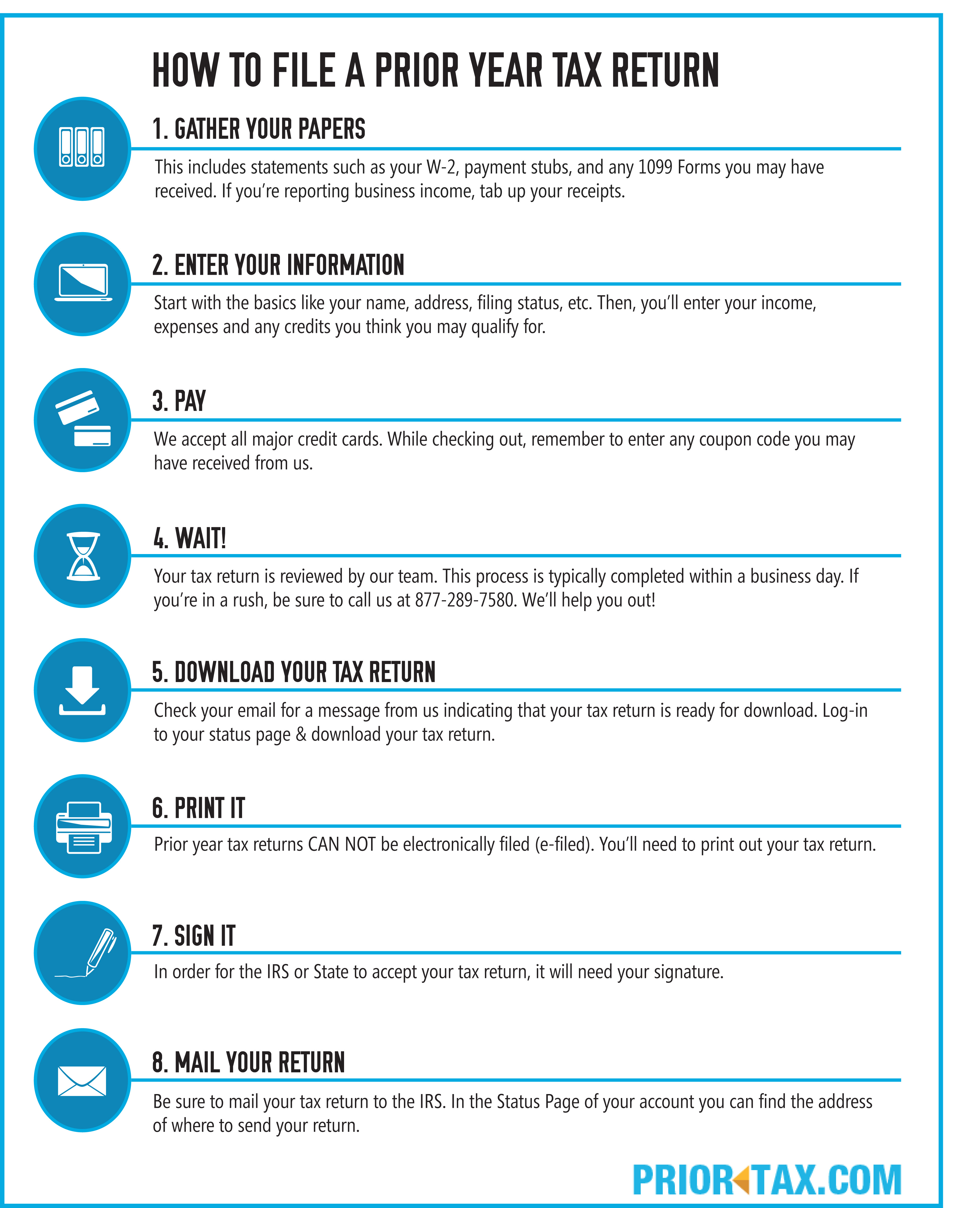
Filing your taxes online, while intuitive, is a structured financial process that requires attention to detail. Breaking it down into manageable steps ensures a smooth experience and helps safeguard the accuracy of your financial submission.
Gathering Your Financial Documents
Before you even log into a tax software, the crucial first step is to assemble all relevant financial documents. This preparation is paramount to avoid omissions and ensure accurate reporting. Key documents include:

- Income Statements: W-2 forms from employers, 1099 forms for contract work (1099-NEC), interest (1099-INT), dividends (1099-DIV), retirement distributions (1099-R), and other income sources.
- Investment Documents: 1099-B (brokerage statements for stock sales), K-1 forms for partnerships or S-corporations.
- Deduction and Credit Documents: Records for mortgage interest (1098), student loan interest (1098-E), tuition payments (1098-T), charitable contributions, medical expenses, property taxes, and receipts for business expenses if self-employed.
- Previous Year’s Tax Return: This contains valuable financial information like your adjusted gross income (AGI), which is often needed for verification, and can serve as a reference for recurring deductions.
- Personal Information: Social Security numbers (SSNs) for yourself, your spouse, and dependents.
Having these documents neatly organized from the outset streamlines the entire process, preventing frustrating searches midway through and reducing the risk of missing critical financial data.
Entering Your Income and Deductions
With your documents in hand, you’ll begin the data entry phase. Online tax software typically uses an interview-style format, guiding you through various sections.
- Income First: Start by accurately inputting all your income sources. The software will prompt you to enter details from your W-2s, 1099s, and any other income statements. Ensure that all figures, such as wages, taxes withheld, and box numbers, match your physical documents precisely.
- Deductions and Credits: Next, the software will walk you through potential deductions and credits. This is where the financial benefits of good record-keeping shine. Common deductions include student loan interest, IRA contributions, health savings account (HSA) contributions, and itemized deductions like state and local taxes (SALT cap applies), mortgage interest, and charitable donations. Credits, which directly reduce your tax liability dollar-for-dollar, include the Child Tax Credit, Earned Income Tax Credit, education credits, and more. The software will ask targeted questions to help you identify which deductions and credits you qualify for, often explaining the financial implications of each choice.
Throughout this process, take your time and double-check every entry. Even a small typo in a financial figure can have a ripple effect on your final tax calculation.
Reviewing for Accuracy and E-Signing
Once all your data is entered, the software will compile your return and calculate your tax liability or refund. Before proceeding, a thorough review is absolutely essential.
- Software Review: Most platforms have an internal review process that checks for common errors, missing information, and potential inconsistencies. Pay close attention to any warnings or suggestions the software provides.
- Manual Review: Don’t solely rely on the software. Take the time to manually review your entire return. Compare the final figures against your original documents one last time. Ensure all dependents are correctly listed, income sources are accounted for, and deductions/credits are accurately applied. This is your last chance to catch costly financial mistakes.
- E-Signing: After confirming accuracy, you’ll electronically sign your return. This typically involves using your prior year’s Adjusted Gross Income (AGI) or a self-selected PIN to verify your identity. This digital signature legally binds you to the information provided.
Submitting Your Return and Tracking Your Refund
The final step is to electronically submit your completed return to the IRS (and your state, if applicable).
- E-File Confirmation: After submission, you should receive a confirmation email from the tax software provider, and then a second confirmation directly from the IRS (and state tax agency) indicating that your return has been successfully received and accepted. Do not consider your return filed until you receive this acceptance confirmation.
- Payment or Refund: If you owe taxes, the software will guide you on how to make an electronic payment directly from your bank account or via other accepted methods. If you’re due a refund, you can typically choose direct deposit, which is the fastest and most secure way to receive your money.
- Tracking Your Refund: The IRS offers an online tool called “Where’s My Refund?” where you can track the status of your federal refund using your Social Security number, filing status, and refund amount. State tax agencies usually have similar tools.
Keep a digital copy (PDF) and ideally a printed copy of your filed return and all supporting documents for your financial records. The IRS generally recommends keeping tax records for at least three years, or longer for certain situations.
Essential Tips for a Smooth Online Tax Filing Experience
Beyond the mechanics of filing, a strategic approach can significantly enhance your online tax filing experience, potentially leading to better financial outcomes and reducing stress. These insights are rooted in sound personal finance principles.
Understanding Your Tax Obligations and Deadlines
One of the most fundamental aspects of responsible financial management is understanding your tax obligations. Knowing what taxes you owe (federal, state, local) and by when is critical. The primary federal tax deadline is typically April 15th, though it can shift if April 15th falls on a weekend or holiday. Different deadlines apply for estimated taxes (for self-employed individuals), extensions, and various business tax forms. Missing a deadline can result in financial penalties and interest. Familiarize yourself with these dates well in advance and mark them in your calendar. If you can’t file on time, remember you can request an extension, but an extension to file is not an extension to pay any taxes owed.
Leveraging Deductions and Credits to Optimize Your Financial Position
Online tax filing software excels at helping users identify potential deductions and credits, but proactive awareness on your part can maximize these benefits. Throughout the year, maintain meticulous records of expenses that could qualify as deductions. This includes charitable contributions, medical expenses (if they exceed a certain percentage of your AGI), student loan interest, educational expenses, and business-related costs for freelancers or small business owners. Understanding common credits like the Child Tax Credit, Earned Income Tax Credit, and various education credits before tax season can influence financial decisions you make throughout the year. For instance, contributing to an IRA or 401(k) not only builds retirement savings but also provides an immediate tax deduction. Proactively seeking out and documenting these financial opportunities is key to reducing your tax liability and optimizing your overall financial health.
Cybersecurity Best Practices for Protecting Your Financial Data
Filing taxes online involves transmitting highly sensitive financial and personal information. Protecting this data from cyber threats is paramount.
- Use Strong, Unique Passwords: Never reuse passwords, and ensure your tax software password is long, complex, and includes a mix of characters. Consider using a password manager.
- Enable Multi-Factor Authentication (MFA): If available, always activate MFA for your tax software account. This adds an extra layer of security, typically requiring a code from your phone in addition to your password.
- Beware of Phishing Scams: The IRS will never initiate contact with taxpayers by email, text messages, or social media to request personal or financial information. Be extremely wary of unsolicited communications claiming to be from the IRS or tax software providers.
- Use Secure Networks: Only file your taxes on a secure, private Wi-Fi network. Avoid public Wi-Fi networks when handling sensitive financial data.
- Keep Software and Operating System Updated: Ensure your tax software, web browser, and computer’s operating system are always up to date. Updates often include critical security patches.
- Securely Store Records: After filing, keep digital copies encrypted and password-protected, and store physical copies in a secure location.
What to Do After Filing
Your financial obligations don’t end the moment you hit “submit.”
- Keep Records: As mentioned, retain copies of your filed return and all supporting documentation for at least three years (or longer for certain situations, like property sales or business records). This is crucial if you ever need to amend a return or if the IRS has questions.
- Monitor Your Refund/Payment: Track your refund status. If you owed taxes and set up an automatic payment, ensure the funds are successfully withdrawn from your account.
- Plan for Next Year: Use the current year’s experience to plan for the next. Did you miss any deductions? Could you adjust your withholdings to avoid a huge refund (which means you’re giving the government an interest-free loan) or a large tax bill? Review your financial situation and make adjustments to your budget or savings plan as needed.
- Consider Estimated Taxes: If your financial situation changes significantly (e.g., you start a side hustle or become self-employed), you may need to make estimated tax payments throughout the year to avoid penalties.
By approaching online tax filing with diligence, leveraging the financial tools available, and adhering to cybersecurity best practices, taxpayers can navigate this annual financial requirement efficiently and confidently. The digital evolution of tax preparation has made it more accessible than ever, empowering individuals to take greater control over their personal financial landscape.
aViewFromTheCave is a participant in the Amazon Services LLC Associates Program, an affiliate advertising program designed to provide a means for sites to earn advertising fees by advertising and linking to Amazon.com. Amazon, the Amazon logo, AmazonSupply, and the AmazonSupply logo are trademarks of Amazon.com, Inc. or its affiliates. As an Amazon Associate we earn affiliate commissions from qualifying purchases.