
In the modern digital landscape, video conferencing has evolved from a niche tool to an indispensable pillar of personal and professional communication. At the forefront of this transformation stands Zoom, a platform synonymous with virtual meetings, online collaboration, and remote connectivity. Yet, as its ubiquity has grown, so too has the common inquiry: “How much does a Zoom account cost?” The answer, far from a simple dollar figure, involves understanding a layered ecosystem of plans, features, and specialized add-ons designed to cater to a spectrum of users, from individuals to multinational corporations. For anyone looking to integrate this powerful communication technology into their daily operations or personal life, a deep dive into Zoom’s pricing structure is essential to make an informed tech investment.
This guide will dissect Zoom’s various offerings, providing a clear roadmap to selecting the most suitable and cost-effective plan for your specific technological needs, ensuring you harness the full potential of this leading Unified Communications as a Service (UCaaS) platform.
Understanding Zoom’s Core Service: More Than Just a Meeting App
Before delving into the specifics of cost, it’s crucial to grasp what a “Zoom account” truly encompasses. While most commonly associated with video meetings, Zoom has developed into a comprehensive communication suite. Its appeal lies in its reliability, user-friendliness, and a robust feature set that has consistently pushed the boundaries of virtual interaction.
The Free Tier: A Gateway to Basic Connectivity
For many, their journey with Zoom begins with its compelling free tier. This no-cost option has been instrumental in democratizing video communication, allowing millions worldwide to experience the platform’s core functionalities without any financial commitment.
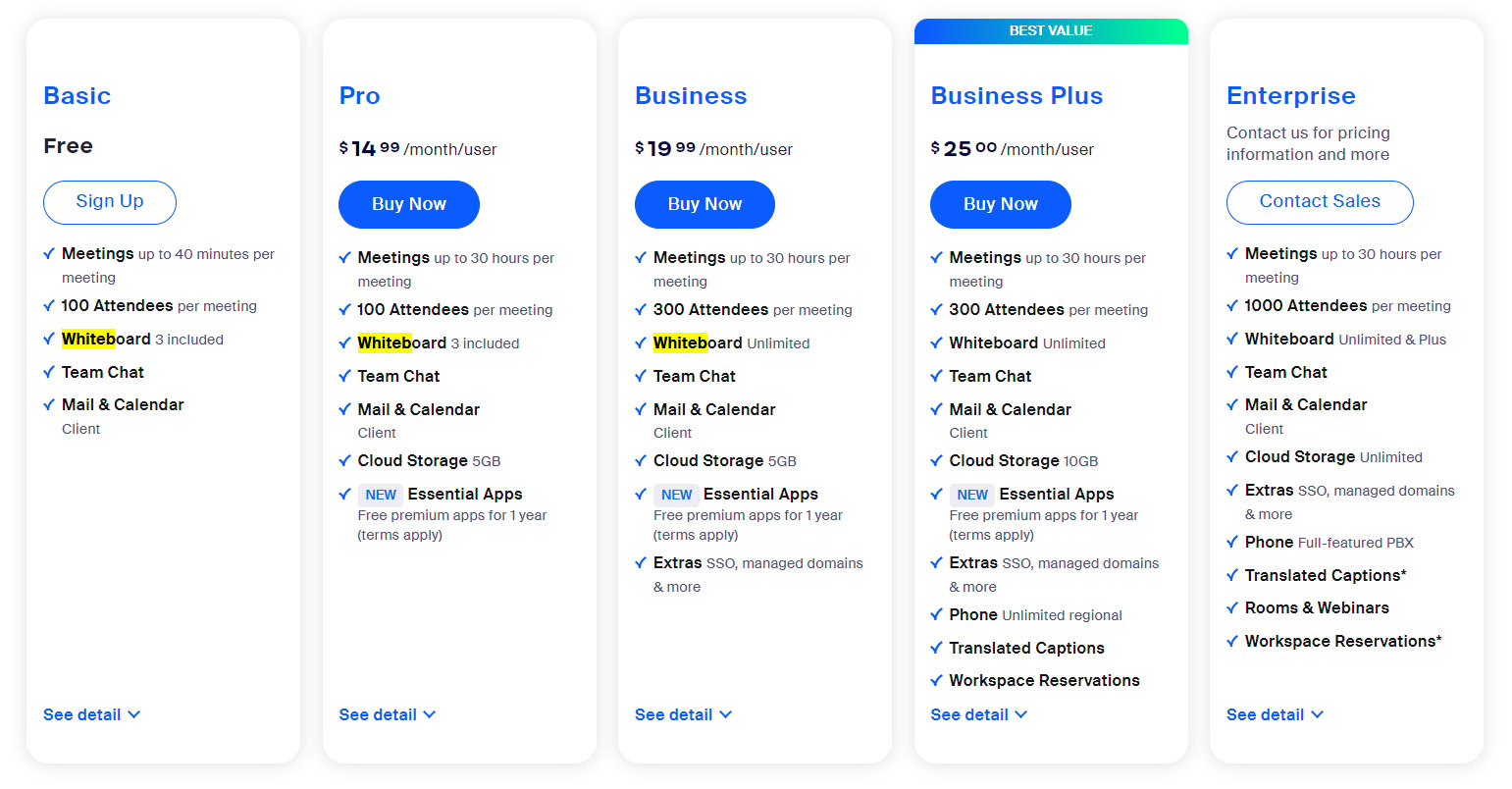
What it offers: The free basic account provides unlimited 1-on-1 meetings, group meetings with up to 100 participants, a 40-minute time limit on group meetings, screen sharing, virtual backgrounds, basic chat, and access to fundamental security features. It’s a fully functional entry point into the Zoom experience, enabling casual calls, family gatherings, and short team huddles.
Ideal users: This tier is perfect for individuals, micro-businesses with very short meeting needs, students, and anyone requiring occasional, spontaneous video communication. It serves as an excellent proving ground for the platform’s interface and stability.
Limitations: The primary constraint is the 40-minute time limit for group meetings, which can be disruptive for extended discussions. Additionally, the free tier lacks advanced administrative controls, cloud recording capabilities, user management features, and dedicated customer support – all elements crucial for professional and larger organizational use. For any serious or continuous professional engagement, the limitations quickly become apparent, necessitating an upgrade.
Why Zoom Stands Out in the UCaaS Market
Zoom’s rapid ascent and sustained dominance in the UCaaS space aren’t accidental. Its architecture and user experience design have consistently prioritized performance and ease of use. The platform offers crystal-clear audio and video quality, even under varying internet conditions, a critical technical achievement. Features like virtual backgrounds, polling, Q&A, breakout rooms, and robust screen sharing capabilities contribute to an engaging and interactive meeting environment. Moreover, Zoom’s extensive integration capabilities with calendars (Outlook, Google), CRM systems, project management tools, and other business applications make it a central hub within an organization’s broader tech stack, streamlining workflows and reducing friction across disparate systems. This seamless integration is a significant technical advantage, enhancing productivity and user adoption.
Deciphering Zoom’s Paid Plans: Tailoring Your Tech Investment
For users whose needs extend beyond the basic functionalities or time limits of the free tier, Zoom offers a range of paid subscription plans. These tiers progressively unlock more features, higher capacities, and enhanced administrative controls, each designed to meet the specific demands of different organizational scales.
Pro Plan: Elevating Individual and Small Business Needs
The Pro plan is Zoom’s most popular paid tier, striking an excellent balance between cost and advanced functionality. It’s the logical upgrade for individuals, consultants, freelancers, and small to medium-sized businesses looking to professionalize their virtual communications.
Target audience: Professionals, entrepreneurs, small teams, and educators who rely on longer, more frequent meetings.
Key features: The Pro plan eliminates the 40-minute meeting limit, allowing meetings of up to 30 hours. It supports up to 100 participants per meeting, offers 5GB of cloud recording storage, and provides user management features, custom Personal Meeting IDs, and basic reporting. This plan also introduces enhanced administrator controls, allowing for greater oversight of meeting settings and participant management, a vital aspect of digital security and compliance for businesses.
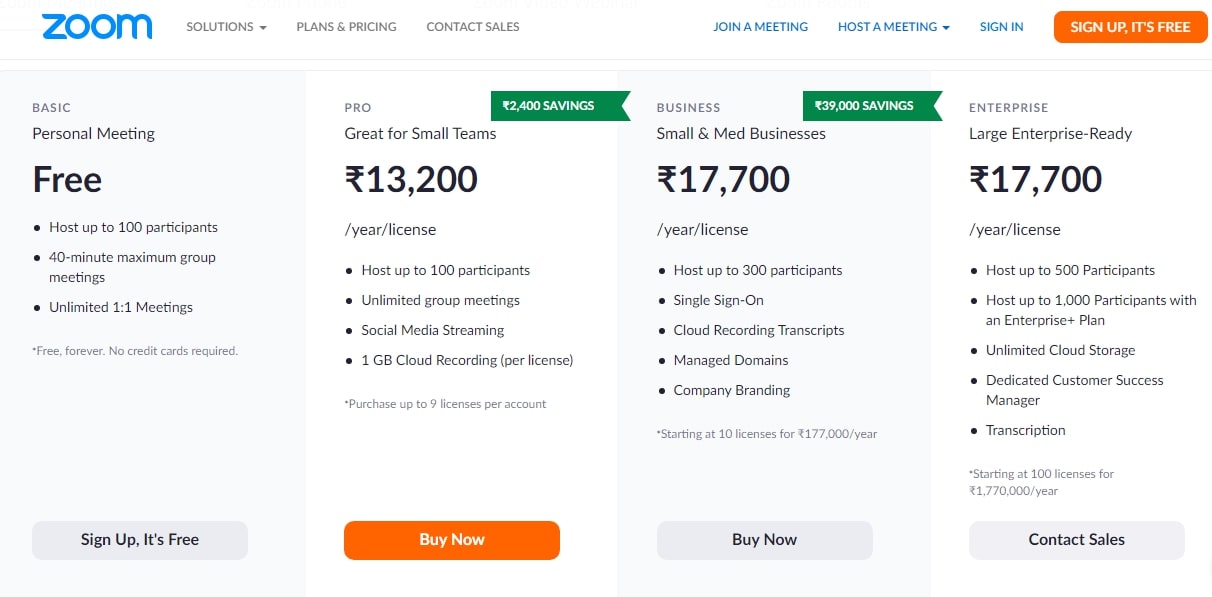
Pricing range: Typically, the Pro plan costs around $149.90 USD per license per year or $14.99 USD per month per license, though specific pricing can vary based on region, promotions, and the number of licenses purchased. Annual billing often provides a discount compared to monthly subscriptions, making it a more cost-effective tech investment for consistent users.
Business Plan: Scaling for Mid-Sized Organizations
As organizations grow, so do their requirements for communication management, security, and branding. The Business plan is tailored to meet the sophisticated needs of mid-sized businesses with multiple teams and a desire for a more cohesive and branded virtual presence.
Target audience: Growing businesses, enterprises with multiple departments, and organizations requiring advanced management and branding capabilities.
Added features: Building on the Pro plan, the Business tier expands participant capacity to up to 300 per meeting. It includes an admin dashboard for centralized management, managed domains (ensuring all users under a specific domain join your account), single sign-on (SSO) for enhanced security and simplified user access, company branding options for meeting rooms, and dedicated phone support. The Business plan significantly bolsters an organization’s ability to manage its communication infrastructure securely and efficiently, critical for maintaining digital integrity.
Pricing range: Generally, the Business plan starts around $199.90 USD per license per year or $19.99 USD per month per license, with a requirement for a minimum number of licenses (e.g., 10 licenses). The per-license cost may decrease for larger bulk purchases.
Enterprise Plan: Comprehensive Solutions for Large Corporations
For large enterprises, global organizations, and institutions with extensive communication needs, the Enterprise plan offers the most comprehensive suite of features, unparalleled scalability, and premium support.
Target audience: Large corporations, educational institutions, and government agencies requiring robust, scalable, and highly customized communication solutions.
Premium features: The Enterprise plan elevates participant capacity to up to 500 (with options for even larger capacities via add-ons), provides unlimited cloud storage for recordings, and includes executive business reviews and a dedicated customer success manager. It often bundles additional licenses for Zoom Rooms and Zoom Webinars, integrating various Zoom products into a single, cohesive solution. Security features are also enhanced with advanced encryption and compliance tools.
Custom pricing model: Unlike the more standardized pricing of Pro and Business plans, the Enterprise plan typically operates on a custom pricing model. This allows Zoom to tailor the solution precisely to the organization’s unique scale, integration requirements, and support needs. Enterprises should expect to engage directly with Zoom sales teams for a personalized quote, reflecting the complex technical environment and specific service level agreements often required at this level.
Beyond Core Meetings: Exploring Zoom’s Ecosystem and Add-ons
Zoom’s evolution has seen it expand beyond its core video conferencing offering into a broader unified communications platform. These specialized add-ons cater to specific technological requirements, allowing organizations to consolidate their communication tools within a single, familiar ecosystem.
Zoom Phone: Cloud-Based VoIP Integration
Zoom Phone is a cloud phone system built on Zoom’s reliable video platform, offering a modern alternative to traditional private branch exchange (PBX) systems.
Description: It provides voice calling, call routing, voicemail, SMS, and other advanced telephony features directly within the Zoom application. This integration allows users to seamlessly switch between a phone call and a video meeting, enhancing the fluidity of communication.
Tech implications: By adopting Zoom Phone, businesses can consolidate their voice and video communications onto a single platform, simplifying IT management, reducing hardware costs, and improving remote work capabilities. It leverages VoIP technology for cost-effective global communication.
Pricing structure: Zoom Phone is typically priced per user per month, with different plans offering various levels of domestic and international calling capabilities. Costs can range from $10 to $20+ per user per month, depending on the plan chosen (e.g., US & Canada Unlimited, Global Select).
Zoom Webinars and Events: Engaging Larger Audiences
For broadcasting to large audiences, whether for marketing, training, or internal communications, Zoom offers dedicated Webinar and Event solutions.
Description: Zoom Webinars allows hosts to broadcast to thousands of attendees, offering features like Q&A, polling, chat, and detailed reporting. Zoom Events takes this further, providing a comprehensive platform for managing multi-session virtual events, complete with ticketing, networking lounges, and exhibition halls.
Tech considerations: These solutions are designed for scale and professional presentation. Pricing is primarily based on the attendee capacity required (e.g., 500, 1000, 3000, 5000+ participants). Higher capacities naturally incur higher costs. These add-ons are crucial for organizations leveraging digital events as a core component of their communication strategy.
Pricing: Webinar licenses are typically an annual add-on fee, scaling with attendee capacity. For instance, a 500-attendee webinar license might cost around $790 per year. Zoom Events, being more comprehensive, also has tiered pricing based on event capacity and features.
Zoom Rooms: Transforming Physical Spaces
Zoom Rooms transforms conference rooms, huddle spaces, and classrooms into intuitive, touch-enabled collaboration environments.
Description: This software-defined solution integrates with existing audio-visual equipment (screens, cameras, microphones) or dedicated Zoom Rooms hardware, providing a seamless meeting experience with one-touch join, wireless content sharing, and integrated calendaring.
Tech setup: Implementing Zoom Rooms involves setting up dedicated hardware (mini PCs, touch controllers, specialized cameras/mics) and subscribing to the Zoom Rooms software license. It requires careful planning of network infrastructure and AV integration.
Pricing: Zoom Rooms is typically priced per room per month or annually, irrespective of the number of users who utilize that room. An annual subscription for a Zoom Room license usually costs around $499 per room per year or $49 per month per room.
Strategic Cost-Benefit Analysis for Your Tech Stack
Choosing the right Zoom plan isn’t merely about finding the cheapest option; it’s about making a strategic technology investment that aligns with your organization’s communication needs, budget, and growth trajectory. A thorough cost-benefit analysis is crucial to ensure optimal ROI.
Assessing Your Usage Patterns and Future Needs
Before committing to a plan, meticulously evaluate your current and anticipated usage.
Factors: Consider the average meeting frequency, the typical number of participants in your largest meetings, your need for recording capabilities, the level of administrative control required (e.g., user management, security settings), and any specific compliance needs.
Scalability: Think about future growth. Will your team expand? Do you anticipate hosting larger events or requiring a dedicated phone system? Choosing a plan that can scale with your organization prevents costly and disruptive transitions later.
Comparing Zoom to Alternative UCaaS Platforms
While Zoom holds a dominant position, it’s prudent to compare its offerings and pricing with other leading UCaaS platforms. Competitors like Microsoft Teams, Google Meet, Cisco Webex, and RingCentral all offer compelling solutions with varying feature sets and pricing models.
Emphasize Zoom’s strengths: For many, Zoom’s renowned ease of use, superior video quality, and reliable performance make it a preferred choice, especially for organizations where broad user adoption and minimal technical hurdles are paramount. Its extensive integration ecosystem also provides flexibility.
Where it might be a better tech fit: If your organization heavily relies on third-party integrations, requires top-tier video performance, or prioritizes user-friendliness above all else, Zoom often presents a compelling technical advantage. However, if your organization is already deeply embedded in a Microsoft or Google ecosystem, their integrated solutions might offer different cost efficiencies and workflow advantages.
Maximizing ROI: Tips for Optimizing Your Zoom Subscription
Once you’ve identified the best-fit plan, several strategies can help optimize your expenditure and maximize the return on your tech investment.
Annual vs. monthly billing: Opting for annual billing often provides a significant discount compared to monthly payments. If your usage is consistent, this can lead to substantial savings over time.
Consolidating communications tools: Leveraging Zoom’s ecosystem (Phone, Webinars, Rooms) can sometimes be more cost-effective than subscribing to separate services from different vendors, simplifying IT management and potentially qualifying for bundle discounts.
Leveraging add-ons only when necessary: Purchase add-ons (like additional cloud storage or larger webinar capacities) only when there is a clear, consistent need. Avoid over-subscribing to features that will be underutilized.
Regularly reviewing subscription tiers: Periodically assess your organization’s Zoom usage and feature requirements. Your needs may change, meaning you could either upgrade to unlock more value or downgrade to save costs if certain features are no longer essential. This agile approach to subscription management is key to maintaining an optimized tech budget.
In conclusion, understanding “how much a Zoom account costs” goes far beyond a simple price tag. It involves a comprehensive evaluation of your communication technology needs, a careful comparison of Zoom’s tiered offerings and add-ons, and a strategic assessment of its value within your broader tech ecosystem. By making an informed decision, you can ensure that your investment in Zoom not only fits your budget but also powerfully enhances your ability to connect, collaborate, and thrive in an increasingly virtual world.
aViewFromTheCave is a participant in the Amazon Services LLC Associates Program, an affiliate advertising program designed to provide a means for sites to earn advertising fees by advertising and linking to Amazon.com. Amazon, the Amazon logo, AmazonSupply, and the AmazonSupply logo are trademarks of Amazon.com, Inc. or its affiliates. As an Amazon Associate we earn affiliate commissions from qualifying purchases.