
Applying for a new credit card can be an exciting step in managing your personal finances, offering benefits from rewards points to improved purchasing power. However, after submitting your application, the wait for a decision can sometimes feel like an eternity. For those who have applied for a Chase credit card, understanding how to track your application’s progress is crucial. This guide will walk you through the various methods to check your Chase credit card application status, explain what different responses mean, and offer insights to navigate the process effectively within the realm of personal finance.
The Anticipation Game: Understanding Credit Card Application Timelines
Once you hit ‘submit’ on your Chase credit card application, a sophisticated review process begins. While some applicants receive an immediate decision, many will find their application goes into a “pending” or “in review” status. Understanding the typical timelines and the factors that influence them can help manage your expectations and reduce anxiety during the waiting period.
Immediate Decisions vs. Further Review
Many online credit card applications boast instant approval, and indeed, many straightforward applications do receive a rapid decision. This usually occurs when your credit profile, income, and debt-to-income ratio clearly meet or exceed Chase’s lending criteria for the specific card you’ve applied for. The automated systems can quickly verify your information against existing databases, leading to a near-instant approval or denial.
However, a significant number of applications are flagged for further manual review. This doesn’t necessarily mean there’s a problem; it often indicates that the automated system requires additional human insight to make a determination. Reasons for this could include discrepancies in your application, a credit history that’s borderline for the card’s requirements, recent significant changes to your credit report, or simply a high volume of applications being processed.
Factors Influencing Review Times
Several key factors can dictate how long your Chase credit card application remains in review:
- Your Credit Profile: A complex or less-than-perfect credit history might require a deeper dive from Chase’s underwriters. If you have a relatively thin file, recent derogatory marks, or a credit score that’s on the cusp of approval for the card, expect a longer review.
- Application Volume: During peak seasons, promotional periods, or economic shifts, the sheer volume of applications can naturally extend review times. Chase, like any major issuer, processes hundreds of thousands of applications monthly.
- Verification Needs: If Chase needs to verify information on your application—such as your income, address, or employment—they may reach out for additional documentation, which adds to the timeline. This is particularly common if your stated income seems unusually high or low compared to your profession, or if there are inconsistencies between your application and publicly available data.
- Type of Card: Some premium cards, especially those with high credit limits or extensive benefits, often undergo a more rigorous underwriting process than entry-level cards, leading to longer review periods.
- Existing Relationship with Chase: While not always a guarantee of speed, having a pre-existing banking relationship with Chase (e.g., checking/savings accounts, mortgages, investments) can sometimes streamline the process as they already have verified information about you.
Typically, most decisions are made within 7-10 business days. If you haven’t heard anything within two weeks, it’s definitely time to proactively check your status.
Primary Methods to Check Your Chase Credit Card Application Status
Chase provides several convenient ways for applicants to monitor the progress of their credit card application. These methods ensure that you can stay informed without having to wait passively for a letter in the mail.
Checking Online Through the Chase Website
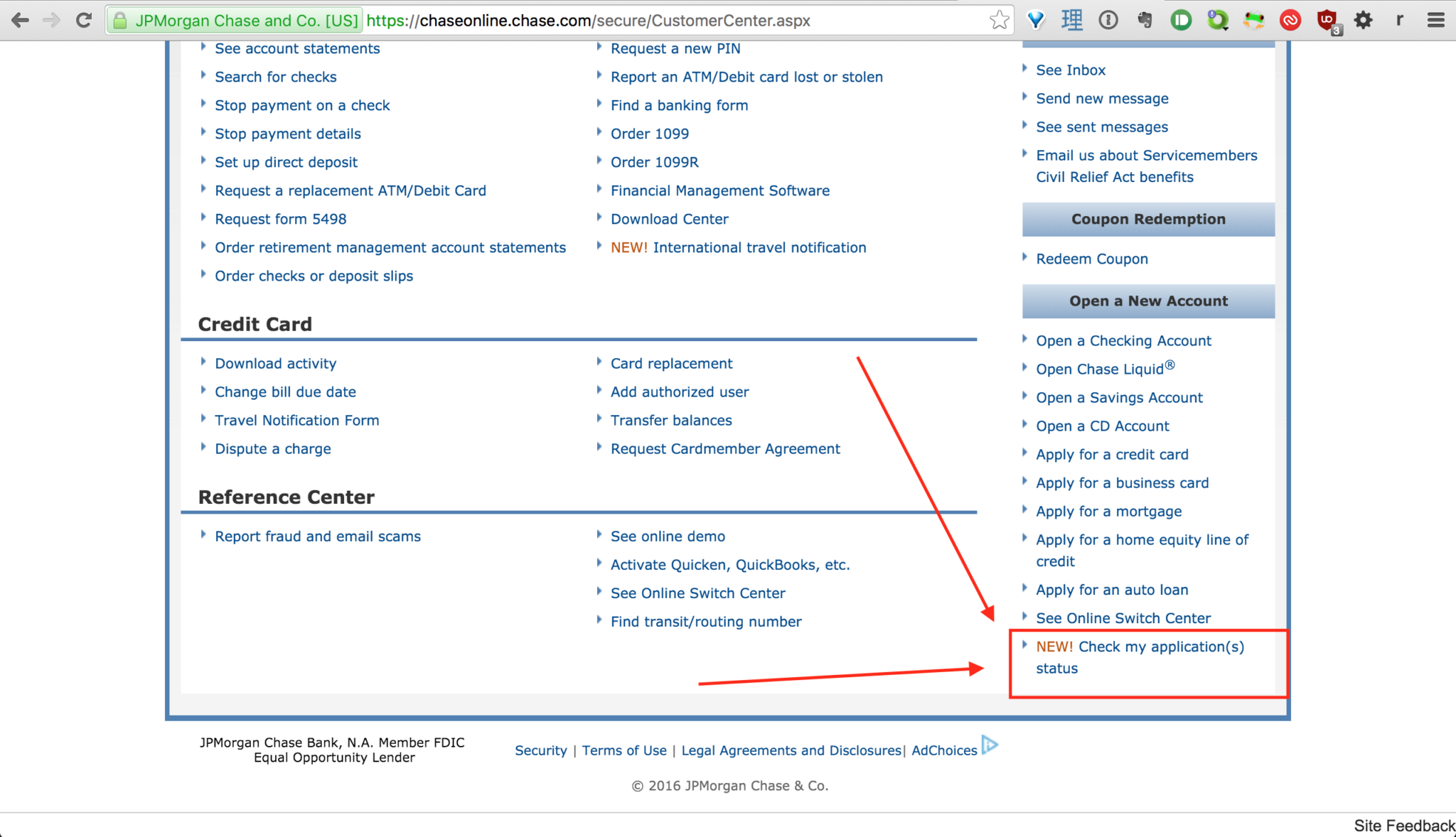
The most straightforward and often quickest method to check your application status is online through Chase’s dedicated application status tool.
Step-by-Step Guide to Online Status Check:
- Navigate to the Chase Application Status Page: Open your web browser and go to the official Chase website (chase.com). Look for a section related to credit cards or directly search for “Chase application status” in their search bar or a general search engine. The direct link is often chase.com/appstatus.
- Locate the Status Checker: On this page, you’ll find a form or prompt asking for specific information to retrieve your application details.
- Input Required Information: You will typically need to provide a combination of the following:
- Social Security Number (SSN): This is the primary identifier for your application.
- Zip Code: The zip code associated with your current address on the application.
- Application ID (Optional but Helpful): If you received an application ID after submission, having it can sometimes speed up the retrieval process, though it’s not always strictly necessary.
- Submit and Review: Once you’ve entered the required details, click “Submit.” The system will then display your application status.
What Information You’ll Need:
Ensure you have your Social Security Number readily available and the exact zip code you used on your application. Mismatched information can prevent the system from finding your application. It’s always a good practice to keep a record of your application details, including the date, the card you applied for, and any reference numbers provided.
Calling Chase Directly for Status Updates
While the online tool is convenient, sometimes a direct conversation can provide more nuanced information, especially if your application is “pending” or requires further action.
Specific Phone Numbers:
- General Chase Customer Service: You can start with the general customer service number found on the Chase website (e.g., 1-800-935-9935 for personal banking). The representative can often direct you to the correct department or even check the status themselves.
- Dedicated Application Status Line (Reconsideration Line): For credit card applications, Chase has a specific reconsideration line, sometimes informally known as the “backdoor number.” While its primary purpose is for reconsidering denied applications, representatives on this line are also highly knowledgeable about application statuses and can often provide more detailed insights into a pending application. Search for “Chase reconsideration line phone number” for the most current number, which is typically 1-888-270-2127 for personal cards.
What to Expect During the Call:
When you call, you’ll need to verify your identity. Be prepared to provide your full name, address, date of birth, and Social Security Number. The representative will then be able to access your application.
- If your application is approved, they can confirm this and provide an estimated card arrival date.
- If it’s pending, they might be able to tell you why it’s pending (e.g., awaiting income verification, further review by underwriting) and if any action is required from your end. This is a crucial opportunity to proactively address any potential issues.
- If it’s denied, they can often explain the specific reasons for the denial, which is invaluable for improving your credit profile for future applications. This is also where you might advocate for reconsideration, presenting a case for why you should be approved despite initial concerns.
Checking Via Mail or Email Notifications
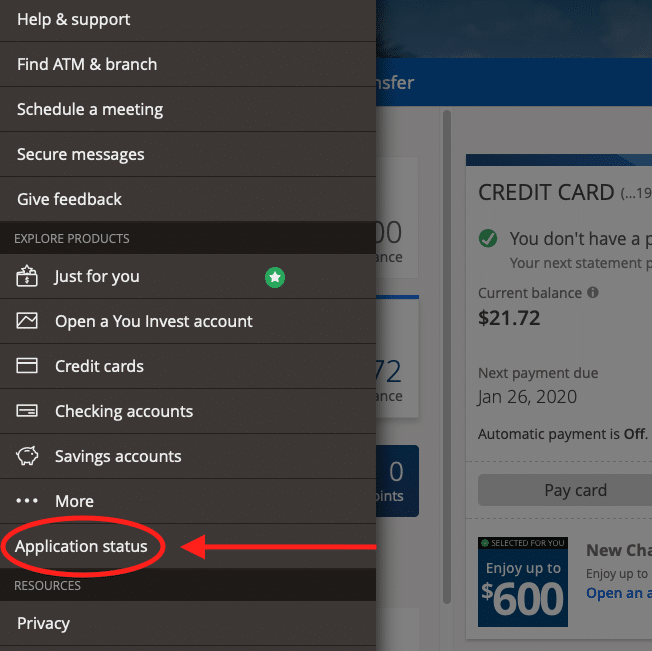
While less immediate, Chase does communicate application decisions and requests for information through traditional mail and, in some cases, email.
- Understanding Physical Mail Updates: If your application is approved, you will typically receive an approval letter along with your new credit card within 7-10 business days. If more information is needed, or if your application is denied, you will receive a letter detailing the specific reasons for the decision. These letters are legally mandated (Adverse Action Notice for denials) and are important documents to review.
- Email Alerts: If you opted into email communications during your application, Chase might send email updates regarding your application status. Always ensure you check your spam or junk folder, as these automated emails can sometimes be miscategorized. However, email is rarely the primary method for critical updates, so don’t rely solely on it.
Deciphering Your Application Status: What Do the Responses Mean?
Understanding the various responses you might receive is crucial for knowing your next steps, whether it’s celebrating an approval or strategizing for future financial moves.
“Approved”: Congratulations! What Happens Next?
An “Approved” status is the goal for most applicants. This means Chase has determined you meet their eligibility criteria and are a suitable candidate for the credit card.
- Card Arrival Time: Typically, your new Chase credit card will arrive by mail within 7-10 business days from the approval date. Some premium cards might offer expedited shipping.
- Setting Up Online Access: Once you receive your card, immediately activate it and set up your online account access via chase.com. This allows you to monitor transactions, make payments, and manage your account details securely.
- Understanding Your Credit Limit: Your approval will come with an assigned credit limit. It’s important to understand this limit in the context of your overall credit utilization ratio, a key factor in your credit score. Aim to keep your utilization low (ideally below 30%) to maintain a healthy credit profile.
“Pending” or “In Review”: Patience is a Virtue
A “pending” or “in review” status means your application is not immediately approved or denied and is undergoing further assessment.
- Common Reasons for Pending Status: As mentioned earlier, this could be due to your credit profile, high application volume, or the need for additional verification. Don’t panic; it’s a common status.
- What Actions Not to Take: Resist the urge to apply for other credit cards while one is pending with Chase. Multiple hard inquiries in a short period can negatively impact your credit score and signal to lenders that you might be in urgent need of credit, which can be a red flag.
- The “Reconsideration Line”: A Strategic Move for Borderline Cases: If your application has been pending for more than a week or two, or if you received an initial denial that you believe is unwarranted, calling the Chase reconsideration line (1-888-270-2127 for personal cards) is a powerful tool. Be prepared to politely and clearly articulate why you believe you are a good candidate for the card, perhaps highlighting a recent increase in income, a lower debt load, or a strong payment history with existing accounts. Emphasize your loyalty if you have existing Chase accounts.
“Denied”: Understanding and Improving for Future Applications
A denial is certainly disappointing, but it’s not the end of your credit card journey. It’s an opportunity to understand what went wrong and improve your financial standing.
- Reasons for Denial (Adverse Action Notice): Chase is legally required to send you an Adverse Action Notice detailing the specific reasons for your denial. This letter is critical. Common reasons include:
- Low Credit Score: Your score did not meet the card’s minimum requirement.
- High Debt-to-Income Ratio: You have too much existing debt relative to your income.
- Insufficient Income: Your income was deemed too low to comfortably handle the credit limit.
- Too Many Recent Hard Inquiries: You’ve applied for too much credit recently.
- Derogatory Marks on Credit Report: Late payments, collections, or bankruptcies.
- The “5/24 Rule”: Chase has an unwritten rule that generally denies applications from individuals who have opened 5 or more personal credit cards from any issuer within the last 24 months.
- Reviewing Your Credit Report: Immediately obtain free copies of your credit reports from all three major bureaus (Experian, Equifax, TransUnion) via AnnualCreditReport.com. Check for inaccuracies or errors that might have led to the denial. Dispute any incorrect information.
- Steps to Take After Denial:
- Improve Your Credit Score: Focus on making all payments on time, reducing existing debt (especially revolving credit), and avoiding new hard inquiries.
- Reduce Debt-to-Income: Pay down loans and credit card balances.
- Wait and Reapply: Give it at least 6 months, or ideally a year, to demonstrate improved credit habits before applying for another card, especially if the denial was due to factors within your control.
Strategies for a Smooth Application Process and Future Success
Beyond simply checking your status, taking a proactive approach to your credit health can significantly improve your chances of approval for a Chase credit card and other financial products in the future.
Preparing Before You Apply
The best way to ensure a smooth application process is to prepare thoroughly beforehand.
- Pre-qualification: Some issuers, including Chase, offer pre-qualification tools that allow you to see if you’re likely to be approved for certain cards without a hard inquiry on your credit report. While not a guarantee, it gives you a good indication.
- Credit Score Check: Know your credit score. Many banks and credit card companies offer free FICO score access. Sites like Credit Karma (VantageScore) also provide valuable insights. Target a score well within the recommended range for the card you desire.
- Debt-to-Income (DTI) Ratio: Calculate your DTI. This is your total monthly debt payments divided by your gross monthly income. Lenders prefer lower DTIs. Be honest and realistic about your income on the application.
The Importance of Accurate Information
Always double-check all information before submitting your application. Errors, even minor ones, can trigger a manual review or even lead to denial because they create inconsistencies that the system cannot reconcile. Ensure your name, address, SSN, and income figures are precise and match your supporting documents or credit report.
Leveraging the Reconsideration Line Effectively
The reconsideration line is not just for denials; it’s a resource for any applicant whose status is not immediately “approved.” When you call:
- Be Polite and Prepared: Have your application details, credit report information, and reasons for approval ready.
- Highlight Positives: Emphasize aspects of your financial profile that are strong, such as a long history with Chase, consistent on-time payments, a recent income increase, or low utilization on other cards.
- Address Concerns Directly: If you know there’s a potential red flag (e.g., a recent late payment from years ago), explain the circumstances concisely and assure them it’s not indicative of your current financial responsibility.
- Offer Alternatives: If you applied for a premium card and were denied, sometimes the representative can offer a less-exclusive card for which you qualify.

Building a Strong Credit Profile for Future Approvals
Ultimately, the best strategy for consistent credit card approvals and favorable financial terms is to maintain a robust credit profile.
- Pay Bills on Time, Every Time: Payment history is the single most important factor in your credit score.
- Keep Credit Utilization Low: Aim for below 30% utilization on all your revolving credit accounts.
- Avoid Opening Too Many Accounts Rapidly: This can signal risk to lenders.
- Maintain a Mix of Credit: A healthy mix of revolving credit (credit cards) and installment loans (mortgage, auto loan) can be beneficial.
- Monitor Your Credit Reports: Regularly check your credit reports for errors and understand the factors impacting your score.
By understanding the process of checking your Chase credit card application status and proactively managing your financial health, you empower yourself to make informed decisions and achieve your credit goals. The wait may be nerve-wracking, but with these tools and insights, you’ll navigate it with confidence.
aViewFromTheCave is a participant in the Amazon Services LLC Associates Program, an affiliate advertising program designed to provide a means for sites to earn advertising fees by advertising and linking to Amazon.com. Amazon, the Amazon logo, AmazonSupply, and the AmazonSupply logo are trademarks of Amazon.com, Inc. or its affiliates. As an Amazon Associate we earn affiliate commissions from qualifying purchases.