
Navigating your personal finances often requires access to specific banking details, none more fundamental than your account number. Whether you’re setting up direct deposit, initiating a wire transfer, or simply need it for record-keeping, knowing how to locate your Chase account number is an essential skill for managing your financial life effectively. This comprehensive guide will walk you through various methods to securely retrieve this crucial piece of information, ensuring you have what you need when you need it.
Understanding Your Chase Account Numbers
Before diving into how to find your account number, it’s beneficial to understand what it is and why it’s so important. Your Chase account number is a unique identifier assigned to your specific checking, savings, or other bank account. It’s a string of digits, typically 10 to 12 characters long, that, in conjunction with your routing number, directs funds accurately to and from your account.
Why You Might Need Your Account Number
The scenarios requiring your account number are diverse and frequent in personal finance:
- Setting Up Direct Deposit: Employers and government agencies need your account number (and routing number) to deposit your paychecks or benefits directly into your account.
- Automatic Payments: Establishing recurring payments for loans, utilities, or subscriptions often requires this detail.
- Wire Transfers: Both sending and receiving wire transfers, especially international ones, hinges on accurate account information.
- Tax Refunds: The IRS and state tax authorities use your account number for direct deposit of tax refunds.
- External Account Linking: If you’re connecting your Chase account to an external financial institution or payment app, you’ll need the number.
- Loan Applications: Some loan applications may ask for your primary checking or savings account number.
- Record Keeping: For personal financial audits or reconciliation, having these details readily available is paramount.
Differentiating Account Numbers from Other Identifiers
It’s common for individuals to confuse their account number with other financial identifiers. Understanding the distinction is crucial to avoid errors and ensure accurate transactions.
- Debit Card Number: This is the 16-digit number found on the front of your Chase debit card. It’s used for purchases and ATM transactions, not for direct deposits or wire transfers. While linked to your account, it is not your account number itself.
- Routing Number: This is a 9-digit number that identifies your bank (Chase in this case) and the specific branch or region where your account was opened. Paired with your account number, it ensures funds go to the correct financial institution and the correct individual account within that institution. Chase has different routing numbers depending on the state or region where your account was opened.
- Credit Card Number: If you have a Chase credit card, this number is entirely separate from your bank account and is used for credit purchases only.
- Login Credentials: Your username and password for Chase Online Banking are for access, not direct transaction identification.
Always double-check which number is being requested to prevent delays or misdirected funds.
Primary Methods for Locating Your Account Number
Fortunately, Chase provides several convenient and secure ways to find your account number. Understanding each method allows you to choose the one that best suits your immediate needs and security preferences.
Through Chase Online Banking & Mobile App
For many, the quickest and most accessible method is via Chase’s robust digital platforms.
Step-by-Step Guide for Chase Online Banking:
- Log In: Visit the official Chase website (chase.com) and log in to your account using your username and password.
- Select Account: Once logged in, you’ll see a summary of all your Chase accounts. Click on the specific checking or savings account for which you need the account number.
- View Account Details: Look for a section often labeled “Account details,” “See account activity,” or similar. Chase often displays the last few digits of your account number for security. To view the full number, you may need to click on a link like “Show full account number” or a similar prompt. For some accounts, you might need to navigate to “Statements & Documents” and select a recent statement.
- Security Precaution: Chase may require you to verify your identity before displaying the full account number, usually through a one-time passcode sent to your phone or email. This is a crucial security measure.
Step-by-Step Guide for Chase Mobile App:
- Open and Log In: Launch the Chase Mobile App on your smartphone or tablet and log in using your credentials or biometric authentication (fingerprint, facial recognition).
- Select Account: Tap on the specific account from your account summary screen.
- Find Account Details: Look for an icon or text that says “Show details,” “Account details,” or similar. Often, it’s a small “i” (information) icon next to the account name or balance.
- Reveal Account Number: Similar to online banking, the app might initially show only truncated digits. Tap to reveal the full account number. You may be prompted for identity verification.
The mobile app and online banking are generally the most efficient methods, as they are available 24/7 and provide instant access.
On Your Physical Checkbook or Bank Statement
If you prefer traditional documentation or don’t have immediate digital access, your physical records are excellent sources.
Where to Look on Your Checkbook:
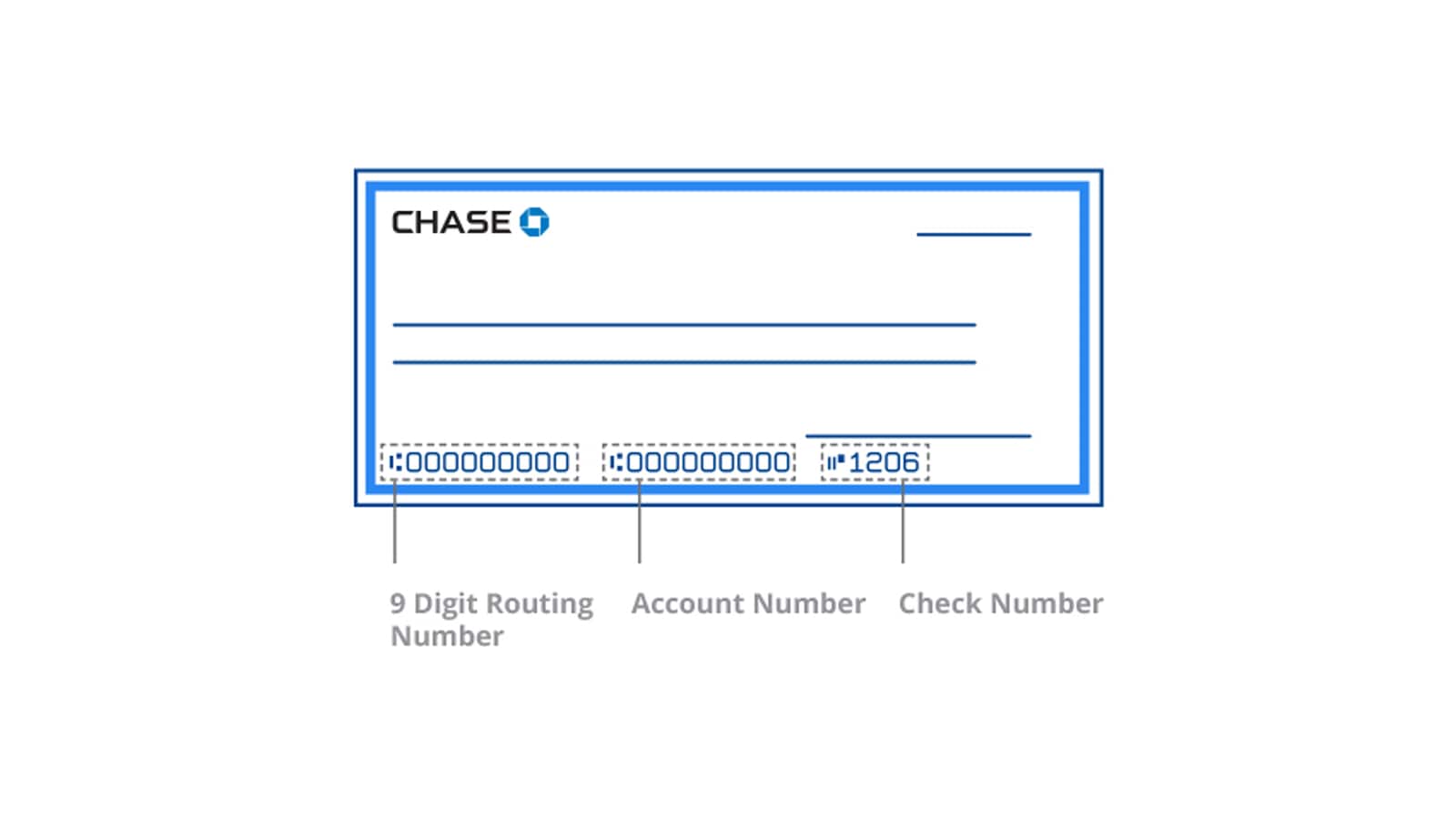
Your account number is prominently displayed on the bottom of your Chase checks.
- Location: Look at the bottom of a blank check. You’ll see three sets of numbers, separated by special symbols.
- Order: From left to right, these are typically:
- Routing Number: The first set of 9 digits.
- Account Number: The middle set of digits (usually 10-12 digits).
- Check Number: The last set of 3-4 digits, corresponding to the sequential number of the check.
It’s always the middle sequence that represents your account number.
Where to Look on Your Bank Statement:
Chase bank statements, whether paper or electronic, also contain your full account number.
- Paper Statements: Your account number is usually listed near the top of the statement, typically alongside your name and address, or within the “Account Summary” section.
- Electronic Statements (eStatements): If you opt for eStatements, you can access them through Chase Online Banking or the mobile app. Navigate to “Statements & Documents” or “Paperless” section, select the desired statement (usually the most recent one), and view or download the PDF. The account number will be in the same location as a physical statement.
Bank statements are reliable, but remember that older statements might not be immediately available digitally, and physical statements take time to arrive via mail.
Contacting Chase Customer Service Directly
When all other methods are unavailable or if you’re experiencing issues, contacting Chase directly is a secure and reliable option.
Phone Support:
- Domestic Calls: Call Chase’s customer service number, typically found on the back of your debit card, on their website (chase.com/contact-us), or your bank statements. The general number for personal banking is 1-800-935-9935.
- International Calls: If you’re outside the U.S., find the international customer service number on the Chase website.
- Verification: Be prepared to verify your identity through various questions (e.g., date of birth, Social Security number, recent transaction details) to ensure you are the legitimate account holder. A representative will then be able to provide your account number.

Visiting a Chase Branch In-Person:
- Branch Locator: Use the Chase website or mobile app to find the nearest Chase branch.
- Required ID: Bring a valid government-issued photo ID (e.g., driver’s license, passport) with you.
- Assistance: A teller or personal banker can securely access your account information and provide your account number after verifying your identity. This is often the best option if you need immediate assistance and prefer face-to-face interaction.
Secure Message Center (Online Banking):
- Within Chase Online Banking, there’s typically a “Secure Message Center” or “Contact Us” section where you can send a secure message to Chase customer service.
- Compose Message: Clearly state your request for your account number.
- Response Time: While convenient, this method is not immediate. Expect a response within one to two business days. The account number will likely be provided in a secure, encrypted message.
Ensuring Security While Accessing Your Information
While retrieving your account number is straightforward, maintaining the security of this sensitive information is paramount. Financial fraud and identity theft are persistent threats, making vigilance a necessity.
Protecting Your Login Credentials
Your username and password for Chase Online Banking are the keys to your financial kingdom.
- Strong, Unique Passwords: Use complex passwords that combine uppercase and lowercase letters, numbers, and symbols. Avoid using easily guessable information like birthdays or common words.
- Two-Factor Authentication (2FA): Always enable 2FA if available (which Chase offers). This adds an extra layer of security, requiring a code from your phone or email in addition to your password.
- Beware of Phishing: Never click on suspicious links in emails or texts that claim to be from Chase, and never enter your login credentials on unofficial websites. Always navigate directly to chase.com.
- Public Wi-Fi Caution: Avoid logging into your bank account on unsecured public Wi-Fi networks, as they can be vulnerable to eavesdropping.
Verifying Information Requests
Always question requests for your account number, especially if they seem unsolicited or unusual.
- Unsolicited Calls/Emails: Chase will never call or email you asking for your full account number, password, or Social Security number. If you receive such a request, it’s likely a scam.
- Legitimate Requests: Only provide your account number to trusted entities (e.g., your employer for direct deposit, government agencies for tax refunds) through secure, verified channels.
Best Practices for Digital Security
Beyond protecting your login, adopt broader digital security habits:
- Regular Software Updates: Keep your computer and mobile device operating systems, web browsers, and antivirus software up to date.
- Monitor Account Activity: Regularly review your Chase account statements and transaction history for any unauthorized activity. Set up alerts for large transactions or unusual activity.
- Secure Storage: If you note down your account number, store it in a physically secure location or a reputable, encrypted password manager, rather than on an easily accessible note or unsecured digital document.
What to Do If You Can’t Find It (Troubleshooting & Alternatives)
Despite the numerous methods available, there might be rare instances where you still struggle to locate your account number. Don’t panic; there are always solutions.
When to Seek Further Assistance
If you’ve exhausted all the methods mentioned (online banking, mobile app, checks, statements) and are still unable to retrieve your account number, the most reliable course of action is to contact Chase customer service directly via phone or by visiting a branch. They have access to comprehensive account information and the tools to verify your identity and provide the necessary details securely. Be patient and prepared for the identity verification process.
Using Routing Numbers for Specific Transactions (and their limitations)
While not a substitute for your account number, a routing number alone can sometimes be used for specific types of transactions or inquiries, but with significant limitations.
- Limitations: A routing number identifies the bank, but without the account number, funds cannot be directed to a specific individual’s account. Therefore, it’s generally insufficient for most financial transactions like direct deposits or wire transfers.
- When it’s used alone: You might use a routing number if you’re trying to identify which bank a certain payment came from or to find general information about Chase for specific online forms that only ask for the bank’s identifier. However, for most personal financial needs, both the routing and account numbers are mandatory.
Proactive Steps for Future Access
To prevent future difficulties in finding your account number, consider these proactive measures:
- Bookmark Your Online Banking: Save the direct login page for Chase Online Banking in your browser for quick and secure access.
- Keep a Record: Consider creating a secure, encrypted document or a physically secured note with your essential banking details (routing number, account number, customer service numbers). Do not store this information unencrypted on your computer or phone.
- Enroll in eStatements: Opting for eStatements through Chase Online Banking ensures you always have digital copies of your statements readily available, which always contain your account number.
- Understand Your Accounts: Take the time to familiarize yourself with the features and information available within your Chase Online Banking and mobile app. The more comfortable you are navigating these platforms, the easier it will be to find critical details.
Beyond the Number: Understanding Your Chase Banking Relationship
Finding your account number is a specific task, but it’s also an opportunity to deepen your understanding of your overall relationship with Chase. Managing your finances effectively involves more than just individual transactions; it’s about having a holistic view of your financial standing.
Managing Multiple Chase Accounts
If you have multiple accounts with Chase—checking, savings, credit cards, investment accounts—it’s important to understand how your account numbers differentiate them. Each distinct bank account (e.g., a primary checking vs. a secondary savings) will have its own unique account number.
- Consolidated View: Chase Online Banking and the mobile app offer a consolidated view of all your accounts, making it easy to toggle between them and find the relevant details for each.
- Organization: Labeling accounts clearly within your online banking (e.g., “Main Checking,” “Savings for Down Payment”) can help you quickly identify which account number corresponds to which financial goal.

Regular Account Health Checks
Proactively managing your accounts includes more than just finding numbers; it means regularly checking their health.
- Review Statements: Don’t just file away your statements; review them for accuracy, reconcile transactions, and verify account balances.
- Monitor Alerts: Utilize Chase’s alert system for low balances, large transactions, or suspicious activity to stay informed.
- Update Information: Ensure your contact information (phone, email, address) with Chase is always current so you receive important communications and can complete identity verification processes smoothly.
In conclusion, knowing how to find your Chase account number is a foundational element of sound personal financial management. By leveraging the various secure methods provided by Chase—online banking, mobile app, physical documents, and direct customer service—you can confidently access this vital information whenever it’s required. Remember that security is paramount; always prioritize protecting your credentials and verifying information requests to safeguard your financial well-being.
aViewFromTheCave is a participant in the Amazon Services LLC Associates Program, an affiliate advertising program designed to provide a means for sites to earn advertising fees by advertising and linking to Amazon.com. Amazon, the Amazon logo, AmazonSupply, and the AmazonSupply logo are trademarks of Amazon.com, Inc. or its affiliates. As an Amazon Associate we earn affiliate commissions from qualifying purchases.