
Deleting a Venmo account is a straightforward process, yet it requires careful preparation to ensure all financial loose ends are tied up and your digital footprint is managed responsibly. As a prominent peer-to-peer payment application, Venmo stores sensitive financial and personal data. Therefore, understanding the technical implications and following a precise sequence of steps is crucial for a secure and definitive account closure. This guide will walk you through the necessary technical prerequisites, the step-by-step deletion process, and important digital security considerations post-closure.
Preparing Your Venmo Account for Deletion
Before initiating the deletion process, it’s imperative to prepare your account to prevent future complications and safeguard your data. This preparation phase is critical from a technical standpoint, ensuring the application can process your request without hurdles related to active funds or linked services.
Clearing Your Venmo Balance
The most critical technical prerequisite for deleting your Venmo account is ensuring your balance is zero. Venmo’s system will not allow account closure if there are funds remaining, whether positive or negative.
- Positive Balance: If you have funds in your Venmo balance, you must transfer them to a linked bank account. Navigate to the “Transfer Balance” option within the app. Select the amount you wish to transfer and choose your preferred linked bank account for the deposit. Standard transfers typically take 1-3 business days. Venmo also offers an instant transfer option for a small fee, which might be preferable if time is a factor.
- Negative Balance: A negative balance indicates that a payment you made was reversed, or there was insufficient money in your linked funding source to cover a transaction. You must add funds to your Venmo account to cover this deficit. This can usually be done by initiating a payment from a linked bank account or debit card to your Venmo balance. Ensure the balance reaches zero before proceeding.
Disconnecting Linked Bank Accounts and Cards
For security and data hygiene, it is advisable to remove all linked bank accounts, debit cards, and credit cards from your Venmo profile before deletion. While Venmo might automatically remove some linked accounts upon deletion, manually doing so adds an extra layer of digital security and ensures no payment methods are inadvertently left connected to a dormant or deleted account record.
- Go to “Settings” within the Venmo app.
- Navigate to “Payment Methods.”
- Select each linked bank account or card and choose the option to remove it. Confirm the removal for each. This action ensures that even if any residual data persists for a short period, no active financial conduits remain associated with the user profile.
Downloading Transaction History
Venmo functions as a financial record-keeper, and depending on your usage, your transaction history might be important for personal record-keeping, budgeting, or tax purposes. Technically, once your account is deleted, this history becomes inaccessible.
- Before deletion, access your transaction history in the app or via the Venmo website.
- Venmo allows users to download a CSV file of their transaction history, which can be opened with spreadsheet software. This feature is typically found under the “Statements & Taxes” or “Transaction History” section in your account settings on the web interface. Download and save this file to a secure location on your device or cloud storage. This ensures a complete digital backup of your past Venmo activities.
Resolving Pending Transactions and Disputes
Any pending payments, requests, or disputes must be resolved before account deletion. Venmo’s system cannot process a deletion request if there are active transactions or unresolved issues tied to the account.
- Pending Payments: Ensure all payments you have sent have been successfully completed and received by the recipient.
- Pending Requests: Cancel any payment requests you have sent to others that have not yet been fulfilled.
- Disputes: If you are involved in any transaction disputes or chargebacks, these must be fully resolved with Venmo’s support team. Contacting Venmo support is necessary to expedite the resolution process if a dispute is delaying your deletion efforts. Their technical support can guide you through the specific steps required to clear your account for closure.
The Step-by-Step Technical Process of Account Deletion
Once your account is fully prepared, you can proceed with the actual deletion. It’s important to note that while the process starts within the app for initial steps, full deletion often requires direct interaction with Venmo’s customer support, especially on the web interface.

Initiating Deletion via the App (Initial Check)
While Venmo’s mobile application is primarily for transactions, some initial account management features are available. However, for complete account deletion, the web interface or direct contact with support is usually required.
- App Limitations: Generally, Venmo does not offer a direct “Delete Account” button within the mobile app interface due to the sensitive nature of financial account closure. This design choice is a digital security measure, requiring users to take a more deliberate path, often involving verification beyond typical in-app actions.
- Support & Help Section: You can navigate to the “Help” or “Support” section within the app. Search for “delete account” or “close account.” This will typically lead you to articles detailing the process and directing you to the Venmo website or to contact customer service.
Accessing the Venmo Website for Deletion
The Venmo website generally provides more robust account management options, including the pathway to account deletion.
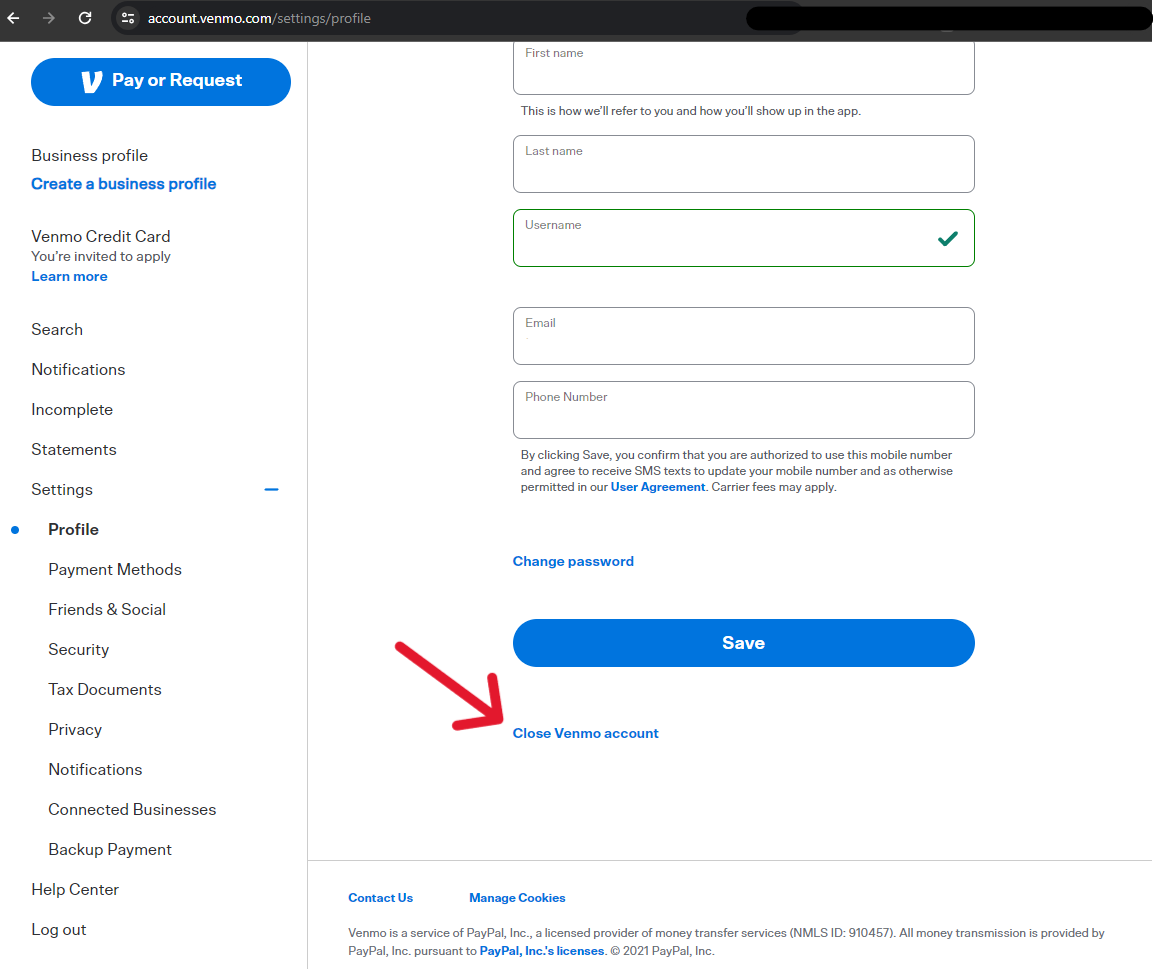
- Log In: Go to venmo.com and log in to your account using your credentials.
- Navigate to Settings: Once logged in, locate the “Settings” or “You” icon (often a profile picture or initial) and click on it.
- Privacy & Security/Account Section: Look for a section related to “Privacy & Security,” “Account,” or “Profile.” The exact location might vary slightly based on Venmo’s UI updates.
- Find “Close Account” or “Delete Account”: Within these sections, you should find an option explicitly stating “Close Account,” “Delete Account,” or a link to “Contact Us” regarding account closure.
- Follow On-Screen Prompts: If a direct “Close Account” option is available, click it. You will likely be prompted to confirm your decision, potentially provide a reason for deletion, and verify your identity through security questions or a code sent to your registered phone or email. This multi-factor verification is a standard digital security protocol to prevent unauthorized account closures.
Contacting Customer Support for Assistance
In many cases, or if you encounter issues with the web-based deletion process, contacting Venmo customer support directly is the most reliable method.
- Channels: Venmo offers customer support through email, live chat (on their website during business hours), or sometimes phone. For account deletion, email or live chat can often be more efficient as they allow for documentation of the request.
- Providing Information: When contacting support, be prepared to provide personal identifying information to verify your identity. This typically includes your full name, email address, phone number associated with the account, and possibly recent transaction details or the last four digits of a linked payment method. This strict verification process is a critical digital security measure.
- Confirmation: Explicitly state your request to delete your Venmo account. The support agent will guide you through any remaining steps or confirm that your account is ready for deletion on their end. They will often inform you about data retention policies and the finality of the deletion.
Verification and Confirmation
After initiating the deletion process, either via the website or through customer support, Venmo will usually send a final confirmation email to the email address registered with the account.
- Email Confirmation: This email serves as a digital record that your account deletion request has been processed. It may contain details about when the deletion will be finalized and a reminder that the action is irreversible. It is essential to retain this email for your records.
- Check Account Status: Occasionally, after receiving confirmation, you might want to attempt logging in one last time (after the stated deletion period). If the login attempt fails with a message indicating the account no longer exists, you can be confident the deletion was successful. This is a technical validation of the process.
Digital Security Considerations Post-Deletion
Deleting your Venmo account is a significant step in managing your digital identity. However, the responsibilities don’t end there. Proactive digital security practices remain paramount to protect your information even after the account is technically closed.
Data Retention and Privacy Policies
While your Venmo account is deleted from an active user perspective, Venmo, like many financial technology companies, has data retention policies dictated by regulatory requirements and internal policies.
- Compliance: They may retain certain transaction data and personal information for a period, typically to comply with anti-money laundering (AML) laws, tax regulations, and fraud prevention. This retention is usually for a legally mandated period (e.g., 5-7 years).
- De-identification: Your personal data, however, is typically de-identified or anonymized after the retention period, meaning it can no longer be linked back to you. Understanding these policies, usually detailed in Venmo’s Privacy Policy and Terms of Service, is crucial for comprehending the full scope of your digital footprint post-deletion. This is a key aspect of app-related data privacy.
Monitoring for Unauthorized Activity
Even after deleting your Venmo account, it’s wise to remain vigilant for any signs of unauthorized activity related to your previously linked financial accounts.
- Bank and Card Statements: Regularly review your bank statements and credit card statements for any unfamiliar transactions that might indicate fraudulent activity. While direct Venmo transactions will cease, the possibility of data breaches or previous compromises affecting linked accounts should always be considered.
- Identity Theft Protection: Consider utilizing identity theft protection services or free credit monitoring tools. These tools alert you to suspicious activities involving your personal information, providing an additional layer of digital security even after disengaging from specific applications.

Password Management Best Practices
If you previously used the same password for Venmo as for other online services, deleting your Venmo account is an opportune moment to reinforce good password hygiene.
- Unique Passwords: Ensure you use unique, strong passwords for every online account. If you reused your Venmo password elsewhere, change those passwords immediately.
- Password Manager: Employing a reputable password manager can significantly enhance your digital security posture by generating and securely storing complex, unique passwords for all your online services. This reduces the risk of credential stuffing attacks, where a password compromise on one service leads to breaches on others. This is a fundamental principle of app and digital security.
Deleting your Venmo account is a comprehensive process that blends technical execution with diligent digital security practices. By carefully preparing your account, following the official deletion steps, and maintaining vigilance afterward, you can ensure a clean and secure exit from the platform, effectively managing your personal data in the digital landscape.
aViewFromTheCave is a participant in the Amazon Services LLC Associates Program, an affiliate advertising program designed to provide a means for sites to earn advertising fees by advertising and linking to Amazon.com. Amazon, the Amazon logo, AmazonSupply, and the AmazonSupply logo are trademarks of Amazon.com, Inc. or its affiliates. As an Amazon Associate we earn affiliate commissions from qualifying purchases.