
Cash App has emerged as a quintessential mobile payment service, simplifying digital transactions for millions. Its intuitive interface allows users to send and receive money, invest, and even bank, all from their smartphones. At the heart of its utility is the ability to link external financial instruments, specifically debit and credit cards, which serve as the primary conduits for moving funds into and out of the app. Understanding how to seamlessly integrate these cards is fundamental to leveraging Cash App’s full potential, ensuring fluid digital transactions and secure financial management within the application ecosystem.
Understanding Cash App and Card Management
Cash App functions as a versatile digital wallet, enabling peer-to-peer payments, direct deposits, and even cryptocurrency transactions. Its core strength lies in its ability to connect directly with users’ existing banking infrastructure through linked debit and, with some limitations, credit cards. This linkage transforms Cash App from a standalone application into a powerful extension of a user’s broader financial toolkit. Effective card management within the app is not just about convenience; it’s about optimizing the speed, security, and flexibility of digital financial interactions.
The Role of Linked Cards
Linked cards are the lifeblood of Cash App’s transaction capabilities. A primary debit card, typically associated with a checking account, is essential for most core functions. It facilitates instant money transfers to and from your Cash App balance, allowing you to “cash in” (add money to your Cash App balance) or “cash out” (transfer money from Cash App to your linked bank account). Without a linked card, many of Cash App’s functionalities, particularly those involving moving money into or out of your personal bank, become inaccessible or significantly limited. The application also offers the Cash Card, a customizable debit card issued by Sutton Bank, which is directly linked to your Cash App balance and can be used for spending anywhere Visa is accepted, independent of your external bank card once funded. However, the initial funding and continued access to external funds rely heavily on a correctly linked primary debit card.
Security Considerations
Digital security is paramount when linking sensitive financial information like card details to any application. Cash App employs robust security measures to protect user data and transactions. All data is encrypted, and the app supports various authentication methods, including PIN, fingerprint ID, or facial recognition, to secure access to your account. When adding a card, Cash App’s systems verify the card’s legitimacy through standard banking protocols. Users are also empowered with tools like instant notifications for transactions, the ability to disable their Cash Card directly from the app if lost or stolen, and comprehensive activity tracking. Best practices for users include creating strong, unique passwords, enabling multi-factor authentication, and being vigilant against phishing attempts or unsolicited requests for personal information. Understanding these security layers builds confidence in utilizing Cash App for daily financial activities.
Step-by-Step: Linking a Bank Account or Debit Card
The process of adding a primary debit card to Cash App is designed to be straightforward, guiding users through a series of intuitive steps. This initial setup is critical for unlocking the app’s full suite of features, from sending money to friends to receiving direct deposits.
Initial Setup and Verification
Before adding a card, ensure your Cash App account is properly set up. This typically involves registering with your phone number or email, and potentially providing personal details like your full name and date of birth for identity verification, especially if you plan to send or receive larger sums of money. This verification process is a regulatory requirement (KYC – Know Your Customer) and helps secure your account against fraud. Once your basic profile is established, you can proceed to link your financial instruments.
Adding Your Debit Card
To add a debit card:
- Open Cash App: Launch the Cash App on your smartphone.
- Navigate to the Profile Icon: Tap the profile icon (it looks like a person or circle) located in the top-right corner of the home screen.
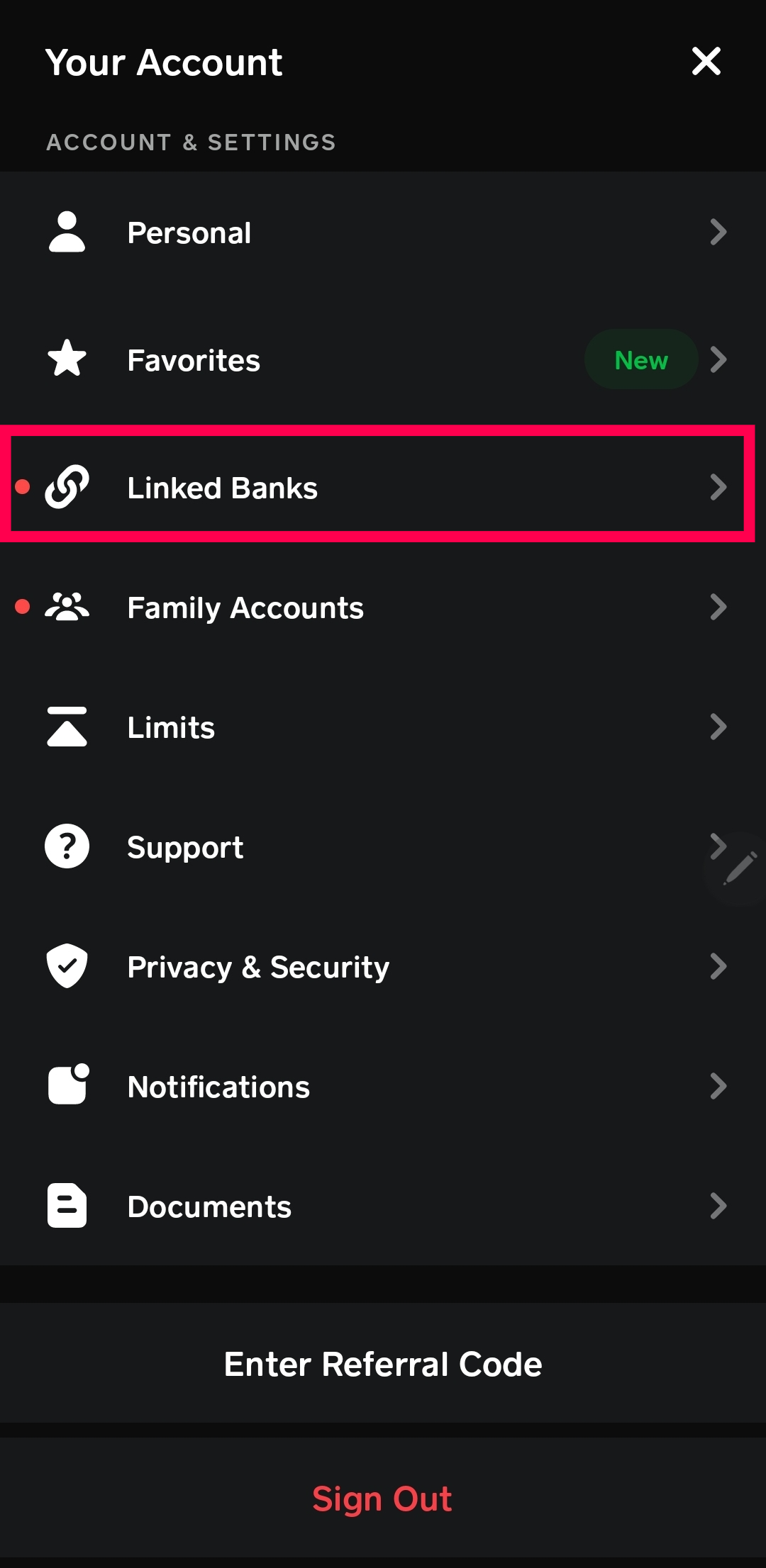
- Select “Linked Banks”: Scroll down the profile menu and tap on “Linked Banks.” This section manages all your external financial connections.
- Tap “Link Debit Card”: Within the “Linked Banks” section, you’ll see an option to “Link Debit Card” or “Add Bank & Cards.” Tap this option.
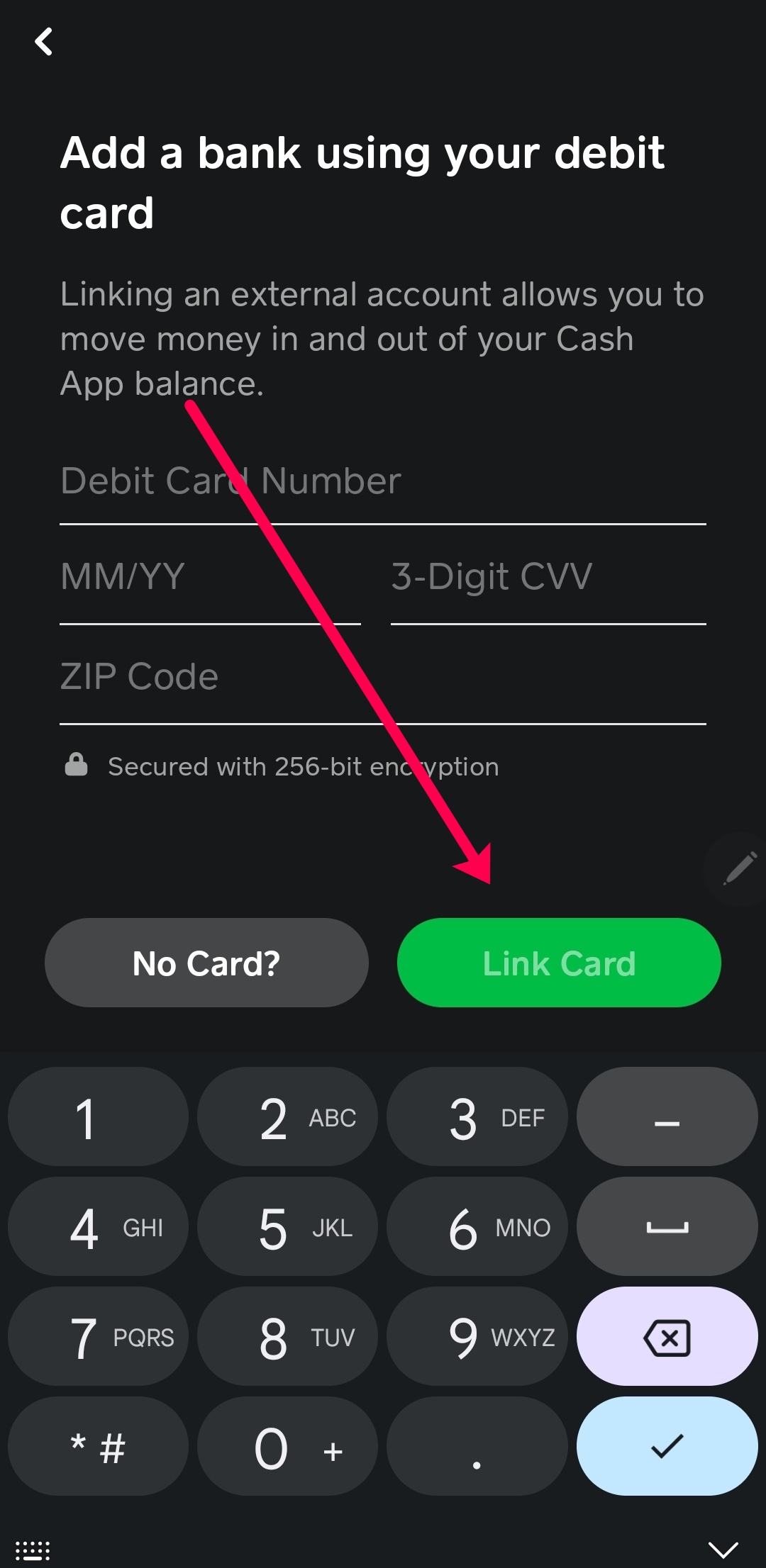
- Enter Card Details: You will be prompted to enter your debit card number, its CVV (the 3-digit security code on the back), and the expiration date. Ensure these details are entered accurately.
- Enter Billing Zip Code: Provide the billing zip code associated with your debit card. This is another layer of security verification.
- Confirm: Tap “Add Card” or a similar confirmation button. Cash App will then attempt to verify your card with your bank. If successful, your card will be linked, and you will see it listed under “Linked Banks.”
During this process, it’s crucial to have your physical debit card handy to ensure all details are entered correctly. Any discrepancy can lead to the card being rejected. If you encounter issues, double-check your input and ensure your card is active and eligible for online transactions.
Adding a Credit Card to Cash App
While linking a debit card is standard and fee-free for most transactions, adding a credit card to Cash App comes with specific conditions and implications, primarily concerning fees. Cash App supports credit cards for sending money, but it’s important to understand the associated costs.
Specifics for Credit Cards
Unlike debit cards which are primarily used for adding and withdrawing funds without transaction fees (outside of instant cash outs), credit cards in Cash App are generally intended for sending money. They cannot be used to “cash out” your Cash App balance to your credit card, nor can they typically be used to directly “cash in” money to your Cash App balance for free. The primary use case is to fund payments directly to other Cash App users. This distinction is crucial for managing your finances effectively within the app.
Fee Structure for Credit Card Transactions
When you send money using a linked credit card on Cash App, a transaction fee is applied. This fee is typically a percentage of the transaction amount, often around 3%. For instance, if you send $100 using a credit card, you might be charged an additional $3 by Cash App. This fee is standard for many peer-to-peer payment platforms when using credit cards, primarily because credit card companies charge merchants (in this case, Cash App) processing fees, which are then passed on to the user. This fee structure is designed to cover these underlying costs and encourage the use of debit cards or your Cash App balance for routine transactions. Always review the transaction details before confirming a payment made with a credit card to be aware of the exact fee.
Managing Your Linked Cards and Troubleshooting
Effective management of your linked cards extends beyond the initial setup. Users need the flexibility to update card information, remove old cards, and troubleshoot any issues that may arise. This ongoing maintenance ensures the app remains a reliable tool for your financial transactions.
Updating and Removing Cards
Life happens, and card details change—be it a new expiration date, a new CVV after a card replacement, or simply switching banks. To update or remove a card:
- Open Cash App: Launch the application.
- Navigate to Profile: Tap the profile icon in the top-right corner.
- Select “Linked Banks”: Go to the “Linked Banks” section.
- Select the Card to Manage: Tap on the specific card you wish to update or remove from the list.
- Update or Remove:
- To Update: You may see an option to “Replace Card” or “Update Card.” Tapping this will allow you to enter new details for the existing card.
- To Remove: Tap the “Remove Card” button. You will be asked to confirm your decision. Once removed, the card will no longer be available for transactions through Cash App until it is added again.
Regularly reviewing your linked cards helps maintain security and ensures you are using current, valid payment methods.
Common Issues and Solutions
Users may occasionally encounter issues when adding or using cards. Here are some common problems and their typical solutions:
- Card Declined/Unable to Add Card:
- Incorrect Details: Double-check the card number, expiration date, CVV, and billing zip code for any typos.
- Inactive Card: Ensure your card is active and authorized for online transactions by your bank.
- Insufficient Funds (for debit cards): Although adding a card doesn’t require funds, some banks might require a small balance. For transactions, ensure sufficient funds.
- Bank Restrictions: Some banks might temporarily block transactions from new services. Contact your bank to confirm there are no holds or restrictions.
- Old App Version: Ensure your Cash App is updated to the latest version from your app store.
- Credit Card Fees Unexpectedly High: Reconfirm that you understand the 3% fee for credit card transactions. This fee is applied when sending money with a credit card, not just for linking it.
- Trouble with Identity Verification: If you are asked for more identity details and encounter issues, ensure the information you provide matches your official records precisely. Sometimes, a slight mismatch can cause verification failures. Contact Cash App support with your official documents ready if the issue persists.
For persistent issues, Cash App’s in-app support or their official website support resources are the best next steps. They can provide specific insights based on your account and transaction history.
Maximizing Your Cash App Experience with Linked Cards
Integrating your bank cards with Cash App transforms it into a powerful, multifaceted financial tool. Beyond basic peer-to-peer payments, optimized card management enhances transaction capabilities and fortifies digital security, ultimately improving your overall user experience.
Enhancing Transaction Capabilities
With a properly linked debit card, Cash App offers unparalleled flexibility. You can:
- Instantly Send and Receive Money: Fund payments or cash out received funds to your bank account with ease.
- Utilize the Cash Card: Once your primary bank account or debit card is linked, you can order a physical or virtual Cash Card. This card draws directly from your Cash App balance and can be used like any debit card, making it convenient for daily spending without directly accessing your bank account for every transaction.
- Automate Direct Deposits: Link your Cash App account to receive direct deposits from employers or government benefits, turning it into a primary banking hub. This relies on the robust connection to your underlying financial infrastructure.
- Invest in Stocks and Bitcoin: Fund your investments within Cash App by transferring money from your linked debit card or existing balance. The seamless transfer of funds is crucial for timely investment actions.
A well-managed set of linked cards provides the financial agility needed to fully engage with all these features, making Cash App a central point for managing various aspects of your digital finances.

Digital Security Best Practices
While Cash App provides a secure platform, user vigilance is the strongest defense against potential threats.
- Regularly Review Activity: Consistently check your Cash App transaction history for any unauthorized activity. Immediate reporting of suspicious transactions is crucial.
- Enable All Security Features: Utilize PIN locks, fingerprint, or facial recognition for accessing the app. For the Cash Card, enable notifications for every transaction and keep the card locked when not in use.
- Beware of Scams: Be highly suspicious of unsolicited requests for money or personal information, especially those promising unrealistic returns. Cash App will never ask for your PIN or full sign-in code via phone or email.
- Use Strong, Unique Passwords: Ensure your Cash App password (if you use one instead of just PIN/biometrics) is complex and not reused on other services.
- Keep Software Updated: Regularly update your Cash App to ensure you benefit from the latest security patches and features.
By combining Cash App’s built-in security with these user-side best practices, you can confidently manage your financial transactions and safeguard your digital assets. Proper card management is not just about functionality; it’s about creating a secure and efficient digital financial ecosystem tailored to your needs.