
For businesses and developers migrating to or operating on Amazon Web Services (AWS), the question of “how much AWS hosting” truly costs is paramount. It’s a deceptively simple inquiry that quickly unravels into a complex web of services, pricing models, and optimization strategies. Unlike traditional hosting, where a fixed monthly fee often covers a predictable set of resources, AWS operates on a dynamic, granular pay-as-you-go model. This flexibility is its greatest strength, offering unparalleled scalability and resource efficiency, but it also demands a deeper understanding to accurately forecast and manage expenditures.
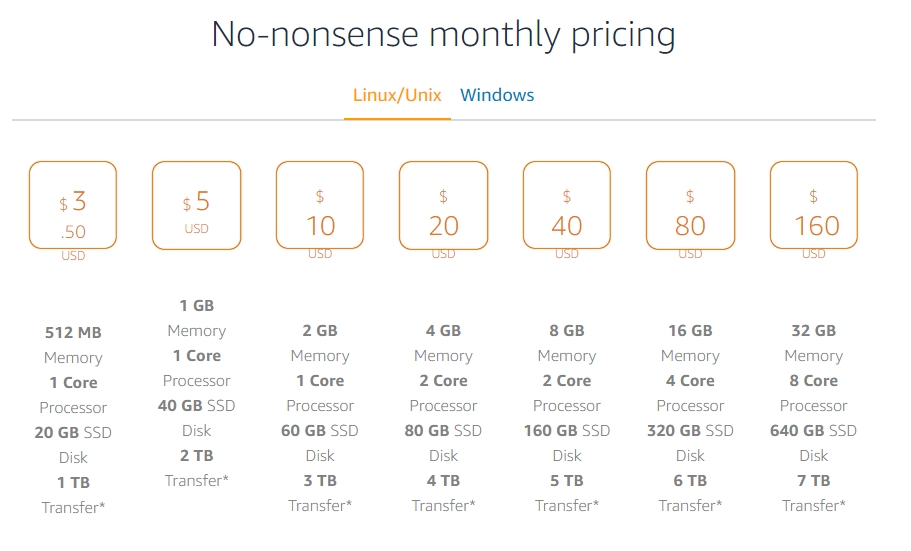
Navigating the intricacies of AWS pricing requires more than just glancing at a calculator; it involves comprehending the interplay of compute, storage, data transfer, and a multitude of specialized services. The aim isn’t just to find the cheapest option, but to find the most cost-effective solution that aligns with your performance, availability, and security requirements. This comprehensive guide will demystify AWS hosting costs, breaking down the key components, outlining effective optimization strategies, and providing a framework for managing your cloud spend efficiently.
The Foundational AWS Pricing Philosophy: Pay-as-You-Go and Beyond
At its core, AWS champions a pay-as-you-go philosophy, offering an unprecedented level of granularity in billing. This model means you only incur costs for the specific resources you consume, down to the second for many compute services. While this might sound liberating, it also means that every decision – from instance type to storage class to data egress – has a direct impact on your monthly statement.
The Core Principle: Only Pay for What You Use
AWS has built its entire infrastructure on the premise of utility computing. There are no long-term contracts (unless you opt for commitment-based discounts), no minimum usage fees for most services, and no upfront hardware investments. You provision resources as needed, scale them up or down dynamically, and are billed based on actual consumption. This allows startups to experiment cheaply and enterprises to handle variable loads without over-provisioning. However, it also necessitates vigilant monitoring, as forgotten resources or misconfigured services can lead to unexpected charges. Understanding this fundamental principle is the first step toward effective cost management.
Understanding Free Tiers and Their Limitations
For new users, AWS offers a generous Free Tier that allows exploration and development without immediate cost. This typically includes a certain amount of free usage for popular services like Amazon EC2 (compute), Amazon S3 (storage), Amazon RDS (database), and AWS Lambda (serverless functions) for 12 months following signup, plus some services that are always free. While invaluable for testing and small-scale projects, it’s crucial to recognize the Free Tier’s limitations. Exceeding its thresholds, even slightly, will trigger standard billing rates. Furthermore, it only applies to specific service components and usage limits. Over-reliance on the Free Tier beyond its intended scope can lead to surprises when scaling up or deploying production workloads.
Key Pricing Dimensions: Compute, Storage, Data Transfer
AWS costs primarily revolve around three fundamental dimensions:
- Compute: This refers to the processing power required to run your applications. Services like Amazon EC2 (virtual servers), AWS Lambda (serverless functions), and Amazon ECS/EKS (container orchestration) fall into this category. Pricing is typically based on instance type, CPU, memory, operating system, and the duration of use.
- Storage: This covers the persistence of your data. Amazon S3 (object storage), Amazon EBS (block storage for EC2), Amazon RDS (relational databases), and Amazon DynamoDB (NoSQL databases) are key players here. Storage costs are usually determined by the volume of data stored, the storage class (e.g., standard, infrequent access, archival), and data access patterns.
- Data Transfer: This is often the most overlooked and potentially costly aspect. AWS charges for data transferred out of its regions and often between different AWS services or regions. Inbound data transfer to AWS is generally free, but egress to the internet, or even between Availability Zones in some scenarios, incurs costs. Understanding these transfer patterns is critical.
Core AWS Services That Drive Hosting Expenses
While AWS boasts over 200 services, a handful are almost universally central to any hosting architecture and thus constitute the bulk of most users’ bills. Understanding their individual pricing models is key to predicting overall spend.
Amazon EC2: The Heart of Your Compute Costs
Amazon Elastic Compute Cloud (EC2) instances are virtual servers that provide the compute capacity for most applications. EC2 costs are multifaceted:
- Instance Types: AWS offers a vast array of instance types (e.g., t3, m5, c5, r5, p3) optimized for different workloads (general purpose, compute optimized, memory optimized, storage optimized, GPU instances). Each type has a specific hourly or per-second rate, varying by CPU, memory, and networking capabilities.
- Operating Systems: Linux-based instances are generally cheaper than Windows instances due to licensing fees.
- Regions: Pricing for identical instance types can vary significantly across different AWS regions due to local infrastructure costs, energy prices, and market demand.
- Pricing Models: On-Demand (pay for what you use), Reserved Instances (commit to 1-3 years for significant discounts), Spot Instances (bid on unused capacity for massive savings, suitable for fault-tolerant workloads), and Savings Plans (flexible commitment-based discounts across EC2, Fargate, and Lambda).
Amazon S3: Object Storage Pricing Nuances
Amazon Simple Storage Service (S3) is the industry standard for object storage, ideal for static website content, backups, and data lakes. S3 pricing depends on:
- Storage Classes: S3 offers multiple storage classes (e.g., S3 Standard, S3 Standard-IA, S3 One Zone-IA, S3 Glacier, S3 Glacier Deep Archive), each with different per-GB-month costs and retrieval charges. Choosing the right class based on access frequency is crucial.
- Requests: Each PUT, GET, LIST, or DELETE request against your S3 buckets incurs a small charge. High-traffic applications can accumulate significant request costs.
- Data Transfer Out: As with most AWS services, transferring data out of S3 to the internet or other AWS regions is chargeable.
Amazon RDS & DynamoDB: Database Cost Considerations
Databases are critical components, and AWS offers managed services like Amazon Relational Database Service (RDS) for SQL databases and Amazon DynamoDB for NoSQL.
- RDS: Costs are based on the database instance type (CPU, RAM), storage (provisioned space and IOPS), data transfer, and optional features like Multi-AZ deployments for high availability. Licensing for commercial databases like SQL Server or Oracle is also a factor. Reserved Instances are available for RDS, offering savings.
- DynamoDB: This serverless NoSQL database charges based on provisioned read/write capacity units (RCUs/WCUs) or on-demand capacity, storage consumed, and data transfer. For highly variable workloads, on-demand capacity can simplify management but might be slightly pricier than provisioned capacity if not optimized.
Data Transfer: The Often-Overlooked Cost Driver
Data transfer costs are frequently underestimated. While data inbound to AWS is generally free, charges apply for:
- Data Outbound to the Internet: This is the most common and often largest data transfer expense.
- Inter-Region Data Transfer: Moving data between different AWS regions (e.g., EU-West-1 to US-East-1) incurs charges.
- Cross Availability Zone (AZ) Data Transfer: While often small, transferring data between different AZs within the same region can add up, especially if not architected efficiently. Architectures should minimize unnecessary cross-AZ traffic where possible.
Networking and Content Delivery: VPC and CloudFront
While Amazon Virtual Private Cloud (VPC) itself is free, services within it, such as Elastic IP addresses (if not associated with a running instance), NAT Gateways, and VPN connections, incur charges. Amazon CloudFront, a global Content Delivery Network (CDN), optimizes content delivery and reduces latency. Its costs are based on data transfer out (to end-users) and the number of HTTP/HTTPS requests. For applications with global users, CloudFront can actually reduce overall data transfer costs by caching content closer to users and leveraging AWS’s optimized network.
Strategic Approaches to AWS Cost Optimization
Simply understanding the costs isn’t enough; proactive optimization is essential to keep your cloud bill in check. AWS offers a powerful suite of tools and mechanisms to help users reduce their spending without compromising performance or availability.
Leveraging Commitment Discounts: Reserved Instances and Savings Plans

One of the most effective ways to reduce costs is by committing to a certain level of usage over a longer period.
- Reserved Instances (RIs): Available for EC2, RDS, ElastiCache, and Redshift, RIs offer significant discounts (up to 75% off On-Demand rates) in exchange for a 1-year or 3-year commitment. You pay an upfront amount (optional) and then a reduced hourly rate. EC2 RIs are becoming more flexible with regional RIs, applying to any AZ within a region.
- Savings Plans: A more flexible commitment model, Savings Plans (Compute Savings Plans and EC2 Instance Savings Plans) offer up to 72% discount in exchange for a commitment to a consistent amount of compute usage (measured in $/hour) for 1 or 3 years. Unlike RIs, Compute Savings Plans automatically apply to various compute services (EC2, Fargate, Lambda) across regions and instance families, providing greater flexibility.
Harnessing Elasticity: Auto Scaling and Spot Instances
The inherent elasticity of the cloud is a powerful cost-saving tool when used effectively.
- Auto Scaling: Dynamically adjust your EC2 capacity to meet demand, ensuring you only pay for the instances you need. Set minimum and maximum instance counts, and define scaling policies based on metrics like CPU utilization or network traffic. This prevents over-provisioning during off-peak hours.
- Spot Instances: Offer the deepest discounts (up to 90% off On-Demand) by allowing you to bid on unused EC2 capacity. While instances can be interrupted with a two-minute warning if AWS needs the capacity back, they are ideal for fault-tolerant workloads, batch processing, data analytics, and CI/CD pipelines where interruptions are acceptable.
Rightsizing and Decommissioning Unused Resources
A common source of wasted spend comes from resources that are over-provisioned or simply forgotten.
- Rightsizing: Regularly review your EC2 instance types, RDS database sizes, and EBS volume sizes. AWS Cost Explorer and Compute Optimizer can recommend smaller, more cost-effective instance types that still meet performance requirements. Don’t pay for resources you’re not fully utilizing.
- Decommissioning Unused Resources: Orphaned EBS volumes, unattached Elastic IPs, old snapshots, and idle load balancers are common culprits for “zombie costs.” Implement a routine audit to identify and delete resources that are no longer needed.
Utilizing Cost Management Tools: AWS Cost Explorer and Budgets
AWS provides native tools to help visualize, analyze, and control your spending.
- AWS Cost Explorer: A powerful visualization tool that allows you to view your AWS costs and usage data. You can filter by service, region, tags, and even create custom reports to identify trends and cost drivers. Use it to analyze past spend, forecast future costs, and identify areas for optimization.
- AWS Budgets: Set custom budgets to track your costs against planned spending. Create alerts that notify you when your actual or forecasted costs exceed your defined thresholds, preventing unexpected bill shock. Budgets can be set for overall spend, specific services, or even individual tags.
Beyond Core Services: Hidden Factors Influencing Your Bill
While EC2, S3, and databases dominate most discussions, other elements can significantly influence your total AWS hosting cost. Being aware of these additional factors is crucial for comprehensive cost management.
AWS Support Plans: Choosing the Right Level
AWS offers various support plans (Developer, Business, Enterprise) with escalating features and costs. While the Basic plan is free, higher-tier plans provide faster response times, technical account managers (TAMs), and architectural guidance. The cost of these plans is typically a percentage of your monthly AWS usage, making it a direct add-on to your overall bill. Choosing the appropriate support level is a balance between your operational needs, the criticality of your applications, and your budget.
Managed Services and Serverless Offerings (Lambda, Fargate)
While often simplifying operations and reducing administrative overhead, managed and serverless services also have their own cost models.
- AWS Lambda: A serverless compute service where you pay for the number of requests and the compute duration (in milliseconds). While incredibly cost-effective for event-driven, intermittent workloads, rapidly scaling or long-running Lambda functions can accumulate significant costs.
- AWS Fargate: A serverless compute engine for containers. You pay for the CPU and memory resources consumed by your containers from the time you start to download your container image until the Amazon ECS task or EKS pod terminates. It eliminates the need to manage EC2 instances but has a higher per-resource cost than running containers on self-managed EC2 instances.
Geographic Region Selection and Its Impact
The AWS global infrastructure consists of regions around the world. The cost of running identical services can vary between regions due to local economic factors, energy costs, and the maturity of AWS’s infrastructure in that area. For example, instances in North Virginia (us-east-1) are often among the cheapest, while those in Sao Paulo (sa-east-1) might be significantly more expensive. Choosing a region strategically, considering latency requirements and regulatory compliance, can impact your bill.
Data Archiving and Lifecycle Management (Glacier)
For data that needs to be retained for compliance or historical purposes but is rarely accessed, services like Amazon S3 Glacier and S3 Glacier Deep Archive offer extremely low storage costs. However, these services typically come with retrieval fees and longer retrieval times. Implementing S3 Lifecycle policies to automatically transition older, less frequently accessed data to cheaper storage classes can yield substantial savings over time, but it requires careful planning to avoid unexpected retrieval charges if data is accessed too frequently.
Illustrative Scenarios: From Startup to Enterprise
To truly grasp “how much AWS hosting” costs, it’s helpful to consider how different architectural patterns and business scales translate into real-world expenditures. These scenarios are illustrative and highly simplified, but they demonstrate the drivers of cost.
The Lean Startup Website: Minimalist Approach
A basic web application or static site for a startup might use:
- Amazon S3: For static website hosting or storing uploaded content (minimal GBs).
- Amazon CloudFront: For CDN to accelerate content delivery.
- AWS Lambda & API Gateway: For serverless backend functions (e.g., contact forms, light APIs).
- Amazon DynamoDB: For small, infrequent database needs.
- Route 53: For DNS.
- Estimated Monthly Cost: Potentially within the AWS Free Tier or just a few dollars ($5-$50), assuming low traffic and efficient design. Cost scales with data transfer out and Lambda invocations/duration.
Growing E-commerce Platform: Balancing Performance and Cost
A moderately trafficked e-commerce site might require:
- Amazon EC2: For web servers and application servers (e.g., 2-4
t3.mediuminstances with Auto Scaling). Perhaps am5.largefor a backend worker. - Amazon RDS: For the relational database (e.g., a
db.t3.mediumordb.m5.largeMySQL instance with Multi-AZ for high availability). - Amazon S3: For product images, user uploads, and backups.
- Application Load Balancer (ALB): To distribute traffic.
- Amazon ElastiCache (Redis/Memcached): For caching user sessions or product data.
- Data Transfer: Significant egress due to images and dynamic content.
- Optimization: Reserved Instances for stable EC2/RDS components, S3 lifecycle policies.
- Estimated Monthly Cost: Hundreds to low thousands of dollars ($300-$2,000+), highly dependent on traffic, database load, and optimization efforts.
Large-Scale Data Processing: Optimizing for Big Data Workloads
An enterprise running large-scale data analytics, machine learning, or complex microservices might utilize:
- Amazon EKS/ECS with EC2 or Fargate: For containerized microservices.
- Amazon EMR/Glue: For big data processing.
- Amazon Redshift/Aurora: For data warehousing or highly scaled databases.
- Amazon Kinesis/MSK: For real-time data streaming.
- Amazon S3: For data lakes (petabytes of storage).
- Dedicated support plans, extensive data transfer, and specialized AI/ML services.
- Optimization: Aggressive use of Savings Plans, Spot Instances for resilient workloads, careful data tiering in S3, rightsizing EKS/EMR clusters.
- Estimated Monthly Cost: Tens of thousands to hundreds of thousands of dollars, or even millions, with robust optimization critical to avoid runaway costs. The complexity and scale necessitate continuous cost management and FinOps practices.
Conclusion
Understanding “how much AWS hosting” costs is not a one-time calculation but an ongoing process of analysis, optimization, and adaptation. AWS provides an incredible platform for innovation and scale, but its granular pricing model demands attention and expertise. By comprehending the core pricing dimensions, scrutinizing the costs of key services, and diligently applying optimization strategies like Reserved Instances, Savings Plans, Auto Scaling, and rightsizing, businesses can harness the full power of the cloud without incurring unnecessary expenses. Effective cost management on AWS isn’t about avoiding the cloud; it’s about mastering it to build robust, scalable, and economically viable solutions.
aViewFromTheCave is a participant in the Amazon Services LLC Associates Program, an affiliate advertising program designed to provide a means for sites to earn advertising fees by advertising and linking to Amazon.com. Amazon, the Amazon logo, AmazonSupply, and the AmazonSupply logo are trademarks of Amazon.com, Inc. or its affiliates. As an Amazon Associate we earn affiliate commissions from qualifying purchases.