
Percentages are an indispensable tool in navigating the complexities of personal finance, understanding investment performance, and making informed business decisions. From deciphering sales discounts to calculating loan interest, estimating profit margins, or analyzing portfolio returns, a solid grasp of percentage calculations on a basic calculator is a fundamental financial literacy skill. This guide demystifies the process, ensuring you can confidently crunch numbers for any financial scenario.
The Ubiquity of Percentages in Your Financial Life
Understanding how to calculate percentages isn’t just an academic exercise; it’s a practical skill with daily financial applications. Nearly every aspect of money management, from budgeting to investing, relies on expressing figures as parts of a whole or as changes over time.
Everyday Personal Finance Scenarios
- Sales and Discounts: Whether it’s 25% off a new appliance or an additional 10% discount during a flash sale, knowing how to quickly calculate the final price helps you determine actual savings and compare deals effectively. This directly impacts your purchasing power and helps you stick to a budget.
- Tips and Gratuities: When dining out or using a service, calculating a 15%, 18%, or 20% tip is a common practice. Accurate percentage calculation ensures fair compensation for service providers while allowing you to manage your discretionary spending.
- Interest Rates: Loans (mortgages, car loans, personal loans) and credit cards charge interest, which is expressed as a percentage of the principal amount. Understanding these percentages helps you grasp the true cost of borrowing and compare different financial products. Similarly, savings accounts and investments may offer interest or returns, enhancing your understanding of your money’s growth potential.
- Taxes: Sales tax, income tax, and capital gains tax are all calculated as a percentage of a transaction amount or income. Being able to compute these figures helps in budgeting for purchases, understanding your take-home pay, and estimating tax liabilities.
- Budgeting and Expense Tracking: Allocating specific percentages of your income to different categories (e.g., 50% for needs, 30% for wants, 20% for savings) is a popular budgeting strategy. Similarly, tracking how much of your total spending goes to groceries or entertainment, expressed as a percentage, offers clear insights into your financial habits.
- Inflation: The rate of inflation, expressed as a percentage, indicates the decline of purchasing power over time. Monitoring this helps you understand the real return on investments and the changing cost of living.
Business and Investment Applications
- Profit Margins: Businesses use percentages to calculate gross profit margin, operating profit margin, and net profit margin. These percentages are crucial indicators of a company’s financial health and efficiency, showing how much profit is generated per dollar of revenue.
- Growth Rates: Investors and business analysts regularly use percentage growth rates to assess the performance of companies or economies. This includes revenue growth, earnings growth, market share changes, and GDP growth.
- Returns on Investment (ROI): Calculating ROI as a percentage allows investors to compare the profitability of different investments. Whether it’s stocks, real estate, or a new business venture, ROI helps in making informed capital allocation decisions.
- Stock Price Changes: The daily fluctuations of stock prices are typically reported as percentage changes. Understanding these figures helps investors gauge market volatility and the impact on their portfolios.
- Expense Ratios: Mutual funds and exchange-traded funds (ETFs) charge management fees, known as expense ratios, expressed as a percentage of assets under management. A lower expense ratio means more of your investment capital works for you.
Mastering the Basics: Core Percentage Calculations on a Standard Calculator
While some calculators have a dedicated percentage key, understanding the underlying mathematical principles ensures accuracy regardless of the device. Most basic calculations can be performed with just the multiplication and division functions.
Finding a Percentage of a Number
This is perhaps the most common percentage calculation, used for discounts, taxes, or calculating a portion of a whole.
Formula: (Percentage / 100) * Number
Example (Discount Calculation): You want to find 15% of $200 (e.g., a 15% discount on an item costing $200).
Calculator Steps (Method 1: Using Division and Multiplication):
- Enter the percentage you want to find:
15 - Divide it by 100:
÷ 100(Result: 0.15) - Multiply this decimal by the number:
× 200 - Press
=.
Result:30
So, 15% of $200 is $30. If it’s a discount, the final price would be $200 – $30 = $170.
Calculator Steps (Method 2: Directly with percentage key, if available):
- Enter the number:
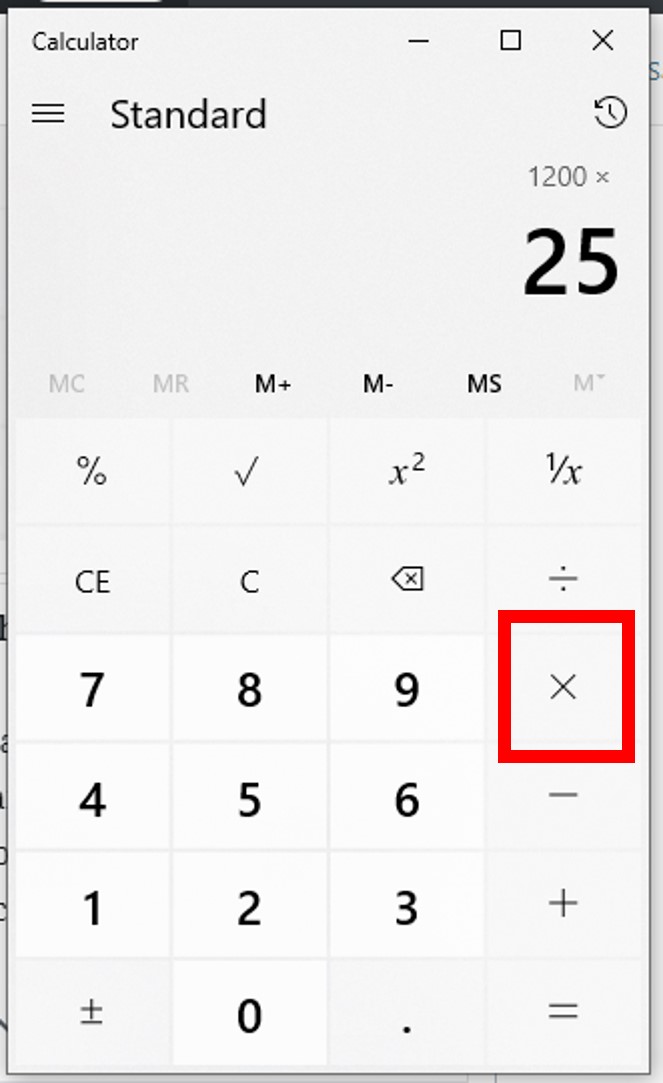
200 - Press the multiplication key:
× - Enter the percentage:
15 - Press the percentage key:
%
Result:30(On many calculators, this directly displays the percentage value)
Expressing One Number as a Percentage of Another
This is useful for understanding how much one value contributes to a total, such as what percentage of your income goes to rent or the percentage of correct answers on a test.
Formula: (Part / Whole) * 100
Example (Expense Allocation): Your rent is $800, and your monthly income is $3,200. What percentage of your income goes to rent?
Calculator Steps:
- Enter the ‘part’ (rent):
800 - Divide it by the ‘whole’ (income):
÷ 3200(Result: 0.25) - Multiply the result by 100 to convert to a percentage:
× 100 - Press
=.
Result:25
So, 25% of your income goes to rent.
Calculating Percentage Increase or Decrease
This calculation helps you understand financial growth or depreciation, such as the change in investment value, inflation rates, or price fluctuations.
Formula (Increase): ((New Value – Old Value) / Old Value) * 100
Formula (Decrease): ((Old Value – New Value) / Old Value) * 100
Example (Investment Increase): Your stock investment grew from $1,500 to $1,800. What is the percentage increase?
Calculator Steps:
- Calculate the absolute change:
1800 - 1500 = 300 - Divide the change by the original (old) value:
300 ÷ 1500(Result: 0.2) - Multiply by 100:
× 100 - Press
=.
Result:20
Your investment increased by 20%.

Example (Price Decrease): A car’s value depreciated from $20,000 to $17,000. What is the percentage decrease?
Calculator Steps:
- Calculate the absolute change:
20000 - 17000 = 3000 - Divide the change by the original (old) value:
3000 ÷ 20000(Result: 0.15) - Multiply by 100:
× 100 - Press
=.
Result:15
The car’s value decreased by 15%.
Leveraging Your Calculator’s Percentage Function Key (%)
Many calculators, especially scientific and financial models, feature a dedicated ‘%’ key. While its functionality can vary slightly between brands, it often simplifies common percentage operations.
Simplifying Percentage of a Number
The ‘%’ key can directly convert a number into its percentage equivalent or perform operations with percentages.
Example (Calculating 20% of $500):
- Enter the base number:
500 - Press the multiplication key:
× - Enter the percentage:
20 - Press the percentage key:
%
Result:100(This calculates 20% of 500, which is 100).
Adding a Percentage (e.g., Sales Tax)
Some calculators can directly add a percentage to a number in one sequence.
Example (Adding 8% Sales Tax to a $120 Item):
- Enter the base price:
120 - Press the addition key:
+ - Enter the tax percentage:
8 - Press the percentage key:
%
Result:129.6(This adds 8% of 120, which is 9.6, to 120).
Subtracting a Percentage (e.g., Discounts)
Similarly, the ‘%’ key can be used for subtracting discounts.
Example (A $75 Item with a 15% Discount):
- Enter the original price:
75 - Press the subtraction key:
- - Enter the discount percentage:
15 - Press the percentage key:
%
Result:63.75(This subtracts 15% of 75, which is 11.25, from 75).
Understanding Calculator Variations
It’s crucial to note that the behavior of the ‘%’ key can differ.
- Some calculators require you to calculate the percentage value first (e.g.,
200 × 15 % = 30), and then you manually add or subtract that result (200 - 30 = 170). - Other calculators perform the entire operation as shown in the adding/subtracting examples above.
Always test your specific calculator with a simple known calculation to understand its functionality. Referencing your calculator’s manual is also highly recommended for mastering its specific features.
Advanced Applications and Common Financial Pitfalls
Beyond basic computations, percentages are foundational to understanding more complex financial scenarios. A calculator, combined with conceptual understanding, empowers better financial decision-making.
Chained Discounts and Markups
A common mistake is to add or subtract percentages in sequence. For example, a 20% discount followed by an additional 10% discount is not a 30% discount. This is because the second discount is applied to the reduced price, not the original.
Example: An item costs $100.
- First Discount (20%): $100 * (1 – 0.20) = $100 * 0.80 = $80
- Second Discount (10% on the new price): $80 * (1 – 0.10) = $80 * 0.90 = $72
The total discount is $100 – $72 = $28, or 28%, not 30%.
To calculate this on a calculator:100 × 0.80 × 0.90 =
Understanding Compound Interest
While calculating compound interest over many periods often involves more complex formulas (like A = P(1 + r/n)^(nt)) best handled by financial calculators or spreadsheets, the core concept relies on applying a percentage (the interest rate) to an ever-growing principal. For simpler, short-term scenarios, understanding how to iteratively apply percentages can illuminate the power of compounding. For instance, calculating monthly interest on a credit card balance involves finding a percentage of the current balance and adding it.
Avoiding Misinterpretations of Percentage Points vs. Percentages
This distinction is critical in finance. If an interest rate increases from 5% to 6%, it’s an increase of 1 percentage point. However, the percentage increase in the rate itself is: ((6 - 5) / 5) * 100 = 20%. Misinterpreting this can lead to significant misunderstandings of financial news, investment performance, or loan terms. Always clarify whether a change is in “percentage points” (absolute difference) or “percentage increase/decrease” (relative change).

When to Use a Financial Calculator or Spreadsheet
While a standard calculator is excellent for basic percentage tasks, for more intricate financial planning—such as loan amortizations, calculating future value of investments with regular contributions, or present value analyses—specialized financial calculators (like the HP 12c or TI BA II Plus) or spreadsheet software (like Excel or Google Sheets) are far more efficient. These tools have built-in functions for time value of money calculations, which are deeply rooted in percentage mathematics, saving considerable time and reducing potential errors for complex, multi-period scenarios. However, even with these advanced tools, the fundamental understanding of how percentages work remains paramount.
Mastering percentage calculations on your calculator is a gateway to greater financial literacy and empowers you to make more confident, informed decisions across your personal and professional financial landscape.
aViewFromTheCave is a participant in the Amazon Services LLC Associates Program, an affiliate advertising program designed to provide a means for sites to earn advertising fees by advertising and linking to Amazon.com. Amazon, the Amazon logo, AmazonSupply, and the AmazonSupply logo are trademarks of Amazon.com, Inc. or its affiliates. As an Amazon Associate we earn affiliate commissions from qualifying purchases.