
In an increasingly digital-first world, establishing a robust online presence is no longer a luxury but a necessity for businesses of all sizes. E-commerce platforms have democratized access to online selling, allowing entrepreneurs to launch their digital storefronts without needing extensive technical knowledge or a massive budget. Among the leading platforms spearheading this revolution is Shopify, a comprehensive, cloud-based solution that empowers millions worldwide to build, manage, and scale their online stores.
Shopify stands out for its user-friendliness, extensive feature set, and powerful ecosystem, making it an ideal choice for anyone looking to create a professional e-commerce website. From aspiring solo entrepreneurs to large-scale enterprises, Shopify offers a scalable technology infrastructure designed to handle everything from product listings and inventory management to secure payment processing and global shipping. This guide will walk you through the technical process of creating a website on Shopify, delving into its core functionalities and providing a clear roadmap to launch your successful online venture. Our focus will be squarely on the technological aspects, dissecting how Shopify’s software and tools facilitate seamless website creation and operation.
Understanding Shopify and Its Technological Edge
Before diving into the creation process, it’s crucial to grasp what Shopify is and why its technological architecture makes it a preferred choice for e-commerce. It’s more than just a website builder; it’s an entire ecosystem designed to support online retail operations.
What is Shopify?
Shopify is a Software-as-a-Service (SaaS) platform that provides a complete suite of tools for running an online store. This means you don’t own the software or host it on your servers; instead, you subscribe to Shopify’s service, and they handle all the underlying technical complexities. This includes web hosting, security, payment processing integrations, and ongoing software updates. Essentially, Shopify provides the digital infrastructure that allows you to focus on your products and customers, rather than server maintenance or coding.
The platform is built on a robust, scalable architecture, capable of handling high traffic volumes and processing numerous transactions simultaneously. Its core technology is designed for reliability and speed, two critical factors for any successful e-commerce operation. Shopify’s offerings range from basic plans suitable for small businesses to Shopify Plus, an enterprise-grade solution designed for high-volume merchants with complex operational needs. This scalability is a key technological advantage, ensuring businesses can grow without outgrowing their platform.
Why Choose Shopify for Your Online Store?
Shopify’s dominance in the e-commerce landscape is attributable to several technological and operational benefits:
- Ease of Use & Low Technical Barrier: One of Shopify’s most significant advantages is its intuitive, drag-and-drop interface. It requires virtually no coding knowledge, making it accessible even for individuals with minimal technical expertise. This low barrier to entry empowers entrepreneurs to quickly get their ideas off the ground.
- Robust Features and Integrations: Shopify offers a comprehensive set of built-in features, including inventory management, order processing, customer management, and analytics. Beyond its core functionalities, the Shopify App Store boasts thousands of integrations with third-party tools for everything from advanced marketing automation to complex shipping solutions, allowing for unparalleled customization and expansion of capabilities.
- Security and Reliability: As a SaaS platform, Shopify handles all aspects of security. This includes SSL certificates (essential for secure data transmission), PCI DSS compliance (critical for processing credit card information), and continuous monitoring for threats. Furthermore, Shopify guarantees high uptime, meaning your store is almost always accessible to customers, minimizing lost sales opportunities.
- Scalability: Whether you’re selling a handful of products or tens of thousands, Shopify’s architecture is designed to scale with your business. This elasticity ensures that as your operations grow, the platform can accommodate increased traffic, orders, and product listings without performance degradation.
- 24/7 Support: Access to technical support around the clock, via various channels, ensures that help is always at hand should you encounter any technical issues or need guidance on platform features.
The Step-by-Step Technical Setup: Building Your Shopify Store
Creating your website on Shopify is a structured process involving several key technical configurations, from initial setup to product population and essential settings.
Step 1: Initiating Your Shopify Journey
The first technical step is to sign up for a Shopify account. Shopify offers a free trial, which is an excellent way to explore the platform without commitment. During sign-up, you’ll provide basic information about your business and your intentions, which helps Shopify tailor your dashboard experience.
Upon successful sign-up, you’ll be directed to your Shopify admin dashboard. This centralized control panel is your operational hub, where you’ll manage every aspect of your online store. Familiarize yourself with the navigation menu on the left, which organizes functionalities like Orders, Products, Customers, Analytics, and Settings. This dashboard is a testament to Shopify’s integrated design, bringing all necessary tools under one roof.
Step 2: Designing Your Store’s Aesthetic with Themes
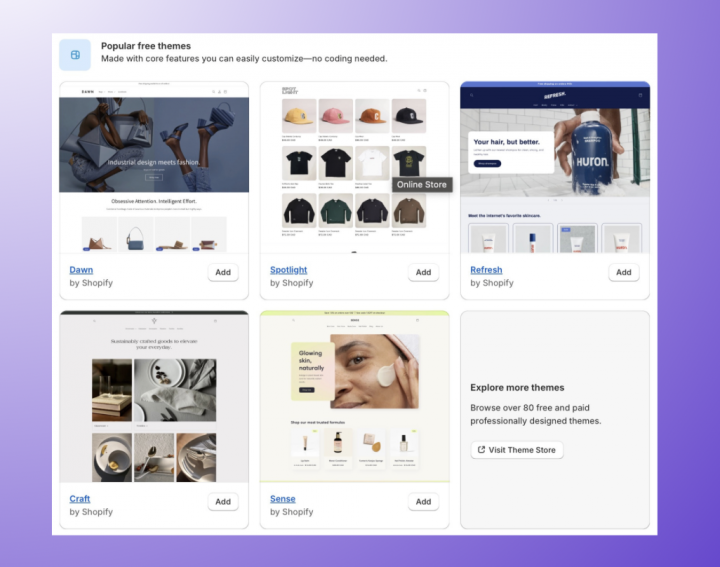
The visual appeal and user experience (UX) of your website are critical. Shopify provides a vast “Theme Store” filled with pre-designed templates that dictate the look and feel of your store. These themes are built using modern web technologies, ensuring responsiveness across various devices (desktops, tablets, smartphones).
- Theme Selection: You can choose from a range of free themes provided by Shopify or invest in a premium paid theme. Paid themes often come with more advanced features, greater customization options, and dedicated support. When selecting a theme, consider its design, features, and how well it aligns with your brand and product type.
- Customizing Themes: Once a theme is chosen, you’ll use the “Theme Editor” (under Online Store > Themes > Customize) to personalize it. This is a powerful, visual drag-and-drop interface where you can:
- Add, remove, and reorder “sections” (e.g., image banners, product grids, text blocks).
- Adjust color schemes, fonts, and typography.
- Upload your logo and favicon.
- Configure navigation menus.
- Preview changes in real-time and ensure mobile responsiveness.
The theme editor abstracts away the underlying HTML, CSS, and JavaScript, allowing non-developers to achieve a professional design.
Step 3: Populating Your Store with Products
The core of any e-commerce website is its product catalog. Adding products involves more than just uploading images; it requires careful data entry and organization for optimal customer experience and search engine discoverability.
- Adding Products: Navigate to
Products > Add product. Here, you’ll input crucial product data:- Title and Description: Craft compelling and descriptive titles and rich descriptions using the built-in text editor. Utilize headings, bullet points, and formatting to improve readability.
- Media: Upload high-quality product images and videos. Shopify automatically optimizes images for web display, but it’s good practice to upload appropriately sized files to begin with.
- Pricing: Set your product price, compare-at price (for sale items), and cost per item (for internal profit tracking).
- Inventory: Manage stock levels, SKUs (Stock Keeping Units), and barcodes. Shopify’s inventory system helps prevent overselling.
- Variants: If a product comes in different sizes, colors, or materials, you can create variants, each with its own SKU, price, and inventory.
- Organizing Products: Use “Collections” (e.g., “Men’s T-shirts,” “Summer Sale”) and “Tags” to categorize products, making them easier for customers to find. Collections can be created manually or automatically based on rules (e.g., all products with “shoes” in the title).
- Search Engine Listing Preview: Shopify includes fields for SEO optimization on each product page. You can customize the meta title and description that appear in search engine results, helping to improve organic visibility.
Step 4: Configuring Essential Settings
Before launching, several critical backend configurations must be addressed to ensure smooth operations. These are primarily found under Settings in your admin dashboard.

- Payments: This is perhaps the most crucial technical configuration for an e-commerce store. Shopify integrates with numerous payment gateways.
Shopify Paymentsis the platform’s native solution, offering seamless integration and competitive rates. You can also integrate with third-party providers like PayPal, Stripe, and various local payment options. Setting up payment gateways involves connecting your bank account for payouts and configuring currency settings. - Shipping and Delivery: Define your shipping strategy by setting up shipping zones (geographic areas you ship to) and associated shipping rates. You can offer flat rates, free shipping, weight-based rates, or calculated rates from carriers like UPS or FedEx. This also includes setting up local delivery or pickup options if applicable.
- Taxes: Shopify has robust tax settings that can automatically calculate sales taxes based on your store’s location, customer’s location, and product taxability. You’ll need to configure your tax regions and ensure your products are correctly assigned tax categories.
- Legal Pages: Shopify provides templates for essential legal pages: Refund Policy, Privacy Policy, Terms of Service, and Shipping Policy. While templates are a good starting point, it’s advisable to customize them to reflect your specific business practices and comply with relevant regulations (e.g., GDPR, CCPA).
- Domains: To establish a professional online presence, you’ll want to connect a custom domain name (e.g.,
www.yourstore.com). You can either purchase a new domain directly through Shopify or connect an existing one you own from a third-party registrar. Shopify handles the necessary DNS (Domain Name System) configurations to link your domain to your store.
Optimizing Your Shopify Website for Performance and Engagement
Building the website is one step; ensuring it performs optimally and engages users effectively is another. Shopify offers features and best practices to technically enhance your store.
Enhancing User Experience (UX) and Site Speed
A fast, responsive, and intuitive website is paramount for retaining customers and achieving conversions.
- Image Optimization: Large image files are a common culprit for slow loading times. While Shopify optimizes images upon upload, further optimization before uploading (e.g., compressing images using tools like TinyPNG, ensuring correct dimensions) can significantly improve site speed.
- App Prudence: The Shopify App Store is powerful, but installing too many apps, especially poorly coded ones, can bloat your site’s code and slow it down. Regularly audit your installed apps and remove any that are not essential or that negatively impact performance.
- Clean Theme Design: Stick to themes with clean code and efficient design. Overly complex animations or scripts can also contribute to slower loading. Prioritize functionality and clarity in design.
- Mobile Responsiveness: All modern Shopify themes are designed to be mobile-responsive, meaning they adapt to different screen sizes. Always test your store on various devices to ensure a seamless experience for all users. A smooth mobile experience is critical, given the high percentage of e-commerce traffic originating from mobile devices.
Integrating Essential Apps and Tools
The Shopify App Store is a technological marvel that extends your store’s capabilities beyond its core features. Carefully chosen apps can automate tasks, enhance marketing efforts, and improve customer service.
- Marketing Apps: Integrate tools for email marketing, social media marketing, SEO, and advertising campaign management.
- Customer Service Apps: Implement live chat, helpdesk systems, and review platforms to enhance customer interaction and build trust.
- Analytics Apps: While Shopify has built-in analytics, integrating with tools like Google Analytics offers deeper insights into user behavior, traffic sources, and conversion funnels, enabling data-driven optimization.
- Dropshipping Apps: For businesses leveraging dropshipping, apps like Oberlo (now Dsers) integrate directly with suppliers, automating product imports and order fulfillment.
Choose apps that provide real value and integrate seamlessly with Shopify’s ecosystem. Prioritize functionality that addresses specific business needs or pain points.
Leveraging Shopify’s Built-in SEO Features
Search Engine Optimization (SEO) is crucial for driving organic traffic to your website. Shopify incorporates several technical SEO features to help your store rank higher in search results.
- Meta Titles and Descriptions: As mentioned earlier, customize these for products, collections, pages, and blog posts to accurately reflect content and include relevant keywords.
- URL Structures: Shopify generates clean, readable URLs (e.g.,
yourstore.com/products/product-name), which are generally good for SEO. You can also customize URL handles for specific pages. - Image Alt Text: Provide descriptive alt text for all images. This improves accessibility for visually impaired users and helps search engines understand the image content, contributing to image search rankings.
- Blogging Platform: Shopify includes a blogging platform that allows you to create content relevant to your products and niche. This is a powerful tool for attracting organic traffic through content marketing, answering customer questions, and establishing authority.
Going Live and Beyond: Launching and Managing Your Website
The culmination of your efforts is the launch of your Shopify website, but the journey doesn’t end there. Ongoing management and iteration are key to sustained success.
Pre-Launch Checklist
Before officially opening your store to the public, conduct a thorough technical audit:
- Test Checkout Process: Place test orders using various payment methods to ensure everything works smoothly. Verify order confirmations, inventory updates, and tax calculations.
- Review All Content: Proofread product descriptions, page content, and legal documents for errors. Ensure all links are functional.
- Mobile View Check: Double-check your entire store’s appearance and functionality on different mobile devices.
- Settings Review: Confirm all shipping, tax, payment, and notification settings are correctly configured.
- Connect Google Analytics and Search Console: Set up these crucial tools to monitor website performance and search engine visibility from day one.
Launching Your Store
Once you’re confident everything is in order, the technical act of launching is simple: navigate to Online Store > Preferences and remove the password protection that Shopify automatically places on new stores. With the password removed, your website becomes publicly accessible. Announce your launch through your chosen marketing channels.

Post-Launch Management and Iteration
A website is a dynamic entity that requires continuous attention.
- Monitoring Analytics: Regularly review Shopify’s built-in analytics and Google Analytics data. Look at traffic sources, conversion rates, popular products, and customer behavior patterns. This data is invaluable for identifying areas for improvement.
- Regular Updates: Keep your product catalog fresh, update pricing as needed, and add new collections. Regularly publish blog posts to maintain engagement and SEO benefits.
- Customer Support: Be responsive to customer inquiries and feedback. Use your website’s contact forms, chat features, and email to provide excellent service.
- Continuous Optimization: Based on analytics and customer feedback, continuously iterate on your store’s design, product offerings, and marketing strategies. A/B test different elements (e.g., product page layouts, call-to-action buttons) to improve conversion rates.
In conclusion, creating a website on Shopify is a streamlined, technologically empowered process that transforms the complex task of e-commerce development into an accessible journey for entrepreneurs. By leveraging its intuitive interface, robust feature set, and scalable architecture, you can build a professional, secure, and high-performing online store. Remember, while the initial setup is crucial, the true success of your website will come from ongoing technical optimization, keen attention to user experience, and a commitment to adapting to the ever-evolving digital landscape. Shopify provides the canvas; your vision and dedication will paint the masterpiece.
aViewFromTheCave is a participant in the Amazon Services LLC Associates Program, an affiliate advertising program designed to provide a means for sites to earn advertising fees by advertising and linking to Amazon.com. Amazon, the Amazon logo, AmazonSupply, and the AmazonSupply logo are trademarks of Amazon.com, Inc. or its affiliates. As an Amazon Associate we earn affiliate commissions from qualifying purchases.