
Creating an Amazon account is the essential first step to unlocking a vast digital ecosystem that extends far beyond simple online shopping. As a global technology giant, Amazon offers an array of services, from e-commerce and digital content streaming to cloud computing and smart home integration. Understanding the process of setting up an account, along with the underlying technological considerations and security best practices, is crucial for anyone looking to fully leverage this powerful platform. This guide demystifies the account creation process, ensuring users can navigate it securely and efficiently.
The Gateway to Amazon’s Digital Ecosystem
Amazon’s expansive digital presence makes an account a central hub for various online activities. At its core, an Amazon account serves as a personalized identifier, enabling users to manage purchases, track orders, access digital content, and configure personal preferences across all of Amazon’s integrated services. This single sign-on approach streamlines user experience, but it also underscores the importance of robust digital security from the outset.

Beyond its famed online marketplace, an Amazon account is the key to:
- Prime Membership: Accessing benefits like expedited shipping, Prime Video, Amazon Music, Kindle Unlimited, and exclusive deals.
- Digital Content: Purchasing and managing e-books, audiobooks, movies, TV shows, and digital music.
- Smart Home Integration: Connecting and controlling Alexa-enabled devices, Ring doorbells, and other smart home gadgets.
- Cloud Services: While often associated with professional use, even basic users leverage Amazon’s cloud for digital content storage and device backups.
- Personalized Experience: Amazon’s sophisticated algorithms learn user preferences, offering tailored recommendations, promotions, and a more intuitive browsing experience.
Establishing an account is not just about making a purchase; it’s about integrating into a multifaceted technological environment designed to simplify and enhance various aspects of digital life.
Step-by-Step Account Creation Guide
The process of creating an Amazon account is designed to be straightforward, whether accessed via a web browser or the dedicated mobile application. However, paying attention to detail, particularly regarding security, is paramount.
Initiating the Process: Navigating to Amazon’s Website or App
The first step involves accessing the Amazon platform.
- Web Browser: Open your preferred web browser (Chrome, Firefox, Safari, Edge) and navigate to the Amazon website. Depending on your region, this will typically be
amazon.com,amazon.co.uk,amazon.de,amazon.ca, etc. Look for a link or button usually labeled “Hello, Sign in” or “Accounts & Lists” in the top right corner. - Mobile App: Download the official Amazon Shopping app from your device’s app store (Google Play Store for Android or Apple App Store for iOS). Once installed, open the app.
Both methods will present you with options to “Sign in” or “Create an account.” Select the “Create an account” option to begin the registration process.
Inputting Essential Information: Your Digital Identity
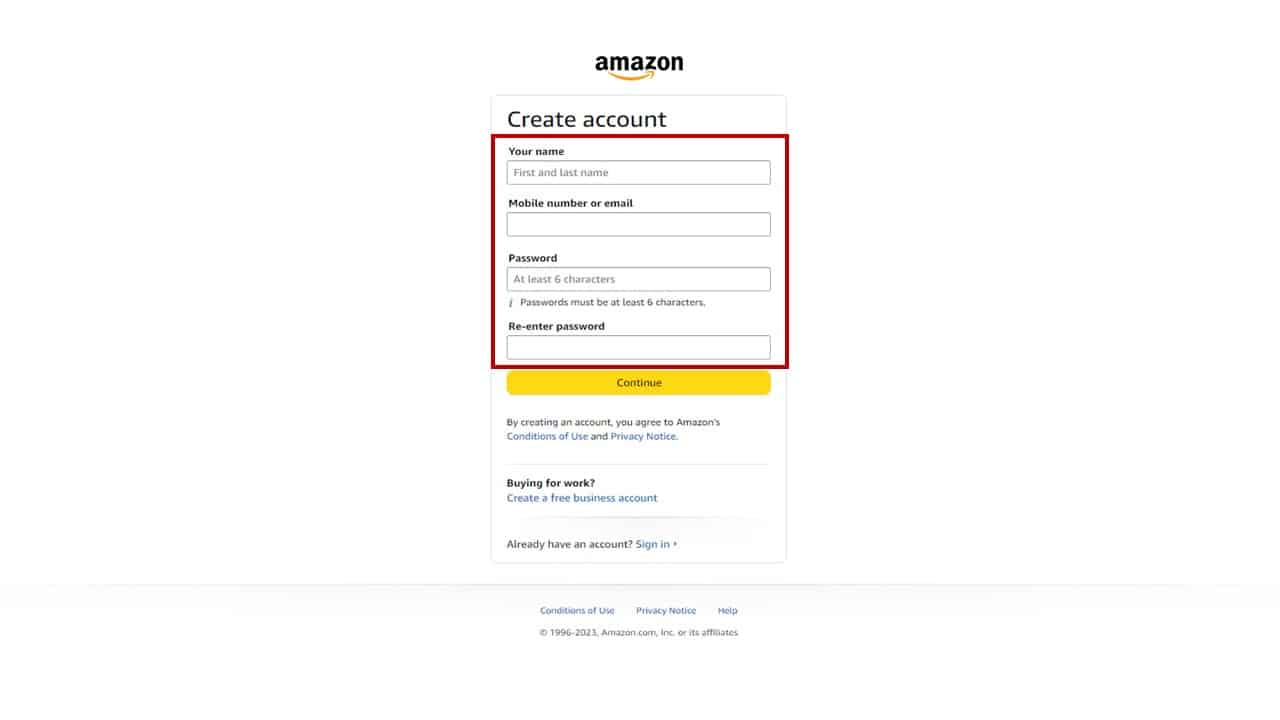
Amazon requires a few key pieces of information to establish your unique digital identity within its system. This data is used for account security, communication, and personalization.
- Your Name: Enter your full name as it appears on official documents. This helps Amazon personalize your experience and is used for shipping and billing purposes.
- Mobile Number or Email: You will be prompted to enter either a valid mobile phone number or an email address. This will be your primary login credential and the main method Amazon uses to communicate with you regarding orders, security alerts, and account recovery. It is highly recommended to use an email address or mobile number that you regularly access and that is unique to you.
- Password: This is arguably the most critical piece of information.
- Strength: Choose a strong, unique password. A robust password typically includes a mix of uppercase and lowercase letters, numbers, and symbols. Avoid easily guessable information like birthdays, pet names, or common words.
- Uniqueness: Do not reuse passwords from other online accounts. If another service you use is compromised, a reused password could lead to unauthorized access to your Amazon account.
- Management: Consider using a reputable password manager (e.g., LastPass, 1Password, Bitwarden) to generate and securely store complex, unique passwords for all your online accounts. This significantly enhances your digital security posture.
After entering these details, click “Continue” or “Verify mobile number/email.”
Verifying Your Account: The Security Check
To ensure the provided contact information belongs to you and to prevent automated bot registrations, Amazon employs a verification step.
- One-Time Password (OTP): Amazon will send a One-Time Password (OTP) or a verification code to the mobile number or email address you provided.
- Inputting the OTP: Retrieve this code and enter it into the designated field on the Amazon registration page. This step confirms ownership of the contact method and adds a layer of security to the account creation process.
- Account Creation Confirmation: Once the OTP is successfully entered and verified, your Amazon account will be created. You will typically be redirected to your personalized Amazon homepage.
Adding Payment and Shipping Details (Optional, but Recommended for First Purchase)
While your account is technically created after verification, to make a purchase, you will need to add payment and shipping information. This can be done immediately or later, during your first checkout.
- Payment Method: Navigate to “Accounts & Lists” > “Your Payments” (on desktop) or “Account” > “Your Payments” (in the app). Here you can add credit/debit card details, bank account information, or link gift cards. Amazon uses advanced encryption protocols to protect your financial data, but it’s always wise to ensure you are on a secure connection when inputting sensitive information.
- Shipping Address: Go to “Accounts & Lists” > “Your Addresses” (on desktop) or “Account” > “Your Addresses” (in the app). Add your primary shipping address, including your full name, street address, city, state/province, ZIP/postal code, and phone number. Accurate information here is critical for timely and correct delivery.
Leveraging Your New Amazon Account: Beyond Basic Shopping
With your account established, the real power of Amazon’s technological infrastructure becomes accessible. Beyond the transactional aspects, Amazon offers a suite of features designed to enhance user experience, manage digital assets, and reinforce security.
Personalizing Your Shopping Experience
Amazon’s strength lies in its ability to tailor the experience to individual users.
- Wish Lists & Registries: Create multiple wish lists for different occasions or gift ideas. This feature also allows others to view and purchase items from your list.
- Order History & Tracking: Easily review past purchases, track current orders in real-time, initiate returns, and access invoices. This centralized log is invaluable for managing your spending and warranties.
- Recommendations: The more you browse and purchase, the more refined Amazon’s recommendation engine becomes, suggesting products, books, and media aligned with your interests. This AI-driven personalization is a hallmark of Amazon’s tech.
Exploring Amazon’s Digital Services
Your Amazon account is the single key to unlocking a wide array of digital content and services.
- Prime Video: Stream thousands of movies and TV shows, including Amazon Originals. Your account manages watchlists, viewing history, and parental controls.
- Amazon Music: Access millions of songs, playlists, and stations. Account settings allow for managing devices, downloading music for offline listening, and curating personal libraries.
- Kindle Library: All your purchased e-books are stored in your cloud-based Kindle Library, accessible from any Kindle device or the Kindle app on smartphones, tablets, and computers. Your account syncs reading progress across devices.
- Alexa & Smart Home: Connect your Amazon account to Alexa-enabled devices (Echo speakers, Fire TV sticks) to control smart home devices, play music, set reminders, and make purchases using voice commands. Your account holds all device configurations and routines.
Managing Digital Security and Privacy Settings
Given the breadth of information stored, robust security management is paramount for any Amazon account holder.
- Two-Factor Authentication (2FA): This is a critical security layer. Enable 2FA from your “Login & Security” settings. This requires you to enter a code from your phone (via SMS or an authenticator app) in addition to your password when logging in from a new device. This significantly reduces the risk of unauthorized access even if your password is compromised.
- Review Account Activity: Regularly check your order history and login activity for anything suspicious. Amazon also allows you to see which devices are currently logged into your account.
- Privacy Settings: Review and adjust your advertising preferences, data sharing options, and communication preferences in your “Account & Lists” section. Understanding what data Amazon collects and how it’s used empowers you to make informed privacy choices.
- Device Management: Under “Content & Devices,” you can manage and deregister devices connected to your Amazon account, such as Kindles, Fire tablets, and Alexa devices. This is particularly useful if a device is lost or sold.
Troubleshooting Common Account Creation Issues
While Amazon’s account creation process is generally smooth, users may occasionally encounter minor technical hitches.
Email/Mobile Verification Delays or Non-Receipt
If you don’t receive the OTP:
- Check Spam/Junk Folder: The verification email might have been filtered into your spam or junk folder.
- Verify Input: Double-check that you entered the correct email address or mobile number during registration. A typo is a common cause.
- Resend Code: Look for an option to “Resend code” on the Amazon registration page.
- Network Issues: For SMS codes, ensure your mobile device has good network reception.
Password Strength and Security Advice
If your chosen password is rejected for being too weak, remember the best practices:
- Combine Characters: Use a mix of uppercase and lowercase letters, numbers, and symbols.
- Length Matters: Aim for at least 12-16 characters. Longer passwords are inherently more secure.
- Avoid Personal Info: Do not use your name, birthdate, or simple dictionary words.
- Use a Passphrase: Consider a “passphrase” – a sequence of unrelated words – which can be long and memorable (e.g., “blue-elephant-cloud-table-ocean”).

Geographic Restrictions or Account Types
Amazon operates country-specific marketplaces. If you’re trying to access a store from a different region, you might need to create a separate account for that specific Amazon domain (e.g., an account for amazon.co.uk is separate from amazon.com). Some advanced services, like specific AWS features, might also have regional restrictions or require specialized account types, but these are typically beyond the scope of a standard consumer account.
Creating an Amazon account is more than a simple registration; it’s an onboarding into a sophisticated technological ecosystem. By understanding each step, prioritizing strong security practices, and exploring the full suite of features available, users can maximize their Amazon experience while maintaining control over their digital footprint.
aViewFromTheCave is a participant in the Amazon Services LLC Associates Program, an affiliate advertising program designed to provide a means for sites to earn advertising fees by advertising and linking to Amazon.com. Amazon, the Amazon logo, AmazonSupply, and the AmazonSupply logo are trademarks of Amazon.com, Inc. or its affiliates. As an Amazon Associate we earn affiliate commissions from qualifying purchases.