
Amazon Prime has evolved far beyond its initial promise of fast, free shipping. Today, it stands as a comprehensive digital ecosystem, offering a myriad of benefits ranging from streaming entertainment to exclusive shopping deals. Yet, for many users, the full extent of their Prime membership remains untapped, particularly when it comes to leveraging its power for subscribing to other digital services and content—a process colloquially known as “subbing with Prime.” This guide delves into the mechanisms, benefits, and strategic insights of using your Amazon Prime subscription to unlock a world of complementary digital experiences, placing a strong emphasis on its most prominent application: Prime Gaming, specifically for Twitch channel subscriptions. This is not merely about consumption; it’s about intelligent utilization of an existing tech investment to enhance your digital lifestyle.

Understanding “Subbing with Prime”: More Than Just Free Shipping
At its core, “subbing with Prime” refers to the ability to use your active Amazon Prime membership to gain access to, or pay for, specific subscriptions or features on other platforms. This concept is a cornerstone of Amazon’s broader strategy to integrate its services deeply into the daily digital habits of its users, creating a sticky and valuable ecosystem. While Amazon Prime is famous for its expedited delivery and streaming content, its interconnectedness with other digital services, particularly through Prime Gaming, offers a unique opportunity for subscribers to extend their benefits into new territories.
The Core Value Proposition of Amazon Prime
Originally conceived as a premium shipping service, Amazon Prime rapidly expanded its offerings to include Prime Video, Prime Music, Prime Reading, and exclusive deals. Each addition bolstered the membership’s value, transforming it into a multi-faceted lifestyle subscription. From an economic perspective, Prime bundles numerous services that, if purchased individually, would far exceed the annual membership fee. From a technological standpoint, it provides a unified platform for commerce, entertainment, and digital content. Understanding this foundational value is crucial before exploring how it can be leveraged for external subscriptions. It’s about recognizing Prime as a hub, not just a destination.
Beyond Shopping: Digital Subscriptions and Content
The true innovation lies in Prime’s ability to act as a gateway to other digital services. While Prime Video and Music are self-contained within the Amazon ecosystem, Prime Gaming (formerly Twitch Prime) exemplifies the outward-facing utility of the membership. This service allows Amazon Prime members to seamlessly integrate their subscription with Twitch, the leading live-streaming platform for gamers and creators. This integration isn’t just a perk; it’s a strategic move that benefits both platforms and, most importantly, the user by providing tangible value outside of Amazon’s direct purview. It represents a powerful model for cross-platform utility within the broader tech landscape.
Introduction to Prime Gaming (Twitch Prime)
Prime Gaming is the primary vehicle for “subbing with Prime.” It’s a premium experience included with Amazon Prime that offers a multitude of gaming-related benefits. The most popular and impactful of these is the free monthly channel subscription on Twitch. This isn’t a trivial perk; it allows users to support their favorite Twitch streamers financially, gain access to exclusive emotes, ad-free viewing (for that channel), and special chat badges, all without incurring an additional cost beyond their existing Prime membership. Beyond Twitch subscriptions, Prime Gaming also delivers free games, in-game loot for popular titles, and other exclusive content, making it an indispensable part of a modern digital entertainment toolkit. This fusion of Amazon’s logistical and content power with Twitch’s live-streaming dominance is a prime example of strategic tech synergy.
Your Gateway to Free Subscriptions: Linking Accounts
The first and most critical step to leveraging your Prime subscription for external “subs” is establishing the digital bridge between your Amazon Prime account and the target service. For Prime Gaming, this means securely linking your Amazon account with your Twitch account. This process is designed to be straightforward, but understanding each step and the underlying security implications is vital for a smooth and protected experience.
Step-by-Step Guide to Connecting Amazon Prime and Twitch
- Ensure Active Amazon Prime Membership: Before anything else, confirm your Amazon account has an active Prime membership. You can check this on the Amazon website under “Your Prime Membership” or by visiting primevideo.com.
- Navigate to Prime Gaming: Go to the official Prime Gaming website (gaming.amazon.com).
- Sign In with Amazon: Click the “Sign in” or “Connect Twitch Account” button. You will be prompted to sign in with your Amazon account credentials. This confirms your Prime status.
- Authorize Twitch Connection: Once signed in with Amazon, Prime Gaming will ask to connect to your Twitch account. If you’re not already logged into Twitch, you’ll be prompted to do so. After logging in, you’ll be asked to authorize Prime Gaming to access certain information from your Twitch account. Review the permissions carefully and then click “Connect.”
- Confirmation: You should receive a confirmation message that your Amazon and Twitch accounts are now linked. You’ll also see your Prime Gaming benefits, including the option to claim your free Twitch channel subscription.
This seamless integration is a testament to the robust API infrastructures that facilitate secure data exchange between two major tech platforms, ensuring that user authentication and benefit delivery are both efficient and secure.
Verifying Your Prime Gaming Benefits
After linking your accounts, it’s good practice to verify that your Prime Gaming benefits are active. On the Prime Gaming website, you should see your Twitch username displayed, indicating a successful connection. More importantly, when you visit any Twitch channel, you should see an option to “Subscribe for Free” or “Use Prime Sub” under the subscription button. This visual cue confirms that your free monthly subscription is ready to be deployed. Additionally, check your Twitch settings under “Connections” to confirm that Amazon is listed as a connected service. This verification step ensures that any future issues can be quickly diagnosed and resolved.
Security Best Practices for Account Linking
Linking accounts across different platforms, while convenient, introduces potential security considerations. Adhering to best practices is paramount:
- Strong, Unique Passwords: Use robust, unique passwords for both your Amazon and Twitch accounts. A password manager can help maintain these.
- Two-Factor Authentication (2FA): Enable 2FA on both Amazon and Twitch. This adds an extra layer of security, requiring a code from your phone or an authenticator app in addition to your password, significantly reducing the risk of unauthorized access.
- Beware of Phishing: Be vigilant against phishing attempts. Always verify that you are on the official Amazon, Prime Gaming, or Twitch websites before entering your login credentials. Look for the padlock icon and “https://” in the URL.
- Regular Review: Periodically review your linked accounts in your Amazon and Twitch settings. If you stop using a service, consider unlinking it to minimize exposure.
- Understand Permissions: Before authorizing any account linking, take a moment to understand the permissions you are granting. While Prime Gaming requires necessary permissions to deliver benefits, being aware of what data is being shared is crucial for digital privacy.
By following these security guidelines, users can enjoy the full benefits of “subbing with Prime” without compromising their digital security.
The Art of “Subbing” on Twitch with Prime Gaming
With your accounts linked, you are now ready to engage in the core activity of “subbing with Prime”: deploying your free monthly Twitch channel subscription. This process is straightforward, but understanding how to select a channel, execute the subscription, and manage its renewal is key to maximizing its value.
Selecting Your Preferred Twitch Channel
The choice of who to “sub” to is entirely yours. Twitch hosts millions of streamers, from gaming professionals and creative artists to talk show hosts and musicians. When considering your monthly Prime sub, think about:
- Content Enjoyment: Which streamer’s content do you consistently enjoy the most?
- Community Connection: Which community do you feel most engaged with?
- Support for Smaller Creators: Many choose to use their Prime sub to support smaller, emerging streamers, as these subscriptions can significantly impact their ability to grow and continue creating.
- Exclusive Emotes: Subscribing often unlocks unique emotes specific to that channel, which can enhance your chat experience.
Once you’ve identified your chosen streamer, navigate to their channel page on Twitch. Remember, you can only use one Prime Gaming subscription per month, so choose wisely!
Executing Your Monthly Free Subscription
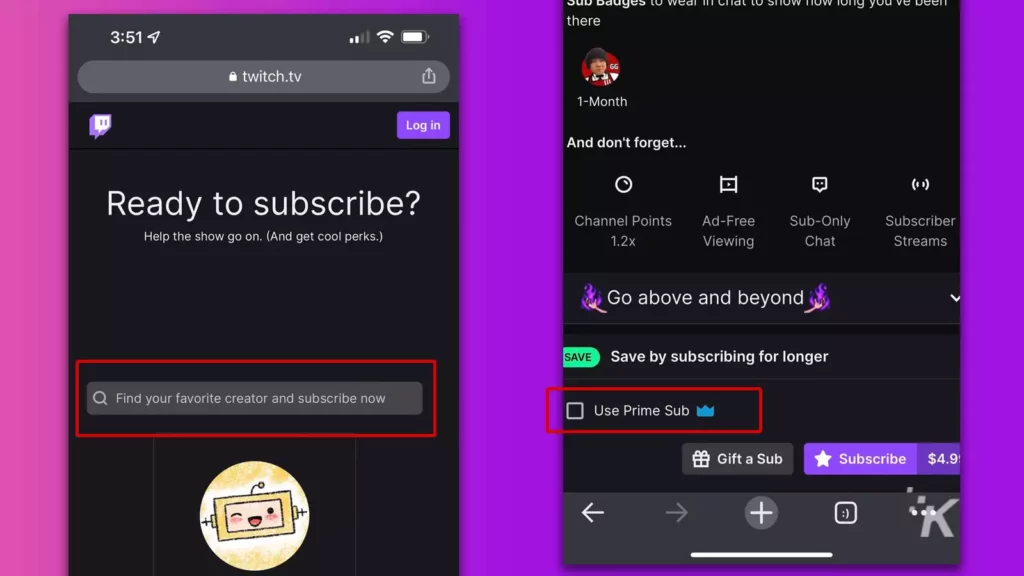
- Locate the Subscribe Button: On the chosen streamer’s channel page, look for the “Subscribe” button. It’s usually located on the top right, below the video player.
- Select “Subscribe Free with Prime”: Click the “Subscribe” button. A pop-up will appear, offering various subscription tiers. At the bottom or within these options, you will see a distinct option labeled “Subscribe Free with Prime” or similar.
- Confirm Subscription: Click this option. A confirmation message will appear, and you will see a notification in the chat indicating that you have successfully subscribed with your Prime Gaming benefit.
That’s it! You’ve now officially “subbed” to a Twitch channel using your Amazon Prime membership. The streamer receives financial support, and you gain access to the subscriber-only perks for that channel. This simple action demonstrates the power of an integrated tech ecosystem designed to benefit both content creators and consumers.
Understanding Subscription Renewal and Management
Your Prime Gaming subscription is for one month. After this period, it does not automatically renew with Prime Gaming. You will need to manually re-subscribe to the same channel, or a different one, the following month. This manual renewal ensures that you maintain control over where your free subscription goes each month.
To manage your current Prime Gaming subscription and see when it expires, you can:
- Visit the Twitch Website: Go to your Twitch “Subscriptions” page (found under your profile icon). Here you can see all your active subscriptions, including those from Prime Gaming, and their expiration dates.
- Check Prime Gaming: The Prime Gaming website also provides details on your active and past subscriptions.
If you wish to continue supporting the same streamer, simply return to their channel after your current Prime subscription expires and repeat the “Subscribe Free with Prime” process. This flexibility allows users to dynamically allocate their support, adapting to their evolving viewing preferences and the changing landscape of Twitch content.
Maximizing Your Prime Gaming Benefits Beyond Twitch Subscriptions
While the free Twitch channel subscription is a flagship feature, Prime Gaming offers a treasure trove of additional benefits that tech-savvy users should actively explore. These benefits extend the value proposition of your Amazon Prime membership into various facets of the gaming and digital entertainment world.
Free Games and In-Game Content
Prime Gaming regularly curates a selection of free PC games that members can claim and keep forever. These aren’t always AAA blockbusters, but they often include critically acclaimed indie titles, cult classics, or hidden gems that offer hours of entertainment. Beyond full games, Prime Gaming also provides exclusive in-game content, loot boxes, character skins, and currency for popular online games like Apex Legends, Valorant, Roblox, and many others. Regularly checking the Prime Gaming website for new offers ensures you don’t miss out on these valuable digital assets, which can significantly enhance your gaming experience without additional purchases. This directly leverages your tech subscription to expand your digital library and enhance your gameplay.
Exclusive Emotes and Chat Badges
For active participants in the Twitch community, the exclusive emotes and chat badges are highly coveted perks. When you use your Prime Gaming subscription on a channel, you often unlock a set of channel-specific emotes that can be used across Twitch. Additionally, Prime Gaming itself provides a set of exclusive emotes and a special chat badge (a crown icon) that identifies you as a Prime Gaming subscriber in any Twitch chat. These visual identifiers foster a sense of community and allow for more expressive communication, enriching the overall social tech experience of live streaming.
Prime Video and Prime Music Integration
While not directly “subbing with Prime” in the same vein as Twitch, it’s crucial to remember that your Amazon Prime membership seamlessly integrates with Prime Video and Prime Music. This means you have access to a vast library of movies, TV shows, and millions of ad-free songs and podcasts, all included. For anyone looking to consolidate their digital subscriptions, Prime offers a compelling bundle. Leveraging these services fully alongside Prime Gaming means maximizing your return on investment from a single tech subscription. The tech infrastructure enables smooth transitions between shopping, streaming, and gaming, all under one umbrella.
Troubleshooting and Optimizing Your Prime Sub Experience
Even with the clearest instructions, digital services can sometimes encounter hiccups. Knowing how to troubleshoot common issues and optimize your overall Prime sub experience ensures you get the most value from your membership. Effective problem-solving and proactive management are key tech user skills.
Common Issues and Quick Solutions
- “Subscribe Free with Prime” Option Missing:
- Check Prime Membership: Ensure your Amazon Prime membership is active and up-to-date.
- Verify Account Linking: Double-check that your Amazon and Twitch accounts are still securely linked on the Prime Gaming website. Sometimes a re-link might be necessary.
- Browser/Cache Issues: Clear your browser’s cache and cookies, or try an incognito window/different browser.
- Ad Blockers: Temporarily disable ad blockers, as they can sometimes interfere with site functionality.
- Subscription Not Showing Benefits:
- Refresh Page: Often, simply refreshing the Twitch page can resolve this.
- Log Out/In: Log out of Twitch and then log back in.
- Check Twitch Settings: Verify under your Twitch “Subscriptions” that the Prime sub is listed as active.
- Prime Gaming Content Not Claiming:
- Region Restrictions: Some content might have regional limitations.
- Game Account Linking: For in-game loot, ensure your gaming account (e.g., Epic Games, Riot Games) is correctly linked to your Prime Gaming account.
- Claim Period: Check if the claim period for the content has expired.
For persistent issues, Amazon Customer Service (for Prime membership issues) or Twitch Support (for Twitch-specific problems) are your go-to resources. Their robust support systems are designed to handle a wide array of technical challenges.
Managing Your Subscriptions and Linked Accounts
Proactive management is crucial for a smooth experience. Regularly:
- Review Your Prime Gaming Page: Visit gaming.amazon.com monthly to check for new free games, in-game loot, and to monitor your current Twitch Prime subscription status.
- Check Twitch Subscriptions: Access your Twitch subscriptions page to see when your Prime sub expires and to plan your next one.
- Audit Linked Accounts: In both your Amazon and Twitch settings, periodically review which third-party services are linked. Unlink any connections you no longer use to enhance security and streamline your digital footprint.
This continuous oversight ensures that you are always in control of your benefits and privacy within the complex tech ecosystem.

Getting the Most Out of Your Overall Prime Membership
To truly optimize your Prime experience, think holistically:
- Explore All Benefits: Don’t just focus on “subbing.” Dive into Prime Video, Prime Music, Prime Reading, exclusive deals, and grocery delivery options. The more benefits you use, the higher the perceived and actual value of your membership.
- Set Reminders: For your monthly Twitch Prime sub, set a calendar reminder so you don’t forget to use it and support your favorite creator.
- Educate Yourself: Stay informed about new Prime benefits or changes to existing ones. Amazon frequently updates its offerings, and being aware of these can unlock even more value.
- Family Sharing: Remember that certain Prime benefits, including Prime Video and expedited shipping, can often be shared with other members of your household through Amazon Household, further extending its tech utility.
“Subbing with Prime” is a powerful demonstration of how a single tech subscription can ripple out to enhance multiple aspects of your digital life. By understanding the mechanics, adhering to security best practices, and actively managing your benefits, you can transform your Amazon Prime membership from a simple convenience into a comprehensive hub for gaming, entertainment, and digital engagement. It’s about empowering yourself to take full advantage of the interconnected digital world Amazon has meticulously built.
aViewFromTheCave is a participant in the Amazon Services LLC Associates Program, an affiliate advertising program designed to provide a means for sites to earn advertising fees by advertising and linking to Amazon.com. Amazon, the Amazon logo, AmazonSupply, and the AmazonSupply logo are trademarks of Amazon.com, Inc. or its affiliates. As an Amazon Associate we earn affiliate commissions from qualifying purchases.