
In the modern financial landscape, efficiency and precision are paramount. Managing a multitude of bills – from utilities and credit cards to loan repayments and subscriptions – can quickly become a significant source of stress and potential financial missteps. Late payments not only incur fees but can also negatively impact your credit score, making future financial endeavors more challenging. This is where the power of automation steps in, offering a robust solution to streamline your financial obligations.
For customers of Bank of America, leveraging their sophisticated online banking and mobile app platforms to set up automatic payments is a strategic move towards financial mastery. This article will serve as your comprehensive guide, delving into the ‘how-to’ of automating your payments specifically within the Bank of America ecosystem, while also exploring the profound financial benefits, best practices, and crucial considerations for maintaining a seamless, worry-free financial life. By embracing automatic payments, you’re not just saving time; you’re building a foundation for financial stability and peace of mind.
The Financial Imperative of Automating Your Bills
The decision to automate your bill payments is more than just a convenience; it’s a fundamental pillar of sound personal finance. In an era where subscription services and recurring charges proliferate, managing each due date manually can feel like a full-time job. Automating these payments transforms a potential financial minefield into a well-ooiled, predictable system.
The Core Benefits: Punctuality, Peace of Mind, and Credit Health
At the heart of automatic payments lies the undeniable benefit of punctuality. By ensuring bills are paid on time, every time, you eliminate the risk of incurring late fees. These fees, seemingly small in isolation, can accumulate rapidly, eroding your budget and diverting funds from savings or investments. Moreover, consistent on-time payments are a critical factor in building and maintaining a strong credit score. Payment history accounts for a significant portion of your FICO score, and a robust credit profile opens doors to better interest rates on loans, mortgages, and credit cards in the future.
Beyond the tangible financial benefits, automatic payments offer invaluable peace of mind. The mental burden of remembering numerous due dates, logging into various portals, and manually initiating transactions is completely lifted. This frees up mental bandwidth, allowing you to focus on more productive tasks or simply enjoy life without the constant nagging worry of an overdue bill. It transforms financial management from a reactive chore into a proactive, background process.
Avoiding Late Fees and Impacting Your Budget
Late fees are a silent budget killer. A $25 late fee here, a $39 fee there – these amounts quickly add up throughout the year, representing hundreds of dollars that could have been saved, invested, or used for discretionary spending. Automatic payments act as a powerful preventative measure, ensuring that these avoidable expenses never materialize. By eliminating late fees, you preserve more of your hard-earned income, allowing your budget to function as intended without unexpected drains. This predictability also makes budget forecasting much more accurate, as you know exactly when and how much money will be leaving your account for recurring expenses.
Streamlining Your Monthly Financial Flow
Imagine a financial system where your essential bills are taken care of without direct intervention, allowing you to focus your financial reviews on discretionary spending, savings goals, and investment opportunities. Automatic payments create precisely this streamlined flow. Instead of scrambling at the end of the month, you can view your bank statements with the confidence that all critical obligations have been met. This clarity simplifies budgeting, highlights your true disposable income, and empowers you to make more informed financial decisions. It transforms the monthly financial scramble into a calm, systematic review process, providing a clearer picture of your overall financial health.
Navigating Bank of America’s Platforms to Set Up Payments
Bank of America offers robust digital platforms designed to empower customers with comprehensive control over their finances, including the crucial function of setting up and managing automatic payments. Whether you prefer the detailed interface of online banking or the convenience of a mobile app, Bank of America provides intuitive tools to automate your financial life.
Online Banking: Your Digital Financial Hub
Bank of America’s online banking portal is the most comprehensive platform for managing your accounts, including setting up and overseeing automatic payments. It provides a detailed view of your transactions, scheduled payments, and account balances, making it the central hub for your financial organization.
Adding Payees
Before you can schedule an automatic payment, you typically need to add the recipient, or “payee,” to your list. This is a one-time setup that involves providing the necessary information for the biller to receive funds.
- Log in to Online Banking: Visit the Bank of America website (bankofamerica.com) and log in using your User ID and Passcode.
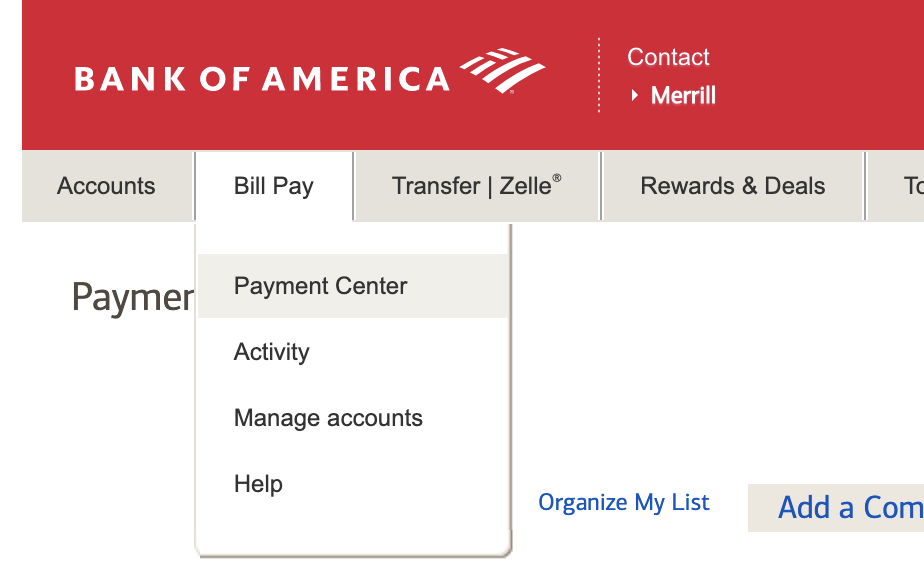
- Navigate to Bill Pay: Once logged in, look for the “Bill Pay” or “Payments” section, usually found in the main navigation menu.
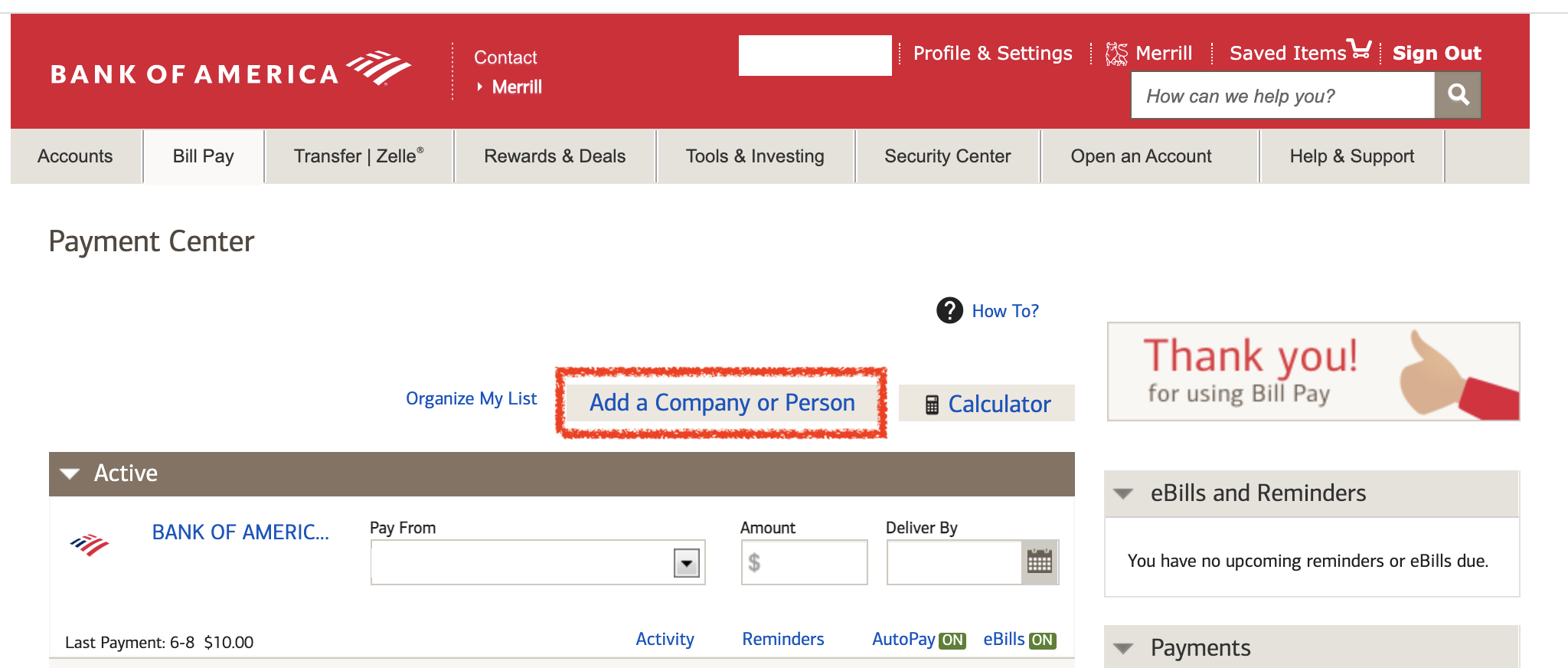
- Add a New Company or Person: Within the Bill Pay section, there will be an option to “Add a company or person” or “Add a new payee.”
- Enter Payee Details: You’ll typically need to enter the payee’s name, address, and account number (your account number with them). For common billers, Bank of America might be able to auto-populate some information simply by searching for the company name.
- Confirm and Save: Review the details carefully and save the payee. This makes them available for scheduling payments.
Scheduling Recurring Payments
Once a payee is added, you can then set up recurring automatic payments.
- Select the Payee: From your list of payees in the Bill Pay section, select the company or person you wish to pay automatically.
- Choose “Set Up Automatic Payment” or “Make Recurring Payment”: The option will be clearly labeled.
- Enter Payment Details:
- Amount: Specify the payment amount. For bills with variable amounts (e.g., utilities), you might be able to set a maximum amount or choose to manually approve each payment, or the system might allow the biller to directly pull the exact amount (often called “autopay” set up directly with the biller). For fixed bills (e.g., loan payments), enter the exact amount.
- Frequency: Select how often you want the payment to occur (e.g., monthly, bi-weekly, weekly).
- Start Date: Choose the date you want the first payment to be sent. Ensure this is well before the actual due date to allow for processing time.
- End Date (Optional): You can set an end date for the payments (e.g., for a fixed-term loan) or choose “No End Date” for ongoing bills.
- Account to Pay From: Select the Bank of America checking or savings account from which the funds should be withdrawn.
- Review and Confirm: Double-check all the details to ensure accuracy before confirming the setup. You’ll usually receive a confirmation message or email.
The Bank of America Mobile App: Convenience on the Go
For those who prefer managing their finances from their smartphone or tablet, the Bank of America mobile app offers a streamlined experience for setting up and managing automatic payments. The interface is designed for quick access and ease of use, mirroring much of the functionality found in the online banking portal.
- Download and Log In: Ensure you have the official Bank of America mobile app installed and log in using your credentials (which may include biometric login if enabled).
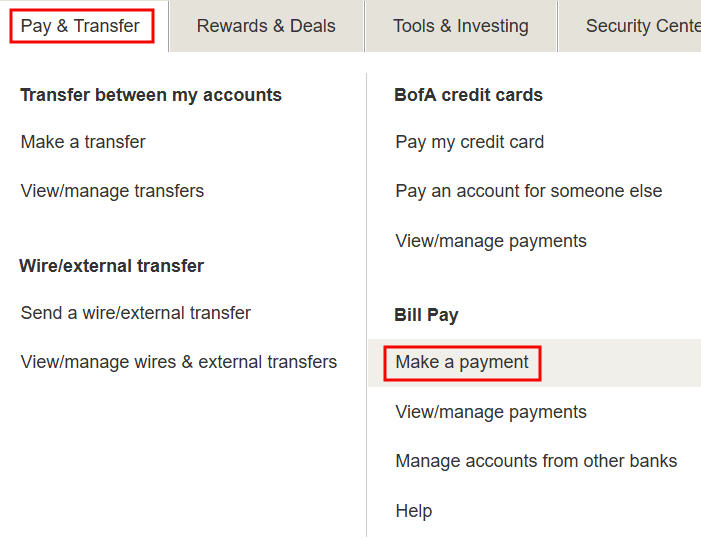
- Navigate to Payments: Look for a “Pay & Transfer” or “Bill Pay” section, typically accessible from the main dashboard or a bottom navigation bar.
- Add Payee/Set Up Automatic Payment: The process is very similar to online banking. You’ll find options to add new payees and then schedule recurring payments directly from the payee’s detail screen. The app usually guides you through entering the amount, frequency, and start date.
- Manage Existing Payments: The app also allows you to view, modify, or cancel scheduled and recurring payments with just a few taps.
Setting Up Payments Directly with Billers (External Automation)
While Bank of America’s Bill Pay service is excellent for managing payments from one central location, it’s also common to set up automatic payments directly with the biller (e.g., your utility company, credit card issuer, or mortgage provider).
- Visit Biller’s Website: Log in to the website of the company you want to pay.
- Find Autopay Option: Look for sections like “Billing & Payments,” “Autopay,” or “Manage Payments.”
- Provide Bank of America Account Details: The biller will typically ask for your Bank of America checking or savings account number and the routing number. You can find these on your checks, bank statements, or within your Bank of America online banking portal.
- Authorize Payment: You will authorize the biller to automatically pull funds from your Bank of America account on your due date.
This method is often preferred for variable bills as it ensures the exact amount due is paid, preventing underpayment or overpayment. However, it means managing multiple autopay setups across different platforms.
A Detailed Walkthrough: Setting Up Automatic Payments Step-by-Step
To ensure a smooth and error-free setup of your automatic payments, a methodical approach is key. This detailed walkthrough will guide you through the preparatory steps and the actual process within Bank of America’s Bill Pay service, reinforcing accuracy and confidence.
Preparing for Automation: Gathering Information
Before you even log into Bank of America, gather all the necessary information for each bill you intend to automate. This preparatory step is crucial for accuracy and will significantly speed up the setup process.
- List All Bills to Automate: Create a comprehensive list of all recurring payments, including credit cards, utilities (electricity, gas, water), internet, phone, insurance premiums, loan payments (car, student, mortgage), subscriptions (streaming services, gym memberships), and any other regular expenses.
- Collect Biller Information: For each item on your list, gather:
- Biller Name: The exact name of the company or individual.
- Your Account Number with the Biller: This is critical for the payee to identify your account.
- Biller’s Mailing Address: Often required for Bank of America’s Bill Pay, even if paid electronically.
- Payment Amount: Whether it’s a fixed amount or typically variable. For variable bills, consider the average amount or the maximum you’d allow.
- Due Date: The precise date each month (or period) when the payment is due.
- Determine Payment Frequency: Decide whether the payment is monthly, quarterly, annually, or another interval.
- Identify Bank of America Account: Decide which Bank of America checking or savings account you want to use for each payment. Ensure this account consistently has sufficient funds to cover the automated transactions.
Step-by-Step for Bank of America Bill Pay
With your information organized, you’re ready to proceed with setting up the payments within Bank of America’s online banking.
- Log In to Bank of America Online Banking: Go to bankofamerica.com and securely log in.
- Access Bill Pay: Click on the “Bill Pay” or “Payments” tab in the main navigation.
- Add a New Payee (if not already added):
- Click “Add a company or person.”
- Search for the company name. If found, select it and proceed. If not, select “Enter address manually” or a similar option.
- Input the payee’s name, address, and your account number with that payee.
- Confirm and save the payee.
- Schedule the Automatic Payment:
- From your list of payees, select the one you want to automate.
- Click on the option to “Set up automatic payments” or “Make a recurring payment.”
- Enter Payment Details:
- Amount: Enter the fixed amount. If variable, you might have options to have the biller send the amount to Bank of America, or you might need to set a “max limit” or opt for manual approval for each bill. For consistency and control, if the amount varies, consider setting a fixed amount and adjusting manually if needed, or using the external automation method mentioned earlier.
- Frequency: Choose “Monthly,” “Bi-weekly,” etc.
- Start Date: Select a date at least 5-7 business days before the actual due date to ensure funds arrive on time. It’s always better to be early.
- End Date: Choose “No end date” for ongoing bills or specify an end date for term-specific payments (e.g., loans).
- Pay From: Select the correct Bank of America checking or savings account.
- Review and Confirm: This is a crucial step. Double-check every single detail: payee name, account number, amount, frequency, start date, and the account funds will be drawn from. An error here could lead to late payments or funds going to the wrong place. Once satisfied, click “Confirm” or “Schedule.”
Verifying and Confirming Your Setup
After setting up an automatic payment, take these steps to ensure it’s correctly established and functioning as expected.
- Check Bank of America’s Scheduled Payments: Immediately after setting up, navigate to the “Scheduled Payments” or “Activity” section within Bill Pay to confirm the payment appears correctly.
- Receive Confirmation: Bank of America typically sends an email confirmation after an automatic payment is set up. Keep these for your records.
- Monitor First Payment: For the first scheduled payment, closely monitor your Bank of America account statement and the biller’s account to ensure the payment is processed successfully and on time. Check that the amount is correct.
- Set Up Alerts: Consider setting up email or text alerts within Bank of America for when payments are sent or when your account balance falls below a certain threshold.
Best Practices for Managing Your Automated Financial Ecosystem
Automating payments is a powerful step, but it’s not a set-it-and-forget-it solution. Effective management of your automated financial ecosystem requires ongoing vigilance and strategic planning to ensure everything runs smoothly and securely.
Regular Review and Reconciliation
Even with automation, regular review of your accounts is non-negotiable. Technology can be incredibly reliable, but circumstances change, and errors, though rare, can occur.
- Monthly Statement Review: At least once a month, preferably shortly after most of your automated payments have cleared, review your Bank of America account statements and your biller statements.
- Verify Amounts: Ensure the amounts withdrawn match the amounts billed. This is especially important for variable bills.
- Check Dates: Confirm payments are being made on time.
- Identify Discrepancies: Look for any unexpected charges, missing payments, or incorrect amounts.
- Annual Automation Audit: Once a year, conduct a comprehensive audit of all your automated payments.
- Are all active payments still necessary? Cancel subscriptions you no longer use.
- Are the payment details still accurate? Has your account number with a biller changed?
- Is the payment frequency still optimal?
Budgetary Planning with Automation in Mind
Automation works best when integrated with a robust budget. Knowing exactly when and how much money is leaving your account helps you anticipate your cash flow and plan your spending.
- Prioritize Funding: Always ensure the Bank of America account linked to your automatic payments has sufficient funds to cover all scheduled deductions. Overdraft fees can quickly negate the benefits of automation.
- Buffer Zone: Maintain a buffer of extra funds in your primary checking account. This acts as a safety net against unexpected larger-than-normal variable bills or other unforeseen expenses that might coincide with an automated payment.
- Income Alignment: Ideally, schedule your largest automated payments to occur shortly after your primary income deposits into your account. This minimizes the risk of low balances.
What to Do When Account Details Change
Life happens, and sometimes account details change. It’s crucial to update your automated payments promptly to avoid disruptions.
- New Bank of America Account: If you open a new Bank of America checking account and want to switch payments to it, you’ll need to manually modify each automatic payment within Bill Pay to draw from the new account.
- Changed Biller Account Number: If a biller assigns you a new account number (e.g., due to a service change), you must update the payee details in Bank of America’s Bill Pay or directly with the biller if you set up external automation.
- New Credit Card/Expiration: For automatic payments linked to a credit card, if the card number changes or a new expiration date is issued, update the payment information immediately with the biller. Bank of America’s Bill Pay usually only deals with direct bank account debits, so this typically applies to payments set up directly with the merchant using your credit card.
Security Considerations for Automated Transactions
While convenient, automation also requires attention to digital security to protect your financial information.
- Strong Passwords & Multi-Factor Authentication (MFA): Always use strong, unique passwords for your Bank of America online banking and mobile app. Enable MFA (e.g., text codes, authenticator apps) for an added layer of security.
- Monitor for Fraud: Regularly review your transactions for any unauthorized activity. Automation makes it easier to spot anomalous payments.
- Secure Wi-Fi: Only access your online banking and app over secure, private Wi-Fi networks. Avoid public Wi-Fi for sensitive financial transactions.
- Beware of Phishing: Be vigilant against phishing attempts. Bank of America will never ask for your password or full account details via unsolicited email or text message.
Beyond the Basics: Advanced Tips and Troubleshooting
While setting up automatic payments is generally straightforward, understanding how to manage more complex scenarios and troubleshoot common issues can further enhance your financial control and prevent potential headaches.
Handling Irregular Bills and Variable Amounts
Not all bills are fixed. Utilities, credit card statements, and some subscription services often have varying amounts, which requires a nuanced approach to automation.
- Biller-Direct Autopay: For truly variable bills like electricity or water, the most effective method is often to set up autopay directly with the biller. This allows the utility company to automatically debit the exact amount due from your Bank of America account on the due date. This ensures full payment without manual intervention. You typically provide your Bank of America routing and account number to the biller.
- Bank of America’s Bill Pay with Notifications: If you use Bank of America’s Bill Pay for a variable bill, you might need to manually adjust the amount each month. Some billers can send electronic bills to Bank of America, allowing you to review the amount before it’s sent, or the system might allow you to set a maximum limit to prevent excessively high payments. In cases where the exact amount is unknown, setting up a recurring payment for a minimum amount (e.g., minimum payment on a credit card) and then manually paying the remainder each month provides a partial automation safety net.
- Envelope Budgeting (Digital): For highly variable bills, consider a digital “envelope” system. Each month, allocate funds to a separate savings account (or just earmark in your budget) for these variable expenses, ensuring funds are available when the bill arrives, regardless of automation.
Stopping or Modifying Automatic Payments
Circumstances change, and you may need to stop or modify an automated payment.
- Within Bank of America’s Bill Pay:
- Log in to online banking or the mobile app.
- Navigate to the “Bill Pay” section and then to “Scheduled Payments” or “Payment Activity.”
- Select the specific payment you wish to modify or cancel.
- You’ll find options to “Edit,” “Change,” or “Cancel” the payment. Be mindful of cutoff times; payments often cannot be canceled if they are too close to the scheduled processing date.
- Directly with the Biller: If you set up autopay directly with a biller (e.g., utility company), you’ll need to log into their website or contact their customer service to stop or modify the arrangement. Bank of America cannot stop a debit that a biller is authorized to pull directly.
- Monitoring After Modification/Cancellation: Always verify that the modification or cancellation has taken effect by checking your Bank of America account statement and the biller’s account in subsequent billing cycles.
Common Issues and How to Resolve Them
Even with careful setup, minor issues can arise. Knowing how to address them can save time and frustration.
- Payment Not Sent/Received:
- Check Scheduled Payments: Verify the payment is still active and hasn’t been accidentally canceled or has an incorrect future start date.
- Processing Time: Remember that Bank of America’s Bill Pay typically requires 3-5 business days for electronic payments and potentially longer for mailed checks. Ensure your start date allows for this buffer.
- Incorrect Payee Information: Double-check the payee’s account number and address. A single digit off can cause delays or misdirection.
- Insufficient Funds:
- Alerts: Set up low-balance alerts with Bank of America.
- Link Overdraft Protection: Consider linking your checking account to a savings account or line of credit for overdraft protection, but be aware of associated fees.
- Adjust Payment Date: If consistently short on funds, consider adjusting the payment date to align better with your income or manually transfer funds prior to the due date.
- Duplicate Payments:
- This usually occurs if you set up automation with both Bank of America’s Bill Pay and directly with the biller. Choose one method for each bill to avoid this.
- Contact both Bank of America and the biller immediately to report a duplicate payment and request a refund.
When to Seek Assistance from Bank of America
For issues that you cannot resolve yourself, Bank of America offers various support channels.
- Online Help Center: The Bank of America website has an extensive help section, FAQs, and search functionality that can answer many common questions.
- Secure Message: You can send a secure message directly from your online banking portal for non-urgent inquiries.
- Phone Support: For urgent issues or complex problems, calling Bank of America’s customer service number is often the most direct route. Have your account details and any relevant transaction information ready.
- Visit a Branch: For highly complex or sensitive issues, visiting a local Bank of America branch for in-person assistance can be beneficial.
By understanding these advanced tips and being prepared to troubleshoot, you can maximize the benefits of automatic payments, ensuring they remain a valuable asset in your financial management strategy rather than a source of stress. The goal is complete financial control, and automation is a powerful tool to achieve it.
Conclusion
Setting up automatic payments with Bank of America is a proactive and financially intelligent step towards managing your money more effectively. It’s an investment in your peace of mind, your credit health, and your overall financial stability. By meticulously setting up your payments through Bank of America’s online banking or mobile app, you safeguard yourself against late fees, simplify your monthly budgeting, and free up valuable mental space previously consumed by bill management.
While the “set it and forget it” aspect is appealing, true financial mastery through automation involves diligent initial setup, regular review, and proactive management. By integrating these best practices—from gathering accurate information and reviewing statements to understanding how to handle changes and troubleshoot issues—you transform a simple convenience into a powerful cornerstone of your personal finance strategy. Embrace the efficiency and security that Bank of America’s automatic payment features offer, and take a significant leap towards a more organized, less stressful financial future.
aViewFromTheCave is a participant in the Amazon Services LLC Associates Program, an affiliate advertising program designed to provide a means for sites to earn advertising fees by advertising and linking to Amazon.com. Amazon, the Amazon logo, AmazonSupply, and the AmazonSupply logo are trademarks of Amazon.com, Inc. or its affiliates. As an Amazon Associate we earn affiliate commissions from qualifying purchases.