
In an increasingly complex financial landscape, mastering your money is not merely an aspiration but a fundamental necessity for achieving financial freedom and peace of mind. While various apps and digital tools promise to simplify financial management, the humble budget spreadsheet remains an unparalleled cornerstone for those seeking granular control, deep insight, and complete customization over their financial lives. This guide delves into the strategic creation of a budget spreadsheet, transforming it from a mere collection of numbers into a powerful financial compass that directs your spending, illuminates your saving potential, and paves the way for a secure future.
A well-crafted budget spreadsheet offers more than just a tally of ins and outs; it’s a living document that reflects your financial journey, highlights spending patterns, and empowers informed decision-making. Far from being a restrictive exercise, budgeting through a spreadsheet is an act of financial liberation, providing clarity and control that no other method can fully replicate.
The Indispensable Value of Strategic Budgeting
Before diving into the mechanics of spreadsheet creation, it’s crucial to understand why budgeting is paramount. It’s not about deprivation; it’s about prioritization and alignment of your spending with your values and goals. A strategic budget serves as the blueprint for your financial future, whether that involves saving for a down payment, paying off debt, investing, or simply understanding where every dollar goes.
Unveiling Your Financial Truth
Many people operate under assumptions about their spending habits, only to find the reality quite different. A budget spreadsheet forces you to confront your actual income and expenditure, often revealing surprising leaks in your financial bucket. This transparency is the first step towards rectifying inefficient spending and identifying opportunities for savings. By categorizing every transaction, you gain an undeniable truth about your financial behavior, which is invaluable for making sustainable changes.
Empowering Financial Goal Achievement
Every significant financial goal—be it a new car, a dream vacation, retirement, or debt freedom—requires a clear path. A budget spreadsheet transforms abstract goals into concrete, actionable steps. By allocating specific amounts towards savings or debt payments within your budget, you convert intentions into commitments. It allows you to monitor your progress, adjust your strategy as needed, and celebrate milestones, keeping motivation high and your goals firmly in sight.
Reducing Financial Stress and Fostering Confidence
Financial uncertainty is a leading cause of stress. A budget doesn’t just manage money; it manages anxiety. Knowing exactly where you stand financially, understanding your cash flow, and having a plan for future expenses instill a profound sense of security and control. This confidence extends beyond finances, positively impacting various aspects of your life, from career choices to personal relationships, as the burden of financial worry is significantly lightened.
Laying the Foundation: Setting Up Your Budget Spreadsheet
The beauty of a budget spreadsheet lies in its flexibility. While you can start with templates, crafting your own ensures it perfectly aligns with your specific financial situation and preferences. The initial setup is critical and involves selecting your platform, structuring your data, and defining your financial parameters.
Choosing Your Platform: Excel, Google Sheets, or Alternatives
The most common choices for budget spreadsheets are Microsoft Excel and Google Sheets. Each has its advantages:
- Microsoft Excel: Offers robust features, powerful computation, and works offline. Ideal for those comfortable with advanced formulas and desktop software.
- Google Sheets: Cloud-based, allowing for easy collaboration and access from any device with an internet connection. Excellent for shared household budgets or individuals who prefer web-based tools.
- Other Alternatives: LibreOffice Calc, Apple Numbers, or even simplified apps that export to CSV can be used as a starting point, but dedicated spreadsheet software offers the most power.
For the purpose of this guide, the principles apply universally, regardless of your chosen platform.
Structuring Your Worksheet: Essential Components
A well-organized spreadsheet is intuitive and easy to update. Start by dedicating separate tabs or sections for different aspects of your financial life to maintain clarity.
- Overview/Dashboard: A summary tab providing a quick glance at your financial health. This might include total income, total expenses, net cash flow, and progress towards key goals.
- Monthly Income & Expenses: The core of your budget. This is where you’ll list all your income sources and every expense item, ideally on a monthly basis.
- Transaction Log: A separate tab to record every individual transaction as it occurs. This is vital for accurate tracking against your budget.
- Savings/Debt Tracking: Dedicated sections to monitor your progress on savings goals or debt reduction strategies.
Defining Your Categories: Income and Expense Classification
The effectiveness of your budget hinges on how well you categorize your money. Be thorough but not overly granular to avoid complexity.
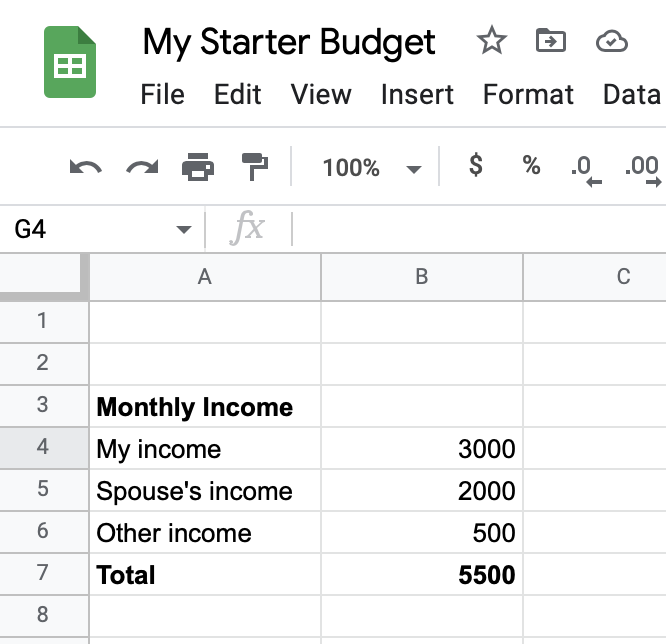
- Income Sources: List all consistent income streams, such as salary, freelance payments, rental income, or interest earnings.
- Fixed Expenses: These are expenses that typically remain constant each month and are often contractual. Examples include rent/mortgage, loan payments (car, student), insurance premiums, and subscriptions.
- Variable Expenses: These fluctuate from month to month and offer the most opportunity for adjustment. Examples include groceries, utilities (though some are semi-fixed), dining out, entertainment, transportation (gas, public transit), and clothing.
- Savings & Investments: Treat these as an expense within your budget. “Pay yourself first” is a golden rule of personal finance.
- Debt Payments: Beyond minimums, allocate specific amounts for accelerating debt repayment.
The Step-by-Step Blueprint for Building Your Budget Spreadsheet
Now, let’s get into the practical steps of constructing your financial masterpiece. This section will guide you through populating your spreadsheet with data and setting up the formulas that bring it to life.
Phase 1: Setting Up the Core Monthly Budget Sheet
Start with a blank sheet and title it “Monthly Budget” or “Budget [Month/Year]”.
- Header Row: In row 1, list your main columns:
Category,Budgeted Amount,Actual Amount,Difference,Notes. You might addSubcategorybetweenCategoryandBudgeted Amountfor more detail. - Income Section: Begin by listing all your income sources. For example:
- Income
- Salary (Net)
- Freelance Income
- Interest Income
- Add a
Total Incomerow and use theSUM()function to calculate the total.
- Income
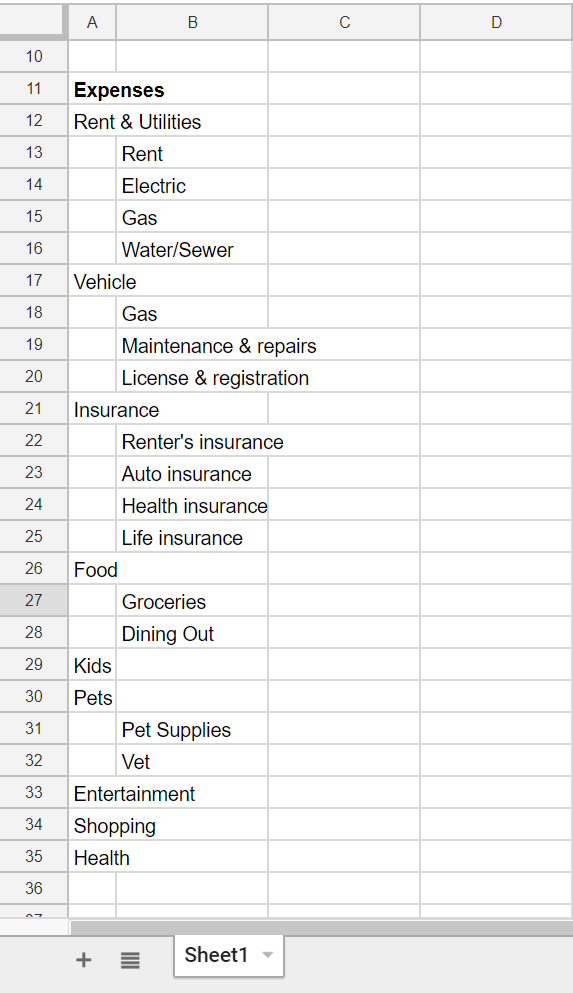
- Expense Section: Below your income, create sections for Fixed Expenses, Variable Expenses, and Savings/Debt Payments.
- Fixed Expenses
- Rent/Mortgage
- Car Payment
- Student Loan
- Insurance (Health, Car, Home)
- Subscriptions (Netflix, Gym)
- Variable Expenses
- Groceries
- Utilities (Electricity, Water, Internet)
- Dining Out
- Entertainment
- Transportation
- Personal Care
- Clothing
- Savings & Debt Payments
- Emergency Fund
- Retirement Investments
- Down Payment Savings
- Credit Card Debt Extra Payment
- Add a
Total Expensesrow and sum all budgeted expense items.
- Fixed Expenses
- Net Cash Flow: Calculate
Total Income - Total Expensesto see your net cash flow. Ideally, this should be zero or positive (if you account for every dollar, it should be zero, meaning every dollar has a job, including savings).
Phase 2: Implementing the Transaction Log and Actuals
This tab is crucial for tracking real-time spending. Title a new sheet “Transaction Log” or “Transactions”.
- Header Row: Columns should include:
Date,Category,Subcategory(optional),Description,Amount,Type(Debit/Credit or Income/Expense),Account. - Data Entry: Consistently enter every transaction as it occurs, or at least weekly. This is the most disciplined part of budgeting.
- Connecting to the Budget Sheet (Formulas): This is where your spreadsheet comes alive. On your “Monthly Budget” sheet, in the
Actual Amountcolumn for each expense category, you’ll use aSUMIForSUMIFSformula to pull data from your “Transaction Log”.- Example for
Groceries(assuming your Transaction Log is named ‘Transactions’):
=SUMIF(Transactions!B:B, "Groceries", Transactions!E:E)
(WhereTransactions!B:Bis your Category column in the transaction log, “Groceries” is the specific category you’re summing, andTransactions!E:Eis the Amount column.) - Repeat this for all your categories.
- Example for
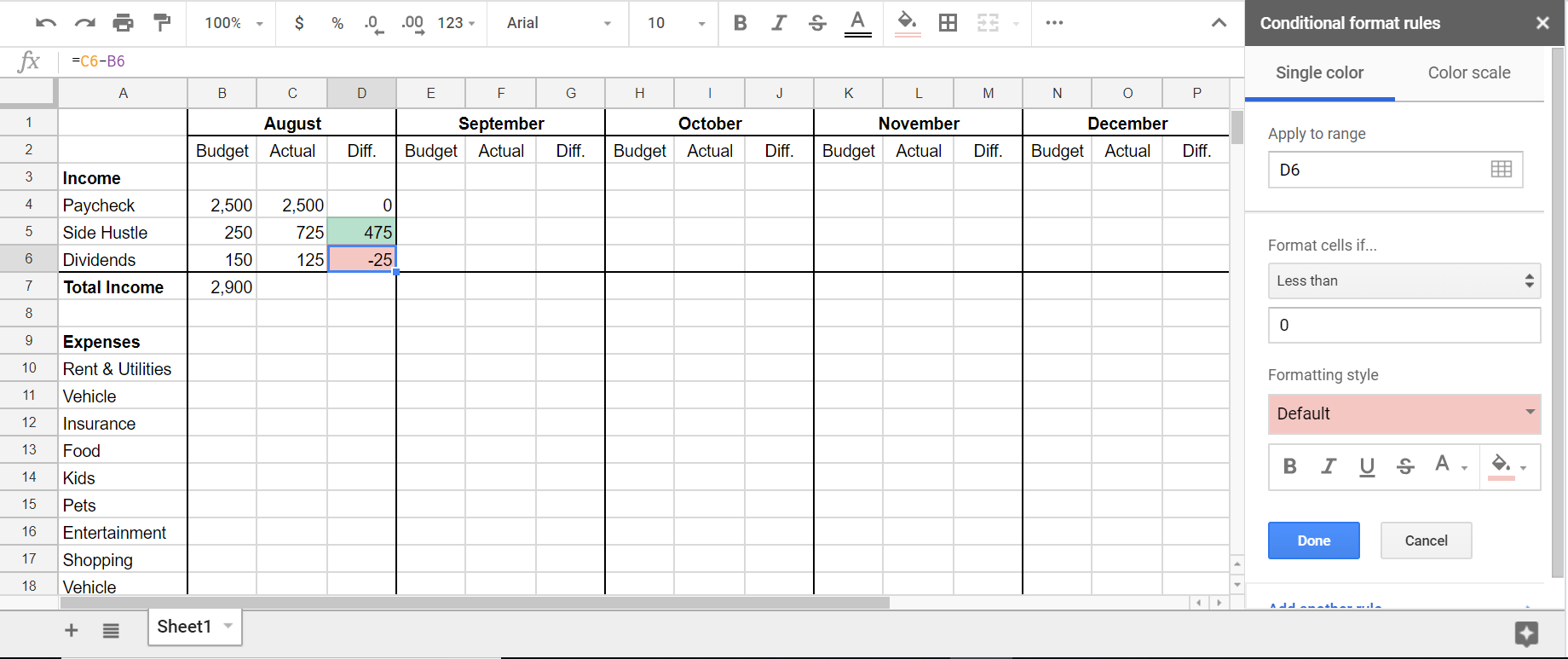
- Difference Column: For each item, calculate
Budgeted Amount - Actual Amount. This will show you exactly where you overspent or underspent.
Phase 3: Advanced Features and Visualizations
To enhance insight and user-friendliness:
- Conditional Formatting: Apply rules to the
Differencecolumn to highlight overspending (e.g., red for negative values) or underspending (e.g., green for positive values). - Charts and Graphs: Create a dedicated “Dashboard” tab. Use your data to generate:
- Pie Chart: Showing the percentage breakdown of your actual expenses by category.
- Bar Chart: Comparing budgeted vs. actual amounts for each expense category.
- Line Graph: Tracking your net worth or savings progress over time.
- Month-End Review & Rollover: At the end of each month, review your
Differencecolumn. Adjust your next month’s budget based on these insights. Copy your “Monthly Budget” sheet for the next month, clear out theActual AmountandDifferencecolumns, and start fresh with new transaction logging.
Sustaining Your Budget: The Art of Continuous Financial Improvement
Creating the spreadsheet is only half the battle; the real victory lies in its consistent use and adaptation. A budget is not a static document but a dynamic tool that should evolve with your life.
Regular Reviews and Adjustments
Schedule regular check-ins, ideally weekly, to update your transaction log and review your Difference column. A monthly comprehensive review is essential to assess overall performance against your goals. Did you overspend in certain areas? Were there unexpected expenses? Use these insights to refine your budgeted amounts for the following month. Life changes—job promotions, new dependents, unexpected repairs—all necessitate budgetary adjustments.
Integrating Savings and Debt Reduction Strategies
Ensure your budget reflects your highest financial priorities. If debt reduction is critical, dedicate a specific line item in your expenses for extra payments beyond the minimum. If building an emergency fund is paramount, budget a fixed amount towards it each month, treating it as an essential bill. Visualizing these allocations within your spreadsheet reinforces commitment and provides a clear picture of progress.
The Power of Consistency and Patience
Budgeting is a marathon, not a sprint. There will be months where you deviate, unexpected costs arise, or motivation wanes. The key is consistency. Don’t abandon your budget if you have an “off” month. Simply learn from it, adjust, and recommit. Over time, the discipline of using your budget spreadsheet will become second nature, transforming your financial habits and propelling you towards your long-term goals.
Conclusion
Making a budget spreadsheet is a powerful act of financial empowerment. It’s a disciplined approach that demystifies your money, reveals opportunities, and holds you accountable to your financial aspirations. While it demands initial effort and ongoing attention, the clarity, control, and peace of mind it provides are invaluable returns on that investment. By following this comprehensive guide, you can create a personalized financial tool that not only tracks your money but actively shapes your financial destiny, helping you to make smarter decisions, build wealth, and live a life aligned with your truest financial objectives. Start building your budget spreadsheet today, and embark on your journey towards profound financial mastery.
aViewFromTheCave is a participant in the Amazon Services LLC Associates Program, an affiliate advertising program designed to provide a means for sites to earn advertising fees by advertising and linking to Amazon.com. Amazon, the Amazon logo, AmazonSupply, and the AmazonSupply logo are trademarks of Amazon.com, Inc. or its affiliates. As an Amazon Associate we earn affiliate commissions from qualifying purchases.