
The ubiquitous presence of digital tools in our daily lives often leads us to take for granted the intricate processes they encapsulate. One such seemingly simple, yet fundamentally powerful, tool is the fraction-to-decimal calculator. Far from being a mere arithmetic aid, this type of calculator embodies core principles of digital logic, algorithm design, and user interface development. In the realm of technology, understanding how such a calculator functions, how it’s built, and its broader implications offers a fascinating glimpse into the mechanics of computational problem-solving. This article delves into the technological underpinnings of converting fractions to decimals, exploring the design, development, and significance of calculators that perform this essential mathematical operation.
The Fundamental Role of Fraction-to-Decimal Conversion in Computing
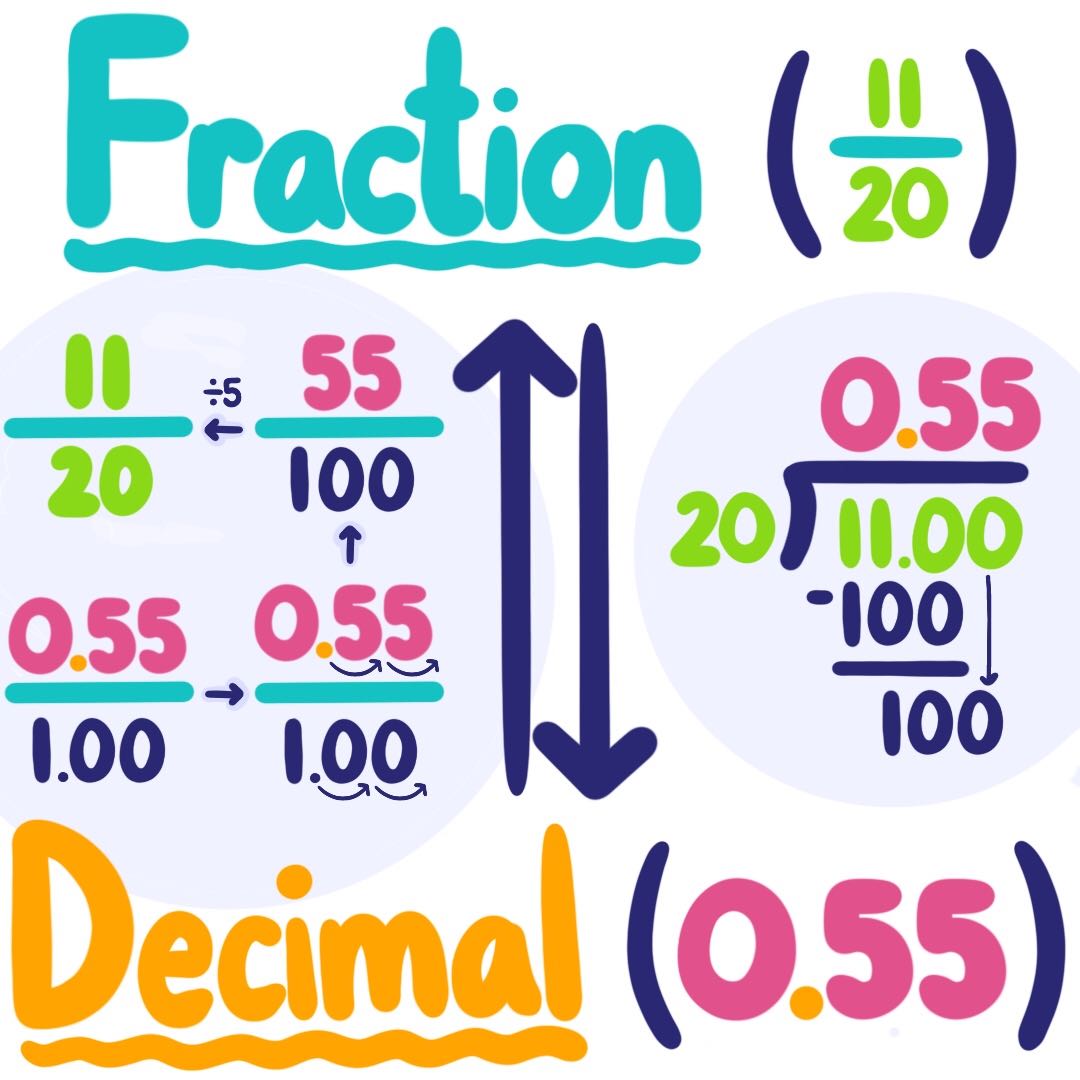
At its heart, a fraction-to-decimal conversion is a bridge between two distinct numerical representations: rational numbers expressed as a ratio of two integers and real numbers represented in base-10 positional notation. For humans, fractions offer intuitive ways to express parts of a whole, especially in contexts like cooking or construction. For computers, however, decimals (or more accurately, floating-point numbers) are the native language for calculations, data storage, and display. The ability to seamlessly translate between these formats is not just a mathematical convenience; it’s a computational necessity that underpins countless technological applications.
Bridging Mathematical Concepts and Digital Logic
The journey from a fraction like 3/4 to its decimal equivalent, 0.75, is a straightforward division operation for a human. For a computer, this simple division involves a series of complex steps rooted in binary arithmetic and floating-point representation standards (like IEEE 754). Digital logic circuits are designed to perform arithmetic operations on binary numbers. When we input a fraction into a calculator, the numerical values for the numerator and denominator are first converted into their binary representations. The division algorithm then operates on these binary numbers, producing a binary result that is subsequently converted back into a decimal string for display. This process highlights how abstract mathematical concepts are meticulously translated into the tangible world of transistors and logic gates, forming the bedrock of all digital computation. Understanding this translation is crucial for anyone building or analyzing software and hardware systems that handle numerical data.
Practical Applications Across Scientific and Engineering Disciplines
The utility of fraction-to-decimal conversion extends far beyond elementary school math. In scientific research, engineers, physicists, and chemists often encounter measurements and theoretical values expressed as fractions or precise ratios. When these values need to be processed by analytical software, simulated in computational models, or plotted on digital graphs, conversion to decimals is indispensable. For instance, in signal processing, filter coefficients might be derived as fractions for theoretical accuracy but implemented as floating-point numbers in digital signal processors. In computer graphics, fractional coordinates or ratios are often converted to decimals for rendering precision. Even in fields like finance and data analysis, while exact fractions might be used in theoretical models, practical applications and data storage rely heavily on decimal representations. A reliable fraction-to-decimal calculator, therefore, becomes a fundamental tool in the digital workflow of nearly every STEM discipline, ensuring accuracy and interoperability between theoretical models and computational execution.
Deconstructing the “Fraction-to-Decimal Calculator”: Behind the Code
To build or even truly appreciate a fraction-to-decimal calculator, one must delve into the algorithmic core that drives its functionality. It’s more than just a simple division sign; it involves careful handling of input, precision, and the unique characteristics of decimal representations, especially repeating decimals.
The Core Algorithm: Division as the Foundation
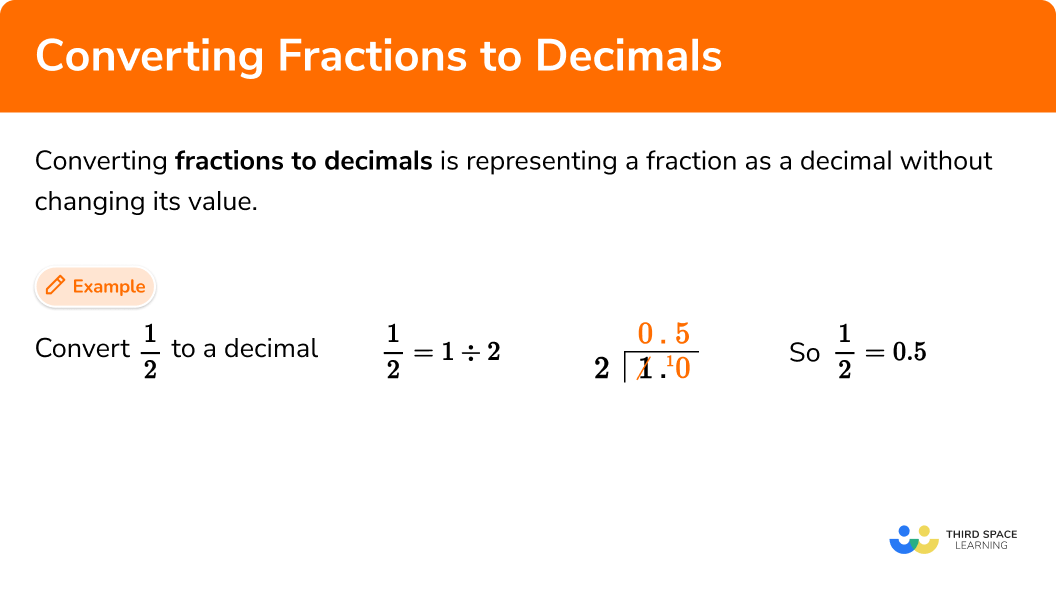
At its most fundamental level, turning a fraction (N/D) into a decimal is a simple division: divide the numerator (N) by the denominator (D). In a programming context, this typically involves using the language’s built-in division operator for floating-point numbers. For example, in Python, numerator / denominator would yield the decimal result. However, the simplicity of this operation in high-level programming languages often masks the underlying complexity of floating-point arithmetic. Computers represent real numbers using a finite number of bits, which means that most decimal numbers, especially those with infinite or repeating decimal expansions, can only be approximated. The core algorithm must therefore consider the maximum precision supported by the chosen data type (e.g., float or double in many languages) and how to manage potential rounding errors that arise from this approximation. For a basic calculator, the direct division is sufficient, but for higher precision or specific scientific applications, libraries for arbitrary-precision arithmetic might be employed.
Handling Edge Cases and Recurring Decimals
One of the most significant challenges in developing a robust fraction-to-decimal calculator is effectively handling edge cases, particularly those involving recurring decimals. For example, 1/3 converts to 0.3333… and 1/7 converts to 0.142857142857… . A simple division operation in a computer will typically truncate or round these repeating decimals after a certain number of digits based on the data type’s precision. For many applications, this approximation is acceptable. However, an insightful calculator might offer options to:
- Specify precision: Allow the user to define how many decimal places they want.
- Detect and indicate recurring decimals: More advanced calculators can analyze the remainder during the division process. If a remainder repeats, it signifies a recurring decimal. The calculator could then display the result with a bar over the repeating sequence (e.g., 0.3̅) or clearly state that the decimal is repeating. This involves keeping track of remainders and their corresponding quotients during a simulated long division.
- Handle division by zero: This is a critical error case. The calculator must detect if the denominator is zero and prevent a program crash, instead displaying an “Error” message.
These features elevate a basic conversion tool to a more sophisticated utility that provides accurate and meaningful representations of rational numbers.
From Manual Calculation to Automated Precision
The historical evolution of numerical computation illustrates a continuous drive towards automation and enhanced precision. Before electronic calculators, converting fractions to decimals involved arduous manual long division, prone to human error and limited by patience. Early mechanical calculators automated the arithmetic, but still required manual input of each digit. The advent of digital computers and software-based calculators revolutionized this process. Modern fraction-to-decimal calculators offer instant conversion with high, customizable precision. This automation not only saves time but also significantly reduces the margin for error, allowing users to focus on the higher-level problems their numerical data represents. The transition from manual methods to automated precision underscores a broader theme in technology: empowering users by abstracting complex, repetitive tasks into efficient, reliable digital processes.
Designing and Developing Your Own Fraction-to-Decimal Calculator
Creating a fraction-to-decimal calculator, while seemingly simple, offers an excellent hands-on project for aspiring developers to understand fundamental programming concepts, UI/UX design, and error handling. It’s a microcosm of software development.
Choosing the Right Programming Language and Environment
The choice of programming language and development environment largely depends on the target platform and desired complexity.
- Web-based Calculators: JavaScript (often with HTML/CSS) is an ideal choice for creating interactive calculators accessible through web browsers. Frameworks like React, Vue, or Angular can enhance development for more complex interfaces. This approach benefits from widespread accessibility and no installation requirements for end-users.
- Desktop Applications: Python with libraries like Tkinter, PyQt, or Kivy, or C# with WPF/Windows Forms, Java with Swing/JavaFX, are excellent for creating standalone desktop applications. These offer potentially faster execution and deeper integration with the operating system, though they require installation.
- Mobile Apps: Kotlin/Java for Android or Swift/Objective-C for iOS are necessary for native mobile apps, offering the best performance and integration with device features. Cross-platform frameworks like React Native or Flutter can also be used to build apps for both iOS and Android from a single codebase.
Each environment presents its own advantages and disadvantages in terms of learning curve, deployment, and performance, but all provide the necessary tools to implement the core conversion logic.
User Interface (UI) and User Experience (UX) Considerations
A calculator’s utility is heavily influenced by its UI and UX. A well-designed calculator is intuitive, efficient, and visually appealing.
- Input Clarity: The UI should clearly distinguish between numerator and denominator input fields. Providing separate input boxes, or a single input field with clear instructions (e.g., “Enter fraction as N/D”), enhances usability.
- Output Readability: The decimal result should be displayed prominently and formatted for readability, possibly with options for different levels of precision or scientific notation. If recurring decimals are handled, their representation should be unambiguous.
- Button Layout: For calculators with multiple functions (e.g., adding, subtracting fractions), a logical button layout is crucial for ease of use.
- Feedback: Providing immediate feedback on input errors (e.g., “Invalid input,” “Denominator cannot be zero”) is vital for a good user experience. A clear “Calculate” button or automatic calculation upon input completion also improves interaction.
- Accessibility: Considering users with disabilities means ensuring keyboard navigation, adequate color contrast, and screen reader compatibility are built into the design.
Implementing Input Validation and Error Handling
Robust software always includes thorough input validation and error handling. For a fraction-to-decimal calculator, this means:
- Type Checking: Ensuring that inputs are indeed numbers. Preventing non-numeric characters from being entered into number fields is a common practice.
- Denominator Check: Absolutely critical is validating that the denominator is not zero. Division by zero is mathematically undefined and will cause a program crash if not handled gracefully. The calculator should display an informative error message to the user.
- Fraction Format Validation: If the input is expected in a specific format (e.g., “N/D”), the program must parse this string correctly and catch malformed inputs.
- Overflow/Underflow Prevention: For extremely large or small numbers, floating-point arithmetic can lead to overflow (number too large to represent) or underflow (number too small to represent, often approximating to zero). While less common for typical fraction conversions, it’s a consideration for high-precision or specialized calculators.
By meticulously implementing these validation and error handling mechanisms, developers ensure their calculator is not only functional but also reliable and user-friendly, capable of gracefully managing unexpected inputs.
Beyond Basic Conversion: Advanced Calculator Features and Integrations
While the core function of converting fractions to decimals is foundational, modern calculators, particularly those in the digital realm, can offer a wealth of additional features and integrations that enhance their utility and sophistication. These advanced capabilities transform a simple converter into a comprehensive mathematical assistant.
Incorporating Mixed Numbers and Improper Fractions
A basic calculator might only handle proper fractions (numerator less than denominator). However, real-world problems often involve mixed numbers (e.g., 2 1/2) and improper fractions (e.g., 5/2). An advanced calculator should seamlessly handle these formats. This requires:
- Parsing Mixed Numbers: The calculator must be able to interpret “A B/C” as
A + (B/C)before performing the decimal conversion. - Converting Improper Fractions: Improper fractions directly convert through division, but the UI might offer an option to first convert them to mixed numbers before showing the decimal.
- Input Flexibility: Allowing users to input mixed numbers directly (e.g., “2 1/2” or “2+1/2”) rather than requiring them to manually convert to an improper fraction first significantly improves user experience. This shows an understanding of how users naturally interact with these number types.
Multi-functionality: Simplifying, Comparing, and Operating with Fractions
A fraction-to-decimal calculator can evolve into a full-fledged fraction calculator by incorporating additional functionalities:
- Fraction Simplification: Automatically reducing fractions to their lowest terms (e.g., 2/4 simplifies to 1/2) is a valuable feature, often requiring the calculation of the Greatest Common Divisor (GCD).
- Fraction Comparison: Allowing users to compare two or more fractions (e.g., determine which is larger) by converting them to decimals or finding a common denominator.
- Arithmetic Operations: Extending functionality to add, subtract, multiply, and divide fractions. This involves common denominator calculations for addition/subtraction and straightforward multiplication/division rules for the respective operations, with results often simplified automatically.
- Conversion to Other Bases: For specialized technical users, converting the resulting decimal to binary, hexadecimal, or octal could be a powerful addition, reinforcing the calculator’s role as a versatile digital tool.
Web-Based Tools, Mobile Apps, and API Integrations
The true power of modern calculators lies in their distribution and integration capabilities.
- Web-Based Tools: Online fraction-to-decimal calculators are highly accessible, requiring only a web browser. They can be embedded into educational websites, engineering portals, or financial blogs, serving a broad audience without installation hurdles.
- Mobile Apps: Dedicated mobile applications provide convenience on the go, often leveraging device-specific features like haptic feedback or offline functionality. They cater to students, professionals, and anyone needing quick calculations away from a desktop.
- API Integrations: For developers, a fraction-to-decimal conversion engine exposed via an Application Programming Interface (API) is incredibly valuable. This allows other software applications—from data analysis scripts to e-commerce platforms (for pricing models)—to programmatically request fraction-to-decimal conversions, embedding mathematical intelligence directly into larger systems. This kind of integration turns a standalone tool into a fundamental service within the digital ecosystem.
The Future of Mathematical Computing Tools
The evolution of tools like the fraction-to-decimal calculator points to a future where mathematical computation is increasingly intelligent, interactive, and integrated. As technology progresses, so too will our methods for solving and understanding numerical problems.
AI and Machine Learning in Symbolic Computation
While converting a fraction to a decimal is a deterministic algorithm, the broader field of symbolic computation, which deals with mathematical expressions rather than numerical approximations, is ripe for AI and machine learning integration. Future calculators might use AI to:
- Understand Natural Language Input: Allowing users to simply type “What is 3/8 as a decimal?”
- Suggest Alternative Representations: Automatically recommend simplified fractions, scientific notation, or other relevant numerical forms based on context.
- Automated Problem Solving: Go beyond simple conversions to solve complex equations involving fractions and decimals, identifying patterns and optimizing solution methods.
While fraction-to-decimal conversion itself won’t be “AI-powered” in the sense of learning, it will be a component of larger, AI-driven mathematical assistants that simplify and contextualize numerical tasks.
Interactive Learning Platforms and Augmented Reality
The future of mathematical tools is deeply intertwined with education. Interactive platforms and augmented reality (AR) can revolutionize how we learn about fractions and decimals. Imagine:
- AR Calculators: Overlaying decimal equivalents directly onto physical objects that represent fractions (e.g., a pie cut into eighths visually displaying 0.125 on each slice).
- Gamified Learning: Integrating fraction-to-decimal conversion into educational games where students solve problems in an engaging, visual environment.
- Personalized Tutoring: AI-powered tutors that identify a student’s difficulty with fractions or decimals and provide tailored exercises and explanations, potentially using the conversion calculator as a core interactive element. These advancements will make abstract mathematical concepts more tangible and accessible, enhancing comprehension and engagement.
Democratizing Complex Calculations
Ultimately, the trajectory of technological advancement in mathematical tools is towards democratizing access to complex calculations. Just as the simple fraction-to-decimal calculator made basic conversion accessible to anyone with a device, future tools will make advanced mathematical concepts and problem-solving techniques available to a much broader audience. By abstracting away the computational complexity and providing intuitive interfaces, technology empowers individuals across all fields to leverage mathematical insights without needing to be expert mathematicians themselves. This ongoing evolution ensures that fundamental operations like turning a fraction into a decimal remain a cornerstone of accessible and powerful digital computation.
aViewFromTheCave is a participant in the Amazon Services LLC Associates Program, an affiliate advertising program designed to provide a means for sites to earn advertising fees by advertising and linking to Amazon.com. Amazon, the Amazon logo, AmazonSupply, and the AmazonSupply logo are trademarks of Amazon.com, Inc. or its affiliates. As an Amazon Associate we earn affiliate commissions from qualifying purchases.