
The ability to extract a mathematical equation from a visual graph is a cornerstone of data analysis, scientific research, engineering, and predictive modeling. In an increasingly data-driven world, graphs represent complex information concisely, and deriving the underlying equations allows for deeper understanding, interpolation, extrapolation, and automation. Modern technology has revolutionized this process, moving beyond manual calculations to sophisticated software tools, advanced algorithms, and even artificial intelligence. This guide delves into leveraging these technological capabilities to efficiently and accurately translate graphical data into actionable mathematical expressions.
The Digital Toolkit for Graph Analysis
Unlocking equations from graphs relies heavily on a robust suite of digital tools designed for data manipulation, visualization, and statistical analysis. These platforms automate complex calculations, visualize potential fits, and provide metrics to evaluate model accuracy.
Spreadsheet Software for Linear and Polynomial Regression
Spreadsheet applications like Microsoft Excel, Google Sheets, or LibreOffice Calc are indispensable entry points for graph analysis. They offer powerful functions and charting capabilities that can transform raw data points into visual graphs and, subsequently, mathematical equations. For linear relationships, these tools can quickly determine the slope and y-intercept. For more complex curves, their regression analysis features can fit polynomial, exponential, and logarithmic functions, providing the equation coefficients directly. The ease of data input, coupled with immediate visual feedback through scatter plots and trendlines, makes spreadsheets a go-to for many initial analyses.
Advanced Graphing Calculators and Online Platforms
Dedicated graphing calculators, both physical hardware (like those from Texas Instruments or Casio) and their online counterparts (e.g., Desmos, GeoGebra), are designed specifically for visualizing and analyzing functions. These tools often include built-in regression features that can take a set of data points and automatically calculate the best-fit equation for various function types (linear, quadratic, exponential, logistic, etc.). Online platforms, in particular, offer an intuitive interface for plotting points, drawing lines, and seeing the derived equation in real-time, making them excellent for educational purposes and quick analyses. They often allow users to manipulate parameters and observe the instantaneous effect on the graph and its corresponding equation.
Unveiling Linear Relationships with Technology
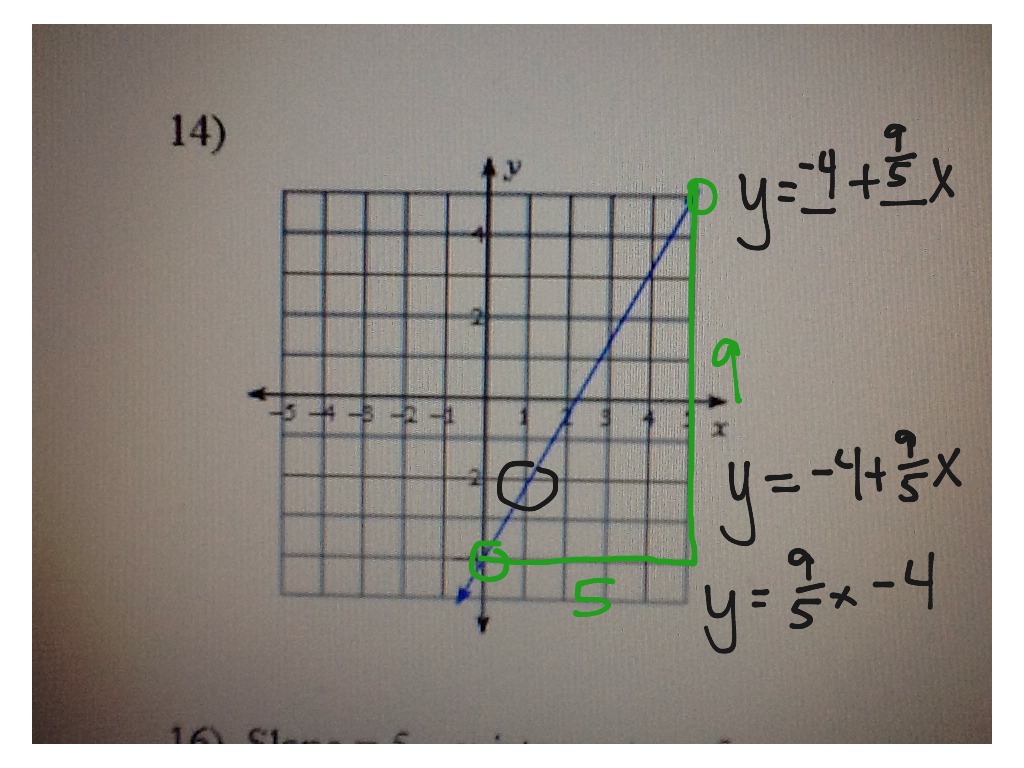
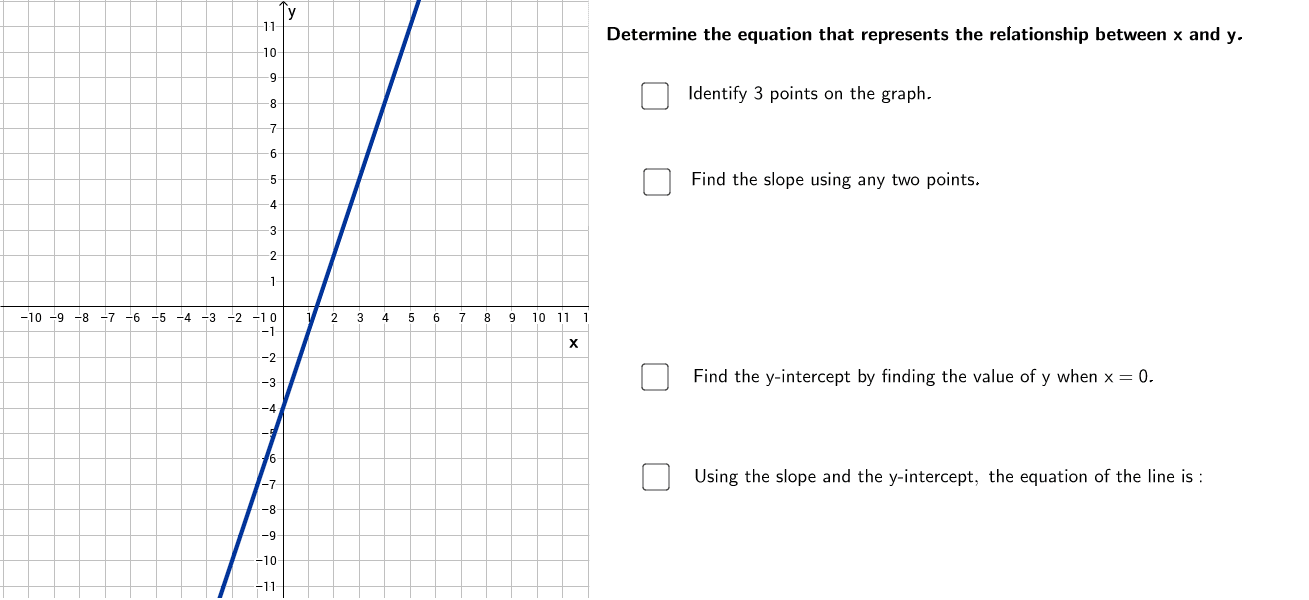
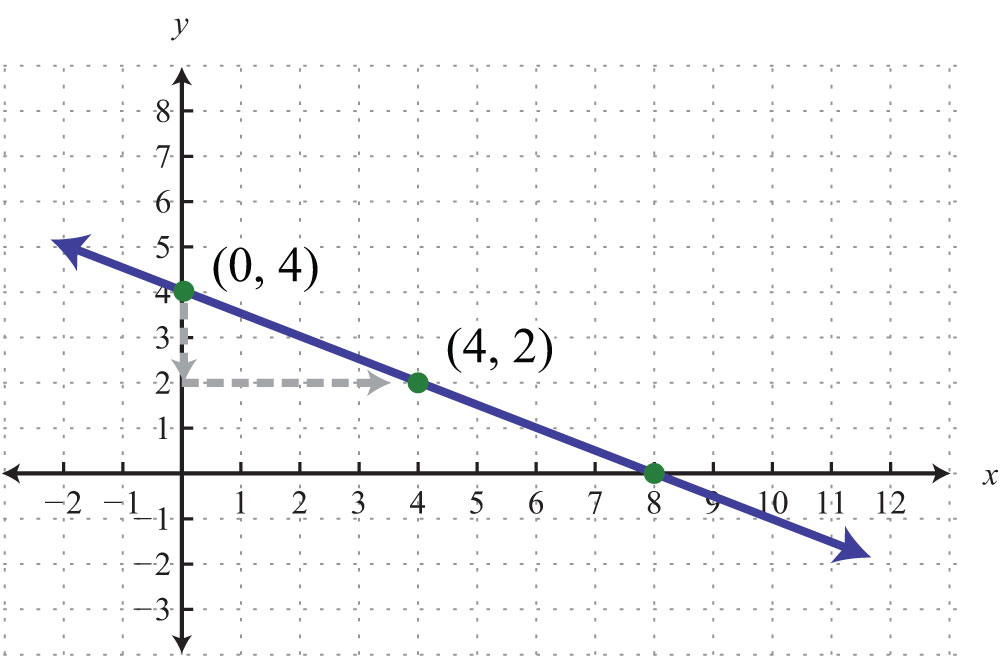
Linear equations, represented by the form y = mx + b, are the simplest and most common relationships found in data. Technology streamlines the process of finding m (the slope) and b (the y-intercept) from a set of data points displayed on a graph.
Step-by-Step with Spreadsheet Functions
To find a linear equation using spreadsheet software:
- Input Data: Organize your
xandyvalues into two separate columns. These represent the coordinates of the points on your graph. - Create a Scatter Plot: Select your data and insert a scatter chart. This visual representation allows you to confirm if the data points appear to follow a linear trend.
- Add a Trendline: Right-click on any data point in the scatter plot and select “Add Trendline.”
- Choose Linear Regression: In the trendline options, select “Linear.”
- Display Equation: Crucially, check the box for “Display Equation on Chart.” The spreadsheet software will then automatically calculate and show the
y = mx + bequation that best fits your data. - Direct Function Use: Alternatively, for even greater precision or programmatic use, you can use built-in functions:
SLOPE(known_ys, known_xs)will return the value ofm.INTERCEPT(known_ys, known_xs)will return the value ofb.
These functions provide the exact coefficients derived from the least squares method, which minimizes the sum of the squared differences between observed and predictedyvalues.
Utilizing Graphing Calculator Features
Graphing calculators and online tools simplify this further:
- Enter Data: Access the “STAT” or “Data” menu and input your
xandyvalues into lists. - Perform Regression: Navigate to the “STAT CALC” or “Regression” menu. Select “LinReg (ax+b)” or a similar linear regression option.
- Calculate and Display: The calculator will compute the values for
a(often representingm) andband display the resulting equation. Many advanced calculators can also plot the data points and the regression line on the same graph, allowing for visual verification. Online tools like Desmos allow direct entry of points, and a simple command likey1 ~ mx1 + bwill automatically calculate and display the best-fitmandb.
Decoding Non-Linear Functions through Software
While linear relationships are fundamental, many real-world phenomena exhibit non-linear behavior. Technology provides powerful tools to identify and quantify these more complex curves.
Quadratic and Polynomial Curve Fitting
When data points form a parabolic shape or show multiple turning points, polynomial regression becomes necessary.
- Quadratic Equations (y = ax² + bx + c): In spreadsheet software, after creating a scatter plot, add a trendline and select “Polynomial” with an “Order” of 2. The software will display the quadratic equation. Graphing calculators and online platforms also offer “QuadReg” options.
- Higher-Order Polynomials (y = axⁿ + … + c): For more intricate curves, you can increase the “Order” of the polynomial trendline in spreadsheets (e.g., to 3 for cubic, 4 for quartic). However, caution is advised, as very high-order polynomials can overfit the data, leading to poor predictive power for new, unseen data. Software generally calculates the coefficients for each term using numerical methods.
- Interpretation: The coefficients (
a,b,c, etc.) quantify the specific influence of each power ofxon theyvalue, providing a precise mathematical model of the observed non-linear trend.
Exponential and Logarithmic Models in Data Science Tools
Many natural growth and decay processes, as well as situations involving diminishing returns, are best described by exponential (y = ab^x or y = ae^(kx)) or logarithmic (y = a ln(x) + b) functions.
- Spreadsheet Trendlines: Spreadsheets offer trendline options for “Exponential” and “Logarithmic” fits, displaying the corresponding equation directly on the chart.
- Data Science Platforms: Tools like Python with libraries such as NumPy, SciPy, and Matplotlib, or R with its statistical packages, provide far more flexibility and power. For instance,
scipy.optimize.curve_fitcan fit virtually any custom function, including exponential and logarithmic models, to data. Users define the function structure, and the tool finds the optimal parameters. These platforms allow for a deeper dive into the statistical significance of the fit and the residuals. - Visualization and Iteration: These platforms enable iterative fitting, where you can try different model types, visualize the fit against the raw data, and evaluate statistical metrics (like R-squared, RMSE) to choose the best mathematical representation.
The Role of Programming and AI in Complex Data Modeling
For highly complex datasets, large volumes of data, or scenarios requiring custom fitting algorithms, programming environments and AI tools offer unparalleled power and flexibility.
Python Libraries for Data Regression
Python has become a cornerstone for data analysis and scientific computing, thanks to its extensive ecosystem of libraries:
- NumPy and SciPy: NumPy provides fundamental numerical operations, while SciPy builds on this with modules for optimization, statistics, and signal processing.
numpy.polyfitis excellent for polynomial regression, returning coefficients for a best-fit polynomial.scipy.optimize.curve_fitis a general-purpose function fitting tool, allowing users to define any arbitrary function (e.g., custom sigmoidal curves, power laws, periodic functions) and find the optimal parameters that best match the data. - Scikit-learn: This machine learning library offers a wide array of regression models beyond simple curve fitting, including linear regression, polynomial regression, support vector regression, and decision tree regression. It’s particularly useful when dealing with multiple independent variables (multivariate regression) or when needing more robust models that can handle noise and complexity.
- Matplotlib/Seaborn: These libraries are crucial for visualizing the data points, the fitted curves, and the residuals, providing essential visual feedback on the quality of the derived equation.
These tools allow for programmatic automation, making it possible to analyze hundreds or thousands of graphs efficiently, compare multiple models, and integrate equation derivation into larger data pipelines.
AI-Powered Pattern Recognition and Equation Derivation
The frontier of finding equations from graphs involves artificial intelligence and machine learning, particularly in areas like symbolic regression and neural networks.
- Symbolic Regression: This branch of AI aims to discover both the mathematical structure (the form of the equation) and its numerical parameters from data. Unlike traditional regression, where the user specifies the function type (linear, quadratic), symbolic regression algorithms (often using genetic programming) explore a vast space of mathematical expressions to find the simplest and most accurate one that fits the data. This is particularly powerful when the underlying relationship is unknown or highly complex. Tools like
gplearnin Python provide frameworks for symbolic regression. - Neural Networks for Function Approximation: While not directly yielding a human-readable algebraic equation in the
y = f(x)format, neural networks can learn to approximate highly complex, non-linear functions from input data. They can effectively model relationships that are too intricate for traditional mathematical equations. The network itself acts as a ‘black box’ function, predictingyfor givenxvalues, even if the explicit algebraic form isn’t extracted. This is useful for prediction and pattern recognition where understanding the exact formula is less critical than accurate output. - Computer Vision for Graph Digitization: For situations where graphs are only available as images (e.g., old research papers, scanned charts), AI-powered computer vision techniques can digitize the graph, extracting the raw data points from the image. Tools using libraries like OpenCV and machine learning models can identify axes, labels, and data points, effectively turning an image back into numerical data suitable for subsequent equation derivation.
Best Practices for Accurate Equation Extraction
Regardless of the technology employed, certain best practices ensure the derived equation is meaningful, accurate, and truly representative of the underlying data.
Data Preprocessing and Outlier Identification
Before fitting any equation, it is crucial to clean and preprocess the data. Outliers – data points that significantly deviate from the general trend – can disproportionately skew regression results, leading to an inaccurate equation. Technologies assist in this:
- Visual Inspection: Scatter plots generated by spreadsheet software or plotting libraries (Matplotlib, Seaborn) allow for quick visual identification of unusual points.
- Statistical Methods: Software can calculate statistical measures like Z-scores or implement algorithms like the IQR (Interquartile Range) method to programmatically flag potential outliers.
- Data Smoothing: For noisy data, moving averages or other smoothing algorithms can be applied (often available in signal processing libraries like SciPy) to reveal the underlying trend more clearly before equation fitting.
Model Validation and Goodness of Fit
Deriving an equation is only half the battle; validating its accuracy and generalizability is equally important.
- R-squared (Coefficient of Determination): Most regression tools automatically report the R-squared value, which indicates the proportion of the variance in the dependent variable that is predictable from the independent variable(s). An R-squared closer to 1 (or 100%) suggests a better fit, but it’s not the sole metric.
- Residual Analysis: Plotting the residuals (the differences between observed and predicted
yvalues) against the independent variablexcan reveal patterns. A good fit will show randomly scattered residuals around zero, while patterns (like a curved trend in residuals) indicate that the chosen equation type might not be the best fit. - Cross-Validation: For more robust models, especially in machine learning contexts, cross-validation techniques (e.g., k-fold cross-validation) ensure that the derived equation performs well on unseen data, preventing overfitting. This involves splitting the data into training and testing sets, fitting the model on the training data, and evaluating its performance on the test data.
- Domain Knowledge: Always consider the real-world context. Does the derived equation make sense theoretically? An equation, however statistically sound, should align with the known principles of the domain it represents.
By systematically applying these technological tools and adhering to best practices, the seemingly complex task of extracting equations from graphs transforms into an efficient, insightful, and highly accurate analytical process.
aViewFromTheCave is a participant in the Amazon Services LLC Associates Program, an affiliate advertising program designed to provide a means for sites to earn advertising fees by advertising and linking to Amazon.com. Amazon, the Amazon logo, AmazonSupply, and the AmazonSupply logo are trademarks of Amazon.com, Inc. or its affiliates. As an Amazon Associate we earn affiliate commissions from qualifying purchases.