
In the rapidly evolving landscape of e-commerce, Shopify has emerged as a dominant force, powering millions of online stores worldwide. From artisanal boutiques to global brands, an increasing number of retailers leverage Shopify’s robust platform to showcase and sell their products. For the modern consumer, understanding how to effectively navigate and utilize these tech-driven storefronts is essential for a seamless, secure, and satisfying shopping experience. This guide will delve into the technical nuances and best practices for shopping on Shopify stores, empowering you to become a more informed and efficient digital shopper.
Understanding the Shopify Ecosystem for Shoppers
Before diving into the mechanics of shopping, it’s beneficial to grasp what a Shopify store fundamentally represents from a technical standpoint. Shopify provides businesses with a comprehensive suite of tools to build, manage, and scale their online presence. This means that while each store might have a unique brand identity and product catalog, they all share a common, powerful technological backbone.
Identifying a Shopify-Powered Store
For the discerning tech-aware shopper, recognizing a Shopify store can offer insights into its operational reliability and the tools at its disposal. While not always overtly advertised, there are several tell-tale signs:
- URL Structure: Many Shopify stores will feature a URL that includes “myshopify.com” somewhere in the address, particularly during the checkout process (e.g.,
storename.myshopify.com/checkout). While custom domains (yourbrand.com) are standard, the underlying checkout often reverts to the Shopify domain for security and consistency. - Footer Links: A common, though not universal, practice is for stores to display “Powered by Shopify” in their website footer.
- Page Source Examination: For those comfortable with basic web development tools, inspecting the page source code (right-click -> “Inspect” or “View Page Source”) will often reveal numerous references to Shopify scripts, stylesheets, and asset paths, confirming its platform.
- User Interface Cues: While highly customizable, certain elements like the default shopping cart icon, checkout flow, or administrative notifications can sometimes subtly hint at the Shopify platform.
Knowing a store is powered by Shopify provides a degree of assurance regarding its technical stability, security infrastructure, and the general quality of the e-commerce experience. Shopify invests heavily in its core technology, ensuring high uptime, fast loading speeds, and consistent performance across diverse devices.
The Underlying Technology: What Makes Shopify Stores Tick (from a Shopper’s Viewpoint)
From a consumer’s perspective, Shopify’s underlying technology translates into several key benefits:
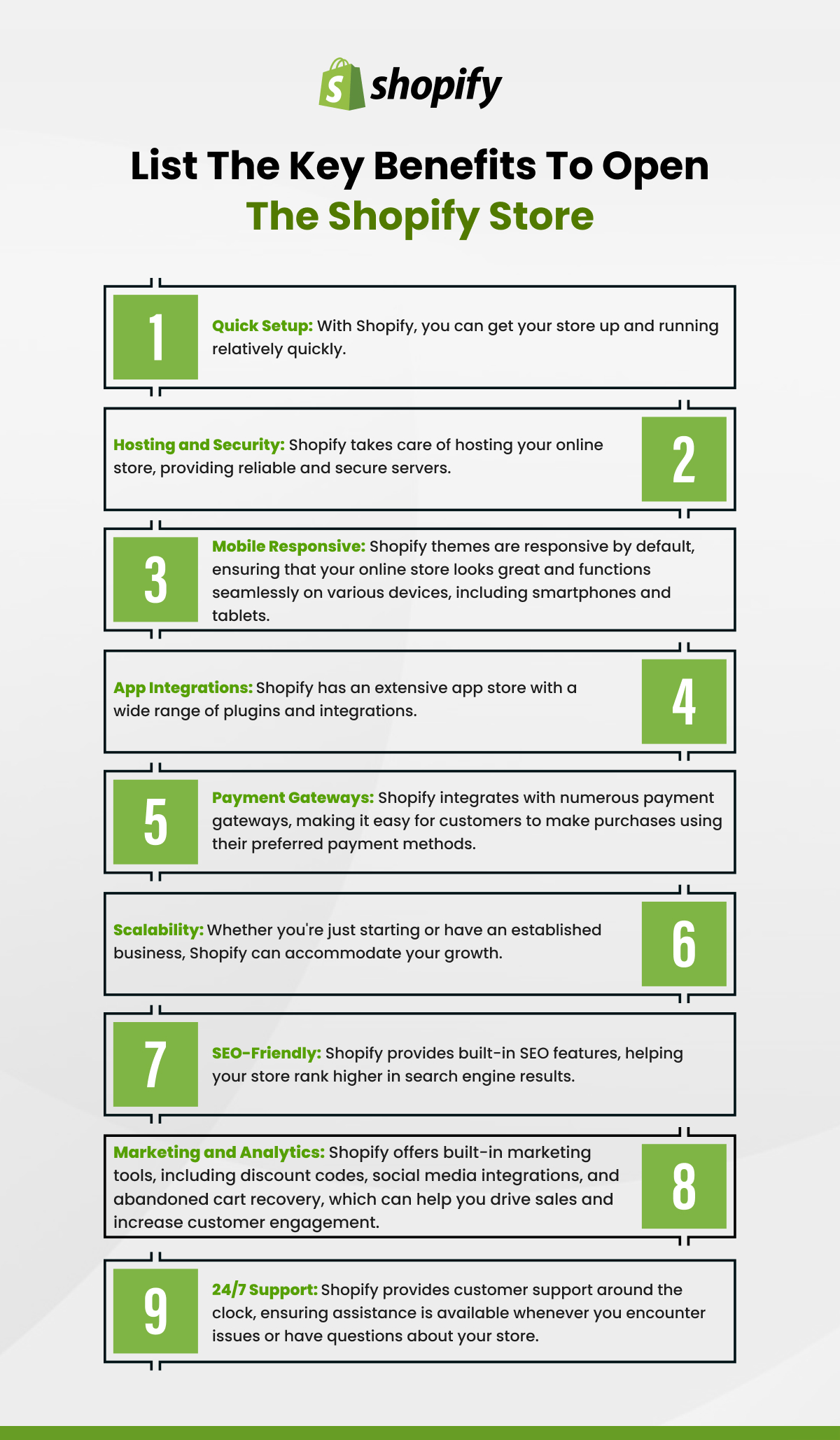
- Reliable Performance: Shopify’s global server infrastructure ensures stores load quickly and remain accessible, even during peak shopping periods. This means less frustration with slow pages or broken links.
- Mobile Responsiveness: All modern Shopify themes are designed to be mobile-first, ensuring that stores adapt seamlessly to various screen sizes – from desktops to smartphones and tablets. This optimizes the user experience regardless of the device.
- Integrated Payment Gateways: Shopify provides robust integration with a wide array of secure payment processors, making transactions smooth and trustworthy. This uniformity in technical integration is a cornerstone of the platform’s reliability.
- Scalability: The platform is built to handle significant traffic and transaction volumes, meaning even small businesses can offer a retail experience on par with larger enterprises.
Navigating the Digital Aisles: Finding and Exploring Products
Once you’ve landed on a Shopify store, the next step is efficiently finding the products that meet your needs. Shopify’s design flexibility allows store owners to create diverse layouts, but common navigational elements are consistent across the platform, leveraging standard UI/UX patterns.
Leveraging On-Site Search and Filtering Tools
Effective product discovery often begins with intelligent use of the store’s built-in search and filtering functionalities, which are core components of Shopify’s front-end technology:
- Search Bar: Nearly every Shopify store features a prominent search bar, usually in the header. Utilizing specific keywords, product names, or even descriptive terms can quickly narrow down vast catalogs. Many Shopify search functions now employ advanced algorithms for smarter results, including typo correction and suggested queries.
- Category Navigation: Products are typically organized into categories (collections in Shopify terminology) accessible via the main navigation menu. Understanding these logical groupings can guide your browsing.
- Filters and Sorting: On category or search results pages, you’ll often find dynamic filters (e.g., by price range, color, size, brand, material) and sorting options (e.g., by popularity, new arrivals, price: low to high). These are powered by Shopify’s product attribute system and help shoppers refine their choices based on specific criteria, enhancing efficiency.
- Tags: Many Shopify stores use tags to further classify products. While not always exposed as direct filters, understanding that products are tagged internally means that sometimes more general search terms can yield relevant results through these hidden metadata.
Deconstructing Product Pages: Tech Features and Information
The product page is where detailed information comes to life, thanks to Shopify’s rich content capabilities. These pages are designed to be interactive and informative, utilizing various technical features:
- High-Resolution Imagery and Media: Expect multiple product images, often with zoom functionality, showcasing items from various angles. Many stores also integrate video demonstrations or 360-degree views, powered by Shopify’s asset management system, providing a comprehensive visual understanding.
- Product Variants: For items with multiple options (e.g., clothing in different sizes/colors, electronics with various configurations), Shopify’s variant system allows for seamless selection. Drop-down menus, swatch selectors, or radio buttons dynamically update the product image, price, and availability based on your choice.
- Rich Descriptions and Specifications: Beyond basic text, product descriptions can include formatted text, tables, and even embedded media, leveraging HTML and CSS within Shopify’s content editor to provide detailed information about features, materials, and usage.
- Customer Reviews and Q&A: Shopify integrates with various review apps that allow shoppers to read and submit product feedback, often with photos. This social proof is a powerful trust-building feature, with the underlying technology managing submission, moderation, and display.
- Inventory Status: Real-time inventory tracking, a core Shopify function, is often displayed to inform shoppers if an item is in stock, low in stock, or sold out, influencing purchase decisions.
The Secure Checkout Journey: From Cart to Confirmation
The checkout process on a Shopify store is engineered for security, speed, and simplicity. Shopify adheres to strict industry standards, including PCI DSS compliance, to protect sensitive financial data.
Mastering the Shopping Cart Interface
The shopping cart (or “bag”) is a crucial staging area before payment. Its interface is designed for intuitive management:
- Adding and Removing Items: Products are typically added with a single click from the product page. Within the cart, shoppers can easily adjust quantities, remove items, or continue shopping. These actions are dynamically updated via JavaScript, providing immediate feedback.
- Applying Discount Codes: Most Shopify carts feature a dedicated field for entering discount codes. The platform’s promotional engine then calculates and displays the adjusted total in real-time.
- Shipping Estimators: Some carts offer tools to estimate shipping costs based on location, providing transparency before proceeding to the full checkout.
Shopify’s Integrated Payment Gateways and Security Protocols
This is arguably the most critical tech aspect for a shopper. Shopify’s checkout is highly secure:
- PCI DSS Compliance: Shopify is Level 1 PCI DSS compliant, meaning it meets the highest security standards for handling credit card information. This includes robust encryption, regular security audits, and strict data management policies.
- Variety of Payment Methods: Shopify supports a vast array of payment options through integrations with various gateways. Beyond traditional credit/debit cards (Visa, Mastercard, Amex), you’ll often find accelerated checkout options like Shop Pay (Shopify’s own one-click checkout solution), PayPal, Apple Pay, Google Pay, and sometimes local payment methods or buy-now-pay-later services (e.g., Afterpay, Klarna).
- SSL Encryption: All Shopify store checkouts are protected by SSL (Secure Sockets Layer) encryption, indicated by the padlock icon in your browser’s address bar. This encrypts all data transmitted between your browser and the store’s servers, safeguarding personal and financial details.
- Fraud Prevention Tools: While primarily for merchants, Shopify’s built-in fraud analysis tools add an extra layer of security, helping to identify and flag suspicious transactions, which ultimately protects both the buyer and seller.
Understanding Order Tracking and Digital Communications
After a successful purchase, Shopify’s backend systems take over to manage the post-purchase experience:
- Order Confirmation: Immediately after payment, you’ll receive a digital order confirmation, typically via email. This email is generated by Shopify’s system and contains your order number, a summary of purchased items, shipping address, and total cost.
- Shipping Notifications: As your order progresses, Shopify’s integrations with shipping carriers (or its own system) facilitate automated email updates – from “order fulfilled” to “shipped” with a tracking number, and eventually “out for delivery.”
- Tracking Links: The tracking number provided is usually linked directly to the carrier’s tracking portal, allowing you to monitor your package’s journey in real-time.
Enhancing Your Shopify Shopping Experience with Tech Best Practices
To truly master shopping on Shopify, leveraging additional tech-driven strategies can significantly improve your efficiency and satisfaction.
Account Creation and Management: Benefits for Repeat Shoppers
While guest checkout is always an option, creating a customer account on a Shopify store offers several technical conveniences:
- Saved Information: Your shipping addresses and sometimes payment methods (securely tokenized) can be saved for faster future checkouts.
- Order History: A dedicated dashboard allows you to view all your past orders, track their status, and easily reorder items.
- Personalized Experience: Some stores use account data to offer personalized product recommendations or targeted promotions, driven by Shopify’s customer segmentation tools.
- Communication Hub: Accounts can serve as a central point for managing preferences and communicating with customer support regarding specific orders.
Mobile Shopping: Apps vs. Browser Experience
Shopping on the go is increasingly popular. Shopify stores are designed to excel in mobile environments:
- Mobile-Optimized Websites: As mentioned, Shopify themes are inherently responsive. This means accessing a store via your smartphone’s web browser provides a clean, functional interface optimized for touchscreens.
- Dedicated Store Apps: Some larger Shopify merchants may offer their own dedicated mobile shopping apps (iOS/Android). These often provide enhanced features like push notifications for sales, wishlists, and a more integrated, app-native user experience compared to a web browser. The choice depends on the frequency of shopping and specific features desired.
- Shop App: Shopify also offers its own “Shop” app (for iOS and Android) which allows you to track all your orders from various Shopify stores in one place, discover new shops, and use its accelerated checkout (Shop Pay) across different merchants. This app unifies aspects of the Shopify shopping experience, showcasing the platform’s overarching tech strategy.
Utilizing Browser Extensions and Digital Tools for Smart Shopping
Tech-savvy shoppers can augment their experience with third-party tools:
- Coupon Finders: Browser extensions like Honey or Rakuten often detect and apply available coupon codes at Shopify checkouts, leveraging automation to save you money.
- Price Trackers: Tools like Keepa or CamelCamelCamel (though more Amazon-focused, similar services exist for other platforms) can monitor price fluctuations, helping you buy at the optimal time.
- Review Aggregators: Some extensions might pull in aggregated product reviews from various sources, giving you a broader perspective.
- Privacy Tools: Browser extensions that enhance privacy (e.g., ad blockers, anti-tracking tools) can also improve load times and security when browsing Shopify stores, by reducing the amount of data processed by third-party scripts.
Troubleshooting and Support: When Tech Glitches Arise
Even with the most robust technology, occasional issues can arise. Knowing how to troubleshoot and seek support efficiently is part of being an informed tech user.
Common Technical Issues and Quick Fixes
Most common problems are browser-related:
- Page Loading Issues: Try refreshing the page, clearing your browser’s cache and cookies, or attempting to access the store in an incognito/private window or a different browser. Outdated browsers can sometimes cause rendering problems.
- Payment Processing Errors: Double-check your card details, billing address, and ensure sufficient funds. If the issue persists, try an alternative payment method or contact your bank.
- Items Not Adding to Cart: This can sometimes be a browser cache issue or a conflict with an extension. Try the incognito window trick.
- Discount Code Problems: Ensure the code is entered correctly, is still valid, and applies to the items in your cart. Check for any minimum purchase requirements.

Engaging Store Support Channels
When self-troubleshooting isn’t enough, leveraging the store’s support channels is key:
- Contact Forms: Most Shopify stores have a “Contact Us” page with a submission form. Provide as much detail as possible about your issue, including screenshots if applicable, and any error messages.
- Live Chat Widgets: Many stores integrate live chat functionality (often powered by apps like Gorgias, Tidio, or Intercom). This offers real-time assistance for immediate queries.
- Email Support: A direct email address for customer service is usually provided. This is ideal for detailed inquiries or when live chat isn’t available.
- FAQ Sections: Before contacting support, check the store’s FAQ page. Many common tech-related questions (e.g., “What payment methods do you accept?”, “How do I track my order?”) are answered there.
By understanding the underlying technology and how to interact with it, you can navigate the vast world of Shopify stores with confidence and efficiency. From secure transactions to mobile-optimized experiences and streamlined support, Shopify’s platform is designed to make online shopping a superior experience. Mastering these digital tools and practices not only ensures smooth purchases but also empowers you to make the most of the innovative e-commerce landscape.
aViewFromTheCave is a participant in the Amazon Services LLC Associates Program, an affiliate advertising program designed to provide a means for sites to earn advertising fees by advertising and linking to Amazon.com. Amazon, the Amazon logo, AmazonSupply, and the AmazonSupply logo are trademarks of Amazon.com, Inc. or its affiliates. As an Amazon Associate we earn affiliate commissions from qualifying purchases.